CNC Milling M Codes List For Beginners

CNC Milling M Codes List For Beginners

CNC Training Call David: 07834 858 407

30 Five Star Reviews

CNC Training Centre Reviews

Contact CNC Training Centre


CNC Milling M Codes
List of M Codes for a CNC Milling Machine

Download CNC Milling M Code List

This is my list of CNC Milling M Codes and you will notice there aren’t many.

That’s because you don’t actually need many.

M Codes are used to turn things on and off on a CNC Milling Machine. Sometimes known as miscellaneous functions.

A typical M Code would be M03 which would start your spindle forwards.

M04 would be reverse and guess what?

M05 is stop the spindle.

There, you learned three already.

You don’t need the extra zero so I advise you leave it out, program M3 M4 M5.

It really doesn’t matter but….. You could be wasting memory space or wearing out the tips of your fingers.

Here’s what I think about leading zeros.

M codes are the Snow Leopards of CNC Machining

Snow Leopards are Solitary Animals

Snow Leopards only ever get together to mate, they don’t even have a Christmas party or get pissed on a stag night.

With M codes they hate being on the same line of code. If they are then they will fight to the death.

Tigers Playing

Please note no animals were hurt in the making of this post.

There are exceptions to this rule, M Codes that is, but please don’t overload yourself with this at the moment.

Just trust me.

The first one in the block usually wins but I can’t  guarantee it. So you could get some crazy shit happening.

G90 M8 G0 G54 X0 Y0 S1500 M3;

You wouldn’t even get an alarm on most controls and it may just obey the first M Code it sees and ignore the last one.

The other thing to note with M Codes is that it makes no difference where they are in a block of code.

So if you put your M Code at the front of a block of code.

M3 S1500 G0 X0 Y0;

Or the end.

G0 X0 Y0 S1500 M3 ;

The spindle will start according to the logic of the machine not where the M Code is in the block of code.

The Boring CNC Milling M Codes

That’s my list of M Codes the rest are really boring doing stuff like changing gear ranges and stuff.

Download CNC Milling M Code List

Sorry I’m being flippant again.

CNC Milling M Codes Where Are The Rest?

Sorry you can’t have them. The reason for this is that they are different depending on what machine they are on.

CNC Milling M Codes
Hand Em Over

For example this beast is a Mazak Megaturn

CNC Milling M Codes
Mazak Megaturn

It Has a Gearbox.

To change gear you program M41 M42 and M43 for the different gears

M40 is neutral. Now on machines with gearboxes they do normally use these same M Codes.

However they can be different.

M10….. mmmm well that’s normally a clamp.

I think you get the picture. It is up to the machine tool builder.

It is best to get a specific set of M Codes from your machine manual.

The manual by the way is that book that nobody ever reads, it’s usually at the bottom of a bent up old filing cabinet.

Please Don’t Read It

I’ll read it for you then charge you a shit load of money for training.

Click here for CNC Training

Joking aside please don’t be arsed to learn a load of M Codes you will probably never use.

Well Commented Programs

Try to put M Code descriptions in your program. That way you won’t need to keep looking them up. A part transfer on a CNC Lathe is a good example, there are an absolute shit load of em.

They are everywhere. If you put a meaning to each one in brackets it will make proving the program out really easy. Oh and if you have a CAM system then change your post processor to output them for you.

M11 (OPEN CHUCK)

M10 (OPEN CHUCK)

etc etc

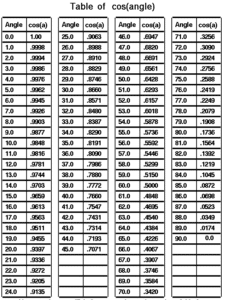
I had a boss once who actually learnt sines and cosines of angles.

Cosines of Angles

Holy shit I mean it’s impressive and I must add in 1975 it was actually worth doing because we didn’t even have calculators.

Hope you enjoyed reading my article on CNC Milling M Codes.

Please remember that it keeps me occupied and while I’m writing these articles I am not holding you up in the supermarkets queue trying to find a coupon for 10p off my incontinence briefs.

Download CNC Milling M Code List


Hyundai Wia L 300LC CNC Lathe

CNC Training Call David: 07834 858 407


CNC Training Centre Reviews

30 five star ratings on Google (Just saying)

Very solid nice big Hyundai Wia CNC two axis lathe with Guide i, what more could you want?

Hyundai Wia

You know like when you have been on holiday eating loads of fancy food and you get home and all you fancy is a nice simple chips n egg?

Staple diet of my childhood. Anyway that is what this machine is. It’s the chips n egg of the CNC Lathe world.

Having just worked on a Nomura sliding head that’s as complicated as a nuclear reactor (are they complicated, I don’t know?) Anyway it just seems nice to come back to some nice simple stuff.

This is a no messing sturdy beast, none of your namby pamby driven tool shit.

No Y axis, and no stupid sub spindle to mess about with. G12.1 forget it. C axis no way.

Happy days, easy training job simple two axis CNC Lathe with a Fanuc i series control. Oh and it’s got Guide i too. I’m gonna love this.

Hyundai Wia With Guide i

Seem to get loads of these lately an I’m kind of getting to like them mmm maybe not. There’s loads of good stuff mixed in with some bad shit.

Sorry I’m rambling.

Guide i Did You Know?

Well I certainly didn’t. Anyway it’s got this button called alter.

Fanuc Guide i

Always wondered what it did so today after some deep breathing exercises I plucked up the courage to press it. Put on a mask, gloves and full PPE.

Safety shoes, check.
Incontinence briefs, check.
Crash helmet, check.

Bingo I pressed it.

Guess what it did…….

Nothing, jack shit, fuck all.

Ah but wait don’t go off to some other boring stupid website with naked chicks or naked dudes. No no no.

After much deliberation me and my new bestie (James) tried every combination.

Anyway if you highlight an M code and then press the beast. Guess what it comes up with a list of all your M codes, all their meanings and you get to pick one.

Fanuc Guide i

Woopee, err, not. Well I suppose it must have a use. If you didn’t know the M code you needed I suppose it could be good.

Now I lost a good 10 minutes of my life trying to sort out what this button did and I’m not impressed.

No matter how totally bladdered my mates are at the pub tonight I wont be able to impress them with this one.

Anyway enough said, I bet someone at Fanuc got promoted after inventing this exceptional, programming aid. A close runner up to the Fanuc PROGRAM RESTART button as another contender for the “this button is fuckin useless” award 2023.

Guide i Did You Know

Honestly this one really is worth reading. When you want to call a sub-program and you are not sure what number it is this one helps.

Press  Fanuc Guide i

Then from the screen move over to subprogram.

Fanuc Guide i

This takes you into the directory and from here you can select your subprogram. It will insert this into your program complete with the M98. And if you use names for your programs then it puts it in those nice little V shaped brackets. What do you call those funny brackets by the way. Does anyone out there know?

Guide i

Names For Programs

Using names for programs is cool. When you are an old school pre-septuagenarian git like me it seems real 21st century. Saves on all those shitty four digit numbers and bracketed descriptions.

This is mine above <FACE-GUIDEI>, certainly save on typos. I recon if you get into the habit of using this it could be very useful.

Guide i

If this sub program call feature is on Trust pilot I will give it 6 out of ten or maybe 7.

So bloody shit-faced convoluted to find. I mean who the fuck would think right I’ll press this button called FIGURE I mean it’s bound to take me somewhere where I can input my sub programs straight from the folder they are in.

Enough said.

The Machine David The Machine

Oh yea, some stuff I like on this machine.

Absolute encoders, no stupid zero return. Switch it on wait a few minutes press the standby button and you are good to go.

No open and close the door shit, no rotate the turret shit no no no just switch the beast on. Lovely.

Clever that is, my tellies at home are the same, can safely say I never had to zero return any of my many 50″ tellies. One in every room by the way except for the shit-house.

No open and close the door shit, no rotate the turret shit no no no just switch the beast on. Lovely.

Gear Change

Now I knew this thing had a gearbox but I couldn’t get the thing to change gear. Well actually you don’t need to. Just select a speed in G97 and it gets the right gear. What’s all the fuss you ask? Well if you are in G96 and it’s in low gear. Imagine you are facing off a part, well it will get to 1000 revs and just stay there.

Anyway the technique is as follow

You will get low gear

G97 S500 M3
G96 S200

You will get high gear

G97 S1200 M3
G96 S200

The G97 will make the machine select the correct gear.

Hand wheel Hyundai Wia

The jog and hand wheel are the same mode just press this button.

Hyundai Wia

When an increment is selected the button will start to flash indicating that You are in hand-wheel mode.

Hyundai Wia

There is a slight delay in starting the jog mode so be patient. A couple of times I thought it wasn’t working and started playing around with other buttons.

Turret Index

Turret will only index in manual mode when the X axis is at zero return. It is probably better to use MDI as it doesn’t mind where it is. Obviously take a good look at the surroundings before pressing cycle start.

Indexing the turret is done with these buttons. Hold in the middle one and press either of the outside ones to move turret clockwise or counter-clockwise. Press and hold for continuous rotation, Top red number is station number.

Hyundai Wia

Don’t forget when you index the turret the tool is not active, the Fanuc control will only display last tool used in MDI or in  program.

Start Spindle Hyundai Wia

As with most Fanuc controlled machines you will have to set a speed in MDI before you can start the machine manually. Once the speed is set use these buttons. Press and hold central button and your direction to start spindle manually,

Hyundai Wia

If you press forward or reverse without the central button the machine will jog the axis at the programmed speed. You can also do this with the door open. lucky you.

Hyundai Wia

Rapid does not work at all with the door open.

The jog feed potentiometer will stop all movement in rapid if set to it’s lowest position, It needs just one notch to make rapid work. A little trick, you only make this mistake once. A call to some smart arsed service engineer who says “did you try moving the dial one click?”

Zero Return

Select zero return then press direction key. One press and you don’t need to keep your finger on the button, This machine has a tailstock so keep an eye out for it when referencing the Z axis,

You can set both axis going together.

I like the door locks on this machine because they release on their own, There is no button to open and close, I like that,

A Room With a View

The viewing window is a bit small but I suppose its a good safety thing when you have a big chuck spinning at 3000 RPM.

One very concerning thing is the fact that there is no safety back kick plate on the chuck pedals, This is a 2022 machine so I would have thought it would have one.

It means you can accidentally press the pedal and open the chuck!! Holy fuckin shit.

We decided to put the pedal under the bench so you couldn’t press it by accident.

Guide i Again

Every time I use guide i I find something new that I like about it. Me and Guide i are definitely in a love hate relationship.

This time I found the two things above.

Fixed Forms

I recon with some work using Fixed forms is a good quick way of programming, Given time you could get a really good library of things.

This would make program creation very quick. Multi screen editing is also good on Guide i. You can have several programs open together and switch between them when editing.

This also means no pesky background edit where you get locked in a fuckin time warp and nothing works until you find the escape button (BG END)

Graphics Graphics Sodding Graphics

Graphics are still pretty shitty, When you alter the rotation or size of the part you lose everything and have to start again.

How annoying is that. I mean I should be used to it by now.

Come on Fanuc this is 2024 not 1981. There is no speed control on the graphics either so it’s all over in a flash.

Not sure on this one can somebody explain? Some controls have a speed control on graphics and some don’t!!

Hyundai Wia Tool Measure

Tool measurement with the tool arm uses the hand-wheel to drive tool towards the probe. Never been a great fan of this way of setting tools but I suppose it’s still better than cut and measure.

You can index the turret with the arm down so beware. Jog and rapid don’t work when the arm is down so that’s good.

No lights on the probe! What no lights on the probe, that’s annoying. When you make contact with the probe the axis just stops, There is no light so you are not sure it has stopped.

It does jump to the correct offset for you and it zeros the wear, Good because not all machines do that.

Big Chuck

It is a big 12 station turret but with a large chuck therefore adjacent tools can easily cause a problem so beware.

Take a look below the tool you are using as it approaches the chuck. Better still bring em in manually just to check before running.

I know you are never supposed to have the jaws above the chuck outside but that’s difficult with hard jaws but it’s really important to watch out for this one.

Big Fanuc Guide i Screen

All men love big TV’s, why is that? I know I do.

Anyway this machine a has a big “fuck off” screen. Big screen means more keys are visible happy days.

Means you don’t have to keep using arrow keys to find butttons.

QWERTY keyboard too, What utter luxury.

Hyundai Wia Easy to Use

All in all I liked the interface on this Hyundai Wia machine, Pretty easy to get it to do most things. Not too many frustrations. Apart from the slight delay on some buttons like the jog, I’d prefer to be able to index the turret anywhere and I don’t like using the Hand-Wheel to measure tools. A light to indicate when you are touching the probe wouldn’t go a miss either.

Tool Change Position

This Hyundai Wia has G30 P2 which you can set a position in parameter 1241 and have a second Zero Return position (G30 P2 U0 w0)

Personally I wouldn’t use it. You will need loads of different tool change positions on a machine this big. Otherwise you’ll be travelling a mile to get to small jobs.

I set it up to use local sub routines. This means I can call program 500 in any program and it can be a unique tool change position. Read this.

My tool change position is local to this program so you can change it for every job.

Hyundai Wia


G92 Threading Single Line Method

CNC Training Call David: 07834 858 407

CNC Training Centre Reviews

G92 threading Cycle is something that concerns me. It’s sadly neglected. Now I know you’re probably saying “no one uses that old shit anymore”

Well you could be wrong.

G92 Threading works exactly the same as G76 except you need to programme every pass. This would be a pain in the arse but hear me out.

The Haas G76 cycle does not have any facility for a spring pass. This is where you add extra cuts at the end of a threading cycle to take out any metal left from the tool pushing off.

On a Fanuc control you can put these extra spring passes in as part of the G76 cycle.

Read this if you need to know more.

If you want this on your Haas control or an old Fanuc control then you can do this.

G76 X16.93 Z-25. K1.534 D.485 F2.5

G92 X16.93 Z-25.
X16.93
X16.93

Just add the G92 after your G76 cycle and whatever X figure you want to go to.

The G92 is modal so you will need a G0 move to cancel it. The code above would give you three spring passes.

Here is a load more interesting stuff.

I hope you have enjoyed reading this article.

Thanks for watching and reading

If you have been affected by any of the issues in this post or need CNC Counselling then contact me.

Siemens 828 840 Sinumerik Training

Or call us 

If you want to learn to program CNC Milling Machines

Look no further Contact CNC Training Centre


Haas SL15 CNC Lathe

Classroom Training Click Here

CNC Training Call David: 07834 858 407

CNC Training Centre Reviews

30 five star ratings on Google (just saying)


Today I got to train someone on a Haas SL15 Lathe, it had live tooling and a sub spindle.

Haas SL15

It also had a bar-feed.

Not worked on one of these for a while. Tell me why on earth don’t other companies look at the pragmatic approach that Haas take to CNC Machining and copy it?

Say what you like about Haas machines but they have an incredible knack of shattering the bullshit and making stuff easy.

Here are two massive ones.

G112

G112 tricks the Haas SL15 CNC Lathe into thinking it’s a machining centre and that it can mill.

It’s like gender identity for CNC Machines. But, and this is the “for fuck sake bit”, on most machines you have to program it like a machining centre but then when your done you need to double X and switch all the Y’s for C’s.

Sounds simple but in practice it’s a shit storm, specially when programming G2 and G3.

Here is an article about it.

When Mr Haas invented the Haas SL15 CNC Lathe he must have looked at this and laughed. Here is a really clever idea. We’ll trick the machine into thinking it’s a machining centre and here is the clever bit. We’ll keep up the facade.

So you make a milling program (XY) and then……. you leave it that way. How incredibly clever is that?? Mmmmmm

“Read More”

CNC Lathe Tool Nose Radius Compensation

Tags :

Category : Fanuc Turn Haas Turn

CNC Lathe Tool Nose Radius Compensation

CNC Training Call David: 07834 858 407


CNC Training Centre Reviews

30 five star ratings on Google


This video “CNC Lathe Tool Nose Radius Compensation” is a follow up from my previous video “Tool Nose Radius Compensation on a CNC lathe”.

When you use tool nose radius compensation on a CNC Lathe (that means we are using G41 and G42) you have to tell the machine where the cutting point of the turning tool is so that the correct tool path is produced.

On a CNC Milling machine the cutting point is the centre of the tool but on a CNC lathe there are numerous choices depending on how the tool is going to cut.

This is sometimes known as the virtual nose position or the Tool Cutting Point. It is usually shown in a square diagram like this.

CNC Lathe Tool Nose Radius Compensation

It is designated by a number from 0 to 9. On a Haas control this is under the column TIP on a Fanuc control it is usually under the column T although it is different on some controls.


You would be forgiven for thinking that T stands for tool and that it is the tool number (sorry it aint). Mmm I dunno the jury is out on this one.

CNC Lathe Tool Nose Radius Compensation


On the offset page your machine will need to know the X and the Z position of the tool. If you are using a Tool Presetting arm or you want to use tool nose radius compensation (and you definitely should) then you will need to input the Tip Radius under the R column and the Virtual Nose position under the T column or the TIP column on a Haas.


CNC Lathe Tool Nose Radius Compensation

So when you use CNC Lathe Tool nose Radius Compensation the computer will allow for the radius that you specify for your tool. The cutter path will also use the cutting point that you specify.

Below is a tool measurement arm. This can automatically measure a turning tool. It will need to know the type of tool in order to measure it in the correct part of the square. This boring bar would be a type 2.

CNC Lathe Tool Nose Radius Compensation

So here it is folks and remember……..


“Like***Share***Comment***and***Subscribe to my video channel”


Services offered at CNC Training Centre

Edgecam programming and training.

Classroom programmer and Setter Operator Training.

Onsite CNC Machine Training.

CNC Programming and Training on all controls and machines.

Mazak Training Fanuc Training

Don’t forget we offer training on all types of Mazak Machines and all Fanuc Controls 6m to 31i Oi old to young.


Careers in CNC

View all current vacancies in CNC

Click here

Call David: 07834 858 407