Month: December 2024

Fanuc Useful Variables

Category : Macro News

Call David: 07834 858 407  (On or off-site Training)


If you use macro programming quite a lot these Fanuc Useful Variables will definitely speed things up for you.

#0 Null Mmmm

#0 this is null, use this to make something have no value, that’s not zero by the way.

You can use this to see if your macro user has not entered a value for some letter you have used.

This means you can then apply a default value if there is none stated.

#1 to #33 are classed as local variables. These values are not retained depending on settings.

Fanuc Useful Variables

These variables will be assigned to corresponding letters in your macro call line.

For example using letter A will represent #1 in the body of your macro.

We have loads more articles on macro if you are interested.

System Variables

These are amazing you can interrogate the sytem, ask it questions like.

What tool is in the spindle?

What time is it?

What speed are you running at?

Almost anything, well you know not anything as in, will I go bald or what horse should I bet in the Grand National?

Fanuc Useful Variables Work Offsets

Fanuc Useful Variables

Or these

Fanuc Useful Variables

Setting a Macro As an Alias Using M Code

Fanuc Useful Variables

Fanuc Useful Variables

Setting a Macro As an Alias Using G Code

Fanuc Useful Variables

Fanuc Useful System Variables Modal Information

Fanuc Useful Variables

Don’t Be alarmed

#3000 is a system variable it puts the machine into an alarm state. You can assign a value of 0-200 and a message in brackets such as.

(THE TOOL IS BROKEN YOU TWAT)

#3000=100 (SORRY FOR SWEARING AT YOU)

Single block

#3003=1 will disable single block

#3003=0 will enable single block.

Thanks for reading my article, if you need to look for more information there’s loads more on this website or go here for Fanuc manuals.

It’s a bit spammy but you can get the manuals you need.


Decimal Point Fanuc Parameter 3401

Messing With Parameters Can Be Fatal!!!!!

Decimal Point Fanuc Parameter, to change this parameters you need to go to the setting screen in MDI. Now put a 1 in the parameter write box.

Today we are going to change the parameter that allows us to program with or without a decimal point.

Decimal Point Fanuc Parameter

If you set parameter 3401 BIT 0 (DPI) to a 1 then you can input numbers like a calculator.

X5000 will be taken as 5000mm

If you set parameter 3401 BIT 0 (DPI) to a 0 then your numbers will be taken as microns..

X5000 will be taken as X5  (in other words 5000 microns you would need to program X5000. to get 5000mm

X5000000 would also work

Decimal Point Fanuc Parameter

This should make it work. If it doesn’t then maybe you should call the Samaritans.

Decimal Point Fanuc Parameter Why?

It doesn’t really matter how you set this it’s entirely up to you. What I would recommend is that you make all your CNC machines behave in the same way.

Teach everyone to always input a decimal point and then if it’s needed then you got it.

Parameters You may Want to Change

1300 Stops over travel alarm

1401 Cutting Feed-Rate 0% stops movement of machine

3101 Clear Screen

3102 Unlock Programs

3203 Clear MDI Screen

3204 Unlock Program 9000 to 9999 and 8000 to 8999 to Edit

3291 Wear Offset requires Key to Adjust

3401 Calculator Type Decimal Point or Integer

3402 G Codes that are Active When The machine is Turned On

5003 Retain Geometry when you Press Reset

6005 Allows the Use of Local Subroutines (Newer Control)

6050-6059  Allows you to Call a 9000 series Program with a G Code

6080-6089 Allows you to Call a 9000 series Program with An M Code

8134 3453 allows you to use ,R and ,C (Rads and Chamfers)

That’s it away you go.

This guy has more CNC Manuals than you can shake a stick at.

Oh just one other thing before you go off and cripple your machine forever.

Do yourself a favor take a picture of the screen before you change a parameter. If you aint got a camera then you must have a piece of paper.

Even better back everything up.

Thanks

If you have been affected by any of the issues in this post or need CNC Counselling then contact me.

If you want to learn to program CNC Milling Machines

Look no further Contact CNC Training Centre


G Code Alias Fanuc Parameter 6050

Messing With Parameters Can Be Fatal!!!!!

G Code Alias Fanuc Parameter, to change this parameters you need to go to the setting screen in MDI.

Put a 1 in the parameter write box.

Today children we are going to change the parameter that allows us to alias a G code to a 9000 series program.

G Code Alias Fanuc Parameter

So for example if you were to put 384 in parameter 6050 then if you program G384 you would be directed to program 9010. (See the list below the program)

09010 (G384 Macro)
M9 (Turn off Coolant)
M5 (Stop Spindle)
G40 (Cancel Cutter Compensation)
G80 (Cancel Canned Cycle)
G90 (Absolute)
G0 G53 X0 (Return X To Tool change Position)
G53 Z0 (Return Z To Tool Change Position)
(Any Old Shit You Want to Do)
M99

So when you program G384 in MDI or from a program it jumps into program 9010 and does all that lot.

Parameter 6050 is the G code for program 9010
Parameter 6051 is the G code for program 9011
Parameter 6052 is the G code for program 9012
Parameter 6053 is the G code for program 9013
Parameter 6054 is the G code for program 9014
Parameter 6055 is the G code for program 9015
Parameter 6056 is the G code for program 9016
Parameter 6057 is the G code for program 9017
Parameter 6058 is the G code for program 9018
Parameter 6059 is the G code for program 9019

G Code Alias Fanuc Parameter

There is just no end to the stuff you can do with this.

I’m not telling you anymore cos I need the work and probably couldn’t handle the competition. This bloke seems to know more than me about all this macro shit so go and visit him.

Don’t come crying back to me cos I wont have you on my site again.

The Bonus

Because you didn’t go I’ll tell you more….

You can alias programs to M codes and G codes.

Whats the difference?

When you alias a G code you get to pass parameters to it.

It’s like when you call a canned cycle for example when you call G81

G81 R1. Z-10. F100.

This would tell the machine to drill a hole 10mm deep. Well that Z figure of -10 is a parameter being passed to the cycle.

So when you program a special G code that jumps into a 9000 series program you can send information with letters.

With an M code sadly you can’t

Some More Interesting Parameters


1300 Stops over travel alarm

1401 Cutting Feed-Rate 0% stops movement of machine

3101 Clear Screen

3102 Unlock Programs

3203 Clear MDI Screen

3204 Unlock Program 9000 to 9999 and 8000 to 8999 to Edit

3291 Wear Offset requires Key to Adjust

3401 Calculator Type Decimal Point or Integer

3402 G Codes that are Active When The machine is Turned On

5003 Retain Geometry when you Press Reset

6005 Allows the Use of Local Subroutines (Newer Control)

6050-6059  Allows you to Call a 9000 series Program with a G Code

6080-6089 Allows you to Call a 9000 series Program with An M Code

8134 3453 allows you to use ,R and ,C (Rads and Chamfers)

That’s it away you go.

Oh just one other thing before you go off and cripple your machine forever.

Do yourself a favor take a picture of the screen before you change a parameter. If you aint got a camera then you must have a piece of paper.

Even better back everything up.

Thanks

If you have been affected by any of the issues in this post or need CNC Counselling then contact me.

If you want to learn to program CNC Milling Machines

Look no further Contact CNC Training Centre


Parameters I Like to Change

Messing With Parameters Can Be Fatal!!!!!

If you have worked on many Fanuc controls like I have you will know that there are massive differences in the way they operate. No it’s not because they were not all created equal. It’s just the dreaded parameters.

Now I can’t stress enough how important it is not to mess with the parameters of a machine. So don’t.

Please Proceed If You Are Stupid

Maybe your not stupid maybe you actually want to wreck your CNC Machine so you chose to carry on.

Once I have set these parameters the machine almost performs how I want it to.

These are not machine options that you pay for or anything like that. They are just choices as to how you want the control to work.

Point of No Return

First of all you’ll need to go to the setting screen and change the parameter write box to a 1.

You will need to be in MDI to do this and all the subsequent alterations.

Please note that these parameters wont necessarily be the same on all machines so please check your parameter manual.

1300 Stops over travel alarm

This stops that annoying alarm when you reach the end of travel on the various axis.

1401 Cutting Feed-Rate 0% stops movement of machine

When proving out I like to use the feed rate override control to stop rapid moves as well as feed moves.

3202 Unlock Program 9000 to 9999 and 8000 to 8999 to Edit

I often need to acces the 9000 series program and this allow me to do it.

3203 Clear MDI Screen

This parameter will clear the MDI screen each time it is used.

3401 Calculator Type Decimal Point or Integer

This parameter will determine if you need to add a decimal point to your X Y Z numbers.

6005 Allows the Use of Local Subroutines (Newer Control)

I love local sub routines, this parameter means M98 Q500 will jump to internal program N500

3301 Allows you to make screen shots

I use screen shots all the while they are really useful for keeping a record of the different screens especially parameters so do yourself a favour and use this one

That’s it away you go.

Oh just one other thing before you go off and cripple your machine forever.

Do yourself a favour take a picture of the screen before you change a parameter. If you aint got a camera then you must have a piece of paper.

Even better back everything up.

Thanks

If you have been affected by any of the issues in this post or need CNC Counselling then contact me.

If you want to learn to program CNC Milling Machines

Look no further Contact CNC Training Centre

More interesting parameters.

1300 Stops over travel alarm

1401 Cutting Feed-Rate 0% stops movement of machine

3101 Clear Screen

3102 Unlock Programs

3203 Clear MDI Screen

3204 Unlock Program 9000 to 9999 and 8000 to 8999 to Edit

3291 Wear Offset requires Key to Adjust

3401 Calculator Type Decimal Point or Integer

3402 G Codes that are Active When The machine is Turned On

5003 Retain Geometry when you Press Reset

6005 Allows the Use of Local Subroutines (Newer Control)

6050-6059  Allows you to Call a 9000 series Program with a G Code

6080-6089 Allows you to Call a 9000 series Program with An M Code

8134 3453 allows you to use ,R and ,C (Rads and Chamfers)


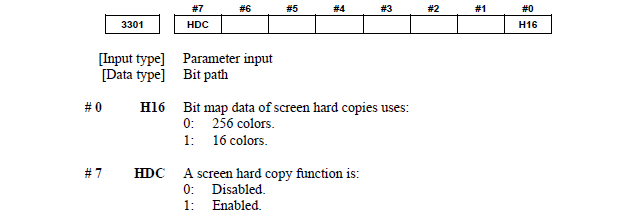
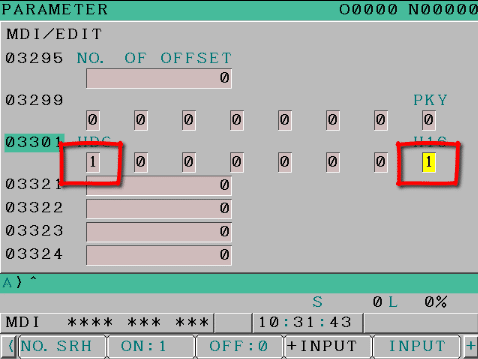
Allow Screen Shot Fanuc Parameter 3301

Messing With Parameters Can Be Fatal!!!!!

Unlock Programs Fanuc Parameter, first of all you’ll need to go to the setting screen and change the parameter write box to a 1.

If you want to make screen shots on your Fanuc control this parameter may need altering.

Just press and hold the shift key to make a picture of the screen on your data card or usb.


Should look like this to make it work.

Parameters You may Need to Change

3203 Clear MDI Screen

3401 Calculator Type Decimal Point or Integer

3402 G Codes that are Active When The machine is Turned On

6005 Allows the Use of Local Subroutines (Newer Control)

6050-6059  Allows you to Call a 9000 series Program with a G Code

6080-6089 Allows you to Call a 9000 series Program with An M Code

5003 Retain Geometry when you Press Reset

3291 Wear Offset requires Key to Adjust

8134 3453 allows you to use ,R and ,C (Rads and Chamfers)

That’s it away you go.

Oh just one other thing before you go off and cripple your machine forever.

Do yourself a favour take a picture of the screen before you change a parameter. If you aint got a camera then you must have a piece of paper.

Even better back everything up.

Thanks

If you have been affected by any of the issues in this post or need CNC Counselling then contact me.

If you want to learn to program CNC Milling Machines

Look no further Contact CNC Training Centre


Careers in CNC

View all current vacancies in CNC

Click here

Call David: 07834 858 407