

Driven Tools (Live Tooling) Milling on a CNC Lathe
Category : Useful Stuff
Classroom Training Click Here
This article is about driven tools (sometimes known as live tooling) on a CNC Lathe and how we use G12.1 (G112) to mill shapes.
At the CNC Training centre we have a three day course which covers all aspects of driven tools on a CNC Lathe. You will learn about machines with a Y axis and machines that use a virtual Y axis. There is also a lot of advanced CNC Turning material too and you get to test it all out on your own virtual CNC machine.
Everything we do is demonstrated on a real machine.
- Sub Spindle Machining
- Y axis machining
- Using a B axis
- Axisl and radial drilling
- Part transfer to sub spindle
- Everything you wanted to know about mil turn machining but were just too embarassed to talk about.

If you want to apply for this classroom course, then don’t bother reading this article.
By all means read on, in fact you’ll probably not need to do the course and waste your money!
A new CNC Machine is a very expensive investment even a simple two axis X Z lathe would represent a large investment to most companies.
If you want your lathe to be able to do milling with driven tools as well, then it will cost considerably more.

First of all you will need special holders for the driven tooling. That means the tools in your turret can rotate so you can have drills end mills taps all sorts of shit spinning around in your turret. Not all at once mind.
And you will need special holders for your driven tools like this to do axial holes (holes in the front face).


You will need a holder for driven tools like this to do radial holes.


So now when you turn a part you could mill some flats on it or maybe drill and tap some holes in the front face of the job.
You could even mill a radial slot or drill some radial holes.
This machine will need a rotary axis. Well it already has one its called the spindle and it has a great big chuck stuck to the end of it.
On this type of machine you will be able to lock into your spindle and it becomes a rotary axis. On your position display you will see X Z and C.
The C is the rotary axis.
You can even engage your handwheel and rotate it manually.
X50.236
Z25.235
C180.000
It is usually known as a C axis (Because it runs through the Z axis)
This works just like any other axis except it is programmed in decimal degrees. C90. is 90 degrees. It works as a simultaneous axis so that means you could program a Z move along with a C move.
G1 Z-30. C1080.
Your C axis would do three full turns (360 x 3 = 1080).
Meanwhile your Z is moving 30mm that is 10mm every turn.
That gives you a spiral with a 10mm pitch.

You can program angles down to .001 of a degree like C123.456
By the way these are all machines that don’t have a Y Axis.
Get live demonstrations as well as hands on experience on this course.
Y Axis
Crudely (and I am known for being crude) a Y Axis means your turret can go up and down.
So when you are milling on the front face of your part the machine behaves just like a milling machine cutting in X and Y.
Here is what milling a hexagon looks like when you have a Y axis machine.

Having a Y Axis is awesome the options are endless. But before you get too excited these machines come with a government bank balance warning.

You got it they don’t come cheap.
And…. in any case that’s not what this article is about.
Lets forget the Y axis for a minute just buy one of these with the money I’m gonna save you.
There is another way to machine that hexagon (I never wanted a stupid Y Axis anyway)
Take a look at this.

What’s happening you ask? Well there is some clever shit going on here.
Get live demonstrations as well as hands on experience on this course.
(Horay who needs a fuckin Y axis?)
The X axis is moving in and out and the C axis is rotating and magically the hexagon is produced.
Soooo…. no Y axis?
Sometimes known as Cartesian to Polar Coordinate Transformation.
Google it if you don’t believe me and no it’s not a sex change or something out of Doctor Who.

You would be forgiven for thinking you need a CAD/CAM system to produce this result.
The answer is yes and no. A CAD/CAM system would produce a bucket full of code to do this.
But actually you don’t need it.
This is what you need………
G112 and G12.1
G112 (G113) or G12.1 (G13.1) comes to the rescue. It kind of turns your lathe into a virtual milling machine.
Once you activate G12.1 or G112 (depending on your control) you can write a program just like on a CNC milling machine.
Now this does vary from one control to another so please smart arses back off. I’m just trying to make an honest living here.

If you want to go feed the cat at this point I’ll forgive you.

A gratuitous silly animal picture for all you pussy lovers. (David please, please save this crap for Facebook. No one laughs at your childish sexual inuendo either )
This is the program.
:0001 (MILL HEX SAMPLE)
M98 P600 (TOOL CHANGE POSITION)
T0505 (16MM ENDMILL)
M91 (ENGAGE C)
G98(FEED PER MIN)
G97 S100 M4 (Start Spindle 1000 RPM)
G0 X100. Z-5. C0. M8
S1500
G12.1 (MILL MODE)
G1 G42 X50. C-14.433 F500.
C14.433
X0. C28.867
X-50. C14.433
C-14.433
X0. C-28.867
X50. C-14.433
C14.433
G40 X64. C14.433
Z3. F2000
G13.1(TURN MODE)
M5
M41 G99 (FEED PER REV)
M98 P600 (TOOL CHANGE)
M30
Ok so it’s a bit hard to get your head around.

So let’s first of all see how it would look if you programmed it in X and Y on a CNC Mill.

Ok so I’ll go make a cup of coffee while you digest the above.
………………….

I’m back now.
So all you do is double all your X figures (because you are in the diameter mode).
Then you put a C in the place of Y.
And you have what is below.

Stupid you say. Why do they do that? Well you better write to Mr Fanuc and ask him. Some machines like Mazaks just let you program it in X and Y just like it’s on a milling machine.
Hitachi Seiki is the same.
But sorry it’s what we are stuck with.
Template Program
So once you get your head around how all this works I suggest you make a template program.
Once you have a program that works in your machine it’s real easy to come back to it and modify it for another job.
Also there are lots of things, like changing from feed per rev to feed per minute, that you need to remember to do. If these are all in a template program you won’t get into any of those annoying situations.
You could put all the stuff you need in a sub program and call it before you start using your driven tools. That way you could use it each time you use driven tools.
Get live demonstrations as well as hands on experience on this course.
On-site Training
The CNC Training Centre (that’s me David) recently trained some guys at a company I can’t mention for legal reasons.
They had a couple of really nice Matsuura Machining Centres and this baby below.
It’s a Nakamura – Tome CNC Lathe with a C Axis and driven tools.
This is a sample part. They are producing some real high precision parts for racing motorbikes on this beast. This is a test program we ran on it.
So back to driven tools (live tooling). So if you don’t go for a Y axis you save shit loads of money and you get to buy a Lambo.
There is more to it though. If you don’t have a Y axis there are restrictions on what you can do radially.
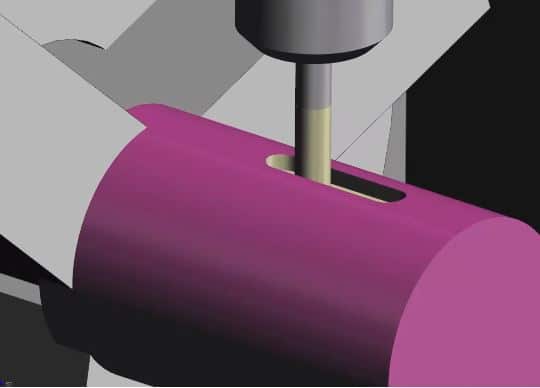
Like this slot.

You couldn’t do this without a Y Axis. You would only be able to slot sideways by moving your Z axis. That means you need your cutter to be exactly on centre and if it’s over size then your stuffed I’m afraid.
So if you have a Y axis you have choices but it does work out to be an expensive machine.
When you have a Y axis you can program with or without it. For larger profiles on the front face of the job (Axial) you more than likely won’t have enough movement on your X and Y axis to cover it. The G12 option is then going to be best.
All Without a Y Axis
If you want one of these I can make you one. Would look nice on your desk.
A Few Disadvantages
Driven tools need holders and they are expensive. Oh and you will soon run out of stations if you are doing lots of drilling and tapping for example.
Radial Holes
1 Spot Drill
1 Drill
1 Tap
Axial Holes
1 Spot Drill
1 Drill
1 Tap
That’s six holder!!!
A lot of cash.
These guys may help you. This is like the Arnold Schwarzenegger of turrets armed to the fuckin teeth.

You can even get multi station ones like these. (Make sure you look to see if you need a Y axis or not.)

EWS Tool Technologies
More Disadvantages
You need a high level of skill to set, operate and prove out when using driven tools. Obviously that doesn’t include you cos you read my articles.
Driven Tools (Live Tooling)
Just one other point before you go. Now it’s no good me telling you to be careful not to crash your machine. If you do then it’s really important not to pretend it never happened or blame it on your mother.
Once the alignment is out then you are going to have loads of trouble. So you need to keep these machines in tip top condition, and the alignment must be spot on. The slightest bump then you need to check it.
Some machines are more sensitive than others it’s easy done just a sneeze on the turret and it’s completely shagged.
If you have no Y axis then the centreline of the tools is absolutely crucial and I can’t stress the importance of this enough. Most of the problems with these machines will come back to alignment, so make that the first check you do.
Get live demonstrations as well as hands on experience on this course.
Y Axis If You Have One (A Word of Caution)
Everyone loves being the hero don’t they.
Now I’m no exception to this rule. I’ll call it “The Y Axis Trick” or it might be just the opportunity to wear spandex.
When you have a Y axis you must always include a Y axis move when you first bring in a tool (even if you aint using it).
G0 X50. Y0 Z3.
Why??? You ask
Because if there is an offset in the Y axis it well stay in that position. If your last tool had 0.1 in the Y axis offset then your tool will remain 0.1 off centre.
If you don’t program a Y axis move to zero (Y0) the Y stays where it is.
It’s one of the first things I would look at when there is an alignment issue just check the position display (it’s a give away).
In Conclusion
Sorry there is no real conclusion but I didn’t know what to put for a title.
For those who like conclusions……
- I now fully get this driven tool bullshit so therefore stick the course up your fat arse.
- I kind of get it but you want to learn more.
- None of the above.
- I enjoyed reading this article and feel so happy the next time I’m in a supermarket queue I’ll pay for a random persons shopping.
Please contact me for further information. All complaints are directed straight to junk email so don’t even bother.
Apply now for a three day advance mill turn CNC training course


