This article tells you how to limit wear offset input on your Haas Machine.
Collisions should be avoided at all costs on a CNC machine, so anything you can do to prevent them has got to be a good thing.
There are many things you can do, like paying careful attention to the way you prove out your program.
When run a programme that has already been proven, you know the actual CNC code is fine.
So you have two things to worry about.
Is the WORK SHIFT or WORK OFFSET correct?
Are the TOOL OFFSETS correct?
These are the two things that you control and they link the programme to the machine.
It would make sense therefore to check each tool change. Check the point where it first approaches the workpiece.
Once a programme is running we only need to go into our prove out mentality when we change the programme or the tool wear offset.
When we adjust the tool offset we can either adjust the Geometry or the Wear. Now it’s always best not to touch the Geometry. That’s because it’s a big number and big numbers can hurt you.
Lets say this number was 200.986 and you wanted to move it by 0.116
Not too difficult but it would be quite easy to alter it by a large amount and not even notice.
Then you could be in trouble.
Now if you always use the WEAR you know it’s always going to be a small amount. So if you see a large amount in the wear column you can go into a mad panic.
What’s The Point of All This Where’s He Going?
So if you always use the WEAR and not the GEOMETRY you’ll be ok. Unless of course you were stupid enough to put a big number in the WEAR
or…….
Against my advice you alter the GEOMETRY.
Help Is At Hand (limit wear offset)
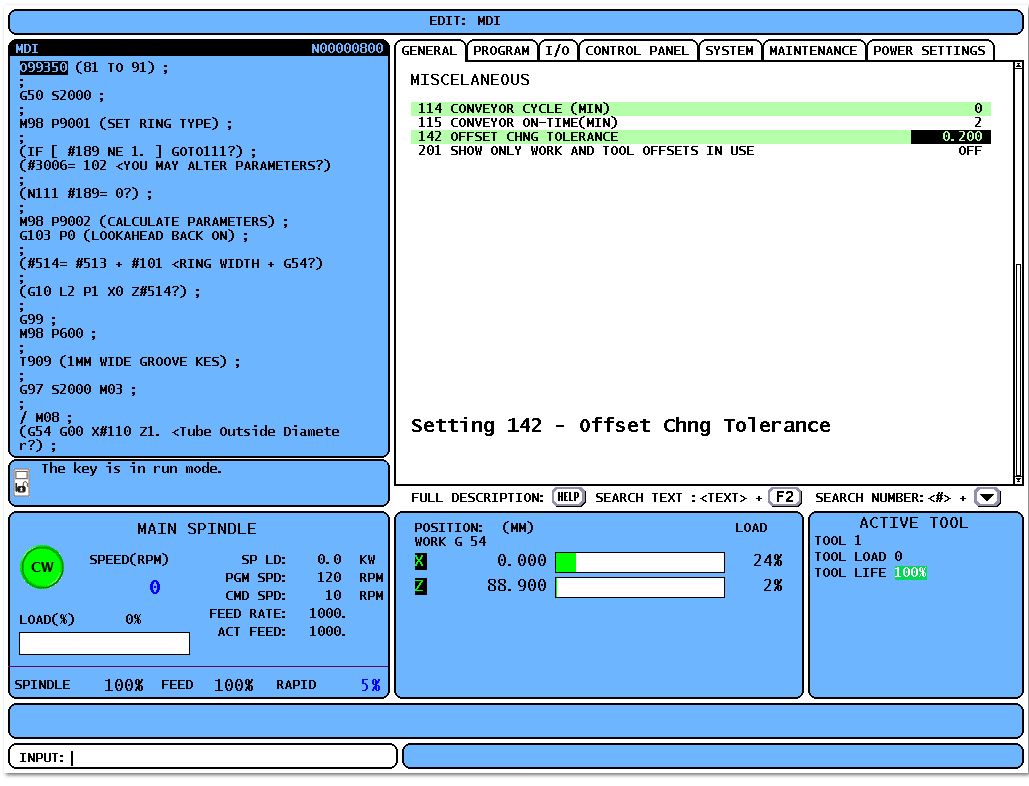
On a Haas Machine you can limit wear offset amount in a your settings.
It still lets you do it but gives you a sarcastic little warning.
Press this button
Sorry it’s a dirty grubby button but it’s the only one I have (welcome to the real world)
Type into setting 142 the maximum amount you want to limit wear offset input by.
Now if you try n exceed the dose, this is what you get.
Note
This limits the amount you can add to your offset not the total amount of the offset.
Thanks for watching and reading
If you have been affected by any of the issues in this post or need CNC Counselling then contact me.
We really love you but honestly we don’t give a shit if you break your machine. If you do, make sure you YouTube it. You could make a shit loads of money from the video.
I sometimes think I have the best job in the world apart from a few people like rock stars, pornstars and people who work in chocolate, and beer making facilities.
Everyday I get to work with interesting friendly people (apart from that bloke who knocked me out for accidentally deleting all his programmes). There are some very unreasonable people around. It took him less than three weeks to re-programme all the parts.
This week I worked at a company that makes lights n light fittings for posh restaurants and hotels.
Now I have never been allowed in a posh hotel or restaurant so I was amazed at all these fancy lights. The quality of the products these guys produce is absolutely stunning.
I got to train them on one of these.
Now I know what you are thinking “Lucky Dave, that’s a beauty” but I can see straight through your sarcasm and please don’t keep calling me fuckin Dave, it’s David.
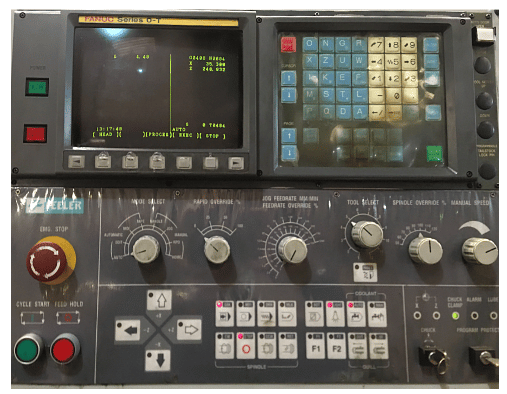
Anybody who reads my articles, and there’s only three of you,will know that I absolutely shit-faced love these old machines.
This one looks a bit shabby I admit but it’s previous user was not so gentle with it. A good service and some re-alignment and it’s back to to the workhorse it was meant to be.
Got to be honest here. I had forgotten some of the little quirks to the old Fanuc OT control.
Dig Deep
Once you get your head around it there really ain’t much it wont do. There are variations on this control and this one didn’t have all the bells and whistles. You know like rigid tapping and macro.
I mean who needs all that complicated shit. I’d much rather keep breaking taps and not be able to parametrically control a CNC programme with the flexibility to make varying sized parts. Not to mention probing and automatic tool measurement. No no no bollocks to that keep it simple.
Joking aside dig deep and make sure you’re using everything it’s got.
I’m a great believer in working with what you have n with a body like mine believe you me you have to.
Anyway let’s get on with it.
MDI On The Fanuc OT
The MDI screen is not like the newer controls where you just write into programme O0000.
You type in commands and it fills in details on the screen.
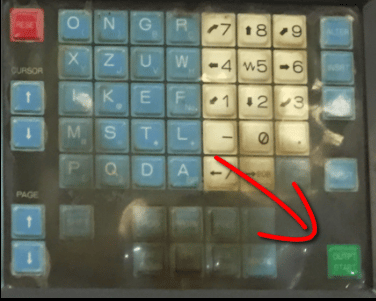
You have to input each word of code separately, then when they are all on the screen hit cycle start or this green button.
Sorry but you are going to have to get used to all the shit pictures because it’s all I have access too.
If you don’t like it there are way more interesting sites than mine. Not about CNC by the way but there are so many good porn sites out there these days.
I mean it bores the arse off me, and I’m the one writing this crap!!
If you input a position move and a tool change in MDI. It will make the move first then do the tool change.
Wouldn’t recommend it.
This MDI is not like the newer ones where it’s a programme it’s just one page that gets filled in.
It’s OK once you get used to it.
Programme Copy Fanuc OT
Editing is a little bit shit but once you get used to the protocol it’s not too bad. Try to change the way you look at this. I mean use the lower cursor arrow to search.
This is because the keys are quite cumbersome so if you can get into the habit of keying in the address, for example G or M, you can find the next G or M.
Or choose something more specific like G71 and then press your lower arrow to search.
I always feel sorry for these guys working in the chip shop where they have this thick polythene membrane over the keypad for the till. It’s pretty random which button they hit.
I paid £40 for fish and chips the other day (mind you the way inflation is going it was probably correct).
Fish and Chips from an English Fish and Chip Shop
I said to the young lad serving me “is this fish cooked” he said “I’m sure it is”. I said “well it’s eaten half my fuckin chips”
Anyway this Fanuc keyboard was a bit like his. Maybe I should work in a chip shop, wonder if you get free chips?
Enough About Chip Shops
If you make yourself use the search key it will make the whole experience a lot less frustrating.
To copy programmes is long winded but worth the effort, press the extra edit key and then move to start of the bit you want. You then press the first cursor button. Move to the end of the bit you want to copy and press the other cursor button.
So what the fuck is programme zero? Programme O000 is the programme number that the Fanuc control uses as a sort of clip board. When you use the merge button this programme O0000 is what it merges.
It even has find and replace.
End Of Block
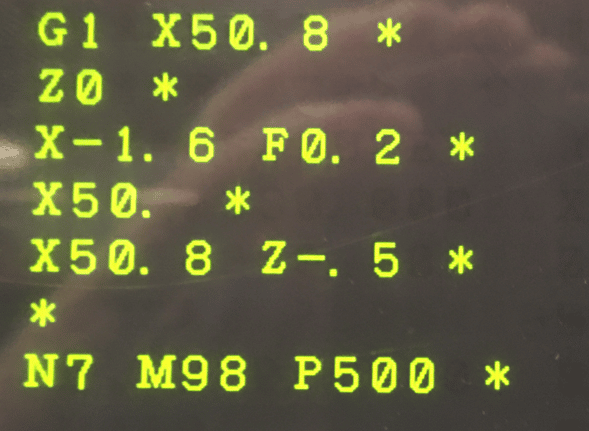
My control had asterisks instead of semi colons for EOB (end of block)
This would annoy the shit out of me but it’s not my machine and I really couldn’t justify altering it and putting the users future in jeopardy.
If you don’t like this then just change parameter 10 bit 1
It really makes no difference it just looks different.
OCD
I often get accused of having OCD. People go around saying “oh it’s OCD”. When you just keep your work area tidy.
No fuck off, I like things tidy I’m a fuckin engineer.
If this is you then stop saying it. If you ever meet someone with real OCD you will be shocked. It’s a terrible condition it’s not just about keeping the knives straight in the bloody cutlery draw.
Rolls Royce 1971
When I worked at Rolls Royce in 1971 the guy who trained me was Ex-RAF and an absolutely amazing guy.
Reg his name was.
Reg knew I had a reputation as an apprentice for having absolutely no interest in work and just dreamt of being a rock star all day. Bit of a prick in those days but Reg didn’t seem to mind that.
This Really Is Me
My early attempt at being Robert Plant
Reg was a clever guy gave me a full sex education and taught me more about good engineering practises, in the six months I was in his care, than I have in my whole career.
He had a more subtle approach to training me. To start with he just used to talk to me and what stories he would tell. This guy was a fighter pilot in the second world war. The stories were amazing and mostly could not be used on this page. Even with my very low editorial standards.
He was talking one day about how much the guys used to swear and how ridiculous it got.
He was home on leave one day and the whole family had lunch together. Grand parents, aunties and uncles about 15 people for dinner.
All was silent as they all started to eat lunch, after they said prayers as they did in those days.
“Pass the fuckin salt” Reg said in a load voice completely forgetting where he was.
I found this story so fumy. There was an embarrassed silence and then everyone chatted on as if they hadn’t heard.
This guy believe it or not had a pet shop in the precinct in Coventry which he ran in his spare time.
He had a pet monkey. He told me how the monkey would sit on his shoulder whilst he served customers. The monkey found it amusing to stick his prick in Reg’s ear when he was serving customers.
I was so charmed and in ore of this guy that before I knew it I was assisting him to build gearboxes for the Nimbus Engine
He taught me basic skills like wire locking and how to correctly use spanners.
Before long I was assembling gear trains. I was really into motorbikes so a lot of the skill was transferable to what I was doing at home.
Fortunately i didn’t have one of these (Norton Jubilee) My mate did and it was an unreliable piece of crap.
The most important thing he taught me was the importance of keeping your work area spotless clean and all your tools neatly in place.
He knew where every spanner rachet and Allen key was and could drop his hand straight on any one without even looking.
If one tool was missing or out of place he would notice immediately. Imagine if you left a spanner inside an engine!
Oh and my workshop is still immaculate as you can see.
Being tidy is pragmatism not obbsessive compulsive dissorder.
OCD I rest my case.
Other Exciting Parameters Fanuc Ot
You might want to fuck with some of the other parameters like these:
Parameter 40 bit 0 displays programme description in Library
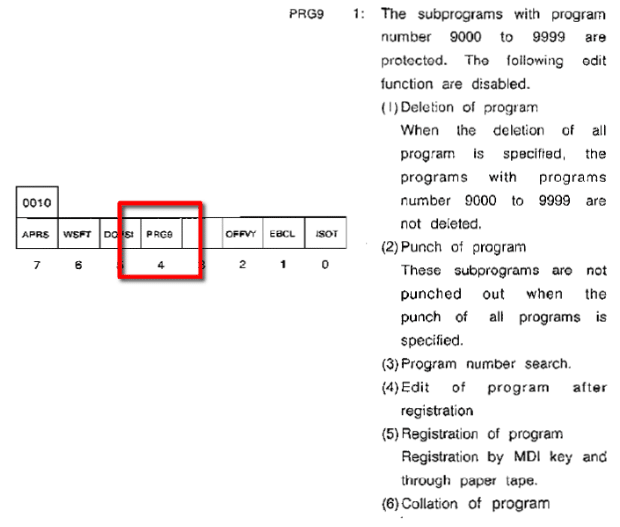
Parameter 4 is to protect O9000 series programmes
Chamfer and Radii Fanuc OT
This control has the ability to add a radius or chamfer to a programme.
Just programme point to point and then add C or R as an after thought.
You learn something new every day.
My daughter is autistic so everything is taken in a very literal sense. I witnessed a friend drop straight into this trap. He was explaining how good it was to use a roller to paint furniture. yes, he said, “you learn something new everyday”.
Oh dear methinks.
I knew what was about to happen. “Mmm” my daughter said “what about yesterday?”
He thought she was joking, but no, she wanted to know exactly what he had learnt every day of that week.
When he said “It’s one of those things that people say”. I knew he was digging himself deeper and deeper into the shit.
I decided to pull him out. “It’s just a stupid neurotypical saying. It’s just not true”.
What I Learnt Today Fanuc OT
On this machine you don’t need a comma when you use R and C.
G1 X50. R10. Z-20.
When I saw it I thought “mm where the fuck is the comma?”
Turns out there is a parameter to change it. (That’s what I learnt)
Don’t get this confused with G2 and G3. All you need with this is to programme the shape without the corner radius or chamfer (point to point) then just stuff in the pesky little C or R afterwards.
Authors Note:
I also learnt that there is no such word as learned. It’s learnt. Should have listened at school. (Smart arses please feel free to give me an English lesson.)
A Hidden Button Fanuc OT
Bet you didn’t know about this button.
Now I can tell you for sure there is nothing good about getting old. No no, it’s definitely the shit end of the chronological stick. It’s fucked up and I don’t like it.
You definitely get more patient with age. Like standing in queues. When I was young after five minutes in a queue I would rather remove my own appendix without anaesthetic than to stay another second.
Nowadays I just change into my slippers (which I have with me at all time in a carrier bag for life) and light up my pipe. Happily waiting for hours to be told “oh you can only do that online love”
People even call you “love” when you are old.
Have you ever noticed the No at the bottom of the F key? Anyway, I know the suspense is killing you. Well…. if you are on the offset page or the parameter page, when you press this key you will see No flashing on your screen. You can now input offset or parameter number and it will search for that number when you press input.
Now I know you’re thinking “this twat should find something better to do with his time” and you’re probably right.
The thing is if you force yourself to use all these little shortcuts then overall it will make a real improvement in efficiency. Oh and I’ve been watching you, you really need to up your game. Pissing around with that iphone all day.
It Will Make You More Efficient
Not to mention repetitive strain injury.
I often say to people who I’m training “I just read the manuals that you just can’t be arsed to read” and then charge you for training. They just laugh, mmm.
One More Really Important Thing
Now I know I’m banging on a bit about chip shops today but what the fuck is this thing about having gravy on chips!!!
Fuckin disgusting. Now I know it’s a northern thing and I know you northerners have some strange traditions but frankly this should be outlawed by public health.
This article is about Fanuc Background Editing. Now I suggest you move straight to the end if that’s all you are interested in.
If your happy to listen to me ranting for a while then read on.
I love gadgets, I don’t think people call them that now but in the absence of a better word then I’ll use it.
Whenever I get lose on a CNC Machine I’m always looking for something extra that it will do, like some hidden extra that it’s got.
It’s always nice to find something new. When you know everything a machine can do. That is when you are in a position to make an informed choice as to how you want to use it.
I use a toolbox metaphor. All the different functions and options are tools that the user can chose from.
One day a problem arises and the person I once trained thinks “mm I remember that miserable old bastard showed me something here”.
Something I taught them that they didn’t see a use for suddenly becomes relevant. They don’t remember the minutia but just find it in a manual, refresh their memory and use it.
Like using a G10 to write your work offset from the programme. You might never need this but if you know it exists. It’s easy to look up how it works and subsequently use it.
Gadgets Like Cruise Control
I adore cruise control on a car. Even my old V70 Volvo has it. I use it all the while especially on a motorway. What really pisses me off is that all these much newer cars most of them have a monthly rental cost that’s more than I paid for my car.
I mean surely these cars must have cruise control for that money I’d want fuckin cruise missiles.
So why in the name of holy shit do people not use it. I’m like cruising along at exactly 70 mph when somebody starts passing me on the inside. I let them go only to find they slow down and I have to pass them. Sometimes this goes on for quite a while. Now I’m not an aggressive driver but fuckin hell this is annoying.
If they are not using cruise control how many options on this car are they not using. I mean do they have a handle fitted on the windows to avoid pressing the electric windows button.
Some poor bastard at BMW is creating all these brilliant features and no fucker is using them. Windows open on a hot day cos they don’t know how to use the climate control.
These peole who say “oh I like a manual gearbox”. I say “fuck off your not Jenson Button” why do you need a bloody manual gearbox. Oh and a clutch (what’s that all about).
Drving is suppoed to be easy, buy yoursalf an old Ford Cortina or something or maybe an 1960”’s tractor. Do these people need something to do.
Driverless cars bring it on.
Background Edit is Useless
Background editing on a Fanuc control is useless.
No it’s not who said that?
The main reason why I’m writing about background editing is because you can get locked into it by mistake. It’s so easy to press the wrong button and end up stuck in background edit. It’s like the Guantánamo Bay of CNC Programming, very hard to escape from.
It’s Useless But Here is How To Use It
You will be in Memory or Auto mode and your programme is running merily producing your parts.
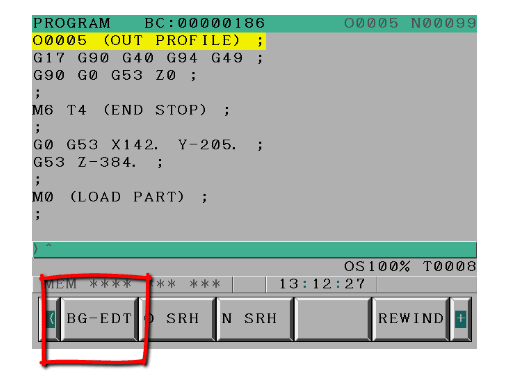
First of all press BG-EDT
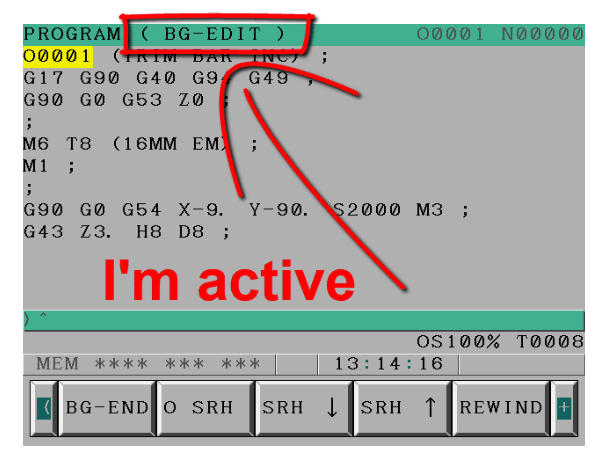
Once it’s active it’s there at the top of the screen
You can now go to your directory and call your programme to edit in the usual way. Enjoy yourself editing your programme or even create a new one.
Don’t Hit Reset
There is only one thing you must not do in background edit. That is to hit reset as it will stop the machine.
Try to get into the habit of using rewind not reset.
Rewind
Background Edit (Fanuc)
You can’t Press RESET
You can’t edit the programme that’s running.
You can’t get to MDI screen
Some other screens won’t work.
Most edit functions will work.
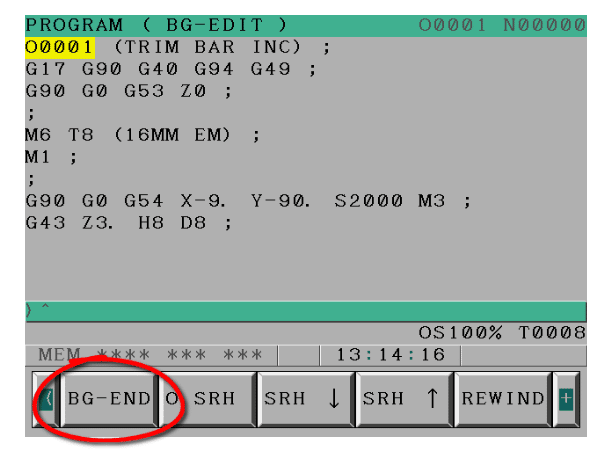
As I said before you can get stuck in background edit it’s easy you just need to press this.
When I’m training people on Fanuc Controls I always teach them about Background Edit. Even if you don’t use it, one day you’ll press it by accident. It could take you a long time before you realise what you did
Ignore At Your Peril
It’s easy to ignore these buttons and not even know what they do. When you one day accidentally press Background Edit in a pressing frenzy you’ll remember this.
Always Read The Label
When you get a problem on a CNC Control step back and carefully read everything on the screen. Sometimes your CNC Machine is screaming at you but you chose to ignore it.
Background edit is no exception.
Backgroung Edit Haas
You can edit the program that is running. How cool is that?
Piss off it’s not dangerous it’s the dogs bollock.
All that happens is that when the program finishes once you press reset your programme is changed.
Dead useful when you see something that wants changing and you know you’re gonna forget.
Mazak In ISO
On a Mazak when you are running an ISO programme (G Code) if you see an error on the next line or further on. You can edit it before the machine gets to it. Don’t you just love it.
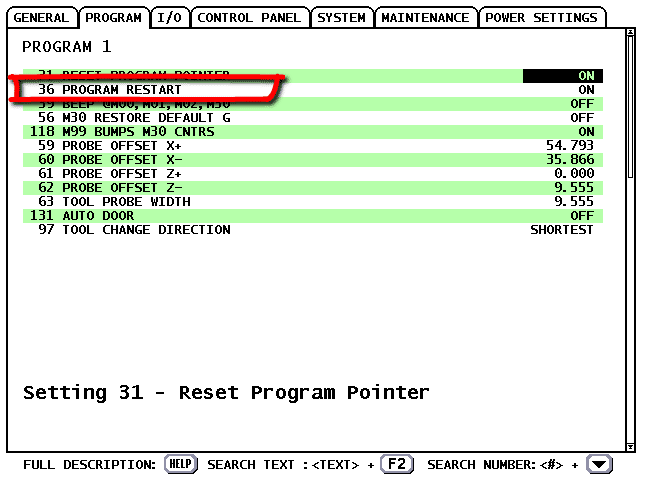
Best feature by far on a Haas Machine is it’s programme restart. Guess what, loads of people don’t use it. In fact they don’t even have it switched on.
First thing to do is switch it on on the setting screen.
If you are used to using a Fanuc control then you probably restart on a tool-change line.
So you would search for N19 and start at that line.
Haas Restart, Total Confusion
What I find confuses people when they first try this on a Haas machine is that it picks up the previous tool. This is purely because it thinks the tool change is what you want to do. So it gets ready.
All you need to do is start on the next line.
Yep it’s that easy.
The control sorts out everything.
Coolant
Spindle
Position
You name it
It will even feed the dog, change your underwear and load the dishwasher.
Sorry I’m joking how could it feed the dog when you don’t have one.
Press cycle start and away you go. If your Z axis is above the part it will come down slowly just in case something is in the way.
It really is that easy.
Oh n by the way it works just as well on a Haas CNC Lathe
You might not know it but if you put your memory stick into your Haas control then press and hold SHIFT as you press F1 you get a Haas screenshot or a (Haas screen capture) on your memory stick.
It is really useful if you need help because you can save a record of what is on the screen.
With this Haas Screen Capture. You could use it for set up sheets. It will also be useful if you want to create training literature.
If you want to enter a name for your screen capture just input it before doing the above.
I love the fact that Haas are constantly improving their products the machines are so well thought out. They were the first ones to incorporate a coolant hose to clean down the machine.
Extras
I notice now some things do come as extras but they still come well loaded. It’s not like when you buy a car and you find that all the things that really attracted you to it (don’t we just love the toys) are extras.
Range rover with no wheels
Just having a memory stick on a machine is really good. I cant help but think that it seems to be taking so long for machine tool companies to really get to grips with technology.
Sometimes when I am training people who never worked a CNC before I feel embarrassed to say “oh the memory is like the size of a 1980’s calculator”
1970’s Calculator
The editing on some controls (and I won’t name names, as I can’t retire yet) is poor to say the least. Students used to using a PC expect to be able to easily COPY and PASTE bits of programme.
UNDO (don’t even go there) some do have it. But wouldn’t it be great if you could UNDO things like offset changes. These things are gradually coming in on new controls but I can’t believe how slow it’s all been.
And you thought this articcle was just about taking a Haas Screenshot
Anyway I’m rambling again (only doing it to get the word count up), I will be using this Haas Screen Capture all the time. Typical Haas practical, user friendly. Keep up the good work boys.
Fanuc Screen Shot
Yes Fanuc Does it Too
Go to a screen you would like to capture.
Press and hold the [SHIFT] button for 5 seconds.
The control appears to lock up for about 15 seconds.
Once it frees up an image will be on your memory stick or memory card.