Month: March 2022

G94 and G95 Feed per Rev / Feed per Minute

Category : Fanuc Haas

G94 and G95 are two G codes that are often ignored on a CNC Lathe.

G94 is feed in mm per minute, as normally used on a CNC Milling machine.
G95 is feed in mm per revolution, as normally used on a CNC Lathe.

So if you program F.2 in G95 then for every revolution your tool would move 0.2mm

At 1000 RPM your tool would feed .2 x 1000 = 200mm/min

One of the many things that utterly pisses me off is when I see a line of gratuitous G Code at the beginning of a CNC Program.

Now I know you’re thinking “this miserable bastard is permanently pissed off” and this may be be true but. Allow me to explain.

The idea of these setup lines as I am told is to reset the control at the beginning of a program. I don’t have a problem with this at all.

It’s a bit like tattoos I suppose so long as the tattoo is on you and not on my scrotum sack I don’t have a problem at all.

I keep saying they’ll regret it when they’re older but my mother is 96 and covered in ink and doesn’t seem to give a shit about it, therefore I could be wrong.

My mother definitely doesn’t look her age

I used to work with a guy who had “True Love Julie” tattooed up his arm it was all fine till he caught her shagging the bloke servicing the boiler.

I suggested the next time he got his body inked he should try using more generic terms like “I Really Love My Girlfriend”.

Maybe they could leave a gap for him to “felt tip pen” the name in and when he got fucked over again (which he did on a regular basis) he could just rub it out.

Setup Lines G94 and G95

What I hate is that when I ask the operator what the G Codes at the beginning of the program mean. He just says “fuck knows, but I know you must have them”

Anyway it’s a free country (well kind of) so feel free to put these codes in but please take the time to see what they all mean.

For example if you put G21 at the head of your program it means this program is in millimetres.

But….. if you only use millimetres in your programs then why bother. You only need it if you are using inches (G20) sometimes and need to swap over.

Fish Fingers

Likewise you could put G69 at the head of your program but if you never use coordinate rotation you might as well be telling the machine that you’ve got fish finger and chips for tea again. It’s just not interested.

I love healthy food and Jason Donovan

I get this every day since my wife bought a book called “50 new exciting ways to cook fish finger and chips”.

The green parsley leaf she says is my “Five a Day”

G94 and G95

On most CNC Lathes you will always be using G95 which is feed per revolution. On a CNC Milling Machine you will always be using G94 which is feed in mm per minute.

The lathe will default to G95 and the CNC Milling Machine will default to G94.

Soooo… About this Setup Line

If you never use feed in mm per minute (G94) on your CNC Lathe then personally I wouldn’t bother with it. You don’t need G94 or G95 at the head of your program.

Now if you have a bar feeder on your CNC Lathe you may need to feed the bar out with the spindle stopped.

Feed per revolution is feed per revolution therefore if you have no revolutions then you have no feed.

You must change to G94 so that you can program in mm per minute. Oh and when you are done don’t forget to switch back to G95 (feed per revolution).

Don’t forget these G Codes are modal which means they stay in the control until changed.

G95 Feed Per Revolution (CNC Milling)

Now most programmers don’t use this much on a CNC Milling machine. There are some really good uses for it.

Now I was useless at maths at school. Well thinking about it I was just useless at school although….

I did get a GRADE 1 swimming certificate which I’m still proud of to this day.

Achieving my GRADE 1 swimming certificate was a gruelling task. I remember I had to swim a full width of the swimming pool which I did (only touching the floor three times). Then I had to retrieve a massive,heavy, black rubber brick from nearly three feet of water.

I still have the certificate framed in my office to this day.

You young people now-a-days have it easy with your ipads and Ed Sheeran records.

Anyway most of the ideas I come up with are born out of shear laziness. Humans are useless at adding up in fact all simple arithmetic. So why bother…. fuck it.

Whenever there is an opportunity to do maths give up and let the computer do it. As much as I want to build your confidence as a training provider I can tell you that you are stupid, this in not for you.

Drilling On a CNC Milling Machine

Drilling is a good example. I remember years ago buying a drill and ringing up the tooling guy and asking what feed rate to use. He said “oh, about .15mm per rev”. I didn’t have the confidence to say “what the fuck does that mean” so pretended I knew what he meant.

In actual fact  I just pissed around with the drill until it looked like it was cutting OK.

Obviously you know what is meant by 0.15mm per revolution. It works like this, just incase you know a bloke that doesn’t understand it.

So it your speed is 2000 rpm.

Then your feed would be 2000 x 0.15 = 300

So you would program your drill as F300. that’s 300mm/min.

This is my dog “fuckwit”

Anyway I think you can see where this is leading. If you swap to G95 you could just program what the man said. Completely clueless as to what will happen.

Oh and usually they say stuff like “between 0.1 and 0.25 mm per rev”. Tooling guys are renowned for their ambiguity.

You could  play around with the feed without ever getting out your calculator (save it for your next trip to Lidl).

Tapping On a CNC Milling Machine

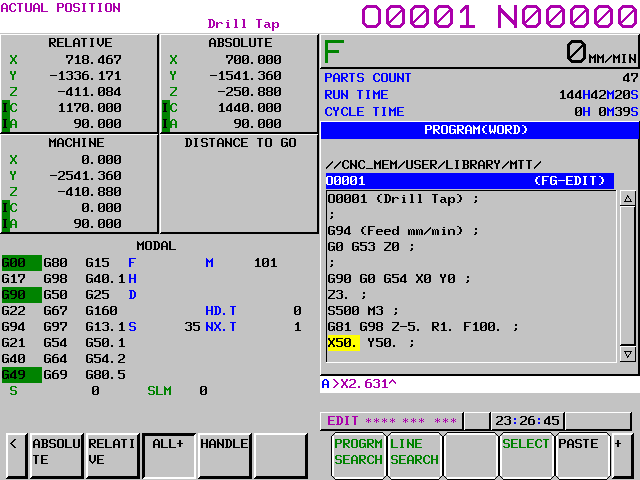
You have a choice G94 and G95.

Loads of people still work out the feed-rate when tapping, is this you?

T1 M6 (M6 x 1 TAP)

G90 G0 G54 X0 X0
G43 Z3. H1 M8

M29 S500
G84 G98 Z-20. R1. F500.
X50. Y50.
G80

In the above program it’s easy to calculate the speed by multiplying the speed by the pitch of the tap.

500 x 1.0 = 500.

It’s easy but there are two problems.

  1. Not all taps are 1mm pitch.
  2. What if you need to change the speed?

So the calculation is not always that simple.

If you change the speed and forget to change the feed you are fucked. Well you’re not but the tap almost definitely will be.

Try This


T1 M6 (M6 x 1 TAP) 

G90 G0 G54 X0 X0
G95 (FEED PER REV)
G43 Z3. H1 M8

M29 S500
G84 G98 Z-20. R1. F1.
X50. Y50.
G80 G94 (FEED IN MM/MIN)

Now it’s really easy the feed-rate is the pitch of the tap. Oh and when you change the speed just do it.

No one gets hurt and no taps are harmed in the process.

G95, what you “young people” would call a no-brainer.


 Best Website with Crack Program:


Full Circle Macro Program on a Fanuc Type Control

Category : Fanuc Haas

Full Circle Macro

When we program G2 and G3 on a Fanuc type control an end point is required and a radius.

Full Circle

The control can then miraculously fit in the circular move. Sometimes on training course my students have read stuff on the Internet about I J and K.

My stock answer is unless you are working on a really old machine and I mean dog shit old you wont need it.

Towards the end of the programming course I admit to lying and drop the bombshell that maybe they do need to know just a little bit about I J and K.

Full Circle

Look at this article if you want to know what it is right now.

Anyway you can actually live your whole life and never worry your pretty little head with such crap as I J and K.

My mother is 96 and if you ask her about I J and K values she would not have a clue what you are on about.

What about a full circle? your smart arsed friend will ask.

Easy you program it in two halves.

Actually I think it is a bit of a cop out because there is a very easy way. I’m not explaining it again cos its in this article. Oh and it’s piss easy.

Piss can be used in many contexts.

In England if your mate is pissed it means he is intoxicated. In America I believe it means he is unhappy.

To say “I can piss it” means I can do it without any effort.

“Piss easy” means easy like taking a piss (urinating for the posh engineers)

“Piss fit” means a loose fit (Engineering technical term).

“It pisses in” means it goes in with ease

“Piss off” means go away.

“On the piss” means out drinking with friends.

Can also be called “out on the piss”

Anyway this program is a macro you can use to easily program a circle of any size in cutter compensation.

Full Circle


In the above main program the tool radius is stated as D17 and #1 is the required radius. #2 is the depth.

Now take a look in the subprogram.

Full Circle

Full Circle Macro

Firstly it swaps to incremental so you you can dig this hole wherever you want in your garden just say where.

It feeds to the Z depth you told it in #2.

Then it applies cutter compensation (you gave it the D offset in the main program).

Then the G3 tells it to mill a full counter clockwise circle .

Hey don’t forget the G1 on this line G1 G40 X-#1. You will get a nasty little alarm if you don’t you naughty boy.

This just cancels the compensation and goes back to the middle.

Then the G90 to swap you back to absolute (keep the place tidy your mom doesn’t work here)

Her is a nice video of the whole thing. Don’t you just love Vericut.

Watch the program step through to give you a full explanation of what’s going on.

Full Circle Macro

Hope you like my Macro. If you use it then keep updating it and making it better. Send me a copy when you perfect it.

A Note

In macro programs it’s the stuff you leave out that counts. What I mean by that is that the more you leave out of the macro program the more you can control externally.

If the feed-rate and D offset were in the macro program you would be stuck with them whenever you use this macro. Think about it.

It’s like my mother in-law without a divorce Im just stuck with her.

Here is how macro type programming is done on a Siemens control

If you want to learn about rads and chamfers on a Sinumeric Siemens 840D read this

Thanks

If you have been affected by any of the issues in this post or need CNC Counselling then contact me.

If you want to learn to program CNC Milling Machines

Look no further Contact CNC Training Centre


Program Restart Fanuc Not Scary At All

Category : Fanuc

Program Restart historically people tend to avoid Program Restart on a Fanuc control. It is an option so again don’t get too excited as you may not have it.

Program Restart

I remember using it years ago on 6MB controls circa 1982 and it was like performing black magic. What a rigmarole and it took me ages to figure out how it worked.

Oh yea and you could only perform it when there was a full moon or an R in the month.

Anyway recently I came across it on a new Hartford Machine I was training on and couldn’t resist getting it going.

Program RestartSo now I am going to share Program Restart with you.

Now I am always banging on about not putting too many N numbers in your programs (they can make you hyperactive).

Anyway you need an N number in order to perform a program restart on a Fanuc control.

Now if you had a load of holes to drill and tap you might want to number them all just in case you need start half way through having broken a drill or tap.

In this program I used an N number for each hole.

Alternatively you could wait till you need to do a program restart and just add an N number where you want to restart the program. In this case it’s N1234

Word of Caution Program Restart

Most tool changers use a 9000 series program for the tool change. There may be N Numbers in here. So if you end up stopped in this program it will normally be a low N number. Therefore I tend to use 100 series numbers N100 onwards.

Here’s What You do for a Program Restart

  1. Reset the program at the head you can use REWIND if you want.
  2. Turn on Program Restart this will be a switch or a soft key depending on the machine control.
  3. Input the N number you wish to start at eg N100.
  4. Press Q-TYPE the machine will jump to this line and the following screen will show.Program Restart
  5. Your sequence number is searched for and this screen will show you where your machine is going Program Restart  and the Program Restart
  6. Turn off Program Restart. (Distance to go will flash)
  7. Go to MDI and get the correct tool then start the spindle at the correct speed. Issue M8 if you need coolant on. (The tool number and recent M codes are all shown on the screen above)
  8. Go back to AUTO or MEMORY mode.
  9. With the machine in SINGLE BLOCK each time you press cycle start the axis will move to position in the order shown on the screen. Use feed controller to position axis.

Program Restart

10. You are allowed to manually move the axis before continuing if a collision is suspected.

11. Once each axis is in its final position the program runs normally from this point.

Advice (Program Restart)

If you got it use it.

Oh and keep using it.

It will become simple.

Confession

I’d forgotten about this and it’s definitely not as scary as I remembered. Maybe I got smarter in my old age.

It is a very underused function if I had a machine with it on it would definitely be in my digital toolbox.

You Can really Impress the Boss With this One

Fetch him over for a demo but make sure you know what you are doing first just in case you fuck it up.

If you have been affected by any of the issues in this post or need CNC Counselling then contact me.

If you want to learn to program CNC Milling Machines

Look no further Contact CNC Training Centre


How G28 Works. Why two pushes of CYCLE START?

How G28 Works

Every wondered why G28 takes two presses of the CYCLE START Button when you are in single block.

How G28 Works

Be amazed you are about to find out.

One of my pet hates, and at my age you have thousands, is when people say

“Oh I don’t know we’ve always done it”

I just think, well you are stood at this machine for eight hours a day why not find out what’s going on.

How G28 Works

How G28 Works

G28 tells the machine to return to its home position. This is usually a convenient point for a tool change.

The command on a machining centre looks a bit strange.

G28 G91 X0 Y0 Z0

Why G91?

Well G28 means return to your home position via an intermediate point.

So if you programmed G28 X0 Y0 Z0 then your machine would rapid down to the workpiece (probably crash) and then go to it’s home position.

What G28 G91 X0 Y0 Z0 tells the machine is this……

  • The reference point is incrementally zero from where you are.
  • So the machine does not move.
  • Then it goes to it’s home position.
  • Hence the two presses of cycle start.

On a CNC Lathe we use U and W for incremental. Read this post if you don’t know.

So if you programmed G28 U0 W0 your X and Z axis would return to their home position. This being because the reference point is incremental.

If you programmed G28 X0 Z0 you would probably get a collision like below.

Well at least it went home.

First move is to X0 Z0 which is the front of the part. (This is your reference point.)

The machine would then move back to zero return.

G28 is fine on a CNC Lathe but on a CNC Machining Centre you must remember to change back to G90 (Absolute).

My preference is to use G53 to get back to your home position.

Read this article if you never heard of G53.

Please note some older machines don’t have G53. Oh and it is classed as an option!

If you are affected by any of the issues raised in this post or need CNC Training then contact us.

Contact CNC Training Centre

Don’t forget to watch my Tutorial Videos

We offer training on all types of CNC Machines and controls check em out.

Or fill out the contact form below


Fanuc Calculator Using the CALC ALTER Key

Category : Fanuc

Fanuc Calculator, did you realize you had a calculator on your Fanuc control?

On the Fanuc Oi control this is what you do to use the calculator.

Just check the buttons before you get too excited you might not have it.

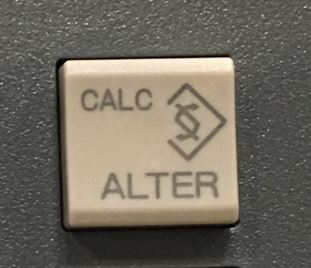
Your ALTER key should look like this.

Fanuc Calculator

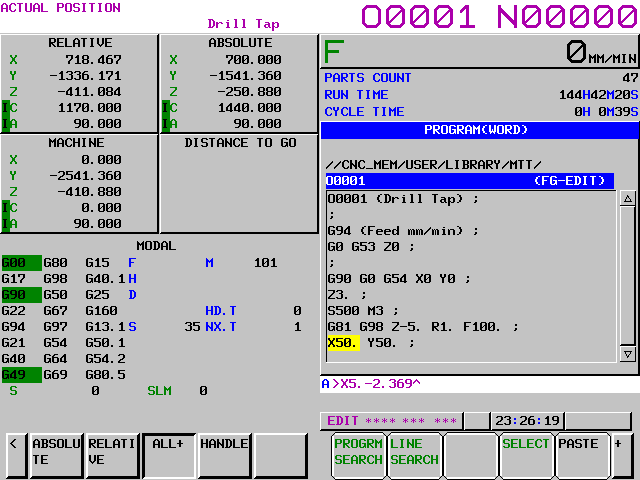
First of all input your calculation which can be part of your X, Y or Z figures.

Fanuc Calculator

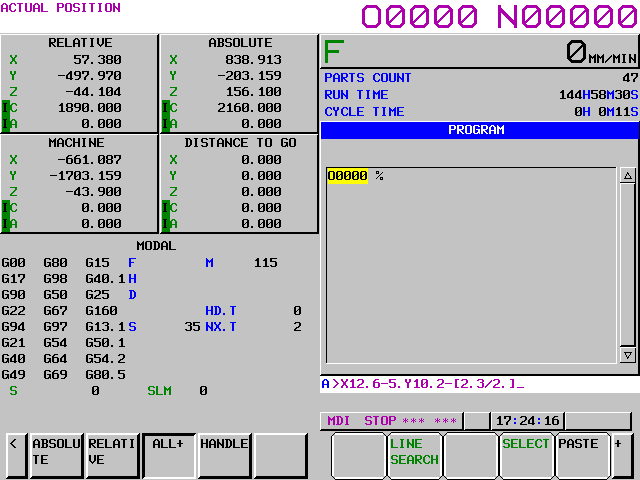
So if I wanted to subtract 2.369 from my X value of 5 then I just input it.

Fanuc Calculator

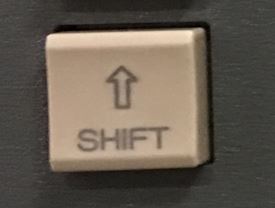
Now press your SHIFT key (mines a bit bent).

Fanuc Calculator

Then press the CALC/ALTER Key

Fanuc Calculator

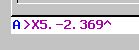
Voila, down in the buffer you magically get your answer.

Fanuc Calculator

(The next bit is boring but read on cos there’s more on the calculator)

History Lesson

If you are an old codger like me you may remember FANUC FAPT. It was an early attempt by FANUC to create an automatic programming system. It was actually pretty damn good at the time.

Well I got trained by this Japanese guy it was in the days where we were genuinely worried about exploiting Japanese workers. Oh how the times have changed.

This guy didn’t speak very good English (but then neither do I). He did a great job of training me but one thing sticks in my mind.

He insisted that I always input exactly what was on the drawing.

Don’t Add Em Up Stupid

If a drawing had two lengths say 12.6 and 13.4 he wouldn’t let me add them together. I had to input 12.6+13.4 into the computer.

It really makes sense because humans are shit at adding up numbers but computers are great at it. It’s in their DNA. We are much better at getting pissed and eating chips.

Yes you could put in the wrong numbers but at least you’re not adding them up as well and messing that up you stupid boy.

Fanuc Calculator

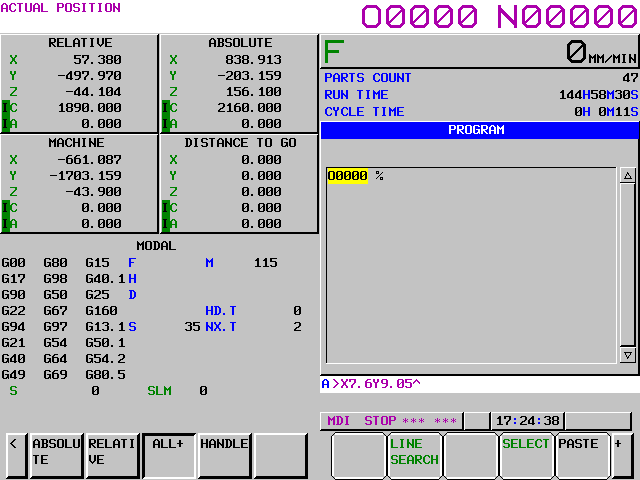
You can even do calculations on two or three axis at once look at the example below.

Fanuc Calculator

Fanuc Calculator

Fanuc Calculator

Down in the buffer you get your answer ready to use.

Fanuc Calculator

Fanuc Calculator

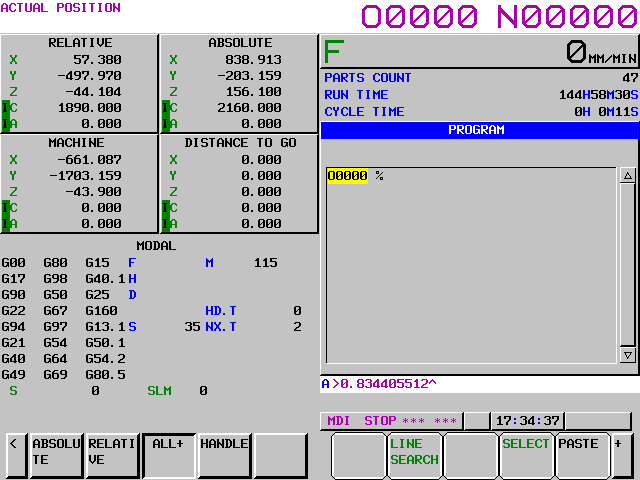
To use it as a regular calculator, type in as below.

Fanuc Calculator

Same again for the answer

Press your SHIFT key.

Press the ALTER Key

Fanuc Calculator

Fanuc Calculator

Fanuc Calculator, oh and guess what?

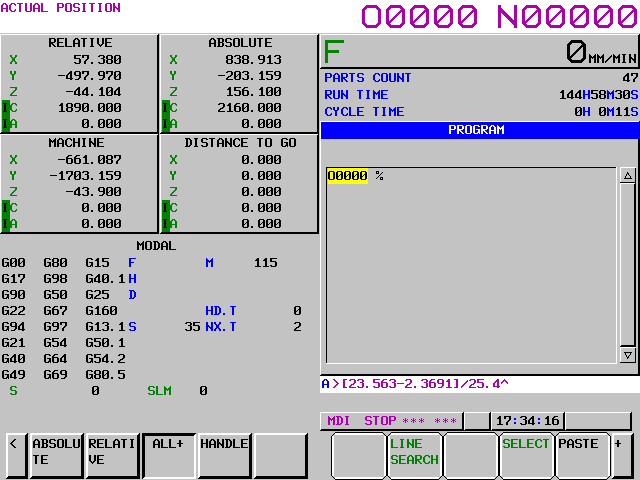
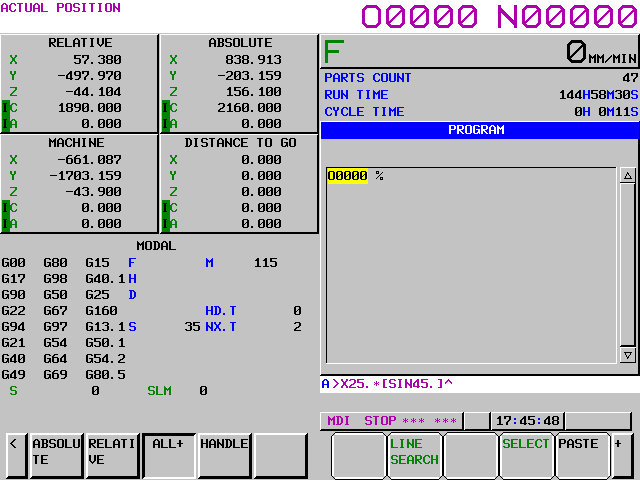
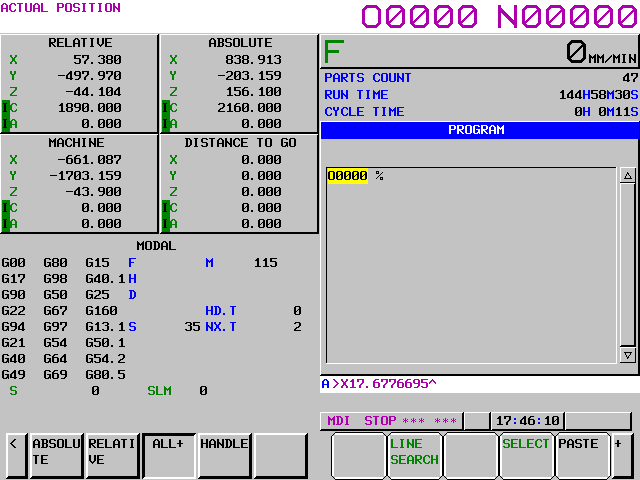
You can even do simple triangle calculation (you know all that trigonometry shit.)

Yes you know the score now SHIFT then the ALTER key

How exciting is that, you might have to get rid of some of those extra numbers but you get it now.

If you need training or have been affected by any of the issues in this article please contact us.


Careers in CNC

View all current vacancies in CNC

Click here

Call David: 07834 858 407