Category Archives: Haas Mill

Learn CNC Canned Cycles G81 G84 G73

Learn CNC Programming (Canned Cycles)

Call David: 07834 858 407

CNC Training Centre Reviews

A Canned Cycle What is It?

If you want to learn CNC programming  then you need to know what a canned cycle is.

I’m going to have to be honest here it is a funny choice of words “Canned Cycle”. But a wild guess would be that all the information to drill a hole would be kept together in a “Can” ready to use.

In a Can…….Learn CNC

So let’s learn CNC Programming….

Make sure you read the end of this article to see a really cool way to drill equally spaced holes.

First of all we state the cycle:

G81 Z-20. R1. F100. X50. Y50. F200.

The machine will move to X50. Y50. then rapid to 1mm above the part (this is the R1.). It will then feed down to Z-20. at a feedrate of 200 mm per minute F200.

Finally it will rapid out of the hole.

It then sits ready for the next move.

dog-163527

All you need to do now is just keep giving positions.

G81 Z-20. R1. F100. X50. Y50. F200.
X60.
X70.
X80.
X90. Y60.
G80
The G80 at the end will cancel the canned cycle. It just means “Look I am a bit pissed off with drilling holes so can you stop”

So that’s it Canned Cycles it really is that easy you put all the information in the “Can” then each time you give a position you get another hole.

Want to know More?

Thought you would. You want to learn CNC programming don’t you?

There are loads of these canned cycle but I am not going to talk about every one in detail. No sorry you will have to read the boring old manual for that.

Not to Worry They Are All The Same

Well sort of. You state the cycle then it repeats at each position given until you cancel it (and that applies to all the cycles).

Anyway Here are a few:

G84 taps holes, tell it the pitch depth usual stuff.


G73 peck drilling is the same as drilling (G81) but you give it the peck depth.It pecks the hole breaking up the swarf.


G83 same as G73 but with each peck the drill comes right out of the hole. For deep holes or swarf that clogs.


G76 bores a hole, stops at the bottom, moves over and rapids out to avoid marking the bore.

Ok let me tell you this, you are doing great so far. This is how we learn CNC programming. Nice small steps.

G98 G99

I already wrote a post on this click to see it all (it’s truly amazing). I purposely didn’t include it in the cycle above which is ok. The idea was to keep it simple.

 G43 Z50.H1 M8

G81 G98 Z-20. R1. F100. X50. Y50. F200.
X60.
X70. G99
X80.
X85. G98
X90. Y60.
G80

g98gif

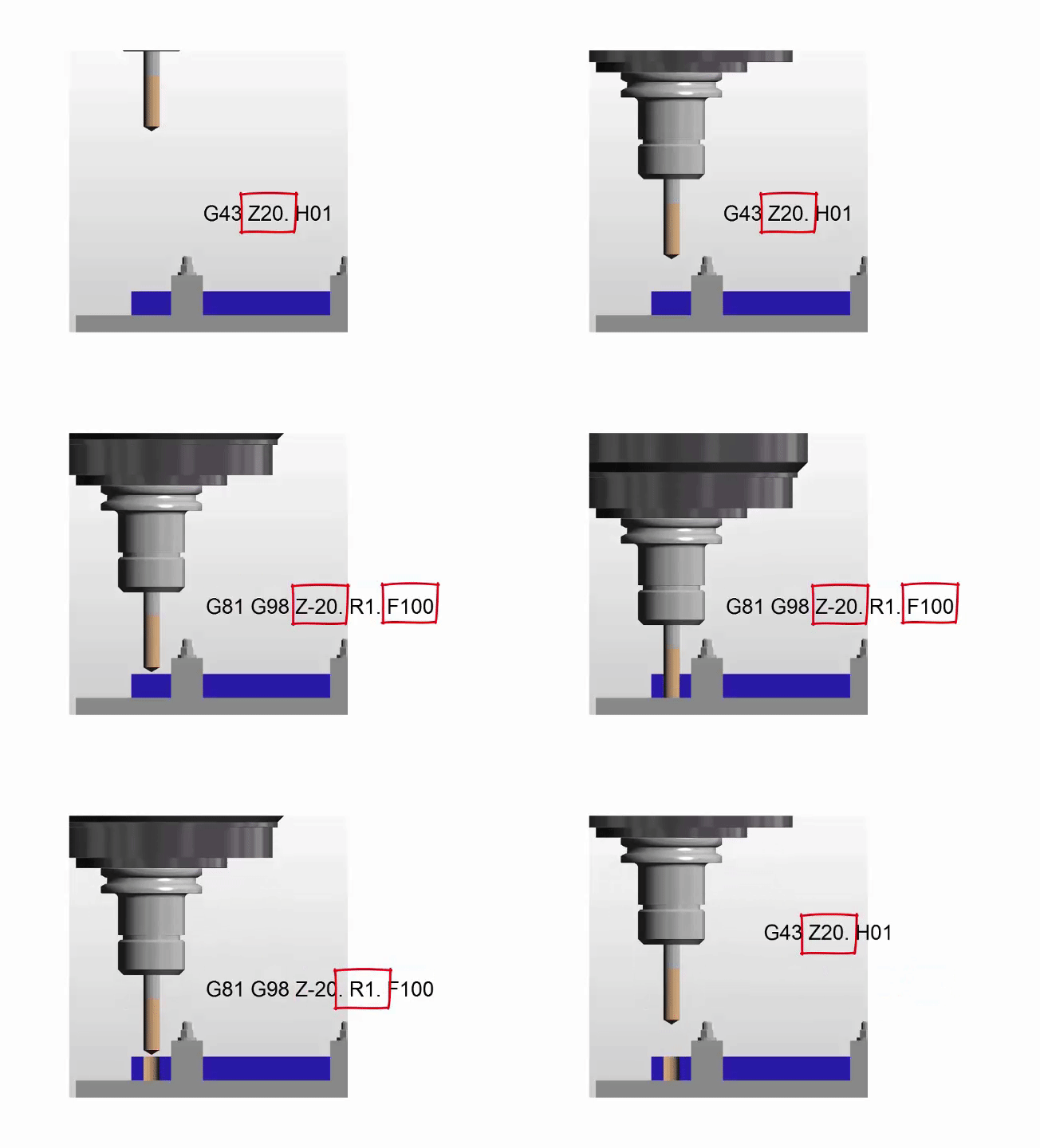
All it is in a nutshell. G98 returns to the Z point you were at before you started the canned cycle.

G99 will return to the R point (R1.)

Why you ask?

Easy you can jump over shit.

Clamps, high sections on a part, tall buildings, anything.

spiderman-1579249

It Gets Better.

G81 Z-20. R1. F100. X50. Y50. F200.

The Z-20. the R1. the feed-rate etc are all known as parameters. These are the things that control your cycle.

These can be altered at anytime and stay in until you alter them again or cancel the cycle.

G81 Z-20. R1. F100. X50. Y50. F200.
X60.
X70. Z-30. (From here onwards the holes are drilled 30mm deep not 20)
X80.
X90. Y60.
G80

Now let’s alter the feed

G81 Z-20. R1. F100. X50. Y50. F200.
X60. F300. (Change feed)
X70.
X80.F200.(Change it back)
X90. Y60.
G80

Remember it stays in until you say otherwise.

I Think you Now Need to Learn About Modal Information

Read the above article. Modal means that the information stays in the control until you cancel it or change it.

Do’s And Don’ts

Do Not………

Put in a rapid command G0 X50. Y50. it will cancel your cycle and the machine will just sit laughing at you. (No hole drilled).

See this post G0 cancels canned cycle.

G81 Z-20. R1. F100. X50. Y50. F200.
X60.
G0 X70. (Rapid to X70. no hole drilled)
X80. (Rapid to X80. no hole drilled)
X90. Y60. (ETC)
G80 (You already cancelled the cycle with G0)

Do Not Repeat Axis Moves. 

G81 Z-20. R1. F100. X50. Y50. F200.
X60. Y50. (Don’t need Y50.)
X70.
X80.
X90. Y60.
G80

D0…….

  • Always use a canned cycle if possible it saves loads of time. It is also really easy if you need to edit anything.
  • Make your CAD/CAM system output canned cycles, not long hand code. I saves loads of time if you need to edit.
  • Love engineering and be nice to your cat.

 Really cool way to drill equally spaced holes

Imagine you need to drill and tap this part. Nine M10 holes.


Learn CNC


Learn CNC


Quite simple but 31.63 added up nine times? Mmmm I never learnt my 31.63 times table.

O0001(Drill and Tap M10)

T01 M06 (20mm Spot Drill)

G90 G0 G54 X0 Y0 S1500 M3

G43 Z3. H1 M8
G81 G98 Z-10. R1. F100 L0
G91 X-31.63 L9
G80
G0 G53 Z0
ETC
M30

Learn CNC Programming? How easy is that?

  • The programme moves to the datum X0 Y0 which is the middle of the part at the right hand end.
  • The G81 has an L0 at the end. L0 is not a Lionel Richie song it just means don’t do one. So it moves to X0 Y0 and does nothing.
  • The next line, G91 means incremental move so it moves incrementally nine times (L9) X-31.63 and drills a hole each time.

Brilliant I told you it was worth waiting for.


Learn CNC


Thanks For Reading

Don’t forget there’s loads more folks.

And a YouTube channel

Call David: 07834 858 407

Learn CNC Programming

Services offered at CNC Training Centre

Edgecam training.

Classroom programmer training.

Onsite CNC Machine Training.

CNC Training on all controls and machines.

Mazak Training Fanuc Training

Don’t forget we offer training on all types of Mazak Machines and all Fanuc Controls 6m to 31i Oi old to young.


Canned Cycles Using G98 G99

This article is about CNC Canned Cycles Using G98 G99

Canned Cycles Using G98 G99

(G Code CNC Programming)

It’s not a competition G99 vs G98. sometimes you need G98 sometimes you need G99.

CNC Canned Cycles Using G98 G99, a canned cycle is usually one line of code for example to drill a hole. This one line of code tells the machine all it needs to know about drilling my holes.

G98 G99

  •  Depth
  •  Feedrate.
  •  Point to rapid to before drilling
  •  Point to rapid back to after drilling

Canned Cycles Using G98 G99

G Code Programming Haas Fanuc (ISO) Mazak

What happens then is each time we give the machine a new position it will drill one of these holes. Each hole will be identical unless we change one of the parameters. So if on one hole we put a different Z depth that hole and all subsequent holes will be to the new depth.

CNC Canned Cycles Using G98 G99

So all in all it’s a really easy way to drill holes. You tell it what you want and then each time you give a position you get a hole. Then when you get sick of drilling holes you type in G80.

Machine says OK he don’t want anymore holes so from now on when the machine moves to a position nothing happens.

Mitsubishi Carbide

There are loads of Canned Cycles I can’t be bothered to tell you about them all cos I’m going out tonight otherwise I would explain them. Anyway they all do different stuff like.

  • G84 Tapping
  • G73 High speed Peck Drilling
  • G83 Deep hole Drilling
  • G81 Drilling

They all work in the same way as each other but with variations.

Now the video at the bottom of the page is about CNC Canned Cycles Using G98 G99 and that’s in all the drilling and tapping type cycles.

Ok what does it do? You may well ask, G99 vs G98

I know for a fact that some of you, and I won’t mention names, put this on the line with the canned cycle but you ain’t got a clue what it does. Maybe you don’t even put it in. Maybe you don’t care.
Anyway it’s simple.

  1. You rapid to an initial point
  2. You rapid down close to the hole (this is the R point)
  3. You feed down to depth (Z Depth)
  4. Then you rapid out to either the initial point (1) or the R point (2)

Canned Cycles Using G98 G99

Now if you program G99 it returns to the R point .
If you program G98 it returns to the initial point (that means the first one)

Ok why on earth would I want that?

Well……. if you made the first point say 50mm above the job (About 2 inches) and the rapid point was 1mm above the job (.040”).
You could drill all your holes in G99 and the drill would each time return to 1mm (.040″) above the part. You get to a clamp and you put G98 and it jumps to 50mm (2”) above the part and misses the clamp. Change back to G99 and it stays down returning to 1mm (0.040) above the part.

Get it? So you eliminate wasted moves. Good init.

Canned Cycles Using G98 G99

CNC Canned Cycles Using G98 G99

Take a look at the CNC Training Courses on offer at the CNC Training Centre

Oh and here is my video it explains how to use G98 and G99 to jump over clamps on a fixture.

If you liked this video, please don’t forget to subscribe to my YouTube channel by going to: CNC Training Centre

Please don’t let on if you don’t like it as I am easily offended.

If you want to learn to program CNC Machines

If you want to learn to program CNC Milling Machines

If you want to learn to program CNC Lathes

Look no further Contact CNC Training Centre

Please contact me if you require:

  • Fanuc training.
  • CNC programming training.
  • Want to Learn CNC programming.
  • Fanuc programming   training.
  • Yasnac programming training.
  • Any type of CNC course.

Don’t forget to watch my Tutorial Videos

We offer training on all types of CNC Machines and controls check em out.

co*****@***************re.com

Or fill out the contact form below


CNC Programming Running Order

CNC Programming Running Order (CNC Basics)

CNC Programming Running Order

CNC Programming Running Order, the order of your CNC code within one block does not matter (see below)

Or does it?

O0001(G81 DEMO)
G21 G90 G40
(G90 G40 G21) Works the same
T01 M06 (20.0 MM DIA X 90 POINT SPOT DRILL)
(M06 T01) Works the same
G90 G0 G54 X12.64 Y88.0 S2546 M3
(S2546 M3 G90 G0 G54 X12.64 Y88.0) Works the same

However it is best to keep the order the same. Create your own convention and stick to it.

G90 G0 G54 X12.64 Y88.0 S2546 M3


So if you always put the speed and M3 (spindle start clockwise) at the end of the first position line try to always stick to that.

It Could Save You

If one day you miss out the speed for example. You will look at the code and it will look strange. You will immediately realise what is wrong.

It’s like the time my cooker got pinched, I looked in the kitchen and their was an old pince of cheese and a dirty floor where it used to be. Whilst I was thinking of a recipe to use the old cheese in I thought “something is wrong”.

Anyway

You will get used to the order of your programs and they will be easier to read, so the CNC Programming Running Order is important.

This helps not only you but your customer, the machine operator or setter.

CNC Programming Running Order

Imagine you have not seen this program for a while. How long will it take you to realise how it works and what it does?

When you look at any code that I write, in any of my articles, I always use extra end of blocks to space out the code.

Compare CNC Programming Running Order to paragraphs in a book, that is how we visually can jump around the pages.

If for example you were looking at an old program,  you would quickly be able to scan the program and see what’s going on.

So although the order does not matter to the machine it matters to you, try to make your programs consistent and to a regular pattern.

Anyone using your programs, including you, will find them easy to read and to fault find.

Summary

  •  Try to keep XYZ in that order to save confusion.
  •  Make your first three or four lines of each tool always follow the same pattern.
  •  Turn on the coolant in the same place (if it’s not there you will notice).
  •  Start the spindle in the same place and the same when you switch them off.
  • Produce an SOP (Standard Operating Procedure) documenting program layout.
  • Bunch code together in meaningful blocks.

Please contact me if you require:

  • CNC programming training.
  • Want to learn CNC programming.
  • Fanuc control training.
  • Yasnac programming training.
  • Any type of CNC course.
  • Fanuc training courses
  • CNC lathe training
  • CNC Vertical Machining Centre training

Services offered at CNC Training Centre

Edgecam training.

Classroom programmer training.

Onsite CNC Machine Training.

Siemens Sinumerik Training

CNC Training on all controls and machines.

Mazak Training Fanuc Training

Don’t forget we offer training on all types of Mazak Machines and all Fanuc Controls 6m to 31i Oi old to young.

G81 Drilling Example (Canned Cycle)

G81 Drilling Example

The G81 is the most commonly used canned cycle it simply drills a hole and retracts.

All other canned cycles are similar to this but with a few extra bells and whistles.

G81 Drilling Example this simple part has four M12 holes drilled countersunk and tapped.

The datum is the centre of the part so the holes positions are.

X55. Y55.
X-55. Y55.
X-55. Y-55.
X55. Y-55.

G81 Drilling Example

G81 Drilling Program Example

Here is the CNC code

G81 Program Example

The machine first moves to X-55. Y-55. and rapids the Z axis to 3mm above the part.

It then rapids the Z axis down to 1mm above the part R1.

The G81 Cycle instructs it to drill a hole 6mm deep (Z-6.) at a feed of 200mm per minute (F200.)

When the hole is done it rapids back to the initial point (Z3.) This was in the line

This is because of the G98.

If it were G99 it would return to 1mm above the job (R1.)

See explanation of G98 and G99

Once the cycle is active each time it sees a position it repeats the drilling process.

When the G80 is programmed it no longer drills holes.

Now watch the video to see it all in action (G81 Drilling Example)

Haas G81

See full explanation

Thanks

If you have been affected by any of the issues in this post or need CNC Counselling then contact me.

If you want to learn to program CNC Milling Machines

Look no further Contact CNC Training Centre


G01 G00 Basic CNC Programming ( G01 not GO1 )

G01 not GO1 Back to Basic CNC Programming

The letter O is only used for a programme number and a GOTO statement on a Fanuc Control. It’s important not to get it mixed up with the number Zero. So we should really say G zero one ( G01 not GO1 ).

So remember it’s G01 not GO1 (Zero not letter O)

G01 not GO1

A good solution is to miss it out where possible G1 not G01 etc.

This is part of a series of articles designed to cover basic CNC Programming.

When I first learnt to programme, before the First World War, I still remember how daunting the thick yellow Fanuc Manuals were. The Japanese were learning to speak English and we were learning to speak G Code.

Fanuc Manuals

Fanuc manuals are just like the yellow pages. A note here for you young people who might not know what yellow pages are (no it’s not like someone pissed on the photocopier)

Long before Google we had these thick yellow books and we used them to find stuff like if your mam needed to get the outside toilet unblocked or something.

None of this stuff was in the Fanuc manuals but you could easily get them mixed up cos they looked very similar.

I can honestly say when I was learning Basic CNC Programming I read the old 6M Fanuc manual from cover to cover. The Macro bit was just like another planet to me. Some things I had to read over and over again to understand.

Some of it was so badly written you kind of had to guess what they meant.

In the Beginning

Every now and then I used to go right back to the beginning and read the basic stuff again. Believe me, every time I would find something I didn’t know, mind you I didn’t know much then anyway.

Try it later and if it doesn’t work I’ll give you your money back.

Okay enough of this bullshit and verbiage let’s talk about G codes.

Geometric Code, that’s what the G stands for.

Useless information but anyway, now I’ve said it. Don’t tell your mates down the pub because you will probably bore them shitless.

I often begin my training courses by saying “you only need to know four G codes to programme a CNC, it really is that easy”

G0 G1 G2 G3

(Please smart arses don’t contact me.)

What that means is that you can get round any shape with straight lines G1 and circles G2 and G3. Oh and you need to quickly get to the part so use G0 rapid.

Yes and another note. You don’t need leading zeros.

G00 can be G0 (Never GO as in letter O)
G01 can be G1 (Never GO1 as in letter O)
G02 can be G2 (Never GO1 as in Letter O)
G03 can be G3 (Never GO1 as in letter O)

Read this if you want to know more.

Lets Get On with It

G00 or G0 commands a rapid move. That means the axis will be flat out. Maximum foot to the floor, shit off a stick as we say in the Midlands.

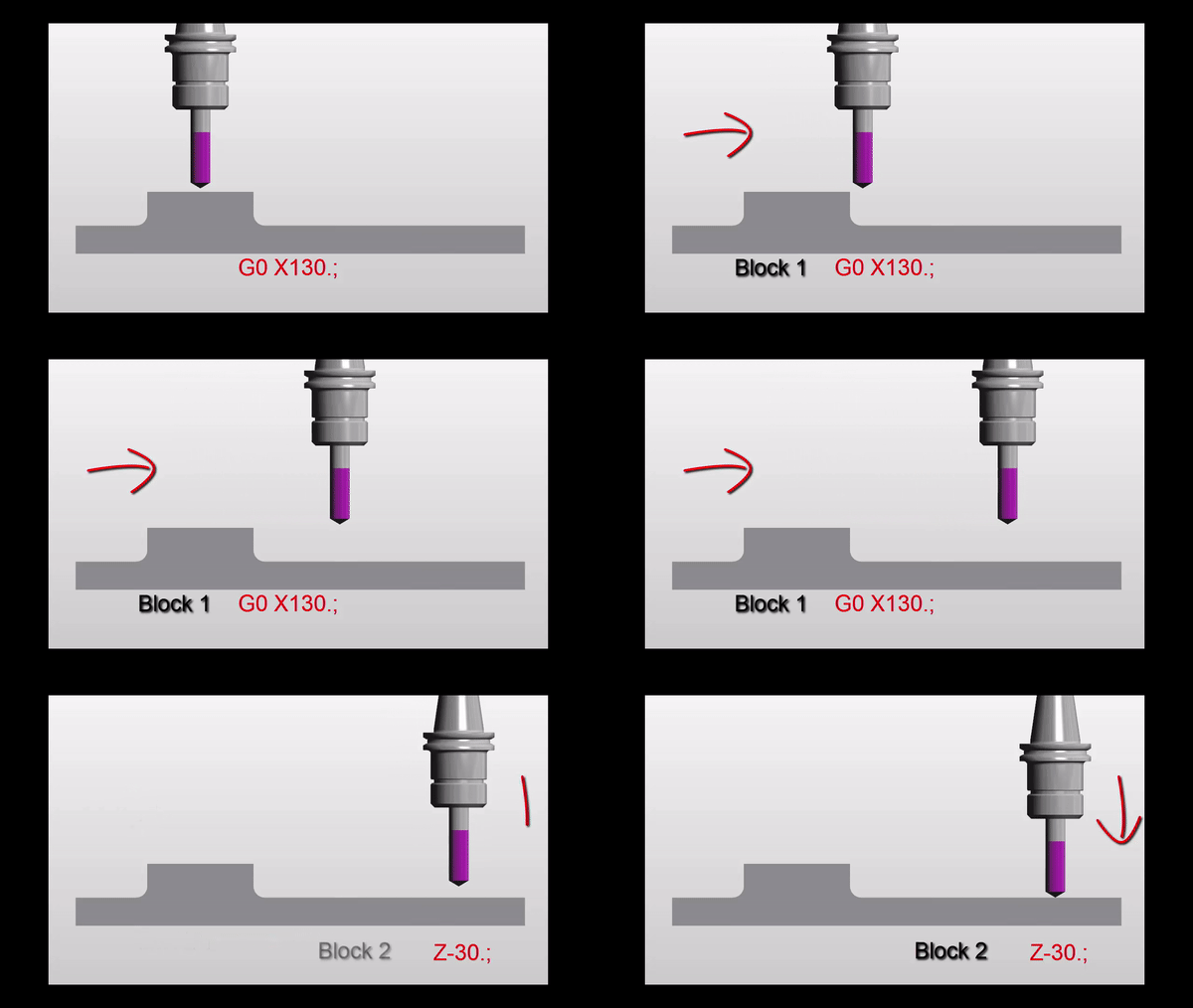
A common mistake with rapid moves is to assume that the axis will all move in a straight line like a bullet from a gun.

Not true. Because each axis is flat out one axis may arrive before the other. The rapid on your X axis could be slower than your Z. Anyway you get what I mean.

Why do I need to know this?

Easy because if something is in the way then you might hit it. That is if you assume the movement is a straight line.

Now lets see.

Move down in Z

G0 Z5.

G01 not GO1

Then a nice straight line G0 X130. Z-30.

G01 not GO1

But meanwhile in the real world

G01 not GO1

It’s obvious really.

Just think for a moment:

If both X and Z rapid motors ran at the same speed. Then each axis will move the same amount until one reaches its destination.

Looks like this.

G01 not GO1

Z has 30mm to move in total so they will both move 30mm. This will make a 45 degree line.

Ah but X is not finished yet. X will carry on and finish its move in a straight line.

G01 not GO1

If something is in the path of your rapid move you may need to programme your axis separately to be sure not to hit anything.

G00 X130. Z-30.

Could be:

G00 X130. ;
Z-30.;

G01 not GO1

Please don’t repeat the G00 (you know it will piss me off).

Now G01 ( G01 not GO1  )

G01 is a linear feed. It means feed in a straight line. Just like stretching a piece of string between two points. It can be just one axis or two simultaneous axis. You can even programme X Y and Z all in one line of code.

So this is what really separates a CNC from a manual machine. Remember how hard it was to machine an angle on a manual milling machine? Or a taper on a lathe.

You do?

Well on a CNC Machine we just programme the end point. It will then machine a straight line from it’s current position to the programmed point

If your machine was at X50. Y0 and you programmed a line

G01 X55. Y-200. ;

You would get an angle.

Ok what’s wrong in this picture?

Just to see if you are not a robot?

Yes congratulations but what is wrong with the line.

G01 X55. Y-200. ;

The Feed-rate

Yes with G01 you need a feed-rate. Don’t repeat the feed-rate, you only need another feed-rate when you want to change it.

G01 X55. Y-200. F100. ;

Don’t forget you can programme X Y and Z together and it will still be a straight line just like you tied a piece of string between the start and end point.

F100. means feed at 100mm per minute.

CNC Turning

On a manual lathe you would have to set up a compound slide to just machine an angle.

Basic CNC Programming

Mmm very skillful and I’m sure it’s loads of fun.

On a CNC Lathe this is just one line of code and some Basic CNC Programming!!

What About 3 Axis Rapid?

Yes you can programme 3 axis together in rapid move. It’s definitely the quickest way to get to the part.

G0 X50. Y20. Z3.

I would definitely advise using it but, and there always is one, just be real careful nothing is in the way. Don’t blame me I’ll just say I never  met you.

Oh just one more thing as Columbo would say.

You could use a very high feed instead of a rapid move. That way you really would guarantee a straight line. I’ve never done this but it just came to me in a flash.

So there you have it G0 is rapid ( never GO letter O).

G1 is linear feed, remember G01 not GO1 (Not letter O)

Thank you for reading my article ( Basic CNC Programming G01 not GO1 )

Services offered at CNC Training Centre

Edgecam training.

Classroom programmer training.

Onsite CNC Machine Training.

CNC Training on all controls and machines.

Mazak Training Fanuc Training

Don’t forget we offer training on all types of Mazak Machines and all Fanuc Controls 6m to 31i Oi old to young.


Careers in CNC

View all current vacancies in CNC

Click here

Call David: 07834 858 407