Category Archives: Haas Mill

CNC Milling M Codes List For Beginners

CNC Training Call David: 07834 858 407

30 Five Star Reviews

CNC Training Centre Reviews

Contact CNC Training Centre


CNC Milling M Codes
List of M Codes for a CNC Milling Machine

Download CNC Milling M Code List

This is my list of CNC Milling M Codes and you will notice there aren’t many.

That’s because you don’t actually need many.

M Codes are used to turn things on and off on a CNC Milling Machine. Sometimes known as miscellaneous functions.

A typical M Code would be M03 which would start your spindle forwards.

M04 would be reverse and guess what?

M05 is stop the spindle.

There, you learned three already.

You don’t need the extra zero so I advise you leave it out, program M3 M4 M5.

It really doesn’t matter but….. You could be wasting memory space or wearing out the tips of your fingers.

Here’s what I think about leading zeros.

M codes are the Snow Leopards of CNC Machining

Snow Leopards are Solitary Animals

Snow Leopards only ever get together to mate, they don’t even have a Christmas party or get pissed on a stag night.

With M codes they hate being on the same line of code. If they are then they will fight to the death.

Tigers Playing

Please note no animals were hurt in the making of this post.

There are exceptions to this rule, M Codes that is, but please don’t overload yourself with this at the moment.

Just trust me.

The first one in the block usually wins but I can’t  guarantee it. So you could get some crazy shit happening.

G90 M8 G0 G54 X0 Y0 S1500 M3;

You wouldn’t even get an alarm on most controls and it may just obey the first M Code it sees and ignore the last one.

The other thing to note with M Codes is that it makes no difference where they are in a block of code.

So if you put your M Code at the front of a block of code.

M3 S1500 G0 X0 Y0;

Or the end.

G0 X0 Y0 S1500 M3 ;

The spindle will start according to the logic of the machine not where the M Code is in the block of code.

The Boring CNC Milling M Codes

That’s my list of M Codes the rest are really boring doing stuff like changing gear ranges and stuff.

Download CNC Milling M Code List

Sorry I’m being flippant again.

CNC Milling M Codes Where Are The Rest?

Sorry you can’t have them. The reason for this is that they are different depending on what machine they are on.

CNC Milling M Codes
Hand Em Over

For example this beast is a Mazak Megaturn

CNC Milling M Codes
Mazak Megaturn

It Has a Gearbox.

To change gear you program M41 M42 and M43 for the different gears

M40 is neutral. Now on machines with gearboxes they do normally use these same M Codes.

However they can be different.

M10….. mmmm well that’s normally a clamp.

I think you get the picture. It is up to the machine tool builder.

It is best to get a specific set of M Codes from your machine manual.

The manual by the way is that book that nobody ever reads, it’s usually at the bottom of a bent up old filing cabinet.

Please Don’t Read It

I’ll read it for you then charge you a shit load of money for training.

Click here for CNC Training

Joking aside please don’t be arsed to learn a load of M Codes you will probably never use.

Well Commented Programs

Try to put M Code descriptions in your program. That way you won’t need to keep looking them up. A part transfer on a CNC Lathe is a good example, there are an absolute shit load of em.

They are everywhere. If you put a meaning to each one in brackets it will make proving the program out really easy. Oh and if you have a CAM system then change your post processor to output them for you.

M11 (OPEN CHUCK)

M10 (OPEN CHUCK)

etc etc

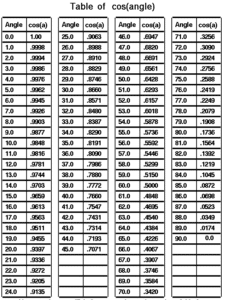
I had a boss once who actually learnt sines and cosines of angles.

Cosines of Angles

Holy shit I mean it’s impressive and I must add in 1975 it was actually worth doing because we didn’t even have calculators.

Hope you enjoyed reading my article on CNC Milling M Codes.

Please remember that it keeps me occupied and while I’m writing these articles I am not holding you up in the supermarkets queue trying to find a coupon for 10p off my incontinence briefs.

Download CNC Milling M Code List


Cutter Compensation

CNC Training Call David: 07834 858 407

30 Five Star Reviews

CNC Training Centre Reviews

Contact CNC Training Centre

Cutter compensation explained.

This is a video explaining cutter compensation in CNC programming.

You will come across various terms to describe this such as:

  •  Tool cutter comp.
  •  CNC cutter comp.
  •  G41 G42 cutter compensation.
  •  Cutter diameter compensation.
  •  Cutter radius compensation.
  •  Heidenhain RL RR.

Cutter compensation is referred to as cutter diameter compensation and cutter radius compensation

Haas cutter compensation, Fanuc cutter compensation and Mazak cutter compensation all work in the same way.

Although Heidenhain cutter compensation or Heidenhain cutter comp looks different. In the programme it functions in exactly the same way.

Cutter Compensation

In the parameters or settings of your control you can set up your system to use the radius or the diameter of your cutting tool.

This means that when you input the data for your cutting tool in your offset table you can use the diameter or the radius of the tool.  This depends on your settings.

Cutter Compensation

When people talk about cutter compensation G code they may say “cutter comp G code” it’s often shortened.
(Cutter compensation G code)
The G codes used in this video are:

  •  G41 cutter compensation left
  •  G42 cutter compensation right
  •  G40 G code to cancel cutter compensation

This Video shows you :

  • How to program G41.
  • How to program G42.
  • CNC cutter compensation examples.
  • Cutter compensation Heidenhain style.
  • Heidenhain RL RR.

We always recommend that you climb mill so you will be using G41 most of the time.

Milling the outside of a square using G41.

Cutter Compensation

Milling the inside of a square using G41.

Cutter Compensation

Milling the inside of a square using G42 (should you want to conventional mill).

Cutter Compensation

Milling the outside of a square using G42 (should you want to conventional mill)

Cutter Compensation


The rules when using compensation on a CNC Milling machine.

Rules are the same as the tool nose radius compensation on a CNC Lathe.
If you programme a shape and you do not use cutter compensation you will have to work out the size of the shape with your tool radius added.

This is simple on a square sided figure or a simple radius. Anything more complex and it’s a nightmare.
I just heard some smart arse say “Ah well my CAD system takes care of that”.
So it should my friend but, and there is a but:

  • What will you do when your cutter wears?
  • What if you want to use a different size cutter?
  • The cutter may not run true.
  • What if the cutter is not exactly size?

In the old days of paper tape and Corned Beef we as programmers would write several programmes.

This was so that we could re-grind the milling cutters in fixed increments. A different programme could be used each time the tool was changed.

Sorry I can’t talk about this much longer as I still have the nightmares (mainly about corned beef sandwiches).

Cutter Compensation


Anyway enough of that. So when we machine our first profile we can add some on to the tool radius in the offset file. When we check the part we can adjust the offset and re-cut the profile to achieve an accurate result.

The Rules:

  • Shape must be continuous and consistent.
  • You can’t cut along a line and then go back along it.
  • It’s important to allow more than the tool radius when entering tool compensation. The same applies when you come out of tool compensation.
  • Internal corner radii and steps must be greater than the tool radius.

Always allow more than the radius because when you adjust it it may be larger than the actual tool you are using.

Don’t ask

For example if you have a 12mm endmill but you have .2mm in the wear compensation. The machine thinks that the tool is 12.4mm in diameter.

You can’t do this in cutter comp:

Cutter Compensation

You would have to apply one cut in G41 and cancel with G40 then do another cut in G42 and cancel with G40:

Cutter Compensation

Call 07834 858 407

Please contact me if you require:

  • Fanuc training.
  • CNC programming training.
  • Want to Learn CNC programming.
  • Fanuc programming   training.
  • Yasnac programming training.
  • Any type of CNC course.

Don’t forget to watch my Tutorial Videos

Services offered at CNC Training Centre

Edgecam training.

Classroom programmer training.

Onsite CNC Machine Training.

CNC Training on all controls and machines.

Mazak Training Fanuc Training

Don’t forget we offer training on all types of Mazak Machines and all Fanuc Controls 6m to 31i Oi old to young.


Haas Super Mini Mill

CNC Training Call David: 07834 858 407

CNC Training Centre Reviews

30 five star ratings on Google (just saying)

I’ve wanted to get my hands on a new Haas machine for a while. Really wanted to see what the new control was like.

Haas Mini Mill

Stiltz provided the machine and the victims for the training.

If you have read any of my articles you will know I have always had an affection for Haas machines. The first one I ever worked on being about 1994. At that time they were nothing short of ground breaking innovation.

Things like a built in airline and coolant wash-hose were not only innovative but really useful.

Coolant Hose (What Will You Do With This)

A machine that worked straight out of the box. Easy peasy tool-change. Handwheel to scroll through the program, people still get impressed by this today.

Programmable coolant nozzles, fuckin hell that was a game changer. Just move nozzle to a position and press an F key and it’s stored with the offset.

Macro at no extra cost (wow) some people wanted two grand for this (cost of a good family car in 1995)

Program restart still the best in the world, don’t get me started.

The New Machine David How Was It?

To start with on this one I didn’t like the interface but it does grow on you. You need to get used to using the touch screen. Access to some menus is a bit convoluted too.

This Haas Mini Mill has a 10k spindle and 30 tools.

Something I suddenly remembered about this model. Well you know when you get a cup of coffee and it’s in a tall tapered glass mug? You are thinking “nice big cup of coffee”. You take four big swigs n it’s gone, shit what happened. What happened is an optical illusion because the cup is tapered it’s actual capacity is that of a thimble.

It happens all the time everything comes in a great big box with loads of packaging and the actual item is minute.

Anyway try moving this machine to the end of it’s stroke in X. Fuckin hell what a disappointment I recon you can only move around about half the table. I mean great you can put a pretty big part on here. That’s great so long as you don’t want to machine it!!!

It definitely is not what you expect from the company that’s known for pragmatism. Anyway that does piss me off.

The way this machine is being used is running programs from a memory stick. At first I thought it was a bit crazy as the programs weren’t particularly big.

Anyway surprise surprise it works well. Just plug in and press load and it runs. But what about editing you ask. No problem you just do it. Same as normal.

Program restart, no problem works exactly the same as when running from memory.

“Read More”

Haas VF3

This week I got to train two people on a Haas VF3, and what a delight it was. This machine was old I mean 1996 but still a great functional machine tool.

CNC Training Call David: 07834 858 407

CNC Training Centre Reviews

30 five star ratings on Google (just saying)

I like to see myself in a similar way, really old but still functioning, well at least as I write.

Haas VF3

It took me back to when I first set up my business of training people on CNC machines. My first two victims were at Armitage Shanks in good old Wolverhampton.

1996 was the year I started out on my own CNC Training and these were the first machines I trained on. I did so many I got pissed off with the sound of my own voice (which I rarely do).
Because all the machines were the same I was saying the same things and quoting the same tired old anecdotes day after day.
Fortunately, I went on to train on all the well-known CNC machines like Mazak, Mori Seiki, Matsuura, Bridgeport to name a few. Quite a lot of the not so well-known ones like Maho, seen below.

Haas VF3

The machine above has a Phillips control and they were the absolute dogs’ bollocks. It even had rigid tapping. You could hit feed-hold while it was tapping and you got the option to reverse the tap out! Training people on these was an absolute delight.

Don’t forget we’re talking mid 80s here.

Shut up David this sounds like a big plug for the CNC Training Centre, or maybe it is.

CNC Training Centre (Home of the CNC Program)

There is pub by us and on the sign, it says “The Home of the Roast”.

You have to queue up to get your food and a young lad carves the meat in front of you. If he don’t like the look of you, which obviously with me he didn’t, you get two or three slices of turkey, so wafer thin, you can see the pattern on the fuckin plate underneath.

Now I don’t want to knock the people of Nuneaton, being as most of my family live there, but honestly there are some greedy bastards about.

After you get your meat and a few accoutrements you follow a long line of people adding cabbage and peas and all sorts of vegetables and potatoes to their plates. This bloke in front of me was scooping so much on to his plate it was flowing over. It was like a fuckin bowler hat as my late father would say, sans expletive.

In those days you didn’t swear in front of ladies, unless of course it was their turn.

I was just thinking “did you like not eat for a fuckin week?” You can imagine his kids at school saying to the teacher “oh, we’re not eating at our house this week miss”. The teacher then asks if this is some precursor to a religious festival or some such thing.

“Oh no miss, we’re booked in at the carvery for Sunday lunch” she gives them a knowing nod.

Anyway, I looked at this blokes plate with utter middle class disgust and vowed never to go there again.

My mate was about three people in front of this bloke and to my amazement my mate’s plate was so full of food, it made his look like he’d paid for the children’s menu.

“Read More”

G10 Using G10 on a Fanuc Type Control

G10

I am always amazed that so many companies still don’t use G10 in their CNC programs. If you know you know.

I must admit I fuckin hate a lot of the things that young people say like “can I get a Latte”. (Get behind this fuckin counter and make it yoursef if you want to “get it”).

Anyway I kind of like “If you know you know”

No G10… Is this you?

I am sure you have your reasons which I will accept. But if your reason is that you don’t understand it then that’s just not good enough.

So you make a part, it’s all setup and you need to break it down.

If you can fix the work holding in such a way that you can reload it in exactly the same place then you need G10.

Let me explain, watch this video to see how single point location works.

G10 No need to spend loads of money.

You could just bolt a sub plate to your machine table so that vices and chucks etc can have dowels to locate them.

But the main idea is that you can relocate your work holding in exactly the same place every time.

G10
Using G10 on a Fanuc Type Control

This is your work offset page on a Fanuc control.

G10

These figures are written in by hand or by automatic setting.

If you had written this line in your program.

G90 G10 L2 P1 X-440.500 Y-265.200 Z-443.00

They would have been written in automatically when you ran the program.

So the work offset page could have any values in G54 but as soon as you run your program this G10 command will replace them with its preset values.

Make Sure Your in Absolute

Try not to forget the G90 (Absolute) because you may accidentally be in G91 (Incremental). What would then happen is it would add these numbers to what is already in the work offset. Oh dear me.

In G90 it will always replace them.

You can write to G54 G55 G56 G57 G58 or G59 just by changing the P number.

G90 G10 L2 P1 X-140.600 Y-265.923 Z-400.00 (G54)

G90 G10 L2 P2 X-125.500 Y-236.865 Z-313.865 (G55)

G90 G10 L2 P3 X-800.500 Y-563.200 Z-125.00 (G56)

G90 G10 L2 P4 X-440.500 Y-265.200 Z-169.369 (G57)

G90 G10 L2 P5 X-440.500 Y-265.200 Z-123.568 (G58)

G90 G10 L2 P6 X-410.500 Y-235.200 Z-443.00 (G59)

The code above would setup all six work offsets.

“Read More”

Careers in CNC

View all current vacancies in CNC

Click here

Call David: 07834 858 407