Well Set Out G Code CNC (CNC Programming)

Well Set Out G Code CNC (CNC Programming)

Well Set Out Code

Contact David 07834 858 407

Well Set Out CNC Code

CNC Training Centre Reviews

30 five star ratings on Google (just saying)

Well Set Out CNC Code is really important. It can save lots of time spent trawling through code trying to find the section you’re looking for. Simple things like leaving gaps after the tool change line can really help.

The program runs exactly the same but……

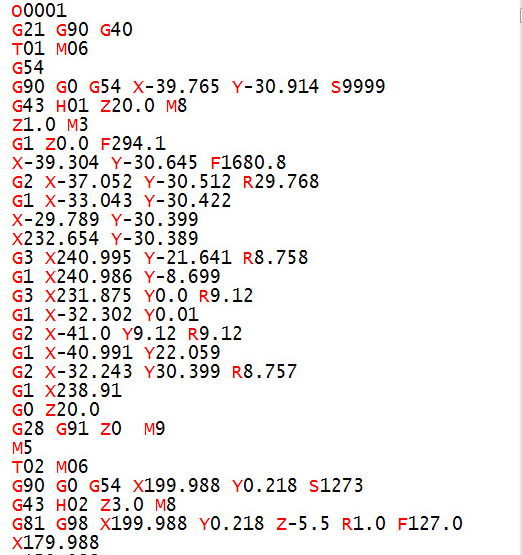
Look at the two examples of the same program

Well Set-Out

g code cnc
Uncluttered CNC Code

Not Well Set-Out

g code cnc
Cluttered CNC Code
  • Notice where the gaps are.
  • They give clarity to what’s happening in your program.
  • Try to create your own convention and always lay your program out in the same way.
  • Notice how your eyes are drawn to the tool change lines. These are usually the first things you are looking for.

Read On

It’s like reading a book without paragraphs, and page numbers. It also makes it easy to spot mistakes with well set out CNC code.

Dog reading a book

This is my dog, his name s “Get Back Here You Bastard”

See if you can find the simple error in the well set out code and let me know what it is. That way I will know you’re concentrating.

Clue: if you are the fortunate owner of a Haas machine it will spot this for you and alarm out.


Meaningful Comments

Insert meaningful comments. Remember you might not see this code for two years and you won’t remember what you did or how you were thinking at the time.

When you eventually come back to this code you’ll be scratching your arse for hours trying to figure it out.

You’ll think:

“Why the fuck did I do that”

A little comment will explain everything


Well Set Out CNC Code
An Elephant and my wife never forget

Come on Get a Grip

Yes you will figure it out eventually but that’s the same with the human genome project.

Well Set Out CNC Code
It takes time to remember what you were doing

Why do I need Well Set Out CNC Code (Things To Do)

  1. Leave gaps at strategic points in the program.
  2. Loads and loads of comments, write them as you would say it, (don’t try to be posh).
  3. Always make the order of the code the same.
  4. Write an SOP (Standard Operating Procedure) for how you want your code laid out.
  5. Make the tool change lines stand out these are the key points.
  6. Use N numbers at strategic points so that you can easily find things.
  7. Don’t use too many N numbers or you will get confused they are like E numbers they can drive you crazy. They also take up loads of memory.
  8. The machine setter and operator are your customers and you need to make their lives as easy as possible. Give em code that’s easy to read.
  9. If your writing X50. Y50. Z50. don’t write Z50. Y50. X50. Yes it will run OK trouble is it’s bloody confusing.
  10. Someone suggested adding M01 after each tool so I’m adding this in. (Thanks Michael)

An M1 or M01 is an optional stop which means you have the choice to stop at each tool. (Very useful if you want to stop at the next tool and you can’t stand around.)

Continuity

When you arrange the program in the same way every time it will be easy to spot mistakes. If you always put your spindle start and speed at the end of the first position line like this.

G90 G0 G54 X50. Y50. S1500 M03

Were you to miss out the speed you would have a very good chance of noticing it because the line will look wrong.

G90 G0 G54 X50. Y50. M03

Tidy neat code is the same as a neat tidy workshop. It’s much easier to find things.

Thanks for reading my post.

Please contact me if you require:

  • CNC programming training.
  • Want to learn CNC programming.
  • Fanuc control training.
  • Yasnac programming training.
  • Any type of CNC course.
  • Fanuc training courses
  • CNC lathe training
  • CNC Vertical Machining Centre training

Services offered at CNC Training Centre

Edgecam Training.

Siemens Sinumerik Training

Classroom programmer training.

Onsite CNC Machine Training.

Training on all controls and machines.

Mazak Training Fanuc Training

Don’t forget we offer training on all types of Mazak Machines and all Fanuc Controls 6m to 31i Oi old to young.


CNC Programming Using CAD/CAM

CNC Programming, When will it not be needed?

CNC Programming Services Call David: 07834 858 407


CNC Training Centre Reviews

30 five star ratings on Google (just saying)

858 407

Are we fast approaching the day when we don’t need to know anything about programming in terms of G code etc.

CNC Programming
Tool Holder (Patent Pending)

Short answer is yes.

I was watching an interesting video on youtube the other day. This guy (seemed like a very clever guy) had bought an old CNC Lathe, a Mori Seiki.

I don’t think he had ever done any machining or general metal work type stuff.

His approach was untainted shall we say. He’d certainly never done any G code type CNC Programming.

CNC Programming

He immediately looked for software which would program this machine and said how in the past it would have been programmed with G code by hand.

Anyway he got something like One CNC or Fusion 360 and created a program. He went on to produce quite a few parts.

Really this proves that you don’t need to know G Code programming, or does it?

Because I am an old dinosaur and I make a living partly from teaching people G code type CNC Programming, I wonder if people like me are clinging on to these old skills and not moving forward.

It reminds of the times when CNC’s were first introduced all the old guys used to say they would never replace the capstans and autos. I remember my dad beating my first chess computer and saying it was just a gimmick.

CNC Programming

So what problems do you get when programming straight from software. Actually if you know what you are doing the answer is none. But do you know what you are doing?

The danger is when the person using the CAM system doesn’t really understand about work-holding and tooling.

I bet the aforementioned guy had some serious problems with his selection of cutting tools.

“Read More”

How to Become a CNC Operator

A rabbit can’t be a CNC Operator.

Every career has to start somewhere. In the world of CNC Machining it’s sometimes difficult to know where to start as a cnc machine operator.

So Where Do You Start?

“Where shall I begin, please your Majesty?” asked the White Rabbit.

Begin at the beginning,” the King said gravely, “and go on till you come to the end: then stop.”

The perfect route would be just like me in the old days when I started at Rolls Royce in 1970. I phoned up Mr Rolls or was it Mr Royce and said “can you give me an apprenticeship?”

Fortunately he didn’t pick up on the fact that I was a lazy piece of shit and he gave me a job.

At the end of it all I got to earn £60 a week and had the “Freedom of The City”

When I asked what “Freedom of the City” actually meant, I was told that one of the perks was that I could drive my sheep across the common whenever I wanted.

I was so pleased to be informed of this and couldn’t wait to get home to tell my parents.

Once the harsh reality hit and I realised I had no sheep in fact no livestock at all.

I had a Guinea pig and and a was still mourning the death of my hamsters, Steven.

“Read More”

Onsite Matsuura CNC Training – Expert Courses at Your Facility

Onsite Matsuura CNC Training – Expert Instruction at Your Facility

In today’s fast-paced manufacturing environment, maximising the performance of your Matsuura CNC machines is essential for staying competitive.

Call David: 07834 858 407

CNC Training Centre Reviews

Matsuura Machinery, a Japanese leader since 1935, produces some of the world’s most precise and reliable machining centres — from high-speed 5-axis vertical models like the MX-520 and MAM72 series to multi-pallet horizontal powerhouses in the H.Plus range.

Onsite Matsuura CNC Training

The first CNC machines I ever worked on were Matsuura 500v and 750v. The 500’s were just a one line display, like a calculator. Incredibly reliable and so solid.

It’s a bit like your first partner you never forget them. Mine dumped me for someone better looking and more money but that’s another story.

Where did he get those glasses

Even the best hardware needs skilled operators and programmers to deliver peak efficiency, reduced cycle times, and flawless parts. That’s where CNC Training Centre comes in.

We specialise in onsite Matsuura CNC training, bringing our instructor directly to your workshop in the UK (and beyond). No travel downtime for your team, no disruption to production schedules — we work around your shifts and focus on your specific machines, parts, and challenges.

Why Choose Onsite Training for Your Matsuura Machines?

  • Zero Travel for Your Operators — Trainer comes to you, saving time and travel costs while keeping your team on-site and productive.
  • Tailored to Your Setup — Training is customised to your exact Matsuura models (MX series, MAM72-35V/52V/63V, H.Plus horizontals, multi-tasking centres, and more), controls, tooling, and typical workpieces.
  • Hands-On & Practical — Real-world scenarios using your machine: safe operation, advanced programming, tool-path optimisation, setup reduction, and unmanned running where applicable.
  • Boost Productivity Immediately — Address bad habits, unlock hidden machine capabilities, and implement best practices that can dramatically improve output and quality.
  • All Levels Covered — From beginners needing operator basics to experienced staff wanting advanced 5-axis simultaneous machining, probing, macros, or lights-out optimisation.

Whether you’re running high-mix/low-volume prototyping on an MX-330 or demanding continuous 72-hour production on a MAM72 pallet-changer, our onsite courses get your team up to speed fast — often spotting quick wins that pay for the training in weeks.

What Our Onsite Matsuura CNC Training Includes

  • Safe machine operation
  • Control familiarisation (Matsuura G-Tech, Fanuc-based, Yasnac, etc.)
  • Programming fundamentals through to advanced techniques
  • Workholding, fixturing, and pallet management
  • Cycle time reduction and efficiency
  • Troubleshooting programming errors

Past clients have seen significant improvements in setup times, reduced scrap, and better machine utilisation after our focused onsite sessions.

Ready to get the most from your Matsuura investment?

Contact CNC Training Centre today for a no-obligation discussion about your onsite Matsuura CNC training needs.

Don’t let underused capability hold back your shop — invest in expert onsite training and watch your Matsuura machines perform at their true potential!

Old machine, new machine give us a call

Onsite Matsuura CNC Training


Learn CNC Canned Cycles G81 G84 G73

Learn CNC Programming (Canned Cycles)

Call David: 07834 858 407

CNC Training Centre Reviews

A Canned Cycle What is It?

If you want to learn CNC programming  then you need to know what a canned cycle is.

I’m going to have to be honest here it is a funny choice of words “Canned Cycle”. But a wild guess would be that all the information to drill a hole would be kept together in a “Can” ready to use.

In a Can…….Learn CNC

So let’s learn CNC Programming….

Make sure you read the end of this article to see a really cool way to drill equally spaced holes.

First of all we state the cycle:

G81 Z-20. R1. F100. X50. Y50. F200.

The machine will move to X50. Y50. then rapid to 1mm above the part (this is the R1.). It will then feed down to Z-20. at a feedrate of 200 mm per minute F200.

Finally it will rapid out of the hole.

It then sits ready for the next move.

dog-163527

All you need to do now is just keep giving positions.

G81 Z-20. R1. F100. X50. Y50. F200.
X60.
X70.
X80.
X90. Y60.
G80
The G80 at the end will cancel the canned cycle. It just means “Look I am a bit pissed off with drilling holes so can you stop”

So that’s it Canned Cycles it really is that easy you put all the information in the “Can” then each time you give a position you get another hole.

Want to know More?

Thought you would. You want to learn CNC programming don’t you?

There are loads of these canned cycle but I am not going to talk about every one in detail. No sorry you will have to read the boring old manual for that.

Not to Worry They Are All The Same

Well sort of. You state the cycle then it repeats at each position given until you cancel it (and that applies to all the cycles).

Anyway Here are a few:

G84 taps holes, tell it the pitch depth usual stuff.


G73 peck drilling is the same as drilling (G81) but you give it the peck depth.It pecks the hole breaking up the swarf.


G83 same as G73 but with each peck the drill comes right out of the hole. For deep holes or swarf that clogs.


G76 bores a hole, stops at the bottom, moves over and rapids out to avoid marking the bore.

Ok let me tell you this, you are doing great so far. This is how we learn CNC programming. Nice small steps.

G98 G99

I already wrote a post on this click to see it all (it’s truly amazing). I purposely didn’t include it in the cycle above which is ok. The idea was to keep it simple.

 G43 Z50.H1 M8

G81 G98 Z-20. R1. F100. X50. Y50. F200.
X60.
X70. G99
X80.
X85. G98
X90. Y60.
G80

g98gif

All it is in a nutshell. G98 returns to the Z point you were at before you started the canned cycle.

G99 will return to the R point (R1.)

Why you ask?

Easy you can jump over shit.

Clamps, high sections on a part, tall buildings, anything.

spiderman-1579249

It Gets Better.

G81 Z-20. R1. F100. X50. Y50. F200.

The Z-20. the R1. the feed-rate etc are all known as parameters. These are the things that control your cycle.

These can be altered at anytime and stay in until you alter them again or cancel the cycle.

G81 Z-20. R1. F100. X50. Y50. F200.
X60.
X70. Z-30. (From here onwards the holes are drilled 30mm deep not 20)
X80.
X90. Y60.
G80

Now let’s alter the feed

G81 Z-20. R1. F100. X50. Y50. F200.
X60. F300. (Change feed)
X70.
X80.F200.(Change it back)
X90. Y60.
G80

Remember it stays in until you say otherwise.

I Think you Now Need to Learn About Modal Information

Read the above article. Modal means that the information stays in the control until you cancel it or change it.

Do’s And Don’ts

Do Not………

Put in a rapid command G0 X50. Y50. it will cancel your cycle and the machine will just sit laughing at you. (No hole drilled).

See this post G0 cancels canned cycle.

G81 Z-20. R1. F100. X50. Y50. F200.
X60.
G0 X70. (Rapid to X70. no hole drilled)
X80. (Rapid to X80. no hole drilled)
X90. Y60. (ETC)
G80 (You already cancelled the cycle with G0)

Do Not Repeat Axis Moves. 

G81 Z-20. R1. F100. X50. Y50. F200.
X60. Y50. (Don’t need Y50.)
X70.
X80.
X90. Y60.
G80

D0…….

  • Always use a canned cycle if possible it saves loads of time. It is also really easy if you need to edit anything.
  • Make your CAD/CAM system output canned cycles, not long hand code. I saves loads of time if you need to edit.
  • Love engineering and be nice to your cat.

 Really cool way to drill equally spaced holes

Imagine you need to drill and tap this part. Nine M10 holes.


Learn CNC


Learn CNC


Quite simple but 31.63 added up nine times? Mmmm I never learnt my 31.63 times table.

O0001(Drill and Tap M10)

T01 M06 (20mm Spot Drill)

G90 G0 G54 X0 Y0 S1500 M3

G43 Z3. H1 M8
G81 G98 Z-10. R1. F100 L0
G91 X-31.63 L9
G80
G0 G53 Z0
ETC
M30

Learn CNC Programming? How easy is that?

  • The programme moves to the datum X0 Y0 which is the middle of the part at the right hand end.
  • The G81 has an L0 at the end. L0 is not a Lionel Richie song it just means don’t do one. So it moves to X0 Y0 and does nothing.
  • The next line, G91 means incremental move so it moves incrementally nine times (L9) X-31.63 and drills a hole each time.

Brilliant I told you it was worth waiting for.


Learn CNC


Thanks For Reading

Don’t forget there’s loads more folks.

And a YouTube channel

Call David: 07834 858 407

Learn CNC Programming

Services offered at CNC Training Centre

Edgecam training.

Classroom programmer training.

Onsite CNC Machine Training.

CNC Training on all controls and machines.

Mazak Training Fanuc Training

Don’t forget we offer training on all types of Mazak Machines and all Fanuc Controls 6m to 31i Oi old to young.


Careers in CNC

View all current vacancies in CNC

Click here

Call David: 07834 858 407