G02 G03 Circular Interpolation

G02 G03 Circular Interpolation

G02 G03 Circular Interpolation

On a Fanuc or Haas control G02 G03 are the two G codes we use to move around clockwise and counterclockwise circles. You don’t need the leading zeros so from now on I will call them G2 and G3.

And by the way never use the letter O it’s number zero

GO2 GO3 looks almost exactly the same as G02 G03. But your control will blow it’s mind and get real mad with you.

It will also do some really weird shit like trying to start a new program. Anyway just don’t do it.

If you want to know how to do this on your Heidenhain control you need to read this article.

Oh and please don’t call it interpolation as it annoys the shit out of me.

  • Linear interpolation is movement in a straight line.
  • Circular interpolation in moving in a circle.
  • Interpolation is movement.
  • CNC Training Centre Reviews

    30 five star ratings on Google (just saying)

Now that’s the telling off out of the way let’s move on. It’s ok I don’t hold a grudge.

Which one of you bastards said interpolation?

Let’ Talk About Milling A Shape

When you are milling a shape and you want to move in a circular motion you use G2 or G3

For a clockwise arc use G2 and for a counter clockwise arc use G3.

They both work the same way. On a modern control you programme the endpoint (an XY figure on a milling machine) and the radius you require.

Then your CNC controller magically creates your circle. You can programme any arc like this with one exception.

Do you know what it is?

Ok I will tell you later, it’s OK to not know. (Just means you are little thick).

Lets go back to school.

Remember construction? Of course you do.

We are going to mill the top section of this part

G02 G03

Let’s see what the control has to do to work out where the centre of the circle is.

It knows its current position and in your G3 line you tell it the end point and the radius you want.

G02 G03

Well it gets out its little compasses and draws two circles at the radius you told it.

G02 G03


It positions the compass first on the start point and draws an arc. Then on the end point and draws an arc.

Where these two arcs cross it places the point of the compass. Now it can strike an arc that touches your start point and your end point.

Get yourself a pair of compasses and try it. It’s great fun.


G02 G03


That’s how the maths works.

Tell me did you really believe that inside your CNC machine there is a little man with a pair of compasses?

Fuckin hell I give up.

Sorry I lied it’s all done with simple trigonometry. But at least I tricked you into understanding the principle.


g02 g03 lathe

So you should now begin to work out why you get an alarm when the radius is too small. Your two arcs just don’t cross. In other words you are trying to fit an arc between two point that simply miss one another.

G2 G3 No Pot of Gold

Your control will give you an alarm “End Point Not Found” which makes sense because it can’t find one. It’s like the pot of gold at the end of the rainbow.


G02 G03

Oh Before you Go More on G02 G03

What about the question. When can you not use endpoint and radius with G02 and G03 ?

Answer: When you want to machine a full circle using G02 and G03.

You can do it but you would have to break it into two halves. I’m not going to explain anymore because this method is for wimps and peole who can’t be arsed to read my articles.

You know who you are, ordering Chicken Korma in an Indian Restaurant.

Well…… what follows is a full, blow your bollocks off, shit your pants the next day, vindaloo.

And Now Ladies and Gentlemen the Infamous I and J

At the CNC Training Centre we don’t get too excited about I and J when it comes to programming circles. That’s because you don’t need to worry your pretty head about it anymore. You almost never need it.

Did he say almost?

Well yes almost. You could programme forever and never bother about using I and J with G02 G03. So just go off and watch some porn for awhile and I will explain to the real programmers when you can use it.

In the old days I and J was the only way to programme an arc. You would tell the control where the centre of the circle is and the endpoint. This is cumbersome and a bit tricky. That’s why I’m not telling you about it.

Anyway one really good simple way to use I and J is for a full circle. Oh and it’s bloody easy. That is once I’ve explained it to you.

Click here for more info on full circle

When I was a boy hundreds of years ago I had a toy called a Spiro Graph.

Spirograph those were the days

It consisted of a series of plastic gears. You stuck your pen in a hole in the gear and rotated it around another gear. With a bit of practice you could make some really nice pictures. Kept us happy for hours. The crime rate dropped dramatically in my area when these things came out.

What’s this to do with CNC programming you ask? Well if you tried to use end point and radius for a full circle this is what you would get:

If your start point was X0 Y0 you would program G3 X0 Y0 R100. assuming radius was 100mm.

So in a full circle your endpoint is the same as your start point. There are millions of circles the computer could pick. It would be just like the shapes above. If you do the compass trick you will see what I mean. That’s why it’s impossible.

In Comes I and J

G02 G03

So some clever bloke thought fucks this I’ll invent I and J.

If we use I and J there are four options as above.

You would simply program as below for a full circle (20mm Radius)

  • G3 I-20.
  • G3 I20.
  • G3 J20.
  • G3 J-20.

And that’s it.

G02 G03

So these are the four options


G02 G03

So there you have a fantastic way to programme a full circle without having to break it down into two halves or be clever like a newsreader or some twat off mastermind.

Why do you only need the I and not X and Y Dave?

For fucks sake don’t call me Dave my name is David.

I had this really nice guy phone me from Africa the other day. He explained to me that he needed to get his inheritance of 10 million pounds out of England and if I helped him he would give me £20,000. All I had to do was give him all my bank and credit card details. Oh and a small one off payment of £1000.

Of course I agreed, what a bargain. Just as I was about to do this the cheeky bastard called me Dave.

I immediately told him to fuck off. I just hate being called Dave.

I gave him my 96 year old mothers phone number because I thought at least she can benefit from it all. Her name is Mary so he couldn’t shorten that. She only has £1200 in savings so it would be doing her a massive favour.


Explanation

You don’t need to re-state the X  and Y because you are already at the endpoint

Click here for more info on full circle

If you want to do this on a Sinumeric Siemens 840D read this

Thanks For Reading

Don’t forget there’s loads more folks.

And a YouTube channel

Services offered at CNC Training Centre

Edgecam training.

Classroom programmer training.

Onsite CNC Machine Training.

CNC Training on all controls and machines.

Mazak Training Fanuc Training

Siemens Sinumerik

Don’t forget we offer training on all types of Mazak Machines and all Fanuc Controls 6m to 31i Oi old to young.

CNC Training Centre Reviews

30 five star ratings on Google (just saying)


Heidenhain The Best Bits

There is some great shit on a Heidenhain 530 and 640 controls. So lets list them. If your not using these features then you certainly should be.

Loads more Heidenhain stuff.

Heidenhain Filter File Type

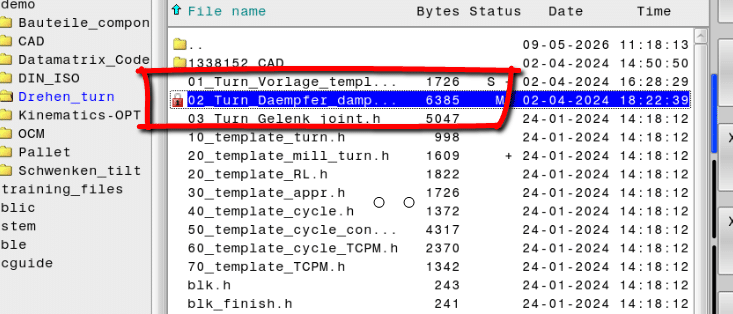
When you switch from Edit to Program Run or Test Run you need to select the program you want. Unlike Fanuc when you switch from edit to program your program is not automatically selected.

This button to the rescue.

Heidenhain

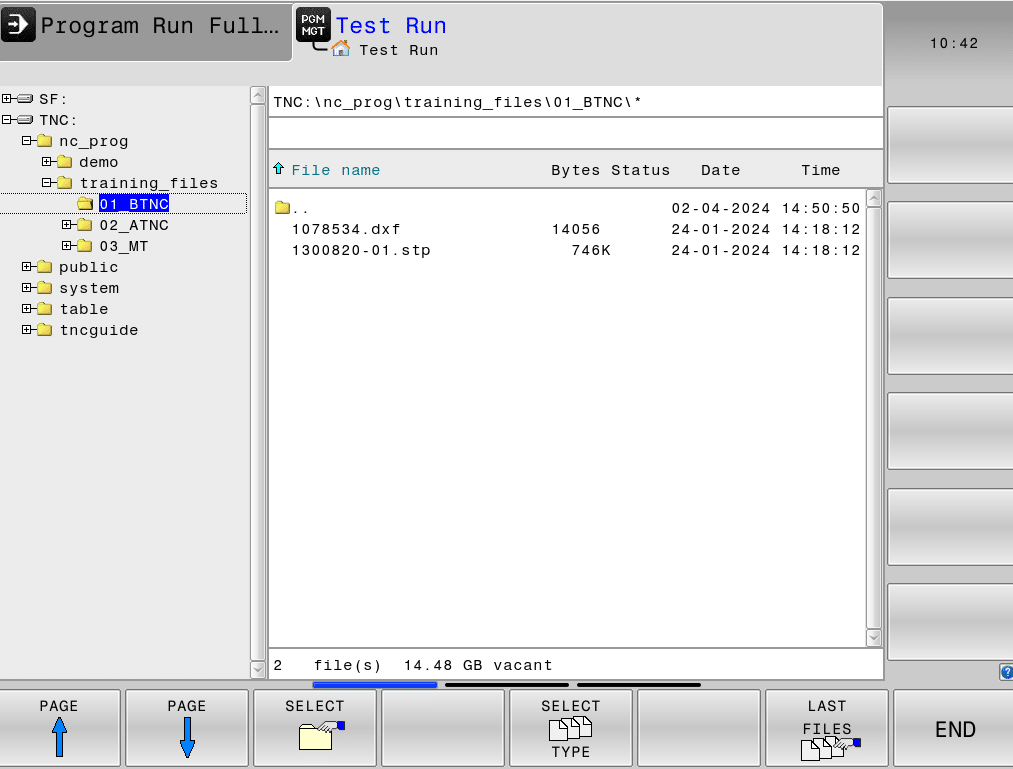
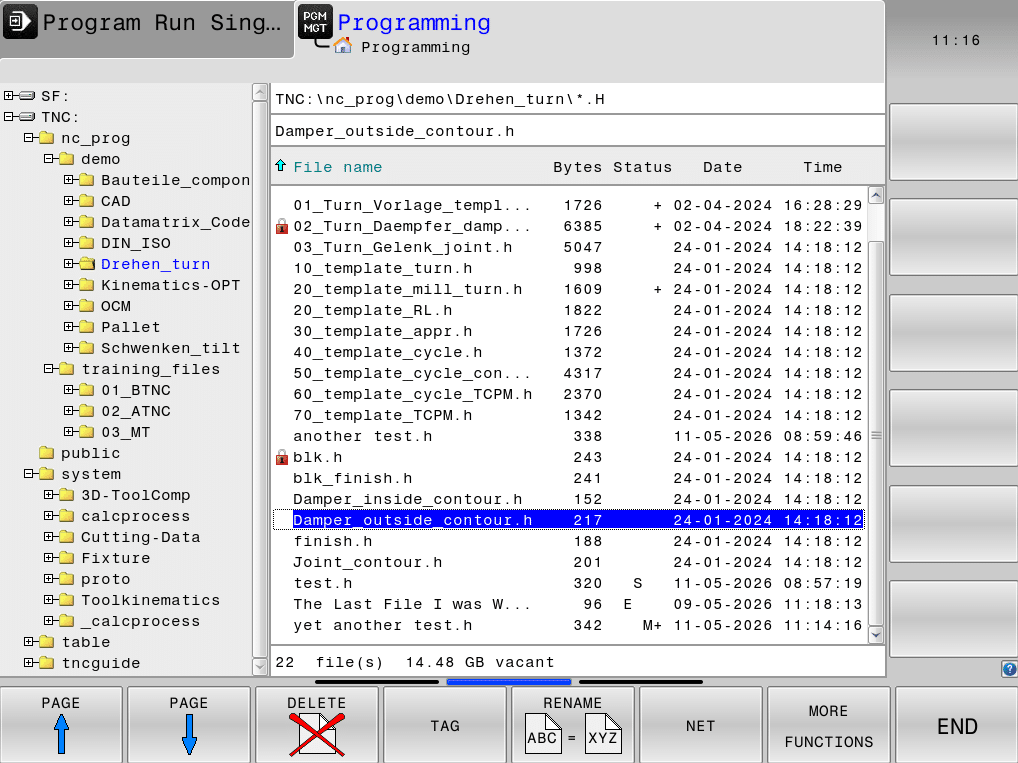
Select your mode for example Test Run then press PGM MGT

You will see this screen

Heidenhain

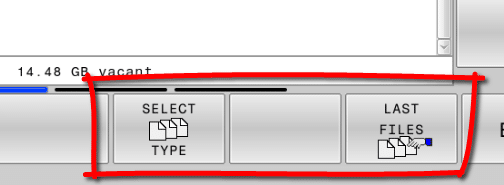
There are two buttons here that on a personal level get me in an absolute frenzy.

SELECT TYPE and LAST FILES

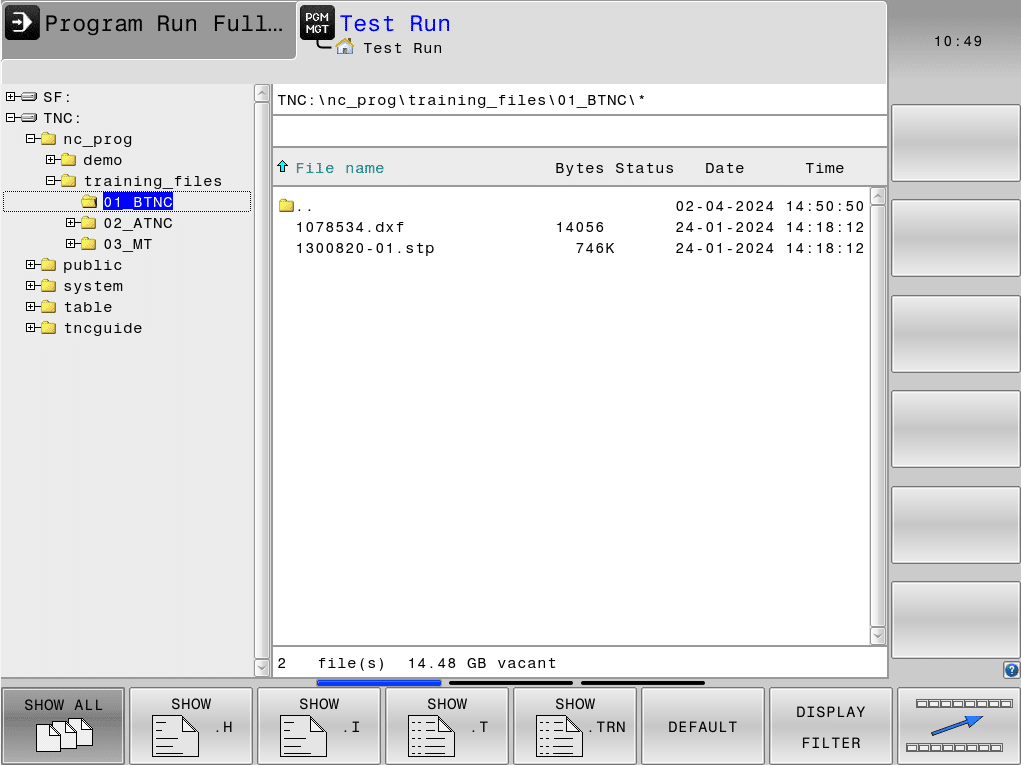
Press SELECT TYPE first.

From here you can select the file type you want to display, best to chose .H which means you will only see the Heidenhain files.

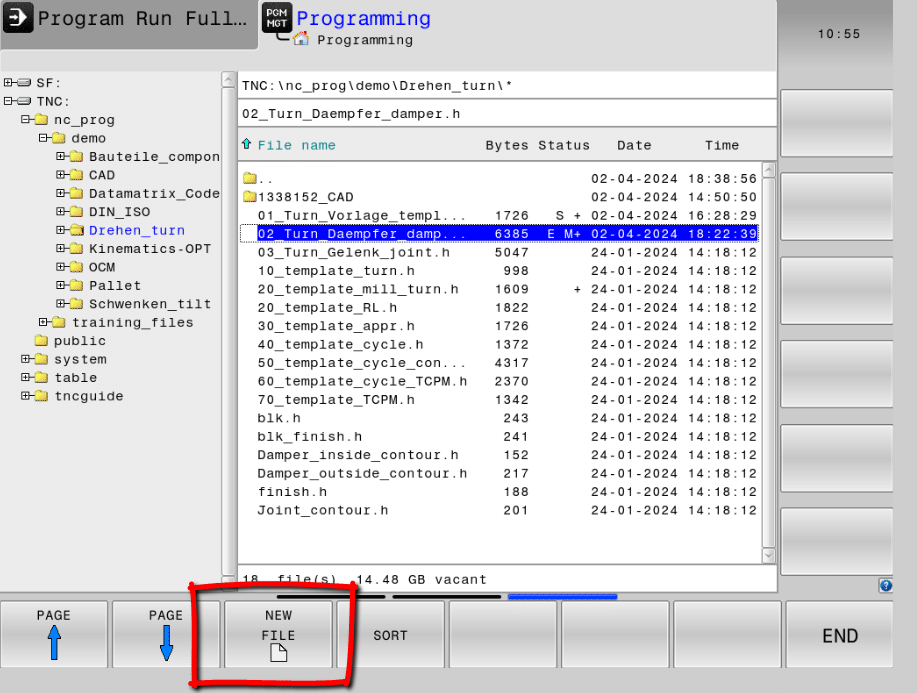
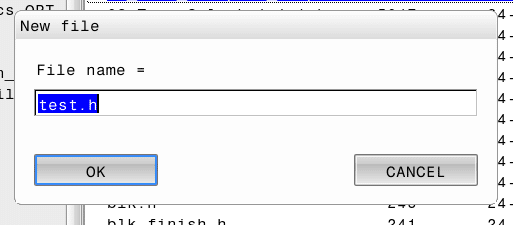
It also means that when you create a file by pressing NEW FILE (in the edit mode) you get Heidenhain by default not ISO G code.

Heidenhain

Any program you create will automatically have the dot H extension meaning it will be a Heidenhain file.

Just write it in and the dot H will be added.

It also makes it a lot less complicated when looking for programs as you won’t see all the other stuff.

Heidenhain Quick Acess to Last File

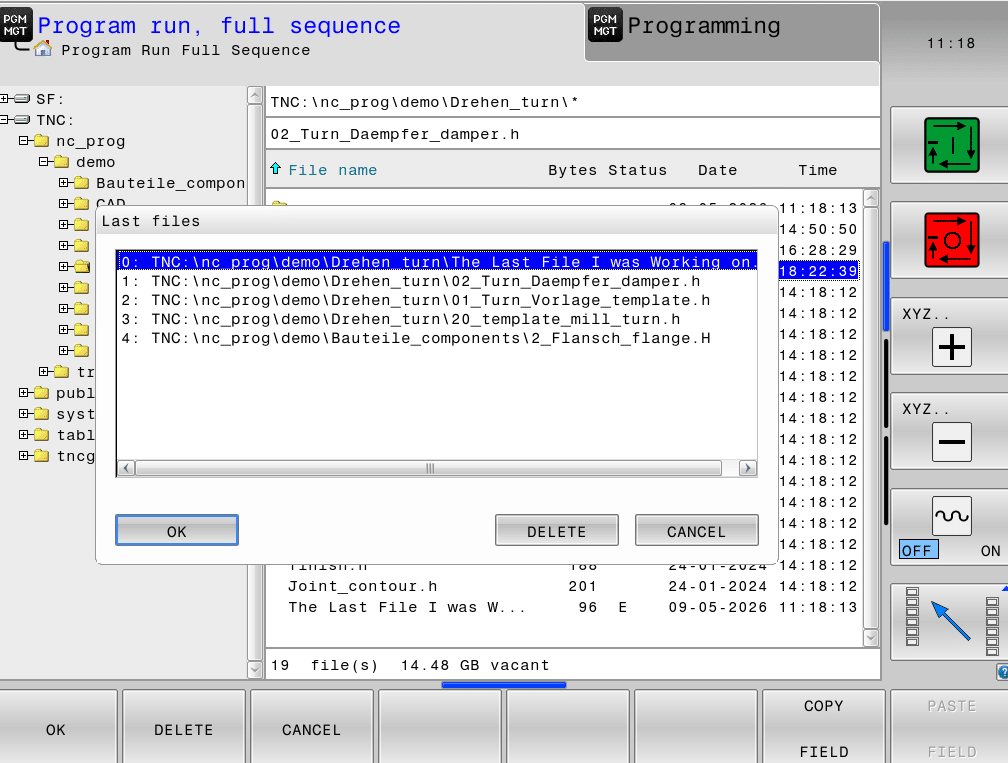
Now onto the next little beauty LAST FILES

Go on give him a nudge, he’s your best friend.

What this does is give a list of all the recently used files, so yours will most likely be at the top, or at worst very near.

If you are using a lot of directories and shit. This will make it very simple and you wont have to trawl through loads of folders to find what you were working on.

Therefore when you switch modes you can instantly get the last file you were working on.

All you need do is press OK.

Heidenhain Are You Unprotected?

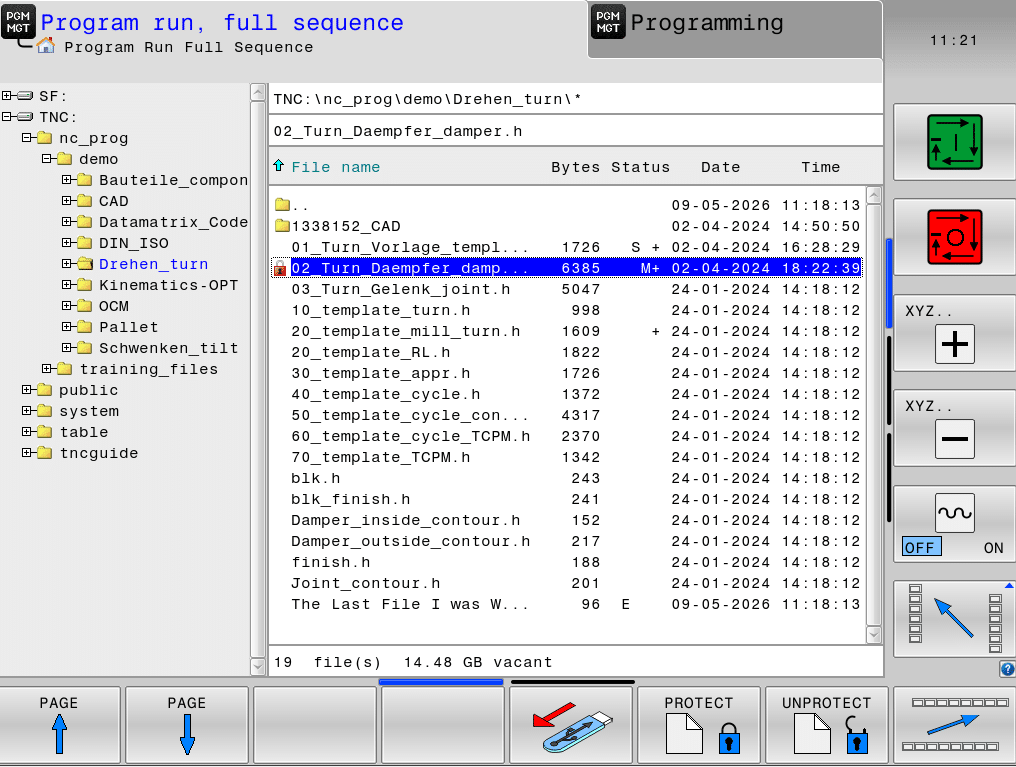
Oh yea another thing, cursor across and you’ll see PROTECT and UNPROTECT.

Heidenhain

This puts a little padlock next to your program. This stops that naughty apprentice from deleting your programs, unless of course he really wants to.

Don’t just Whip Out Your Stick

Now if you are an upstanding honest citizen you will know that you should never just whip out your stick. Especially in a crowded bar.

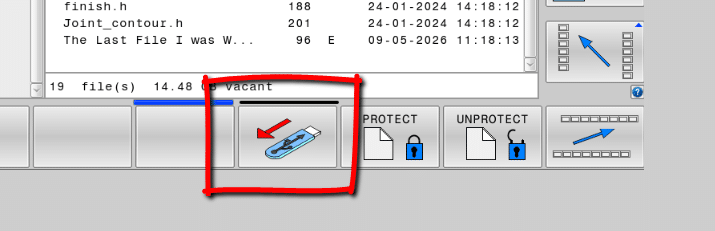
Always safely disconnect your memory stick not just yank it out like some decaying tooth.

You might need to press the MORE FUNCTIONS button first.

You’ll love this button if you like to do things properly.

Just press it, you never know it might save you from wiping a memory stick clean.

Undelete, (Well Kind Of)

You can restore a program back to how it was before you got your little mitts on it, just press CANCEL CHANGE.

Heidenhain

These boxes will be greyed out. This means the document is the same as when you opened it up.

Once you make a change it looks like this.

If you press CANCEL CHANGE your document will go back to how it was when you originally opened it. These buttons will be greyed out again.

If you press STORE then you document will be saved as it is and you wont be able to restore it.

Can be useful for old gits like me who often can’t remember what the were doing. It’s useful just to go back to when you first opened the program.

SAVE AS and Why Not?

The SAVE AS button is also very useful if you want to keep your original document and start with a new copy.

Now you might be thinking all this is no big deal. Well actually you are wrong because you can’t do any of this on a Fanuc control or a Haas

The Devil is in The Detail

Loads of stuff we don’t look at every day, and I’ll admit to being the worlds worst.

Sometimes I’m on the phone to my mate and my wife will say “what did he say”. I’ll say “don’t know wasn’t listening”.

I mean I admit my friends are incredibly boring but maybe I should pay more attention to detail.

Not suggesting you do what I do and it’s probably the main reason why I have no mates, other than you guys reading this.

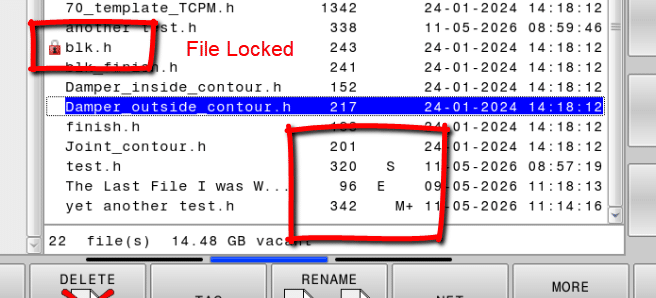
But here is an example if you look in the directory it will tell you the program that is active in Edit, Full Run and Test modes with the letters M E and S.

How cool is that?

M (Memory)

E (Edit)

S (Test Run)

Padlock (File Locked)

Tool Names

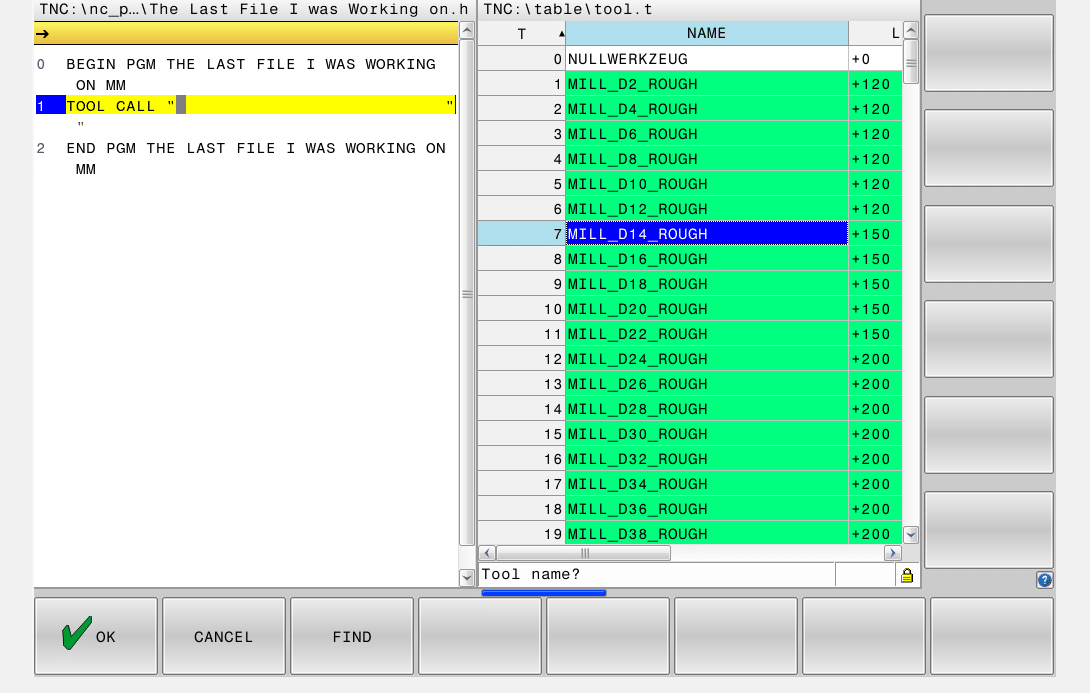
Using tool names as opposed to numbers means you can select them directly from the tool table. This is a much quicker way.

Heidenhain

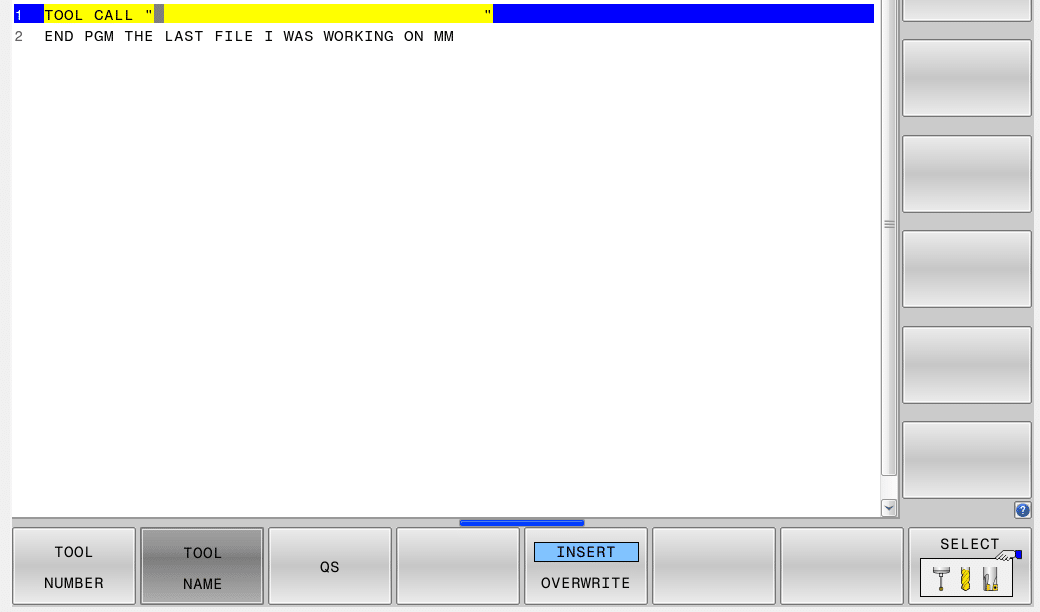
After TOOL CALL press TOOL NAME

By pressing SELECT you can pick at tool straight from your tool list.

LBL NAME

When using labels why not use something that you understand?

Just press LBL NAME

Call your Label “6mm Holes”

Makes your program more readable.

What The Fuck are These For

In a nutshell it means you can look through the program but keep your cursor where it is. So you don’t loose where you are.

Useful, Mmmm maybe?

You decide.


Heidenhain Training

Heidenhain Training

CNC Training Call David: 07834 858 407

CNC Training Centre Reviews
Contact CNC Training Centre

CNC Training Centre offers Heidenhain training both on-site and off-site. The Heidenhain TNC control has been around since the 1970’s and similar to Mazak it was well ahead of its time.

Contact Now For Heidenhain Training

Heidenhain is a lot more friendly to the user than some controls. A lot of controls will allow you to basically input any old shit and then try and run the code. With these types of control nothing is really monitoring what you are inputting. Not until you actually run the program do you start to get alarms flying around everywhere.

Whenever I train people, I would guess under 35, they have this real instinct to just type and press buttons at lightening speed. Now this is great when you are playing space invader or whatever. Sorry I am not well up on computer games.


Heidenhain Training


You see the thing is now most software is very intuitive and programmers and interface designers have done an amazing job. We download an app or some free software and we fiddle around with it and soon its all working. The idea is you just experiment until you get it working. It’s designed with this in mind.

Heidenhain Training

Take Microsoft word as an example. How many of you have actually been on a training course? Exactly none of you.

But everyday we all use it with great success.

Anyway start doing this on a CNC machine and bang crash wallop, you end up with a lost limb and a pile of scrap metal. And I didn’t even mention the busted tool and the machine that needs a £2000 re alignment. Anyway you get my drift.

Heidenhain Training

CNC machines are just not that way at all. I mean yea there are a few exceptions but still you really need professional instruction. Sorry rambling again sign up today for a Heidenhain Training Course.

“Read More”

Heidenhain Sections in a Program

On or Offsite CNC Training
Tel: David: 07834 858 407

Contact CNC Training Centre

Heidenhain Sections, I don’t get to work on Heidenhain controls anywhere near as much as I would like to.

A recent training program we undertook with a packaging company meant I got loads of time to have fun with this control whilst working with some fantastic people oh, and I got paid too.

Heidenhain Sections

Ever since I first worked on Heidenhain controls in the early 80s I have found them very intuitive. As with all the CNC controls (and I am gonna have a moan) they tend to get over complicated.

“Read More”


Careers in CNC

View all current vacancies in CNC

Click here

Call David: 07834 858 407