Month: January 2026

Learn how To CNC Program: Unlock Your Potential

Call David: 07834 858 407

CNC Training Centre Reviews

In today’s fast-paced manufacturing world, the ability to learn how to CNC program is a game-changer for aspiring machinists, engineers, and hobbyists alike.

At CNC Training Centre, we specialise in providing comprehensive, hands-on instruction that equips you with the skills to operate and program CNC machines effectively.

Whether you’re a complete beginner or looking to refine your expertise, our courses are designed to meet you where you are and propel you forward.

Learn to CNC Program

Why Choose CNC Training Centre to Learn how To CNC Program?

Our programs stand out because we offer flexible learning options tailored to your needs. We teach in both classroom settings and onsite at your facility, ensuring that you get practical, real-world experience without disrupting your schedule.

  • Classroom Training: Join us at our facility in Barwell, England, where you’ll benefit from small class sizes, modern equipment, and experienced instructors.
  • Incredibly realistic simulators used for collision free practising and experimenting.
  • Our classroom sessions cover everything from basic CNC concepts to advanced programming techniques using industry-standard software like G-code and M-code. You’ll get to practice on actual CNC machines, simulating real production environments to build confidence and proficiency.
  • Onsite Training: Can’t make it to our centre? No problem! We bring the training to you. Our onsite programs are customised for businesses and individuals, allowing your team to learn how to CNC program directly on your own machines.
  • This minimises downtime and maximises relevance, as we address your specific equipment and workflows. From setup and tooling to troubleshooting and optimisation, our experts ensure you gain actionable skills that boost productivity and reduce errors.

Learn to CNC Program

Learn how to CNC Program

What sets us apart is our commitment to practical learning. Unlike theoretical courses, our training emphasises “learning by doing.” You’ll dive into projects that mirror industry challenges, such as creating precise parts for automotive, aerospace, or medical applications.

By the end of the course, you’ll not only understand CNC programming but also how to apply it to improve efficiency and innovation in your work.

Application

Most CNC Machines use a form of G Code programming. Fanuc and Haas as well as Siemens.

Even Mazak and Hurco machines will run G code programs. So your training will always remain relevant.

The Benefits of Mastering CNC Programming

Investing time to Learn how to CNC Program opens doors to exciting career opportunities. With the global demand for skilled CNC operators on the rise, our graduates often see immediate improvements in job prospects, salary potential, and job satisfaction. Plus, our courses are affordable and provide certification upon completion to add value to your resume.

Learn To CNC Program

Don’t just take our word for it—our alumni rave about the transformative impact:

Highly recommend David as a trainer. The amount that has been taught in a short space of time is unbelievable.

David is very patient and can alter the training to suit your learning style very easily.

He is our go to CNC expert every time

 says one satisfied client.

Ready to Get Started?

If you’re eager to Learn how to CNC Program and take your skills to the next level, contact us today at cnctrainingcentre.com. Spaces fill up quickly, so enrol now for upcoming sessions. Whether in the classroom or onsite, we’re here to help you succeed in the world of CNC machining.


Expert Onsite Hardinge CNC Training

Call David: 07834 858 407

CNC Training Centre Reviews

Onsite Hardinge CNC Training, in today’s fast-paced manufacturing world, staying ahead means mastering the tools that drive precision and efficiency.

At CNC Training Centre, we specialise in delivering top-tier onsite Hardinge CNC training designed to empower your team with the skills they need to excel. Whether you’re operating Hardinge lathes, mills, or advanced machining centres, our expert-led programs bring the classroom directly to your facility, minimising downtime and maximising productivity.

Onsite Hardinge CNC Training

Why Choose Onsite Hardinge CNC Training?

Hardinge machines are renowned for their durability, accuracy, and versatility in industries like aerospace, automotive, and medical device manufacturing. However, unlocking their full potential requires specialised knowledge. Our onsite Hardinge CNC training eliminates the hassle of sending employees off-site, allowing your team to learn on the very equipment they use daily. Here’s what sets our training apart:

  • Customised Curriculum: We tailor each session to your specific Hardinge models and operational needs. From basic setup and operation to advanced programming and troubleshooting, our courses cover it all.
  • Experienced Instructors: Our trainers are industry veterans with years of hands-on experience on Hardinge CNC systems. They provide practical insights that go beyond theory, ensuring real-world application.
  • Flexible Scheduling: We work around your production timetable, offering training during off-peak times to keep your operations running smoothly.
  • Cost-Effective Solutions: By coming to you, we reduce travel expenses and lost productivity. Plus, group sessions for your team mean better value for your investment.
  • Certification and Support: Participants receive certificates upon completion, and we offer ongoing support to reinforce learning and address future challenges.


Imagine your operators confidently handling complex jobs, reducing scrap rates, and boosting output—all without leaving your shop floor. That’s the power of onsite Hardinge CNC training from the CNC Training Centre.

Who Benefits from Our Training?

Onsite Hardinge CNC Training, our programs are ideal for:

  • New hires needing foundational skills on Hardinge equipment.
  • Experienced machinists looking to upskill in advanced features like multi-axis programming.
  • Maintenance teams wanting to understand the basics.
  • Businesses in the UK and beyond aiming to comply with industry standards while enhancing competitiveness.

Based in Barwell, England, CNC Training Centre has a proven track record of transforming teams across the region and internationally. We’ve helped countless clients optimise their Hardinge CNC operations, leading to measurable improvements in efficiency and quality.

Onsite Hardinge CNC Training

Get Started Today

Ready to elevate your machining capabilities? Contact us at cnctrainingcentre.com to schedule your onsite Hardinge CNC training session. Our team is here to discuss your requirements and provide a no-obligation quote. Don’t let skill gaps hold you back—invest in training that delivers results.

For more information on our full range of CNC courses, visit our website or follow us on social media. Let’s machine a brighter future together!

Don’t just take our word for it—here is what people say:

Highly recommend David as a trainer. The amount that has been taught in a short space of time is unbelievable.

David is very patient and can alter the training to suit your learning style very easily.

He is our go to CNC expert every time

 says one satisfied client.

Call David: 07834 858 407

CNC Training Centre Reviews

How to Become a CNC Operator

A rabbit can’t be a CNC Operator.

Every career has to start somewhere. In the world of CNC Machining it’s sometimes difficult to know where to start as a cnc machine operator.

So Where Do You Start?

“Where shall I begin, please your Majesty?” asked the White Rabbit.

Begin at the beginning,” the King said gravely, “and go on till you come to the end: then stop.”

The perfect route would be just like me in the old days when I started at Rolls Royce in 1970. I phoned up Mr Rolls or was it Mr Royce and said “can you give me an apprenticeship?”

Fortunately he didn’t pick up on the fact that I was a lazy piece of shit and he gave me a job.

At the end of it all I got to earn £60 a week and had the “Freedom of The City”

When I asked what “Freedom of the City” actually meant, I was told that one of the perks was that I could drive my sheep across the common whenever I wanted.

I was so pleased to be informed of this and couldn’t wait to get home to tell my parents.

Once the harsh reality hit and I realised I had no sheep in fact no livestock at all.

I had a Guinea pig and and a was still mourning the death of my hamsters, Steven.

“Read More”

Miyano CNC onsite training: Maximise Your Machine Productivity

Miyano CNC onsite training, is your production floor struggling to keep up with the demands of modern engineering?
Get your rapids to 100%
At CNC Training Centre, we specialise in bridging the skills gap with tailored Miyano CNC onsite training. By bringing our expertise directly to your facility, we ensure your team masters your specific Miyano machines in their own working environment.
Miyano lathes are world-renowned for their rigidity and accuracy, particularly in complex turning and milling operations. However, to truly unlock their potential, your operators and programmers need more than just basic knowledge. Our onsite training packages are designed to reduce setup times, eliminate programming errors, and significantly improve cycle times.

Why Choose Onsite Miyano Training?

  • Real-World Application: We train your staff on the exact Miyano models you own, using your tooling and your specific parts.
  • Zero Travel Costs: Minimise downtime and eliminate the expense of sending staff away for external courses.
  • Custom Curriculum: Whether you need to master Fanuc-based controls or complex twin-spindle, multi-turret synchronisation, we adapt the training to your skill level.
  • Immediate Return: Improved operator confidence leads to fewer scrapped parts and faster throughput from day one.

Miyano CNC onsite training

Old or young age is just a number.

From basic operation to advanced macro programming and live tooling integration, our 2026 training modules are updated to reflect the latest industry standards.

Miyano CNC onsite training

Don’t let high-end machinery sit underutilised. Invest in your workforce and see the direct impact on your bottom line.
Miyano CNC onsite training
Contact CNC Training Centre today to book your bespoke Miyano CNC onsite training session.

Call David: 07834 858 407

CNC Training Centre Reviews


Avoid CNC Crashes Don’t Reinvent the Wheel

This is an article designed to help you avoid CNC crashes.

Call David: 07834 858 407

CNC Training Centre Reviews

I listened to a fantastic documentary on Radio 4 the other day about Airline Crashes. The program explained how the hierarchy (cabin crew, flight crew) caused wrong decisions to be made.

In the Kegworth air Crash, cabin crew knew that the pilot had shut down the wrong engine. Unbelievably no one felt empowered to tell the pilot. The program went on to explain about “The No Blame Culture” and how they had taken this further and created a system where everyone could speak out.

Although this is not the main crux of my post it does highlight some of the points I want to make.

So when a machine crashes. What do you do?

  1. Whose fault is it?
  2. How easy will it be to fire this person?
  3. How quick can we get the machine running again and make some parts?


WRONG!!!!


Avoid CNC Crashes


The above are all the things I definitely would not do.

LinkedIn is full of all these soundbites and bulshit.

Quick one word banners. You know the stuff.

Avoid CNC Crashes“Don’t Eat Yellow Snow”. Well maybe that’s not one on LinkedIn but you know the sort of stuff I mean.


Anyway I bet there is one about making disasters into learning opportunities.

If you know one then send it to me. Cos I agree.

So when you have a collision on a CNC Machine here is what you do.


  1. Make it very easy for everyone to tell you exactly what has happened.

  2. Do not apportion blame. It must be seen as a way to improve things (a learning opportunity).

  3. Make a detailed report on the whole incident.

  4. Analyse the report with all parties involved.


When you analyze the information you have gathered, try to break it down into small parts.

(Oh and by the way if you think this is a waste of time work out what the collision just cost you.)

Each time you spot something wrong come up with a permanent solution so that it can never happen again.

The idea is that you only make the mistake once. If you say things like “he’s an idiot”. What are you going to do about that? Well maybe you could sack him. That is after he punched you for calling him a twat.

Sorry but this won’t work. Next time you inadvertently employ an idiot your machine will get broken again.

Avoid CNC Crashes

Now the idea is to Avoid CNC Crashes. If an idiot can operate the machine and not crash it then we have a solution.

I once suggested in a meeting that we fire all the machine operators. The management team had gone on at length about all the problems with staff and how useless they were.

man-110307

What would we do then? I was asked. Well we will recruit more. What would we get?

  • A moaner.
  • Someone who is  often late.
  • A person who has loads of sick days.
  • The guy who crashes machines.
  • A brilliant worker.
  • A total prick.
  • One not so brilliant worker.

Actually you would get what you have now. So the message is to work with the staff you have and get the best out of them.

So an example would be:

An operator altered a program and made a mistake. This resulted in the machine crashing.

We could carefully analyze what happened and come up with solutions. These would then become part of everyday procedures,

  1. You could remove the edit key so that operators needed supervision to alter programs.
  2. You could make a tutorial video on the prove-out procedure after program alteration. Then get all involved to view it.
  3.  What did he alter wrong? Maybe there is a training issue.
  4. Maybe he missed out a decimal point and needs to read my post.


Some ideas below on how to help Avoid CNC Crashes.


Wrong Offset

Always prove out correctly remember the movement after the tool change is very often the most dangerous one as this is when the offset is applied.

Always adjust the wear offset not the big number (Geometry)

Always use + INPUT that way you any mistakes will be smaller. Depending on settings Fanuc will show you the result before you input i

Avoid CNC Crashes


You can also restrict the value it can be adjusted by read this.

This control has a WEAR screen and a GEOM, geometry screen.

What changed?

If program has been used many times before. There should be a procedure in place to keep it in a special folder marked “proven”.

  1. You may be using different tools so did you edit the tool numbers?
  2. Do  the offsets correspond to the tool numbers H and T? oh and don’t forget the D read this.

The Rules

If this is an existing program then the first tool moving toward the part is the most dangerous move.

  • Your work offset could be wrong (G54 to G59) or work shift on a CNC Lathe.
  • Tool measurement could be wrong.

Once this first tool is proven correct then you know your work offset and your first tool are correct. Beware if the work offset changes say from G54 to G55.

G54 may be fine but what about G55?

From now on you need to check the line  where each tool comes into the component.

Once the tool is in use it’s happy days. Just keep an eye out for changes in work offset (G54 to G59).

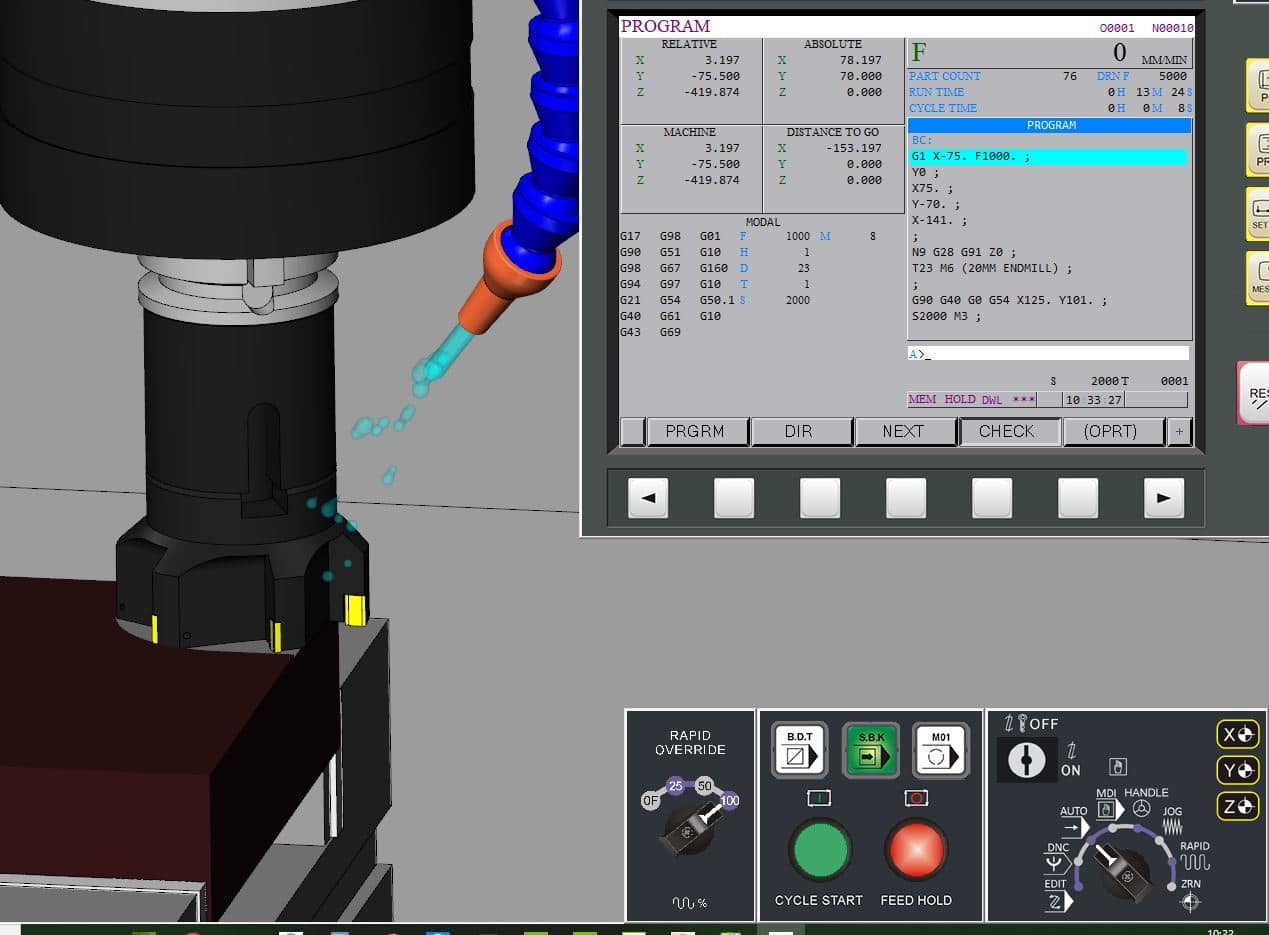
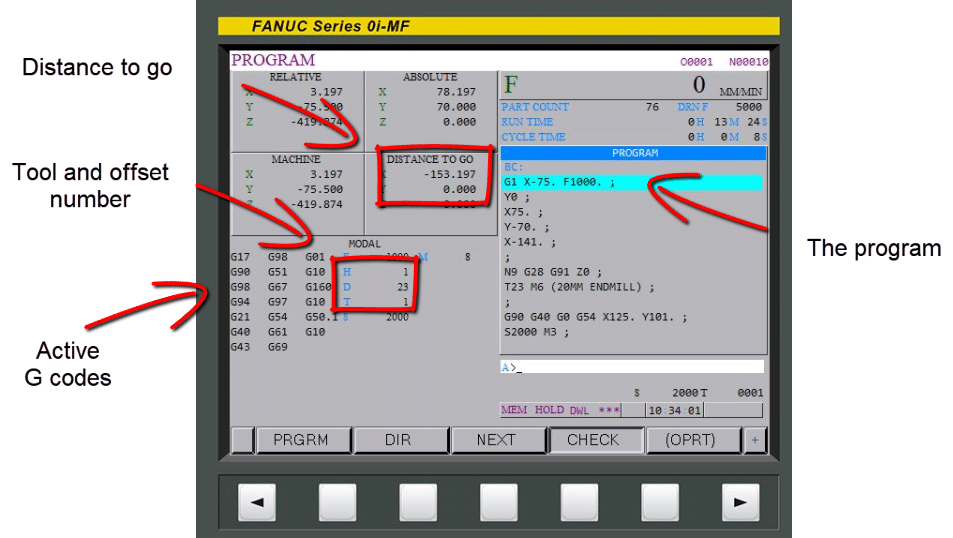
Use your  check screen.

Avoid CNC Crashes

From this you can see all the information you need

Avoid CNC Crashes


Absolute Incremental (Don’t be afraid to use it)

If you use G91 (incremental) make sure you immediately program G90 (Absolute).

To move the tool to the tool change position it is much safer to use G53 Z0 rather than G28 G91 Z0. That way you don’t need to remember to change back to G90.

If you are using a sub-program end it with G90 and begin with G91 that way you won’t forget.

Switch To G90 ASAP

In the parameters of most machines you can set it so that when you press reset the machine will revert back to G90.

Read this on machine wake up state.


G91 is very safe to use if you follow the rules.


Decimal Points

Some controls will take calculator type inputs. X20 will be X 20.00. Beware this can be read as X.020 and there is a big difference.

Fanuc, Haas and Mazak will allow you to set a parameter that allows either.


Read this post first.

Speed Clamps On CNC Lathes (Avoid CNC Crashes)

G50 is really important it should be at the head of every program or possibly on every tool.

G50 S2000 (speed will not go over 2000 rpm)


Avoid CNC Crashes


https://www.youtube.com/watch?v=x14poOHTXlM


Services offered at CNC Training Centre

Edgecam training.

Classroom programmer training.

Onsite CNC Machine Training.

CNC Training on all controls and machines.

Mazak Training Fanuc Training

Don’t forget we offer training on all types of Mazak Machines and all Fanuc Controls 6m to 31i Oi old to young.


Careers in CNC

View all current vacancies in CNC

Click here

Call David: 07834 858 407