Category Archives: Haas Turn

Just an address will do…

Category : Haas Mill Haas Turn

Just an address will do

For CNC Training Call David: 07834 858 407

Just an address will do.

When you work on a machine day after day or you work on the same CAD system. I believe that every now and then you need to look at what you are doing and take stock. You know like when you can’t quite get something to work correctly and you find a way to frig it.

Well done you got yourself out of a mess. But hang on a minute that was two years ago. So when you gonna take the time to find out what was the correct way?

It’s time to get off your fat arse and do something about it.

Sometimes when I am training people I feel like I am being really fussy when I pick them up on minor annoying things they do when operating a machine. By the way I don’t mean things like scratching your bollocks.

For example leading zeros (don’t get me going on that).

Right, your on a Fanuc or Haas control and you want to call program one and you type in O0001 and press search or lower cursor.

Just an address will do

No no no!

Just type in O1 that’s all you need. Honestly it drives me bloody bonkers.

Here is an idea just spend one day sorting all these little things out. I tell you now the saving over a year, once you force yourself to do everything the quick way, is massive and it’s there forever.

There is a slow convoluted way and there’s a right way.

Check out the shortcut keys on your favorite bit of software and use em. It’s amazing once you get a grip on it.

How do you copy and paste? You can let me know on that one.

Anyway Enough Ranting This is The Post

Just an address will do when you are typing code into a Haas control. You don’t need to type the zero. How cool is that?

Impress your mates with this one, or better still the boss (you may get a raise…….  not)

Type in G X Y and press input. (This could be in MDI or EDIT mode)

Yes that’s all you need.

It will go in as G00 X0 Y0

These clever Americans can just guess what you are trying to do.

So much easier, one day all controls will be this good.

There you go just an address will do.

Please contact me if you require:

  • CNC programming training.
  • Want to learn CNC programming.
  • Fanuc control training.
  • Yasnac programming training.
  • Any type of CNC course.
  • Fanuc training courses
  • CNC lathe training
  • CNC Vertical Machining Centre training
  • Vasectomy
  • Lawns mowed

Contact David: 07834 858 407

Services offered at CNC Training Centre

Edgecam training.

Classroom programmer training.

Onsite CNC Machine Training.

CNC Training on all controls and machines.

Mazak Training Fanuc Training

Don’t forget we offer training on all types of Mazak Machines and all Fanuc Controls 6m to 31i Oi old to young.


How to use G50 on a CNC lathe

CNC Turning Basics G50 Speed Clamp

How to use G50 on a CNC lathe

How to use G50 on a CNC lathe

How to use G50 on a CNC lathe.

G50 in a turning program is a speed clamp. The machine accelerates up to the speed you set (G50 S2000) and will not go any faster.

Now before I get arrested by the “Correct Word and Grammar Police” I know it’s not actually a clamp. The truth is it’s just what everybody calls it, so get off my fuckin case.

Black dog his name is Boris

Anyway if I start to call it something else all my CNC mates (and I do have some) will be confused.

Just check me out on LinkedIn. Anyway as I was saying my mates wouldn’t know what the fuck I was on about.

You must program a G50 before each tool and at the beginning of the program for safety reasons which I will explain later.

It’s Modal

G50 is a modal G code (it stays active). If you have a program where you do not want to clamp the speed you must still put the G50 at the beginning of the program (set the clamp to the machines maximum RPM).

Otherwise it may pick up the G50 from the last program and you may not get the RPM you want. It can have the effect of slowing down production because the speed is being restricted and you didn’t realize.

Don’t use someone else’s G50 get your own.

You wouldn’t wear someone else’s dirty pants. (Americans call underpants underwear I think)


These are mine (sorry I din’t get time to wash them).

Modal G code explanation here.

Now Here Is Something You May Not Know

Historically G50 was used to set the machine datum. This still works so do not put any X or Z figures on this line. You will get some weird shit happening if you do. Oh and you will probably trash your 100 grand machine.

Anyway how to use G50 on a CNC lathe

G50 S2000 (SPEED CLAMP 2000 RPM)

Some G code systems, or depending on parameters, may use G92 instead of G50. This is not very common but it works exactly the same way.

On a Fanuc control they are called A type and B type G codes and depends on machine tool builder. Most of the G codes remain the same but proceed with caution.

It is particularly useful when you are facing a part using G96 (constant surface speed). When the tool reaches the centre of the part the machine will be running at maximum RPM. This could be very dangerous on large or out of balance components. When you set a G50 speed clamp, once the machine reaches the clamped speed it will go no further.

Here is a tutorial video about G96 and G97

RULES

  1. Use a G50 at every tool-change
  2. Use a G50 at the beginning of a program (even if you think it’s not needed)
  3. G50 S2000 (Only G50 and speed on one line, nothing else)
  4. There is no rule 4
  5. Never eat yellow snow.

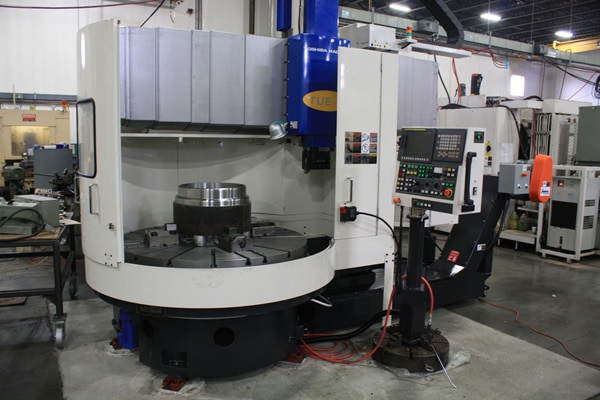
Toshiba VTL CNC

This is a Toshiba VTL (Vertical Turning Lathe).

If you want to buy one or fix one go to Leader CNC

Now imagine this revolving too fast you would soon need their services oh and a good trauma team.

More CNC Turning Help (G70 and G71)

Please contact me if you require:

  • CNC programming training.
  • Want to learn CNC programming.
  • Fanuc control training.
  • Yasnac programming training.
  • Any type of CNC course.
  • Fanuc training courses
  • CNC lathe training
  • CNC Vertical Machining Centre training

Services offered at CNC Training Centre

Edgecam Training.

Classroom programmer training.

Onsite CNC Machine Training.

CNC Training on all controls and machines.

Mazak Training Fanuc Training

Don’t forget we offer training on all types of Mazak Machines and all Fanuc Controls 6m to 31i Oi old to young.


Jumping Sections of Programme Using M99 and Block Skip


Click for M99

Please contact me if you require:

  • CNC programming training.
  • Want to learn CNC programming.
  • Fanuc control training.
  • Yasnac programming training.
  • Any type of CNC course.
  • Fanuc training courses
  • CNC lathe training
  • CNC Vertical Machining Centre training

Contact: 07834 858 407

Services offered at CNC Training Centre

Edgecam training.

Classroom programmer training.

Onsite CNC Machine Training.

CNC Training on all controls and machines.

Mazak Training Fanuc Training

Don’t forget we offer training on all types of Mazak Machines and all Fanuc Controls 6m to 31i Oi old to young.


CNC Turning G Code List For Beginners

Download and print this nice large print CNC Turning G Code List

Download CNC turning G Code List PDF

I always begin my training sessions by telling my students not to remember anything I say.

This sounds completely stupid and my excuse is it wasn’t my idea to say it.

About ten years ago I worked in France. After about a year it seemed obvious that I would need to speak to people to order “Fish n Chips” and stuff like that.

Anyway I got these CD’s to teach me French and the bloke (can’t remember his name) started off by telling you not to remember anything he told you.

Reverse Psychology

I think there is a bit of reverse psychology going on but the main idea is that you understand not remember. It didn’t work for me because I still managed to completely fuck up the language.

Not realising French Canadians speak differently to native Frenchmen (I was working for Bombardier) . Anyway I asked this bloke, in French, to “will you come with me”. I can’t remember what it is in French and after all the bloke on the CD had specifically told me not to remember.

Anyway turns out this had a sexual connotation and made me the complete laughing stock everywhere I went from then on. (I’ll let you do the maths on that one.)

“OK which one of you bastards bought all the fuckin toilet paper in lock-down?”

Now I know what you are thinking, “that is the gnats cock of CNC Turning G Code Lists”. Honestly size isn’t everything.

Learn these first and just by seeing them every day they will just sink into your brain.

When it comes to CNC Programming it is important to enjoy your self and not get bogged down trying to remember loads of G Codes.

The truth is you only need to remember a few and it’s all about understanding what they do.

For Example This is in your Programme.

You watch in amazement as it cuts your part.

So you look up what G71 means on your list of G Codes printed in large letters on the side of your machine.

Download CNC turning G Code List PDF

“Oh yea it’s that’s roughing shit” you say.

As You Watch it Run It All Makes Sense

From your Classroom Training you know that there is a multi repetitive cycle that can rough out a part.

You understand how the cycle works already.

CNC Turning G Code List
G71 Rough Turning Cycle

So as it runs, it all makes sense.


CNC Turning G Code List
Keep it Simple

Type up or print this list in nice big letters and stick it to the side of your machine

Download CNC turning G Code List PDF

CNC Turning G Code List

G00                 Move at Rapid speed
G01                 Feed in a Straight Line
G02                 Clockwise Arc
G03                 Counter Clockwise Arc

G04                 Time Dwell

G28                 Return Axis to Home

G41                 Cutter Compensation Left
G42                 Cutter Compensation Right
G40                 Cancel Cutter Compensation

G50                 Maximum Spindle Speed
G54                Work Offsets

G71                 Stock Removal Cycle
G70                 Finishing Cycle for Above
G76                 Threading Cycle

G83                 Peck Drilling Cycle

G96                 Constant Surface Speed
G97                 Speed in RPM


Haas Screenshot How to Make One

CNC Training Call David: 07834 858 407

30 Five Star Reviews

CNC Training Centre Reviews

Contact CNC Training Centre


You might not know it but if you put your memory stick into your Haas control then press and hold SHIFT as you press F1 you get a Haas screenshot or a (Haas screen capture) on your memory stick.

Haas Screenshot

It is really useful if you need help because you can save a record of what is on the screen.

With this Haas Screen Capture. You could use it for set up sheets. It will also be useful if you want to create training literature.

If you want to enter a name for your screen capture just input it before doing the above.

I love the fact that Haas are constantly improving their products the machines are so well thought out. They were the first ones to incorporate a coolant hose to clean down the machine.

Extras

I notice now some things do come as extras but they still come well loaded. It’s not like when you buy a car and you find that all the things that really attracted you to it (don’t we just love the toys) are extras.

Haas Screenshot
Range rover with no wheels

Just having a memory stick on a machine is really good. I cant help but think that it seems to be taking so long for machine tool companies to really get to grips with technology.

Sometimes when I am training people who never worked a CNC before I feel embarrassed to say “oh the memory is like the size of a 1980’s calculator”

Haas Screenshot
1970’s Calculator

The editing on some controls (and I won’t name names, as I can’t retire yet) is poor to say the least. Students used to using a PC expect to be able to easily COPY and PASTE bits of programme.

Good luck with that one.

Fanuc Screen Capture

Yes you can do it.

Where’s The UNDO Button?

UNDO (don’t even go there) some do have it. But wouldn’t it be great if you could UNDO things like offset changes. These things are gradually coming in on new controls but I can’t believe how slow it’s all been.

And you thought this articcle was just about taking a Haas Screenshot

Anyway I’m rambling again (only doing it to get the word count up), I will be using this Haas Screen Capture all the time. Typical Haas practical, user friendly. Keep up the good work boys.

Fanuc Screen Shot

Yes Fanuc Does it Too

Go to a screen you would like to capture.

Press and hold the [SHIFT] button for 5 seconds.

The control appears to lock up for about 15 seconds.

Once it frees up an image will be on your memory stick or memory card.

Please contact me if you require:

  • CNC programming training.
  • Want to learn CNC programming.
  • Fanuc control training.
  • Yasnac programming training.
  • Any type of CNC course.
  • Fanuc training courses
  • CNC lathe training
  • CNC Vertical Machining Centre training

Contact David

Services offered at CNC Training Centre

Edgecam training.

Classroom programmer training.

Onsite CNC Machine Training.

Siemens Sinumerik

CNC  Training on all controls and machines.

Mazak Training Fanuc Training

Don’t forget we offer training on all types of Mazak Machines and all Fanuc Controls 6m to 31i Oi old to young.


Careers in CNC

View all current vacancies in CNC

Click here

Call David: 07834 858 407