Category Archives: Fanuc Turn

Colchester Tornado CNC Lathe

Classroom Training Click Here

CNC Training Call David: 07834 858 407


CNC Training Centre Reviews

30 five star ratings on Google (Just saying)

Colchester Tornado

Colchester Tornado

A visit to Halesowen to train on this beast. Nice simple two axis Colchester Tornado 90, this guys got six, mmmm.

This one has the following:

  • 12 station turret, just about enough.
  • Fanuc 21i T and it’s got Macro too, lovely.
  • Absolute encoders, useful no zero return required
  • 4000rpm spindle with a collet chuck
  • Bar-feeder (hydrafeed)
  • VDI turret these are great for accurately and quickly changing tools
  • This particular machine has a 42mm bar capacity.
Colchester Tornado
Available from Fortis Tools

VDI

No it’s not a sexually transmitted disease, it’s that funny round thing with a pattern on at the back of the tool.

If you have this you’ll love it because it means you can quickly change a complete tool holder and it repeats really accurately.

Halesowen West Midlands

I’ve not been to Halesowen since 1974 I actually worked as a singer in a nightclub there. The band was “Sweet Rain” I wouldn’t google that one if I was you, if you don’t want to see some dodgy porn movie.

There was certainly no sexual innuendo intended back in 1970 when that name was conceived.

That’s me back then

These dates are not accurate but the price of oil quadrupled in 1974 and there was a shortage. I remember there was a 50mph speed limit on the motorway meaning the 50 mile journey took much longer.

It takes even longer today but that’s another grumble for a different post from me.

I’m a bit bored with 70’s music now but it was great at the time. I remember what it was like to be a tall man, my platforms adding over a foot to my total height. Us little guys were very reluctant to let the platforms go.

I still wear mine on occasions where I want to impress, especially with my mates all being taller than me.

Colchester Tornado

I remember years ago trying to set up a CNC Machine shop on a budget and it was almost impossible. The cost of machines being massive and the second hand market almost non existent. I ended up buying a Beaver, stop sniggering you infantile.

I know it’s now a euphemism but this was 1981 and Beavers were known for their hard work and making dams.

Sorry am I digging myself deeper into this?

Anyway if there had have been good CNC machines around then at the right price I’d now be sunning myself on a Caribbean island instead of writing this gratuitous shit that nobody reads.

Don’t know what gratuitous means but it sounds impressive in that sentence you must admit.

These machines can certainly deliver, now they are not exactly the Carlos Alcaraz in terms of looks but unless you’re a CNC geek like me you wont be taking selfies with one of these to impress your mates with the company you keep.

They ooze pragmatism, much like my wife they get things done, she can plough a large field in an afternoon on a good day.

My Colchester Tornado doesn’t have a tool presetting arm like this one.

Colchester Tornado

That really is a crying shame but let’s not get too upset

Here’s a nice video on how to use cut and measure.

Definitely more time consuming than if you have a measurement arm. So it’s something to look out for if you are buying one of these machines.

Calibration of these arms is not too difficult either. I would suggest you get some one like me or a service engineer to do it for you the first time and watch carefully. You should be able to do it yourself next time.

There is no separate rapid override on this Colchester Tornado. It’s just one control. A bit strange and scarry in equal measures until you get used to it.

I actually got to like it in the end.

Colchester Tornado

No markings at all on ours, welcome to the world of old machines. Anyway it overrides your rapid and your feed rate all in one dial.

Just reember to leave it at 12 o’clock.

Absolute Encoders

Cool, very cool. When you switch this beast on you don’t need to zero return it. Just straight on with business.

What’s An Absolute Encoder David?

I haven’t had an alcoholic drink for nearly 20 years, that’s another story for another time. Anyway I still go out with my mates and they still get absolutely blind, dogshit, pissed.

Come 2am I am the only one who knows exactly where I am, in fact I know where I am at all times.

Well I’m the one with the absolute encoder.

Absolute encoders know where they are even when you switch off your machine. Therefore no need to zero return the axis.

New Shit (Colchester Tornado)

Yes always something new, I must admit it is amazing now a days how you can use shit in almost any context. In my days it was something confined to a toilet, but now it can mean whatever you want.

I personally use it everywhere but I have always loved swearing. My mum used to say “it’s not clever to swear”. Now listen kids I admit to not being clever but I must tell you swearing is great fun, long may it live.

Anyway “new shit” I learn something new on every machine I work on.

M51 means that M30 no longer stops and rewinds. M30 just rewinds and the machine will carry on.

It now thinks it’s an M99.

M52, you guessed it switches the M30 back to it’s normal self.

(Never seen that before, probably made up by Mr Colchester)

No G53….. What?

Not sure if this is an option but most newer machines I work on have it.

Fuck, this ain’t got it. Shame. Can I live without it?

Probably not, watch this space.

What is G53? You mean you don’t know? Shame on you.

No Copy n Paste

Editing is really painful on this beast as you can’t copy n paste at all and using brackets for comments is a mind numbing painful experience to be avoided at all cost. It does tend to piss one off but work with what you got boys.

Editing

So if you are buying a Colchester Tornado be prepared to take a trip back in time when it comes to the editing process.

Check what spec the control is. Not sure how you do this but I recon you just have to try these G  codes to see if they work.

If you know a more scientific way then please let me know. Anyway if this was my machine I would definitely be doing my major program surgery offline.

Nice touch

It has the normal feed-hold but it also has cycle hold.

This means you can halt the program and stop spindle then open the door and have a look around. Then when you close the door you can carry on. Great. The luxury.

How Simple.

You would be forgiven for thinking all CNC’s would do this, take it from me, and I’m old enough to remember when we had fish in the rivers instead of tampons and human excrement, they fuckin don’t.

Stuff I like on Colchester Tornado

Second hand these machines are great value.

Most of em have VDI turrets. (Look out for it)

Cycle hold can stop program for inspection .

If you press F2 you can rotate the turret in reverse to quickly get your tool.

Absolute encoders (no need to zero return)

Loads of em about so therefore easy to get fixed.

Easy to fix yourself.

4000rpm spindle.

Fanuc control, and yes I slagged it but everyone knows it, so if you buy one of these and you advertise for someone to use it they will flood your inbox.

Stuff I Don’t Like on Colchester Tornado

Fanuc control, shit to edit.

Rapid override scare the living bollocks out of me.

Buttons tend to wear down, might be worth investing in new ones.

Tend to be dirty but you can always clean it.

Old Fanuc controls have very small memories.

No tool arm, it’s an option so check if you have one.

Conclusion

This machine is not super precision, it’s not super fast although definitely not slow.

To make a car analogy it’s like buying an old ford car. You know you won’t need a second charge on your house in order to get it fixed and there are loads of em about.

Parked on the drive it might look a bit shit but never mind. My mate once said to me, sat behind the wheel of his new Mercedes “you still driving that old wardrobe”

No-one gets to insult my V70 Volvo. “Yes” was my reply “and when it breaks down I’ll put it in my wheelie bin with the rubbish and buy another one for one months payment on that Mercedes”

Because the Colchester Tornado is common there is plenty of knowledge and bits out there.

Old Fanuc Control? Well that means it’s easy to find someone to work it.

Easy to get training (just come to me)

The price means you can almost have one in the garage. My wife said no but you might have more luck.


G92 Threading Single Line Method

CNC Training Call David: 07834 858 407

CNC Training Centre Reviews

G92 threading Cycle is something that concerns me. It’s sadly neglected. Now I know you’re probably saying “no one uses that old shit anymore”

Well you could be wrong.

G92 Threading works exactly the same as G76 except you need to programme every pass. This would be a pain in the arse but hear me out.

The Haas G76 cycle does not have any facility for a spring pass. This is where you add extra cuts at the end of a threading cycle to take out any metal left from the tool pushing off.

On a Fanuc control you can put these extra spring passes in as part of the G76 cycle.

Read this if you need to know more.

If you want this on your Haas control or an old Fanuc control then you can do this.

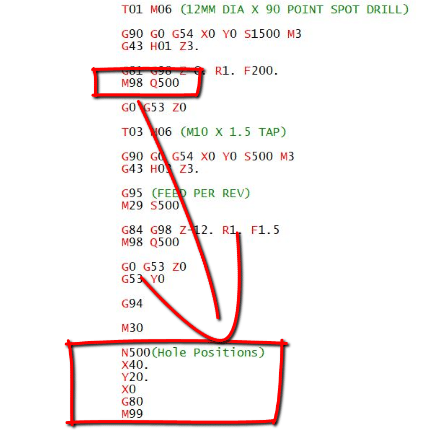
G76 X16.93 Z-25. K1.534 D.485 F2.5

G92 X16.93 Z-25.
X16.93
X16.93

Just add the G92 after your G76 cycle and whatever X figure you want to go to.

The G92 is modal so you will need a G0 move to cancel it. The code above would give you three spring passes.

Here is a load more interesting stuff.

I hope you have enjoyed reading this article.

Thanks for watching and reading

If you have been affected by any of the issues in this post or need CNC Counselling then contact me.

Siemens 828 840 Sinumerik Training

Or call us 

If you want to learn to program CNC Milling Machines

Look no further Contact CNC Training Centre


CNC Lathe Tool Nose Radius Compensation

Tags :

Category : Fanuc Turn Haas Turn

CNC Lathe Tool Nose Radius Compensation

CNC Training Call David: 07834 858 407


CNC Training Centre Reviews

30 five star ratings on Google


This video “CNC Lathe Tool Nose Radius Compensation” is a follow up from my previous video “Tool Nose Radius Compensation on a CNC lathe”.

When you use tool nose radius compensation on a CNC Lathe (that means we are using G41 and G42) you have to tell the machine where the cutting point of the turning tool is so that the correct tool path is produced.

On a CNC Milling machine the cutting point is the centre of the tool but on a CNC lathe there are numerous choices depending on how the tool is going to cut.

This is sometimes known as the virtual nose position or the Tool Cutting Point. It is usually shown in a square diagram like this.

CNC Lathe Tool Nose Radius Compensation

It is designated by a number from 0 to 9. On a Haas control this is under the column TIP on a Fanuc control it is usually under the column T although it is different on some controls.


You would be forgiven for thinking that T stands for tool and that it is the tool number (sorry it aint). Mmm I dunno the jury is out on this one.

CNC Lathe Tool Nose Radius Compensation


On the offset page your machine will need to know the X and the Z position of the tool. If you are using a Tool Presetting arm or you want to use tool nose radius compensation (and you definitely should) then you will need to input the Tip Radius under the R column and the Virtual Nose position under the T column or the TIP column on a Haas.


CNC Lathe Tool Nose Radius Compensation

So when you use CNC Lathe Tool nose Radius Compensation the computer will allow for the radius that you specify for your tool. The cutter path will also use the cutting point that you specify.

Below is a tool measurement arm. This can automatically measure a turning tool. It will need to know the type of tool in order to measure it in the correct part of the square. This boring bar would be a type 2.

CNC Lathe Tool Nose Radius Compensation

So here it is folks and remember……..


“Like***Share***Comment***and***Subscribe to my video channel”


Services offered at CNC Training Centre

Edgecam programming and training.

Classroom programmer and Setter Operator Training.

Onsite CNC Machine Training.

CNC Programming and Training on all controls and machines.

Mazak Training Fanuc Training

Don’t forget we offer training on all types of Mazak Machines and all Fanuc Controls 6m to 31i Oi old to young.


How To Format a Data Card on a Fanuc Control

Format a Data Card on a Fanuc Control yes that’s what were going to do. Now first of all I have a confession to make.

People often say to me how nice it is of me to write all these articles helping people with the shit they can’t do. Well sorry it’s not true actually I’m just a selfish bastard just like all the rest of you.

CNC Training Call David: 07834 858 407


CNC Training Centre Reviews

30 five star ratings on Google (just saying)


My only reason is that I have and always have had the memory of a goldfish. If you have ever had a goldfish and tried to train it (which I once did). I read books on it like “How to Train Your Goldfish in 3 Easy Steps”, for which I got a refund.


Anyway I digress. The reason you can’t train them is, not least of all because you can’t keep them out of the water too long, but they don’t remember a word you say. Fuck all, Jack shit.

So the minute they learn a nice trick they immediately forget it. It doesn’t bother them because they just forget that it bothered them.

Sorry no more about Goldfish.

Anyway its really easy to Format a Data Card on a Fanuc Control. You just hold in these two babies while switching it on.

Oh and make sure you have data card selected in your parameters.

Format a Data Card on a Fanuc Control

This is me doing it. Yes that’s my gnarled up old hand.

“Read More”

G76 Chamfer End of Thread

Tags :

Category : Fanuc Turn New Stuff

G76 Chamfer, this is another myth exploding article about the G76 threading cycle.

It’s so easy to use cycles like G76 day in day out and never really fully understand how they work.

I certainly did and then one day I thought “Fuck this I need to know more” 

That’s when I sorted out the number of passes thing. If you don’t know how to calculate the number of passes in a threading cycle then you should read the article above.

(G76 Chamfer) I want to talk about the P

G76 P011560 Q20 R.02
G76 X16.93 Z-25. P1534 Q485 F2.5

G76 Threading Cycle First Line
P01   One spring pass       15   Chamfer        60   Thread angle
Q       Minimum depth of cut
R       Finishing allowance

G76 Threading Cycle Second line

X         Core diameter of thread
Z         Thread end point
P         Depth of thread (as a radius no decimal point)
Q        Depth of first cut no decimal point.
F         Pitch of thread

Six Figure P Number Holy Shit

G76 P011560 Q20 R.02

First two digits are easy, spring cuts. No it’s not the latest haircut for April.

“Read More”

Careers in CNC

View all current vacancies in CNC

Click here

Call David: 07834 858 407