Skip to content
CNC Training Centre

CNC Training Centre

Classroom and Onsite Training (England)

  • New
  • Onsite Training
  • Programming Services
  • Edgecam
  • Hurco
  • Brother
  • Haas
  • Heidenhain
  • XYZ
  • Siemens
  • Fanuc
  • Fanuc Parameters
  • Apply Classroom Training
  • Course Details
  • Doosan
  • Star & Sliding Head

  • Home
  • June 3, 2024
  • David
  • 0

Edgecam Support From CNC Training Centre

Tags : Edgecam ClassesEdgecam SupportEdgecam Training

Category : Edgecam Training

CNC Training Call David: 07834 858 407

30 Five Star Reviews

CNC Training Centre Reviews

Contact CNC Training Centre

Edgecam Support

The CNC Training Centre is a partner to Edgecam and are always working with the latest features of this innovative software. We can offer either Edgecam support on-site or Edgecam support off- site.

Edgecam Support

Lots of customers buy Edgecam and complete the standard Edgecam training modules.

After completing these modules they then find it’s not quite so easy when it comes to implementing Edgecam in their day-to-day machining. This gets put off and suddenly the guy who signed over the budget to buy Edgecam wonders why he didn’t just buy himself new car instead (well it might be second-hand).

Edgecam Support

One of the massive problems with any new technology in our day-to-day lives is we don’t get to use it properly. This can be due to several things but the most common is lack of time.

It’s easy to just scratch the surface or worse still leave it in the box. Now, honestly how many gadgets did you buy and never get round to using them? Come on we all did it. My misses still nags me about the George Foreman grill I bought, I think we ended up with a takeaway that night.

GeorgeForemanGrill

Anyway it’s time to change all that. We can offer you Edgecam support but sorry I can’t get you on that exercise bike, anyway you’d only break it.

If you want to come away from your busy environment with all its distractions then offsite training will be best for you.

It’s always best to give us loads of information before you start. Models, drawings, machine types, tooling, bank pin numbers.

Edgecam Support

That way we can work the way I prefer to work which is on real life components.

If you opt for on site training then we can really get down to the serious stuff. Link your machines properly to Edgecam with post processors that churn out code the way you like it. Code that is easy to read. Code that looks the same as hand written code with comments and well spaced out (not as in Ozzy Osbourne).

This way you will end up with real life working parts that you can use as templates for other projects.

On the job Edgecam support means that we don’t teach you, you learn. In other words we find real life problems that you encounter every day and sort them out there and then. And, because you make the mistakes the brain pathways are opened up permanently.

I am sure you have all been on training course where you only remember the first couple of hours of a three-day course.

Edgecam Support

That is because you didn’t make any mistakes in the real world.

When you make mistakes that’s when you really start to learn, that is providing you don’t kill yourself in the process.

So don’t hesitate talk to me today about getting your Edgecam system working efficiently linking directly to all your resources. Tooling, modelling CNC code and post processor.

This system can work brilliantly for you. We call it wasting time to save time. In other words we do all the stuff we need to do to get Edgecam running great.

At the end of the month when we need to get work out this would be perceived as a waste of time. Anyway when we have everything set up correctly Edgecam really starts to sing.

Don’t forget to watch my Edgecam Support Tutorial Videos

Other Edgecam Stuff

Edgecam Instruction Simulation

Edgecam Associativity How it Works

Layers in Edgecam

Roughing Edgecam (Centre Cutting Tool)

Edgecam Version Update Now

Services offered at CNC Training Centre

Edgecam training.

Classroom programmer training.

Onsite CNC Machine Training.

CNC Training on all controls and machines.

Mazak Training Fanuc Training

Don’t forget we offer training on all types of Mazak Machines and all Fanuc Controls 6m to 31i Oi old to young.


  • March 12, 2024
  • David
  • 2

How to Become a CNC Operator

Category : Beginners

On or Offsite CNC Training
Tel: David 07834 858 407

A rabbit can’t be a CNC Operator.

Every career has to start somewhere. In the world of CNC Machining it’s sometimes difficult to know where to start as a cnc machine operator.

So Where Do You Start?

“Where shall I begin, please your Majesty?” asked the White Rabbit.

“Begin at the beginning,” the King said gravely, “and go on till you come to the end: then stop.”

The perfect route would be just like me in the old days.

When I started at Rolls Royce in 1970. I phoned up Mr Rolls, or was it Mr Royce, and said “can you give me an apprenticeship?”

Fortunately he didn’t pick up on the fact that I was a lazy piece of shit and he gave me a job.

At the end of it all I got to earn £60 a week and had the “Freedom of The City”

When I asked what “Freedom of the City” actually meant, I was told that one of the perks was that I could drive my sheep across the common, in Coventry, whenever I wanted.

I was so pleased to be informed of this and couldn’t wait to get home to tell my mum and my dad.

Once the harsh reality hit and I realised I had no sheep, in fact no livestock at all.

I had a Guinea pig and was still mourning the death of my hamsters, Steven.

Hamsters

What the fuck is it with hamsters has anyone ever had one that lived more than eighteen months?

Is it gods way of helping children to come to terms with death?

I spent half my childhood years at hamster funerals, one friend or another would lose a beloved hamster almost weekly.

I wish I’d set up a business selling them I’d have made a fortune instead of spending my time writing all this crap.

They should have a fuckin expiry date tattooed on their ears or something so at least you could prepare yourself for their inevitable demise.

I blame my mother who wouldn’t let me have a Gerbil because they had long tails and she said that frightened her.

I mean she could have had the fuckin tail surgically removed cheaper than the cost of buying another bloody hamster every few months.

Hands off my fuckin tail I’ll ring the RSPCA you bastard

 The Fast-Track Route (CNC Operator)

So what if you don’t have time for an apprenticeship? You just want to get in there.

I have found that in engineering the most important thing is that you can do the job. Once you prove that your in.

No one really gives a flying shit weather you have a PHD, or a Grade One Swimming Certificate and a badge that says “I’ve been a Good Boy” from when you had your Polio vaccination.

At some point you need to find a company that will give you an opportunity as an absolute novice. Fortunately there are still plenty of these around.

Look for a company that has all the machines you want to work on. Then try and get a job, even if it’s only cleaning the shit-houses. Lots of people have started off in companies doing simple tasks like de-burring parts and then move on to the job they really want.

CNC Training Centre

I would recommend that you start by doing this course with us.

Absolute Beginners CNC Operator

This will get you started as a CNC Operator.

The course is for absolute beginners. The only thing you need to bring along is a real interest in CNC Machining.

It is a two day course that gives you an introduction to CNC Machining and operating a CNC Machine.

Virtual Reality

When you train at the CNC Training Centre You get your own virtual machine to practice on.

https://www.cnctrainingcentre.com/wp-content/uploads/2020/06/Practice-your-programming-Skill.mp4

When you complete your training with us you can start applying for CNC Operator Jobs.

We recommend that you do the two day beginners course then continue with either Setter Operator Milling or Setter Operator Turning.

Be Patient

Your time will come. Keep listening and learning and watching.

YouTube has loads of CNC related stuff. You can learn about tooling and machining. When the opportunities come you will be ready.

CNC Operator, The Catch

You don’t have experience even though there are loads CNC operator jobs

Well yes this is a problem.

So What is, in your favour?

Don’t forget it’s not just about operating a machine.

  • You are reliable.
  • You can you get out of bed in the morning and you are never late.
  • Tidy worker?
  • Friendly?
  • Will you do overtime if asked?

The list goes on so sell your good points and don’t forget the fact that you trained with us and it was on your own initiative and enthusiasm.

Direct potential employers to this website to let them look at what you have already done.

You’ll get a certificate of completion so make sure you show them this.

Above all no bullshit. Make sure you don’t exaggerate. If you bulshit, everyone will end up dissapointed and your confidence will take a massive knock.

They will more than likely recognise the CNC Training Centre and may have had staff train here.CNC Operator

Next Step (Become CNC Operator)

Once you get a job as a CNC Operator don’t just read the newspaper (younger readers may need to google “newspaper”). Or piss around with your mobile phone all day.

  • Read the programme
  • Look at the modal G Codes
  • Try n work out what the machine is doing
  • Ask for a printout of the programme.
  • Ask loads of questions
  • Pay attention when someone is setting your machine for you.
  • Make sure you show a real interest in what’s going on.

When opportunities arrive to progress, and they will, you will be ready.

One day when you ask your setter to adjust something like an offset he will be too busy. This is when you get your chance.


  • February 26, 2024
  • David
  • 0

Femco HL 25N CNC Lathe

Category : Beginners Fanuc Turn News Whats New

On or Offsite CNC Training
Tel: David 07834 858 407

A Femco, yes they let me out again, tagged but free to train my victims.

Sooo, today I got to work on a Femco not to be confused with products designed to keep your private parts smelling nice n fresh

Femco

As is often the case there were no machine manuals. This is not like pissing into the wind no no this is pissing into a fuckin sunami with a water infection (tsunami so that’s how you spell it).

This one is the Femco HL 25N, Fanuc Oi TD control with macro, whoopee.

Femco HL 25N CNC Lathe

Nice simple two axis lathe, absolute doddle.

No Manuals, No Doddle

Anyway I couldn’t get it to bloody budge. It was like trying to get a teenager out of bed at 6am in the morning (fuck you).

It does everything except for Zero return, Jog and Rapid mm mmm. Apart from that it was great.

Definitely won’t be able to bull-shit my way out of this one.

Hand-wheel, check.
Spindle on off, check.
Index turret, check.
Coolant on, check.
Light on, check.

I suppose I could tell the customer that it was a demo machine and never designed to actually move around. Only thing is they want to make stuff on it so that idea wouldn’t work.

Anyway there was only one way to do this, we decided to take a very logical precise and scientific way to solve this problem of the lazy turret.

Yes you guessed it, we just keep pressing buttons until something happened. Pushing buttons on the fly as it were.

Low and behold it worked.

Is it me or is it outright blindingly shit-faced obvious????

Femco

Please tell me no. You hold the button in the middle as you press the outside buttons. Works for RAPID, JOG and ZERO RETURN

Normally that button is to change the moves to rapid. Not here, this machine has a rapid mode.

Femco

In fact everything on this dial except for the first four selections.

Sooo. That meant we could zero return the machine, phew.

Only an hour into the training and we’re just moving the machine around. But honestly how would I fuckin know. I mean without a manual and unless you worked one of these beasts before you couldn’t know.

Talking of bull-shit it’s something I never do, I mean yes I do bull-shit everybody does especially after 14 pints of lager.

No I mean when I’m training people. I’ve learnt it’s best to say sorry I don’t know. Then afterwards I will spend hours making sure I do know.

Some trainers, and you know who you are, will gloss over shit that they don’t know and it’s easy to do but in the long run it’s not good for anyone.

Anyway It’s Not Over Yet.

Next challenge. Tool arm, all I want to do is get it to rear it’s ugly head. It wont come out.

Tool Measurement arm please reveal yourself. Honestly this one is bonkers.

Have you guessed it yet?

Femco

You hold down the ready button (that’s the one that switches the machine on) and simultaneously press P SET and voila. It appears.


You just can’t know this stuff without a manual. Can’t blame the customer as he bought this machine at auction so it’s always a bit of a lottery.

Anyway once all the, shall we say “teething problems”, are out the way it’s time to have some fun.

Femco Let the Madness Begin

Measuring Tools

With the measuring arm down you can do what you want. So if you wanna smash or just bend this thing it’s dead easy.

Rapid Full Wack     TICK
High Feed                TICK
Index Turret           TICK
Index Turret Whilst Checking a Tool TICK  (I love this one)
Feed as fast as you want whilst checking tools TICK

Anyway that to one side at least it clears the the wear offset each time you check the tool. Which in my experience does not happen on all machines so beware.

It also jumps to the correct offset and displays the offset table. Some machines don’t even do this. Means you can measure the wrong tool mmm.

The tools on this turret are very close together. I mean it’s got 12 tools and they are crammed in. It’s like trying to breakdance in a Mumbai shopping centre on Black Friday. So extra care is needed.

Watch Out For

Tools hitting the chuck when proving out. Don’t forget that the tool you are watching has one sat right underneath it just waiting to kick you square on in the knackers when it clobbers the chuck.

Also when using tool measurement arm you can hit it underneath with the tool below. Now this shouldn’t happen but if you have some unusual weird tool that sticks out too far, it can hit.

When Measuring Tools Do This

Drive the tool in the opposite direction first. That way if you are in Rapid mode by mistake you will spot it.

It is also important to measure the tools at the same feed-rate. This ensures constant measurement and consistent figures.

Mazaks and the like just fix the feedrate when the arm is down so you automatically get the same feedrate regardless of dial position.

When I grow up (which people say I never will) I’m going to make a tool measurement arm that does all these things so you can’t trash it.

Always keep the rapid down real low when setting up a CNC machine.

No more than this.

Femco, It’s A Cool Dude

There is a massive difference between machines with regards to what they allow when using a measurement arm.

Like parents some let the kids do what the fuck they want and when they visit you your house gets trashed and you have to pretend it’s all ok (bastards).

This Femco HL 25N CNC Lathe is the “Hippy” of machine tools. It’s the laissez-faire, the “don’t give a flying fuck”, the “stay on ice man” machine tool. Anyway you get it.

It doesn’t have any respect for your welfare or your wallet. You wanna break this thing go ahead and do it, it’s cool with that.

Joking Aside

This Femco is a second hand machine bought at auction and I recon it’s half decent. The previous owner obviously looked after it. No battle scars, no dents in guards or cracked windscreens. Sounds lovely too, spindle nice n quiet and no axis noises.

Once you get your head around the weird protocol shit it’s easy. Just remember to press the buttons in the right order.

Setting the work offset is easy too. Call out the tool MDI (lay off the reset button) then press this

Femco

The work-shift screen will manifest.

Then press this.

Femco

You will see the work-shift figure update.

Job done just don’t press reset otherwise tool offset may be dumped and everything goes tits-up.

This Femco has Fanuc Oi TD

It has Macro which is great, oh and somebody changed the brackets around.  Just give me a minute I’ll explain.

On a Fanuc control like this it’s a pain the the arse to put comments into your programs. That’s because you have to press a million combinations of buttons to get to the curved brackets.

Anyway by changing a parameter you can make the square brackets into curved brackets making it all much easier.

Fanuc buried access to these extra buttons for brackets and commas and stuff like that deep in the bowels of the control. Without a metal detector and a private investigator they remain the fourth secret of Fatima. For my thick readers this link will save you googling this.

Graphics

Well what can I say.  If this was 1980 I’d be saying these graphics are cool. Unfortunately they are in a time lock a nice way of saying crap.

Anyway I’ve done this rant a million times so I’m not repeating it as much as I know you want me to.

If you have graphics then I will always recommend their use.

If you make a daft typo type error or like me you forget that in G74 the Q value can’t have a decimal point. Then the graphics will show an alarm.

Before

G74 Z-25. Q5. F.2:

After

G74 Z-25. Q5000 F.2:

This is way better than finding it at the prove-out stage.

You have to use machine lock and just run the program in memory as normal. Machine lock switch has to be pulled out to work (to stop you accidentally turning it on)

https://www.cnctrainingcentre.com/wp-content/uploads/2024/02/Femco-Machine-Lock-1.mp4

Use the feed potentiometer to speed up and slow down the graphics.

Be careful using graphics with machine lock. Zero return the machine BEFORE and AFTER use of machine lock.

Setting Speed In Manual on Femco

No need to program in MDI all you need is this.

Femco

Just be careful to leave it turned down or you may get a nasty shock when you start the spindle.

Turret

The turret is absolute “dog shit off a stick fast” so be careful. You can’t select individual tools so it’s a bit like playing roulette trying to get the tool you want. But at least it’s bloody quick. Shame there is no cuddly toy prize when you select the right tool with your first press of the button.

Inches “Oh my God”

For you Americans just say millimetres “holy goddam shit”.

The previous owner had this machine in inches. Now you can’t just program G21 it’s a common misconception. The G20 or G21 are just a check. It will just alarm out if you are in inches and you program G21 to mm. It’s like a shot across the bows, a warning.

Sorry suckers it’s a setting. Oh and to completely fuck you over it does not convert the program. It merely changes the decimal place. Useless. Other controls are available that convert. Never mind.

Femco

So just switch your machine into MDI and press away.

Oh just one thing before you go…… the machine must be at zero return when you do this.

What No G53, Femco Horror

Cover me in bat shite, this is bad. No fuckin goddam G53. Life can’t go on. Fanuc you guessed it, it’s a bloody option, can you believe it.

I use G53 all the time for sending the turret to a tool change position.

Now if you never heard of G53 don’t worry it’s OK. I got your back, yes you are a bit stupid you should know that but just take the time to read this, it’s for a machining centre but it works just as well on a lathe.

Honestly my friend it beats the shit out of G28.

Chamfer and Rads The Saving Grace

So glad it can add chamfers and rads to a program. Just add R3. to the end of a block and you will get a 3mm radius.

It works with C3. too to give you a 3mm 45 degree chamfer.

Important to note that the way this machine is set up you don’t use a comma.

G1 Z-20. F.1
X10. R3. 

Femco Sample code

T0303(ROUGH TURN)
M1

G0 X50. Z0
G96 S200 M3

G1 X-1.6 F.1
G0X52.Z1.

T0300
G0 X200. Z200.

M30

This is the way it was programmed before and I don’t really like it because that T0300 is a tool change and if you altered the tool number you might forget to change that one too BANG BANG

That’s why I’d sooner have G53.

The jury’s out, send me your suggestions.

Femco HL 25N Editing Fanuc Oi TD

This Fanuc Oi TD control has copy and paste and it’s easy to copy a program (if a bit convoluted) and there is a USB for saving programs.

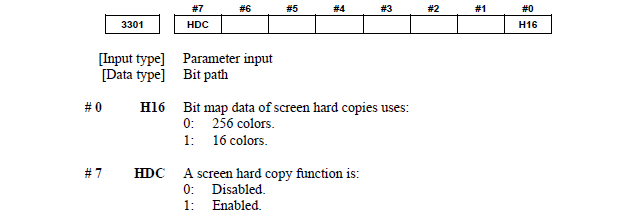
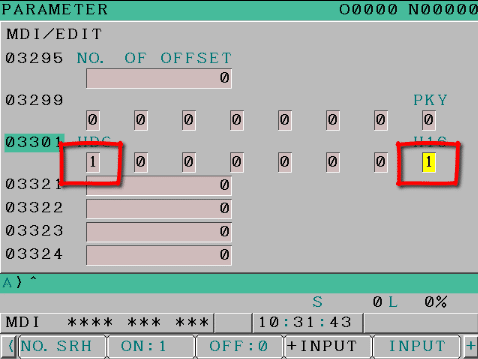
Just press and hold the shift key to send a screen shot to the memory stick. You get a nice picture of the screen on your USB.

Very small memory by today’s standards, but on a two axis lathe you must be a greedy bastard if you run out.

Sorry Mr Femco

I like this machine, honestly I hadn’t heard of it before but they have been around for years.

The Femco brand from South Korea has been around for a long time, it stand for Far Eastern Machinery Company. So now I get it. Sorry for the cheap joke but if you read my stuff you’ll know about my infantile sense of humour.

I couldn’t resist a cheap joke. Maybe he’ll change the name to something more catchy like Anusol CNC, just and idea.

Thanks for reading. Love you all.

Femco


  • February 13, 2024
  • David
  • 4

Takisawa TC 200

Category : News

Takisawa Training

Recently got to work in Skegness which is a bit of an awkward drive for me. Anyway it was well worth the drive to get to work on a Takisawa CNC Lathe. This little beast has a very compact footprint. I recon it was once used with a Robot because it  had a power operated door. It’s a Takisawa Tc 200

You might even be able to buy this one

This is not the actual one but you could buy this and many others machines at:

Thanks for letting me use your picture.

Electric Door

Can’t really see the point of this. It’s like these people you see with their automatically closing boot on the car, I mean for fuck sake can’t people even close their own boot on the car.

They look at you like you live in a fuckin cave, closing your boot or tailgate using your hands no less.

Anyway I recon if you have one of these you need to be really careful when it closes as you might literally be running round like a headless chicken or even worse imagine if you trapped your bollocks in it.

Come on now did you really think I’d put up a picture of a headless chicken?

Oh and at the end of the program the door opens up for you. Mmm that’s quite impressive. Well apart from the fact that it scared the shit out of me at the end of every program especially as I’m usually leaning on the door.

This machine has some strange quirks, but then don’t they all. Setting tools is a bit convoluted but I can see the logic.

To start with the turret must be at zero return when the arm is brought down.

Takisawa

It will then jump to the correct offset and display the geometry screen, very nice. It’s a pain in the arse if you forget as it will still work but it doesn’t record the offset. Having put you through all this rigmarole it still lets you index the turret with the arm down and in any position so be careful.

I shouldn’t moan too much because it does have some common sense built in.

1 The feed-rate is locked in at 30mm per minute when you use the jog button and the rapid is restricted to minimum (phew).

2 Also it zeros out the wear when you measure a tool. Oh and smart arses note not all controls do this.

We did actually rapid the tool into the arm and it stopped, fuckin scary. Still at least I now know what happens when you do it (Thanks Dave). That’s not me by the way, no one ever gets to call me Dave.

This machine has driven tools on every other station and it’s got a C Axis. Always good fun.

Alignment Takisawa TC 200

I can’t stress how important it is to get your machine properly aligned if you have driven tools.

If you have a beat up old two axis CNC lathe you can bump and bash the fuck out of it and then just stuff a bit of packing under the tools to get them on centre. You’ll probably get away with it. Oh but don’t try and drill any small holes or any tapping as you will have more chance of passing a camel through the eye of a needle to quote a famous book.

Anyway on this machine the service engineer did a great job and got everything nicely aligned and on centre for us.

Takisawa Training

This Takisawa machine has a twelve station turret which is great but…… and there often is one. It means that the tools are very close together so you always have to watch your back.

What I mean is the tool next to the one your using might decide to hit the chuck if you are too close.

Some Mazak lathes are like this so beware.

NO OVERHANGING JAWS

Even though everyone does it, your chuck jaws should never protrude past the full diameter of the chuck body. If you don’t believe me read the manual, you know it’s that book you used under one leg of the machine to stop it rocking in G96.

Takisawa

Takisawa Jaw Overhang

Never is it more important than when you have a turret where tool positions are as tight as a duck arse.

So you have been warned. With hard jaws I admit it is almost impossible. I would recommend taking everything out of the turret that you are not using.

Also keep an eye on the tool measurement arm as protruding chuck jaws can clobber that too.

Takisawa Training WorkShift

Setting the work-shift is fuckin weird on this machine but I think all Takisawa use the same method. Lets say different not weird and less of the foul language please David.

Firstly make sure the turret is at zero return in X and Z (it won’t work otherwise). This machine loves its zero return position.

Then throw this switch.

Takisawa

The WorkShift screen will automatically show. Simply move any tool to where you want Z zero and bash this button….. Job done.

Takisawa

Tailstock

This particular machine has a tailstock.

A tailstock for the uninitiated is a big lump of metal at the end of the machine that gets in the way. It also has a pedal that makes it do things and you keep getting it mixed up when you open the chuck. Not sure what they are for but try to ignore it.

Well Actually They are Useful For long Jobs

This one is not like a drag n drop type thing. What you do is  you move it to where you want to use it, bolt it down, and then program M10 and M11 to move the quill in and out.

It’s always a good idea on this style of machine to program an M11 or whatever is needed to bring back the quill at the very beginning of the program. This is to make sure, if the quill is left out for some reason, the first thing it does is pull it back in.

There are loads of things I don’t know about CNC machines, I mean I don’t say this to people I’m about to train but every time I train some one on a machine I see a few more things I didn’t know.

I Didn’t Know This

This machine has to have an M22 at the beginning of the program otherwise it won’t run. I put out a post on LinkedIn to see if anyone could give me more info on it but to no avail.

I hate having to say to people “well it’s just got to be there”

Takisawa

Anyway if you know more about it then message me.

Fast Spindle

Oh yea the Max spindle speed on this CNC Lathe is 5000 rpm. Fuckin hell…. I only got to 3500 and bottled out so I’m not even sure if that’s right.

C Axis

The C axis can be engaged by this button from this little panel or M76 in MDI.

These two buttons will jog or rapid the C axis depending on which mode you select (jog or rapid)

You can start your driven tools from here too, how nice.

This Takisawa CNC Lathe has a  potentiometer for starting the spindles manually so you don’t program the speed in MDI before you manually start the spindle. The potentiometer still doubles as a spindle percentage override but you actually switch the override on and off with this.

Main spindle works on the same principle. Press this button to turn potentiometer to spindle percentage override.

You need to be careful you don’t start the spindle too fast and potentially shit your pants when it’s way too fast.

Takisawa Training

On a CNC Lathe when you want the chuck to grip a part on the inside you normally have a key switch but on this machine it’s a bit different. First of all you issue M89 in MDI you then press cycle start and the M89 sits there laughing at you. The cycle light stays on. It’s ok don’t panic I know you are thinking “shall I ring my mum”.

No no it’s ok your in safe hands just hit RESET, depress the chuck pedal a couple of times and that’s it. You did it. Strange but true.

When you know, you know.

The Japanese Are Very Clever People

Although sometimes I don’t follow Japanese logic. This CNC Lathe seems very safety conscious. It would have got on great with my mum.

Also they did invent the “Karate Kid” which is a great movie.

Slow rapid with the door open.

Only index turret with the door closed

Can’t start spindle with the door open.

Hand-wheel holy fuckin shit what is going on there

(0.01 increment is the maximum yes you heard it 0.01)

I mean if you superglued the turret to a fuckin slug it would move faster. It effectively makes the hand-wheel a useless piece of shit. Sorry Mr Takisawa but someone needs to tell you. Even my mother would have got pissed off with the speed of this thing.

CNC Lathe

These guys should try out a Haas, 1mm increment on the hand wheel shit off a stick springs to mind.

Now that’s what I call a goddam hand-wheel it’s the Lamborghini of hand wheels and you need to be over 18 with a clean drivers licence to use it.

Takisawa Training

Anyway enough said. Once you turn this baby (that’s the guy in the circle below).

Takisawa

Suddenly the machine takes a massive snort of pure cocaine.

“Health and safety, piss off, let’s get on with this”

  1. Spindle works with door open
  2. Turret indexes
  3. Jog works
  4. Rapid works at 25%
  5. You can even run a program with the door open!!!
  6. MDI works

Suddenly this Takisawa machine got it’s kit off. The parents are away for the weekend let’s party.

Sadly no improvement on that sad fuckin hand-wheel (still in intensive care).

Takisawa Tool Pre-setter

I had to adjust the tool pre-setter on this machine.

The best method I have found to do this is to first of all get the geometry for a turning tool absolutely bang on using cut and measure.

Test this by cutting a part. So this offset is correct, you now need to store this figure in an unused offset. You could even write it down, for the younger readers this is done with a pen. Take a picture if you want, no not of your arse or a dick-pic, one of the offset.

Now you have a target figure when you measure the tool with the tool pre-setter you know what it should be.

CNC Lathe

Takisawa Fanuc 21i uses these four parameters

XP is the outer X
XM is the inner X
ZP is the left hand Z
ZM is the right hand Z

Suck It n See

Best thing to do here is adjust the figure you fancy by a large amount say 10mm then check tool and see what it does to the offset. From then on you will know exactly how the adjustment works.

Don’t forget this number is and integer. Ha ha got you there, be honest you had to google that. Never mind thicko.

This means no decimal point.

-141496

Is actually -141.496 so just miss out the decimal point.

Oh and sorry for calling you thicko. You’ll just have to live with it.

Above All Have Fun

It is definitely worth spending time getting to know how to do this. It will definitely be useful in the future and the more you do it the better you get.

Drink More Kids It’s  Good for You

It’s a bit like drinking, even Ozzy Osbourne got pissed on a few pints when he was really young but look at him now. Listen up kids this could be you.

All in all it was a great trip to Skegness these guys gave me a great place to stay and as much tea n coffee as I could drink as well as mince pies.

Oh yea forgot to mention they even gave me accomodation in the form of a log cabin. Much too posh for me but I did remember to clean the place before leaving.

Didn’t really see much of Skegness but I hear it’s nice. Stick of rock would’ve been nice.


  • February 6, 2024
  • David
  • 0

Copy Paste Fanuc CNC Control

Tags : G Code Video

Category : Useful Stuff

On or Offsite CNC Training
Tel: David 07834 858 407

Copy Paste Fanuc CNC Control, here is a video that shows you how to copy and paste on a Fanuc control.

Call 07834 858 407

Copy Paste Fanuc CNC Control, in the video I am using the Fanuc 18i on a big vertical lathe but most Fanuc controls are the same or very similar.

“Read More”

Posts pagination

Previous 1 … 40 41 42 … 58 Next

Onsite Training

  • Onsite Training Enquiry
  • Onsite Training
  • Sliding Head and Swiss CNC Training

Careers in CNC

View all current vacancies in CNC

Click here

Classroom Courses

  • Beginners Operator (Milling)
  • Beginners Operator (Turning)
  • Setter Operator (Milling)
  • Setter Operator (Turning)
  • Advance Mill Turn
  • Edgecam
  • Learn to Program (Milling)
  • Learn to Program (Turning)
  • CNC Router Training
  • Bespoke Training Individual
  • Macro Programming

Apply Now

  • Beginners Operator (Turning)
  • Beginners CNC (Milling)
  • Apply Advanced Mill Turn
  • Apply Edgecam Turning
  • Apply Edgecam Milling
  • Setter Operator (Milling)
  • Setter Operator (Turning)
  • Learn to Program (Milling)
  • Learn to Program (Turning)
  • Macro Programming

Call David: 07834 858 407

Calendar

May 2026
M T W T F S S
 123
45678910
11121314151617
18192021222324
25262728293031
« Apr    

Recent Posts

  • Star Mechatronics Search Paths
  • Star SB-20R Parts Counter Screen Fanuc Oi TF
  • Edgecam Training
  • CNC Programming Using CAD/CAM
  • Sub Contract CNC programming UK – Edgecam Experts

Pages

  • Advance Mill Turn
  • All Posts
  • Apply Advanced Mill Turn
  • Apply Advanced Turn (Mill Turn)
  • Apply Beginners
  • Apply Beginners CNC Milling
  • Apply Beginners CNC Milling TEST
  • Apply Beginners CNC Router
  • Apply Beginners CNC Turning
  • Apply Classroom Training
  • Apply Edgecam Milling
  • Apply Edgecam Milling & Turning
  • Apply Edgecam Turning
  • Apply Learn to Program CNC Milling
  • Apply Learn To Program CNC Turn
  • Apply Macro Programming
  • Apply Now Setter Operator Milling
  • Apply Now Weekend Beginners CNC Turning
  • Apply Now Weekend Beginners Milling
  • Apply Now Weekend Learn to Program Milling
  • Apply Now Weekend Learn to Program Turning
  • Apply Now Weekend Setter Operator Milling
  • Apply Now Weekend Setter Operator Turning
  • Apply Programming
  • Apply Setter Operator
  • Apply Setter Operator Turning
  • Apply Weekend Training Courses
  • Beginners CNC Lathe Operator
  • Beginners CNC Machining (Turning and Milling)
  • Beginners CNC Milling
  • Beginners CNC Milling Operator Course
  • Beginners CNC Turning
  • Beginners Courses
  • Beginners Registration
  • Business Partners
  • Cart
  • Cart
  • Case Studies CNC Training Centre
  • Checkout
  • Checkout
  • Classroom Courses
  • Classroom Courses
  • CNC Classroom Training
  • CNC Macro Programming Training Courses
  • CNC Operator Setter (Turning)
  • CNC Productivity Improvements
  • CNC Programmer Training
  • CNC Programming
    • Training
  • CNC Programming on and offsite
  • CNC Router Training
  • CNC Setter Operator Milling
  • CNC Setter Operator Training (Milling)
  • CNC Setter Operator Turning
  • CNC Training Courses Basic Milling
  • CNC Training Courses Basic Turning
  • CNC Training Onsite and Offsite
  • CNC Turnkey Solutions
  • Contact
  • Course Details
  • Course Details Beginners CNC Lathe Operator
  • Course Details Beginners CNC Milling Operator
  • Course Details CNC Milling Setter Operator
  • Course Details CNC Turning Setter Operator
  • Course Details Learn to Program (Milling)
  • Course Details Learn to Program (Turning)
  • Course Details Macro Programming
  • Courses
  • Dashboard
  • Edgecam
  • Edgecam
  • Edgecam Training (Leicestershire UK)
  • Fanuc Training
  • Home
  • Home
  • Instructor Registration
  • Learn CNC Programming Individual Training
  • Macro Programming
  • Mazak Mazatrol Training
  • My account
  • News
  • Olstral Registration
  • Online CNC Milling on Zoom for Beginners
  • Online CNC Programming on Zoom (Milling)
  • Online CNC Programming on Zoom (Turning)
  • Online CNC Turning on Zoom for Beginners
  • Online Training Enquiry
  • Online Training with Zoom
  • Onsite Training
  • Onsite Training Enquiry
  • Program CNC Milling
  • Program CNC Turning
  • Refund Policy
  • Shop
  • Siemens Training Basic Programming To Shopmill
  • Sliding Head and Swiss CNC Training
  • Student Registration
  • The Edgecam
  • The Haas
  • The Heidenhain
  • The News
  • The Programming
  • The Tips N Tricks
  • The Turning
  • The Video Tutorials
  • Toshiba Tosnuc CNC Training
  • Trainee Register
  • Training Onsite
  • turnkey
  • Tutor Certificate
  • Tutor Login
  • What is the best CNC Training Course for me?
  • Work Holding ** Fixture Design/Manufacture
  • Operator Training All Machines and Controls
  • Careers in CNC

Archives

  • April 2026
  • March 2026
  • February 2026
  • January 2026
  • December 2025
  • November 2025
  • October 2025
  • June 2025
  • April 2025
  • March 2025
  • February 2025
  • January 2025
  • December 2024
  • November 2024
  • September 2024
  • July 2024
  • June 2024
  • March 2024
  • February 2024
  • December 2023
  • November 2023
  • October 2023
  • June 2023
  • May 2023
  • April 2023
  • March 2023
  • February 2023
  • January 2023
  • December 2022
  • November 2022
  • October 2022
  • August 2022
  • July 2022
  • June 2022
  • May 2022
  • March 2022
  • February 2022
  • December 2021

© Copyright 2024. All Rights Reserved