

G00 Straight Line Fanuc Parameter 1401
Category : Fanuc Parameters
Messing With Parameters Can Be Fatal!!!!!
Unlock Programs Fanuc Parameter, first of all you’ll need to go to the setting screen and change the parameter write box to a 1.
G00 Straight Line Fanuc Parameter 1401
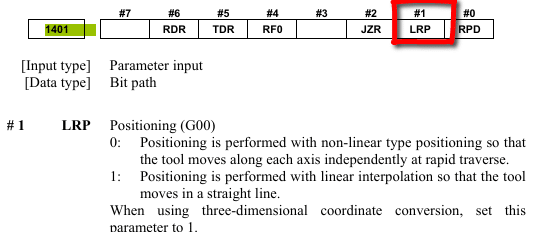
When you program a rapid move on a Fanuc control which ever axis has the shortest path will arrive first. This will give a dogleg type move and may result in a collision.
Changing parameter 1401 Bit 1 will make this into a straight line move.
Parameters You may Need to Change
3401 Calculator Type Decimal Point or Integer
3402 G Codes that are Active When The machine is Turned On
6005 Allows the Use of Local Subroutines (Newer Control)
6050-6059 Allows you to Call a 9000 series Program with a G Code
6080-6089 Allows you to Call a 9000 series Program with An M Code
5003 Retain Geometry when you Press Reset
3291 Wear Offset requires Key to Adjust
8134 3453 allows you to use ,R and ,C (Rads and Chamfers)
That’s it away you go.
Oh just one other thing before you go off and cripple your machine forever.

Do yourself a favour take a picture of the screen before you change a parameter. If you aint got a camera then you must have a piece of paper.
Even better back everything up.
Thanks
If you have been affected by any of the issues in this post or need CNC Counselling then contact me.
If you want to learn to program CNC Milling Machines
Look no further Contact CNC Training Centre