Category Archives: Fanuc Parameters

M Code Alias Fanuc Parameter 6080

Messing With Parameters Can Be Fatal!!!!!

M Code Alias Fanuc Parameter, to change this parameter you need to go to the setting screen in MDI.

Put a 1 in the parameter write box.

Today children we are going to change the parameter that allows us to alias an M code to a 9000 series program.

Bits n Bobs

When counting the bits in parameters you count from right to left so the first one on the right is bit 0 or sometimes known as #0

Alias What the fuck is an Alias?

Well to use an alias you have to know a bit about Macro programming

Now if you don’t it’s probably going to be best if you go and play with your Xbox.

But if you do know about macro (and you don’t need to know much).

It means you can write a program to do something and use your own special M code to call it.

M Code Alias Fanuc Parameter

So for example if you were to put 384 in parameter 6080.

If you program M384 you would be directed to program 9020.

Parameter 6080 is thecode for program 9020
Parameter 6081 is thecode for program 9021
Parameter 6082 is the code for program 9022
Parameter 6083 is the M code for program 9023
Parameter 6084 is the M code for program 9024
Parameter 6085 is the M code for program 9025
Parameter 6086 is the M code for program 9026
Parameter 6087 is the M code for program 9027
Parameter 6088 is thecode for program 9028
Parameter 6089 is the M code for program 9029

Now program 9020 could look like this.

09020 (M384 Macro)
M9 (Turn off Coolant)
M5 (Stop Spindle)
G40 (Cancel Cutter Compensation)
G80 (Cancel Canned Cycle)
G90 (Absolute)
G0 G53 X0 (Return X To Tool change Position)
G53 Z0 (Return Z To Tool Change Position)
(Any Old Shit You Want to Do)
M99

M Code Alias Fanuc Parameter

So when you program M384 in MDI or from a program it jumps into program 9020 and does all that lot.

M Code Alias Fanuc Parameter

There is just no end to the stuff you can do with this. I’m not telling you anymore cos I need the work and probably couldn’t handle the competition.

That’s it away you go.

Parameters You may Need to Change

1300 Stops over travel alarm

1401 Cutting Feed-Rate 0% stops movement of machine

3101 Clear Screen

3102 Unlock Programs

3203 Clear MDI Screen

3204 Unlock Program 9000 to 9999 and 8000 to 8999 to Edit

3291 Wear Offset requires Key to Adjust

3401 Calculator Type Decimal Point or Integer

3402 G Codes that are Active When The machine is Turned On

5003 Retain Geometry when you Press Reset

6005 Allows the Use of Local Subroutines (Newer Control)

6050-6059  Allows you to Call a 9000 series Program with a G Code

6080-6089 Allows you to Call a 9000 series Program with An M Code

8134 3453 allows you to use ,R and ,C (Rads and Chamfers)

Oh Yea By The Way

If you want to learn macro programming look no further.

Oh just one other thing before you go off and cripple your machine forever.

Do yourself a favor take a picture of the screen before you change a parameter. If you aint got a camera then you must have a piece of paper.

Even better back everything up.

Thanks

If you have been affected by any of the issues in this post or need CNC Counselling then contact me.

If you want to learn to program CNC Milling Machines

Look no further Contact CNC Training Centre


Clear MDI Screen Fanuc Parameter 3203

Messing With Parameters Can Be Fatal!!!!!

Clear MDI Screen Fanuc Parameter, to change this parameters you need to go to the setting screen in MDI. Now put a 1 in the parameter write box.

Today we are going to change the parameter that allows us to clear the MDI screen by pressing reset.

Fanuc Parameter
Parameter 03203 Bit 7 (MCL)

If you set parameter 3203 BIT 7 (MCL) to a 1 then when you press reset your MDI screen will be cleared.


Clear MDI Screen Fanuc Parameter

Clear MDI Screen Fanuc Parameter 3203

Ever thought how annoying it is when you want to do a tool change and you type

T01 M6;
M30;

Then later you want to do the same thing but the MDI screen has cleared. Help is at hand.

This was me in fancy dress when i was younger.

Anyway all you need to do is tinker with bit 7 (#7)

That means it will either clear when you press reset or just stay there waiting for you.

Please note you will need an M30 at the end of your MDI program for this to work.

Bits n Bobs

When counting the bits in parameters you count from right to left so the first one on the right is bit 0 or sometimes known as #0

Parameters You may Need to Change

1300 Stops over travel alarm

1401 Cutting Feed-Rate 0% stops movement of machine

3101 Clear Screen

3203 Clear MDI Screen

3204 Unlock Program 9000 to 9999 and 8000 to 8999 to Edit

3291 Wear Offset requires Key to Adjust

3401 Calculator Type Decimal Point or Integer

3402 G Codes that are Active When The machine is Turned On

5003 Retain Geometry when you Press Reset

6005 Allows the Use of Local Subroutines (Newer Control)

6050-6059  Allows you to Call a 9000 series Program with a G Code

6080-6089 Allows you to Call a 9000 series Program with An M Code

8134 3453 allows you to use ,R and ,C (Rads and Chamfers)

That’s it away you go.

Visit this guy if you don’t have a manual.

Oh just one other thing before you go off and cripple your machine forever.

Do yourself a favor take a picture of the screen before you change a parameter. If you aint got a camera then you must have a piece of paper.

Even better back everything up.

Thanks

If you have been affected by any of the issues in this post or need CNC Counselling then contact me.

Or call us

If you want to learn to program CNC Milling Machines

Look no further Contact CNC Training Centre


Rads and Chamfers Fanuc Parameters 8134 3453

Category : Fanuc Parameters

Messing With Parameters Can Be Fatal!!!!!

To change parameters you need to go to the setting screen in MDI. Now put a 1 in the parameter write box.

Bits n Bobs

When counting the bits in parameters you count from right to left so the first one on the right is bit 0 or sometimes known as #0

Rads and Chamfers Fanuc Parameters. Today we are going to change the parameters that make ,R and ,C work this means you can program point to point and just stuff in some rads and chamfers as an afterthought.

Here’s an article on it if you want to use it

Fanuc have two ways of putting on chamfers and rads and that’s where the confusion lies.

Just do as you’re told (oh and read this article)

So in Parameter 3453 you can set bit #0 (CRD) to a 1 this allows what Fanuc call “Direct Drawing Inputs” to work.

Rads and Chamfers Fanuc Parameters

Also in Parameter 8134 set bit #2 (CCR) to a o

Rads and Chamfers Fanuc Parameters

Now don’t let the description put you off this turns on the crappy one that uses R and R- and K and K-. This only works on 90 degree corners and unless you won Mastermind I wouldn’t even try to understand how it works.


Trust me it’s shit

Anyway Rads and Chamfers Fanuc Parameters 8134 3453 all sorted!

Isn’t it just great to sort out those annoying problems?

If you want to learn about rads and chamfers on a Sinumeric Siemens 840D read this

Other Parameters Of Interest

1300 Stops over travel alarm

1401 Cutting Feed-Rate 0% stops movement of machine

3101 Clear Screen

3102 Unlock Programs

3203 Clear MDI Screen

3204 Unlock Program 9000 to 9999 and 8000 to 8999 to Edit

3291 Wear Offset requires Key to Adjust

3401 Calculator Type Decimal Point or Integer

3402 G Codes that are Active When The machine is Turned On

5003 Retain Geometry when you Press Reset

6005 Allows the Use of Local Subroutines (Newer Control)

6050-6059  Allows you to Call a 9000 series Program with a G Code

6080-6089 Allows you to Call a 9000 series Program with An M Code

8134 3453 allows you to use ,R and ,C (Rads and Chamfers)

That’s it away you go.

Oh just one other thing before you go off and cripple your machine forever.

Do yourself a favour take a picture of the screen before you change a parameter.

If you aint got a camera then you must have a piece of paper.

Even better back everything up.

Thanks

If you have been affected by any of the issues in this post or need CNC Counselling then contact me.

Or call us

If you want to learn to program CNC Milling Machines

Look no further Contact CNC Training Centre


Display 9000 Programs Fanuc Parameter 3202

Category : Fanuc Parameters

Messing With Parameters Can Be Fatal!!!!!

Not display 9000 Programs Fanuc Parameter, first of all you’ll need to go to the setting screen and change the parameter write box to a 1.

Programs 9000 to 9999 are used for things like probing, tool-change and all sorts of other important things.

You are allowed to use them but proceed with caution.

Beware and above all back em up ASAP.

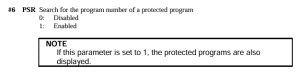
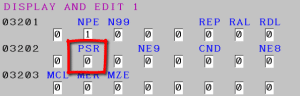
These programs will not be displayed when this parameter PSR #6 is a 1

3202 if #6 PSR is 1 then programs 9000 to 9999 can’t be displayed.

As per Manual

Don’t forget to lock the 9000 programs back up and turn off parameter write switch.

Bits n Bobs

When counting the bits in parameters you count from right to left so the first one on the right is bit 0 or sometimes known as #0

Display Programs Fanuc Parameter 3202

You might want to use this yourself if you have a sub program in your machine that you use quite often and you don’t want anyone messing with it.

Other Parameters You may Want to Change


1300 Stops over travel alarm

1401 Cutting Feed-Rate 0% stops movement of machine

3101 Clear Screen

3203 Clear MDI Screen

3204 Unlock Program 9000 to 9999 and 8000 to 8999 to Edit

3291 Wear Offset requires Key to Adjust

3401 Calculator Type Decimal Point or Integer

3402 G Codes that are Active When The machine is Turned On

5003 Retain Geometry when you Press Reset

6005 Allows the Use of Local Subroutines (Newer Control)

6050-6059  Allows you to Call a 9000 series Program with a G Code

6080-6089 Allows you to Call a 9000 series Program with An M Code

8134 3453 allows you to use ,R and ,C (Rads and Chamfers)

That’s it away you go.

Oh just one other thing before you go off and cripple your machine forever.

Do yourself a favour take a picture of the screen before you change a parameter. If you aint got a camera then you must have a piece of paper.

Even better back everything up.

Thanks

If you have been affected by any of the issues in this post or need CNC Counselling then contact me.

If you want to learn to program CNC Milling Machines

Look no further Contact CNC Training Centre


Unlock Programs Fanuc Parameter 3202

Messing With Parameters Can Be Fatal!!!!!

Unlock Programs Fanuc Parameter, first of all you’ll need to go to the setting screen and change the parameter write box to a 1.

Programs 9000 to 9999 are used for things like probing, tool-change and all sorts of other important things.

So beware back em up ASAP.

These programs along with 8000 to 8999 can be locked so no one can mess with them.

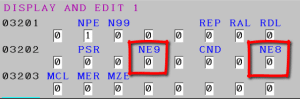
3202 if NE9 is 1 then programs 9000 to 9999 can’t be deleted or edited.

3202 if NE8 is 1 then programs 8000 to 8999 can’t be deleted or edited.

Once you’ve finished don’t forget to lock the 9000 programs back up and turn off that parameter write switch.

Unlock Programs Fanuc Parameter 3202

So you might want to use this yourself if you have a sub program in your machine that you use quite often and you don’t want anyone messing with it.

Don’t forget when this parameter is set to stop you editing the programs  you can’t read them in and out either. That means you can’t back them up until you unlock them.

Parameters You may Need to Change


1300 Stops over travel alarm

1401 Cutting Feed-Rate 0% stops movement of machine

3101 Clear Screen

3203 Clear MDI Screen

3204 Unlock Program 9000 to 9999 and 8000 to 8999 to Edit

3291 Wear Offset requires Key to Adjust

3401 Calculator Type Decimal Point or Integer

3402 G Codes that are Active When The machine is Turned On

5003 Retain Geometry when you Press Reset

6005 Allows the Use of Local Subroutines (Newer Control)

6050-6059  Allows you to Call a 9000 series Program with a G Code

6080-6089 Allows you to Call a 9000 series Program with An M Code

8134 3453 allows you to use ,R and ,C (Rads and Chamfers)

That’s it away you go.

Oh just one other thing before you go off and cripple your machine forever.

Do yourself a favour take a picture of the screen before you change a parameter. If you aint got a camera then you must have a piece of paper.

Even better back everything up.

Thanks

If you have been affected by any of the issues in this post or need CNC Counselling then contact me.

If you want to learn to program CNC Milling Machines

Look no further Contact CNC Training Centre


Careers in CNC

View all current vacancies in CNC

Click here

Call David: 07834 858 407