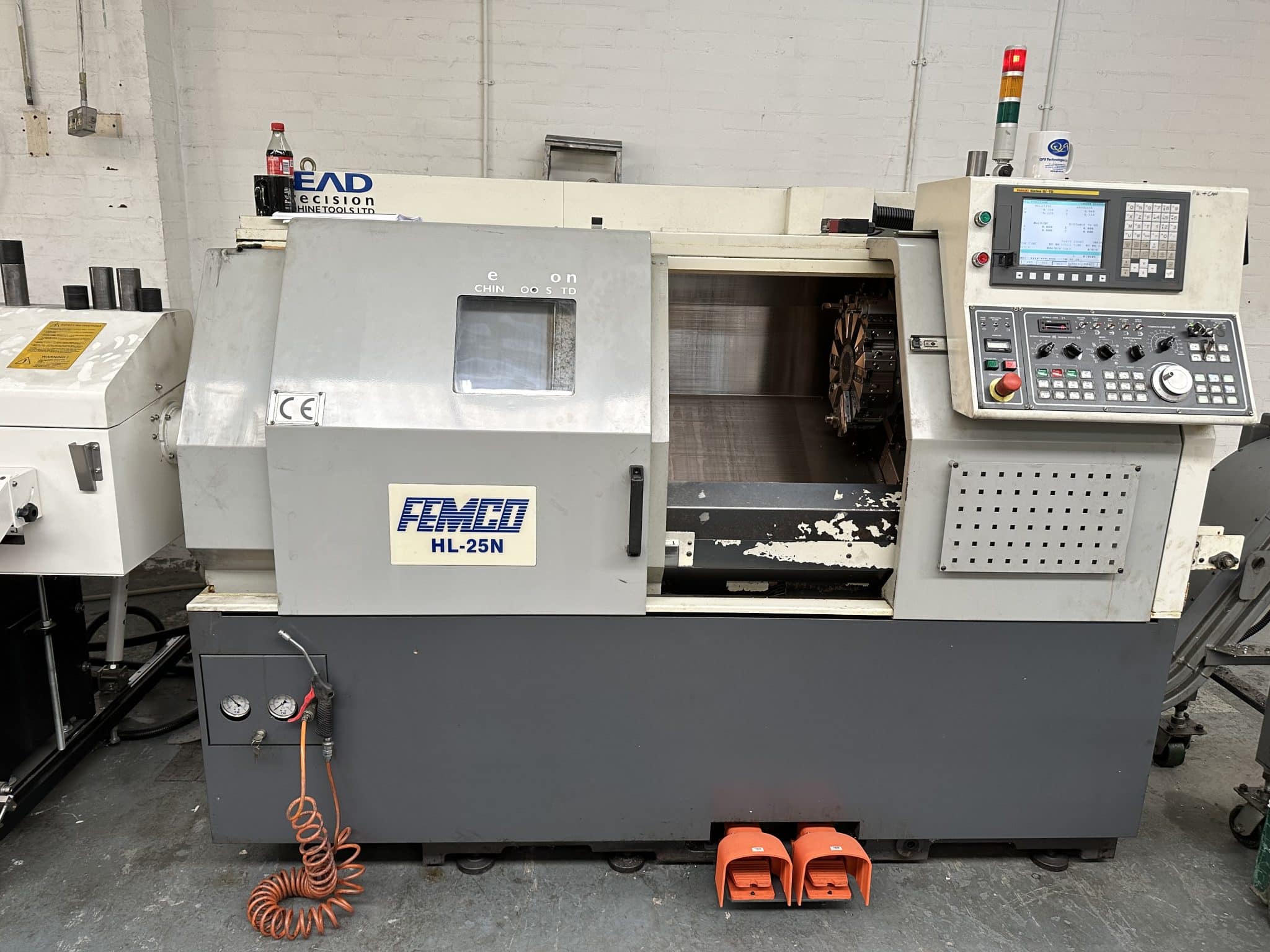
A Femco, yes they let me out again, tagged but free to train my victims.
Sooo, today I got to work on a Femco not to be confused with products designed to keep your private parts smelling nice n fresh
As is often the case there were no machine manuals. This is not like pissing into the wind no no this is pissing into a fuckin sunami with a water infection (tsunami so that’s how you spell it).
This one is the Femco HL 25N, Fanuc Oi TD control with macro, whoopee.
Nice simple two axis lathe, absolute doddle.
No Manuals, No Doddle
Anyway I couldn’t get it to bloody budge. It was like trying to get a teenager out of bed at 6am in the morning (fuck you).
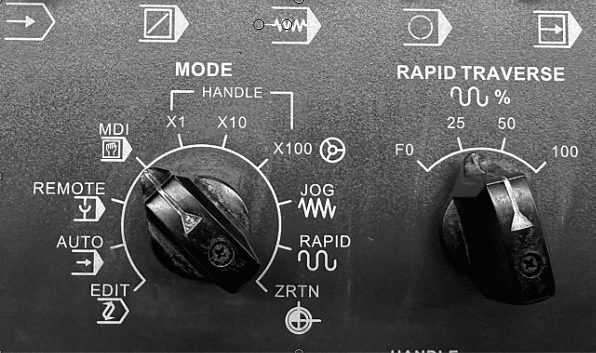
It does everything except for Zero return, Jog and Rapid mm mmm. Apart from that it was great.
Definitely won’t be able to bull-shit my way out of this one.
Hand-wheel, check.
Spindle on off, check.
Index turret, check.
Coolant on, check.
Light on, check.
I suppose I could tell the customer that it was a demo machine and never designed to actually move around. Only thing is they want to make stuff on it so that idea wouldn’t work.
Anyway there was only one way to do this, we decided to take a very logical precise and scientific way to solve this problem of the lazy turret.
Yes you guessed it, we just keep pressing buttons until something happened. Pushing buttons on the fly as it were.
Low and behold it worked.
Is it me or is it outright blindingly shit-faced obvious????
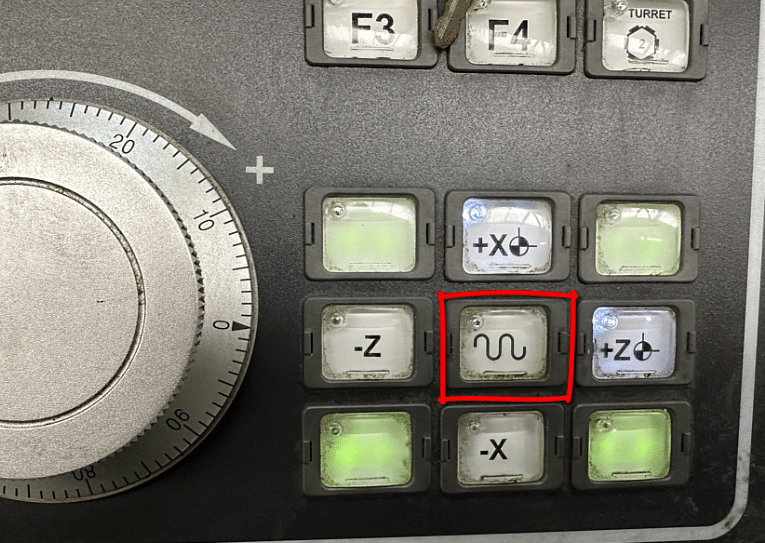
Please tell me no. You hold the button in the middle as you press the outside buttons. Works for RAPID, JOG and ZERO RETURN
Normally that button is to change the moves to rapid. Not here, this machine has a rapid mode.
In fact everything on this dial except for the first four selections.
Sooo. That meant we could zero return the machine, phew.
Only an hour into the training and we’re just moving the machine around. But honestly how would I fuckin know. I mean without a manual and unless you worked one of these beasts before you couldn’t know.
Talking of bull-shit it’s something I never do, I mean yes I do bull-shit everybody does especially after 14 pints of lager.
No I mean when I’m training people. I’ve learnt it’s best to say sorry I don’t know. Then afterwards I will spend hours making sure I do know.
Some trainers, and you know who you are, will gloss over shit that they don’t know and it’s easy to do but in the long run it’s not good for anyone.
Anyway It’s Not Over Yet.
Next challenge. Tool arm, all I want to do is get it to rear it’s ugly head. It wont come out.
Tool Measurement arm please reveal yourself. Honestly this one is bonkers.
Have you guessed it yet?
You hold down the ready button (that’s the one that switches the machine on) and simultaneously press P SET and voila. It appears.
You just can’t know this stuff without a manual. Can’t blame the customer as he bought this machine at auction so it’s always a bit of a lottery.
Anyway once all the, shall we say “teething problems”, are out the way it’s time to have some fun.
Femco Let the Madness Begin
Measuring Tools
With the measuring arm down you can do what you want. So if you wanna smash or just bend this thing it’s dead easy.
Rapid Full Wack TICK
High Feed TICK
Index Turret TICK
Index Turret Whilst Checking a Tool TICK (I love this one)
Feed as fast as you want whilst checking tools TICK
Anyway that to one side at least it clears the the wear offset each time you check the tool. Which in my experience does not happen on all machines so beware.
It also jumps to the correct offset and displays the offset table. Some machines don’t even do this. Means you can measure the wrong tool mmm.
The tools on this turret are very close together. I mean it’s got 12 tools and they are crammed in. It’s like trying to breakdance in a Mumbai shopping centre on Black Friday. So extra care is needed.
Watch Out For
Tools hitting the chuck when proving out. Don’t forget that the tool you are watching has one sat right underneath it just waiting to kick you square on in the knackers when it clobbers the chuck.
Also when using tool measurement arm you can hit it underneath with the tool below. Now this shouldn’t happen but if you have some unusual weird tool that sticks out too far, it can hit.
When Measuring Tools Do This
Drive the tool in the opposite direction first. That way if you are in Rapid mode by mistake you will spot it.
It is also important to measure the tools at the same feed-rate. This ensures constant measurement and consistent figures.
Mazaks and the like just fix the feedrate when the arm is down so you automatically get the same feedrate regardless of dial position.
When I grow up (which people say I never will) I’m going to make a tool measurement arm that does all these things so you can’t trash it.
Always keep the rapid down real low when setting up a CNC machine.
No more than this.
Femco, It’s A Cool Dude
There is a massive difference between machines with regards to what they allow when using a measurement arm.
Like parents some let the kids do what the fuck they want and when they visit you your house gets trashed and you have to pretend it’s all ok (bastards).
This Femco HL 25N CNC Lathe is the “Hippy” of machine tools. It’s the laissez-faire, the “don’t give a flying fuck”, the “stay on ice man” machine tool. Anyway you get it.
It doesn’t have any respect for your welfare or your wallet. You wanna break this thing go ahead and do it, it’s cool with that.
Joking Aside
This Femco is a second hand machine bought at auction and I recon it’s half decent. The previous owner obviously looked after it. No battle scars, no dents in guards or cracked windscreens. Sounds lovely too, spindle nice n quiet and no axis noises.
Once you get your head around the weird protocol shit it’s easy. Just remember to press the buttons in the right order.
Setting the work offset is easy too. Call out the tool MDI (lay off the reset button) then press this
The work-shift screen will manifest.
Then press this.
You will see the work-shift figure update.
Job done just don’t press reset otherwise tool offset may be dumped and everything goes tits-up.
This Femco has Fanuc Oi TD
It has Macro which is great, oh and somebody changed the brackets around. Just give me a minute I’ll explain.
On a Fanuc control like this it’s a pain the the arse to put comments into your programs. That’s because you have to press a million combinations of buttons to get to the curved brackets.
Anyway by changing a parameter you can make the square brackets into curved brackets making it all much easier.
Fanuc buried access to these extra buttons for brackets and commas and stuff like that deep in the bowels of the control. Without a metal detector and a private investigator they remain the fourth secret of Fatima. For my thick readers this link will save you googling this.
Graphics
Well what can I say. If this was 1980 I’d be saying these graphics are cool. Unfortunately they are in a time lock a nice way of saying crap.
Anyway I’ve done this rant a million times so I’m not repeating it as much as I know you want me to.
If you have graphics then I will always recommend their use.
If you make a daft typo type error or like me you forget that in G74 the Q value can’t have a decimal point. Then the graphics will show an alarm.
Before
G74 Z-25. Q5. F.2:
After
G74 Z-25. Q5000 F.2:
This is way better than finding it at the prove-out stage.
You have to use machine lock and just run the program in memory as normal. Machine lock switch has to be pulled out to work (to stop you accidentally turning it on)
Use the feed potentiometer to speed up and slow down the graphics.
Be careful using graphics with machine lock. Zero return the machine BEFORE and AFTER use of machine lock.
Setting Speed In Manual on Femco
No need to program in MDI all you need is this.
Just be careful to leave it turned down or you may get a nasty shock when you start the spindle.
Turret
The turret is absolute “dog shit off a stick fast” so be careful. You can’t select individual tools so it’s a bit like playing roulette trying to get the tool you want. But at least it’s bloody quick. Shame there is no cuddly toy prize when you select the right tool with your first press of the button.
Inches “Oh my God”
For you Americans just say millimetres “holy goddam shit”.
The previous owner had this machine in inches. Now you can’t just program G21 it’s a common misconception. The G20 or G21 are just a check. It will just alarm out if you are in inches and you program G21 to mm. It’s like a shot across the bows, a warning.
Sorry suckers it’s a setting. Oh and to completely fuck you over it does not convert the program. It merely changes the decimal place. Useless. Other controls are available that convert. Never mind.
So just switch your machine into MDI and press away.
Oh just one thing before you go…… the machine must be at zero return when you do this.
What No G53, Femco Horror
Cover me in bat shite, this is bad. No fuckin goddam G53. Life can’t go on. Fanuc you guessed it, it’s a bloody option, can you believe it.
I use G53 all the time for sending the turret to a tool change position.
Now if you never heard of G53 don’t worry it’s OK. I got your back, yes you are a bit stupid you should know that but just take the time to read this, it’s for a machining centre but it works just as well on a lathe.
Honestly my friend it beats the shit out of G28.
Chamfer and Rads The Saving Grace
So glad it can add chamfers and rads to a program. Just add R3. to the end of a block and you will get a 3mm radius.
It works with C3. too to give you a 3mm 45 degree chamfer.
Important to note that the way this machine is set up you don’t use a comma.
G1 Z-20. F.1 X10. R3.
Femco Sample code
T0303(ROUGH TURN) M1
G0 X50. Z0 G96 S200 M3
G1 X-1.6 F.1 G0X52.Z1.
T0300 G0 X200. Z200.
M30
This is the way it was programmed before and I don’t really like it because that T0300 is a tool change and if you altered the tool number you might forget to change that one too BANG BANG
That’s why I’d sooner have G53.
The jury’s out, send me your suggestions.
Femco HL 25N Editing Fanuc Oi TD
This Fanuc Oi TD control has copy and paste and it’s easy to copy a program (if a bit convoluted) and there is a USB for saving programs.
Just press and hold the shift key to send a screen shot to the memory stick. You get a nice picture of the screen on your USB.
Very small memory by today’s standards, but on a two axis lathe you must be a greedy bastard if you run out.
Sorry Mr Femco
I like this machine, honestly I hadn’t heard of it before but they have been around for years.
The Femco brand from South Korea has been around for a long time, it stand for Far Eastern Machinery Company. So now I get it. Sorry for the cheap joke but if you read my stuff you’ll know about my infantile sense of humour.
I couldn’t resist a cheap joke. Maybe he’ll change the name to something more catchy like Anusol CNC, just and idea.