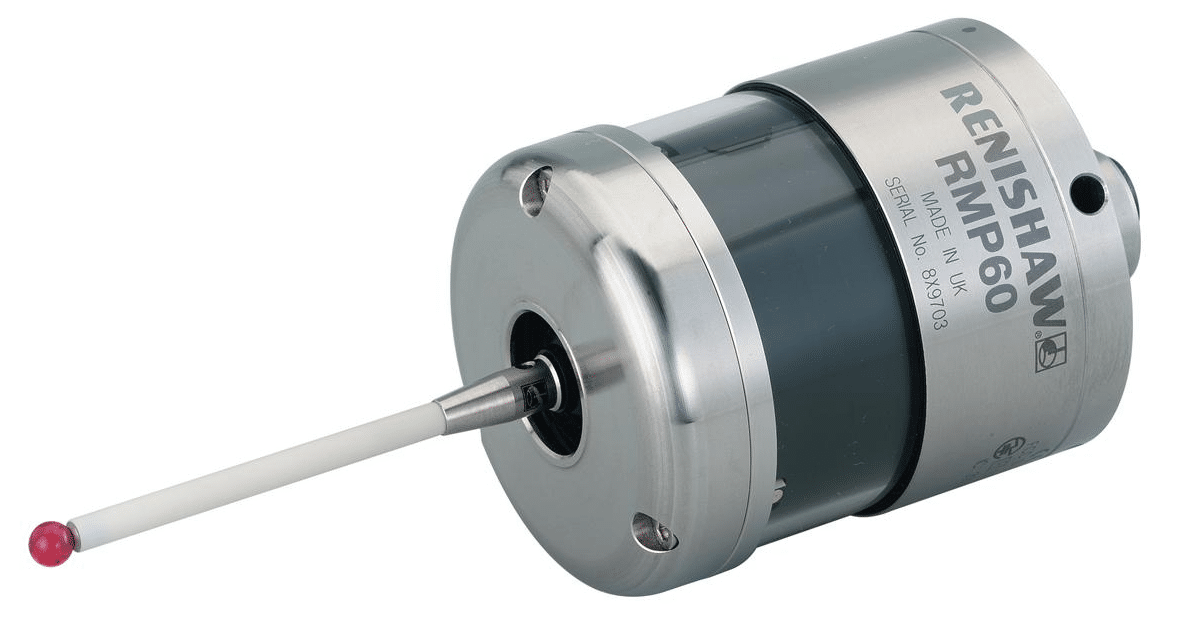
CNC touch probe, everyone should have an electronic probe on their machine but I’m sure there are lots of reasons why you don’t have one.
The purpose of this article is to show some of the alternatives to buying an expensive touch probe systems. Please note if you can afford to one of these systems I’ll guarantee you’ll soon get your money back with increased productivity.
Probe Shaming
Now I know there is a lot of this about but if you’re guilty then I’m sorry but you deserve all you get.
What the fuck is he on about?
Yes you know who you are. Yes you, you with that gorgeous once shiny Renishaw CNC touch probe left to get covered in grease, shit and swarf in the back of your machining centre.
Sorry just remembered I must change my pants.
Yes I regularly come across this when training people onsite on their CNC Machines. The machine originally came with a touch probe and maybe got used a few times but then no one bothered to properly learn how to use it.
Most likely the bloke who knew how to use it left to buy a chip shop in Bradford.
As a result it was ignored for three years and left in the tool carousel to generally decay and rot.
Please sort it there’s a lot of cash sat there in the tool carousel oh and don’t leave your dirty pants lying around either.
Avoid People Who Own Wobblers
Maybe you call them wibblers never mind the fuckin semantics they are basically a piece of shit on a stick. Bin them.
Now I’m an old school engineer I remember the old halcyon days of engineering. I have the missing limbs, teeth and scars to prove it.
Pissing in the coolant tank on nights.
Using your finger as a work steady on a long component.
Dividing heads.
Clocking in cards.
Smearing engineers blue onto machine handles in the tea break.
Making star shapes in sheet steel to throw up and stick in the ceiling of the sheet metal training department at Rolls Royce.
Cleaning my Norton motorbike parts in the degreasing tanks.
Listen to David “it’s time to let this shit go”
You might be stuck in a 1950’s time warp but it’s costing you money.
Wibbler Wobbler
When you use a Wibbler there are so many things to go wrong. Get the speed wrong and it will kick off at the wrong point. If you don’t engage it far enough down the part it will probably snap off.
Maybe if you practice for long enough you can set a datum in less than an hour.
Why am I telling you this?
Just bin it and spend just a small amount of cash on some of the more up to date solutions.
Buy a full blown probing system such as Renishaw, Blum, M & H.
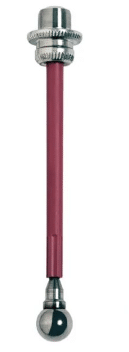
Buy a 3d taster type tool, loads to chose from.
Electronic edge finder
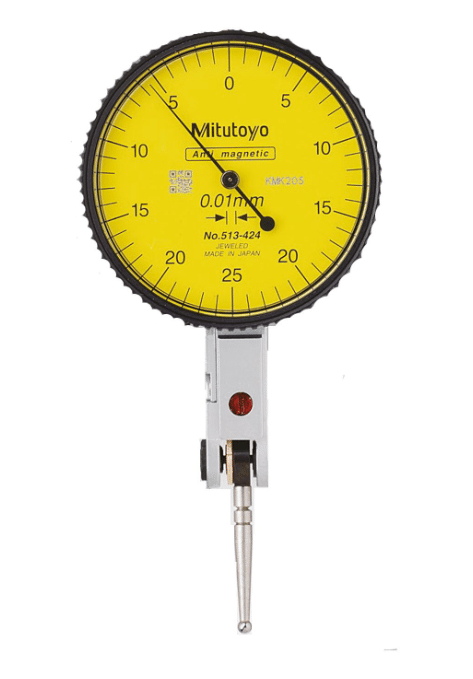
DTI clock
Cutting tool
Rip off a bit of paper
In that order the costs are thousands, hundreds, tens and units.
Advantages of a CNC touch probe
There are many, you can quickly set your part datum must be the most obvious one.
If the probe software is already on your machine then your machine will most likely have all the routines built in. These will quickly set your datums on corners, centre of bosses and bores and in slots. All at the press of a soft key.
Also you can quickly set your indexer or fourth axis to zero. Not least of all you get to measure shit. That means anything you make on the machine you can check all it’s sizes without taking it out of the machine.
If you can be arsed to learn Macro programming then the possibilities are endless. This will allow you to write your own routines and cycles.
For example within a program you can measure a part and update it’s offsets ready for the next run. Most probes will have simple cycles with this built in.
Don’t forget to download the apps for your probing system, the Renishaw one is amazing it just guides you through what you want to set or measure and then gives you the cycle. It even tells you where the results are stored (Variables)
You can even use your touch probe to recognise fixtures or parts. It’s quite common to drill holes in strategic places on fixtures so that the probe can detect the presence of the hole and thus identify the fixture.
Justification
It is a good idea to justify the cost of your probing system, do this by timing setups and things without the probe.
Soooooo, when you bust it which inevitably you will. Look back at this justification and you’ll see that the cheapest option is to buy a new one I guarantee.
3D Taster or similar
I love these, I mean I really do. I actually sleep with one by my side I love it so much, oh and it doesn’t fart all night like the fuckin dog did.
When these devises are on the edge of your part you don’t have to allow for the diameter of the ball, it’s all done for you. Magic how do they do that?
It is worth spending time setting these up getting them calibrated to length and running really true.
Once you clocked it all up, take some time here to get it spot on. Oh yea and keep it in the same holder so it’s always calibrated true and to length.
Don’t leave it in the machine although the new ones are waterproof.
This means that by simply zeroing your display in X Y or Z you can use it to accurately inspect your parts.
Make sure to get the long stilus this means you are always well away from the body when your using it. Worst scenario is you break a stylus. It’s like cleaning up dog shit, best done at arms length.
Easy to Break
Handle with care because these devices are easy to break. Don’t don’t don’t leave it lying on the bench. It will roll off and fuckin break so put it on a proper stand.
These are not too expensive to buy. You can even make your own from an old porridge box and the cardboard centre of a toilet roll.
Here’s one I made earlier not quite fully developed but you can see where I’m going with this one.
Learn Macro Programming
By the sounds of this you’d think I ran a training school. Really how cynical of you.
But really if you can write macros you can do loads of clever stuff with 3D tasters by getting them to write into system parameters n stuff. Once you are in position you can automatically write into your work offsets.
Electronic Edge Finder
Still way better than a wobbler these devices pick up the edge of your part and sound a buzzer as well as lighting up. They don’t work on all machines as a circuit needs to be completed.
Again there are loads of macros you can write to make life easier.
Not good on Z as the ball does not compress.
DTI Gauge (Old School)
This method was traditionally used on jig borers and is very accurate if a tenth clock is used.
Very time consuming and fiddly but it is accurate.
Use your dti gauge to find the edge of the part. Simply rotate the clock on the edge of your part and zero the dial. Now zero your position display on your machine.
Hold a slip gauge on the edge you just zeroed. Now clock the slip on the opposite side.
Half this final figure on you REL display to get to the edge of your part.
Cutting Tool (Endmill)
Touch your endmill on the edge of your part, best to have it rotating.
Move over the radius of the tool. Some controls even have a screen with icons to do this.
Make sure you know the exact diameter of your endmill and make sure it is running true.
Safety First CNC touch probe
If you use an electronic probe there are no safety issues unless your boss thumps you for breaking it.
Some of the methods decribed above are quite tricky to do with the machine doors closed so be very careful.
Never try to override any doorlocks or safety mechanisms on your CNC Machine
When I say Large CNC Machine I probably don’t mean this big but you can do some serious big shit with this machine.
Anyway you might be thinking “big machine” slow rapid, slow tool change etc etc. Well unless it’s really new and very expensive, it probably will be. But read on….
The Small Machine
So, you have a small machine brand new and its tool change time is just 2 seconds and the rapid is the speed of light.
Now let’s just imagine you are making a part that’s fairly simple and uses 12 tools. Your cycle time is 5 minutes.
You finish machining it and check it all over. You give it to the “I just chewed a wasp” inspector and he passes it off first time.
Then you dance around the workshop like a schoolboy who just scored his first goal throwing your arms in the air.
Ok lets run one. Five minutes later. “Oh it needs another and another…”
So now you have to stay at the machine constantly loading it.
You then wet your pants cos there’s not even enough time to get to the toilet and back while it’s running. Not to mention the repetitive strain injury from loading a part every 5 minutes.
Large CNC Machines
On a large CNC machine you can load your part in several different presentations. In the example below the holes are being chamfered on the bottom of the part in a separate setup. Saves all that messy deburring.
You may think large machines are just for large components. Well yes that’s true. But…… I may have to disagree and ask you to think again.
On a large CNC machine you can fill the table with repeat parts. Or you could have many presentations of the same part.
The cube above could be machined on all the faces in one setup.
So this might take a while to setup but once it’s running you would get a complete part after each run. Not to mention that you could nip home and feed the cat and still have time to make the boss a cup of tea before it’s done.
Never Never Ever
Why would you never set a part up in the middle of the machine table?
Come on answer I don’t have all day.
So the boss comes along and says “Jack, stop that job you are doing and do this one instead”
Must have happened to you before.
So which one of the above machines do you want now?
Yes you got it. The one with the part set up to the right.
Easy because you can leave it all completely setup and when the boss finally wants that job it’s just a matter of calling the program and hitting the CYCLE START
You get to leave loads of shit on the machining table all ready to run.
Leave It Set
You might just leave your machine permanently with two vices and a table chuck all ready to use with the datums set. Oh and did I mention the fourth axis that’s just sat there in case I’m ever arsed to use it?
I Despair (Beam me up Scotty)
I was training this bloke recently and he said “oh we like to break every job down completely when we’ve finished, we take all the tools out and clean the machine”
Anyway I just smiled and muttered some profanity he couldn’t hear.
If you read this and think it’s you then it’s definitely not, I just don’t want any trouble ok.
I will agree on one thing only and that’s the cleaning of the machine.
Now look at this There’s Hope
Imagine your machine is big enough to get all these parts on the table.
When you pick up your spot drill it’s going to do some serious work (88 holes).
Eight parts in total..
Lets say the tool change time chip to chip on this big old machine is 10 seconds well now it’s actually 1.25 seconds because it did 8 parts.
10/8 = 1.25
Now what about the slow rapid. OK but it’s not really moving very far either is it?
If you watch this video you’ll see that where the spot drill ends the drill takes over in the same place. (No wasted movement).
With a bit of work you could make the rapid moves on this part even shorter.
Now imagine this on every tool. The cycle time saving is breathtaking. And when it’s home-time, load the machine up and let it run. Oh by the way if the next day you have a pile of scrap and a grands worth of busted tools it wasn’t my idea ok.
What if You only Have a small One
Little and often is the approach.
If you saw some kind of sexual innuendo here then I think you need to grow up. This is serious engineering shit and I don’t want your filthy infantile minds on my website.
Wave Form Milling as it’s called by Edgecam is a way of using a large depth of cut but small engagement.
You can remove metal very fast by this method and you don’t need a lot of power. Other CAM systems have a similar things but with a different names.
If you have large threads to produce rather than tapping, where you need a lots of power, consider thread milling.
https://www.youtube.com/watch?v=cDTpeLyU2TQ
Add an Indexer or Fourth Axis
Adding an indexer or fourth axis to your small CNC Machine will increase capacity and allow you to rotate parts to get to areas that otherwise you couldn’t reach.
Here’s a free advert for someone
New Small CNC Machine
Pros Small CNC Machine
Shiny.
Very fast rapid and tool-change.
Small Footprint.
Quick to set up.
High rpm.
Lowish cost.
Warranty.
Cons Small CNC Machine
Not many tools.
Often low power.
Not much space to set up extra parts.
Large CNC Machine (Maybe Old and not too Expensive)
Pros Large CNC Machine
Make big bits.
You can leave jobs set-up cos there’s room for other work.
Make loads of bits at once, multi op or multi loading.
Tend to have a lot more tool pockets.
Usually more power.
You can leave vices and chucks permanently on the table.
Represent very good value second hand.
Machine runs much longer unmanned so you can get on with re-thatching your cottage roof.
Before you go home you can load up a full set of parts and let it run.
One tool does loads of work.
Great for “just in time” delivery because one complete part comes off per cycle.
Cost shit loads of money new (more than a six bed-roomed mansion where I live)
Slow rapid moves.
Slow tool changes and pallet change times.
Can cost an arm and a leg to maintain, find a good independent specialist to fix it.
Can be very dirty.
Have you got room for it?
Watch the max RPM isn’t too slow.
More Things to do if You Have a Small One
Consider a fourth axis with a cube on it.
With a four sided cube you can increase your table capacity by an awful lot. Oh and you get to work on the side of the part too.
Manual pallet changers can be very cost effective.
Again these give you loads of extra capacity. They are actually cheaper than you think.
Conclusion
Let’s imagine you have £90,000 to spend on a machine. You could buy a new super fast small machine.
But, if you got the room you could buy a big second hand machine.
The new one will have a warranty and will be very fast. But what about the “old banger”. Well if you have room and you know someone who can fix it if it goes wrong …….
Thanks
If you feel you have been affected by any of the issues raised in this post or need CNC Counselling then contact me.
If you want to learn to program CNC Milling Machines
Productivity Improvements, how to achieve massive reductions in set-up times and implement methods that will save you money year on year.
Is all this 5s stuff just a posh person telling us to tidy up
A few years back I worked for a company that supplied pressure control systems to the oil and gas industry.
It all started off with some very expensive Inconel components that were getting scrapped at an alarming rate. It’s a very long story and I won’t bore you with the minutiae.
To cut the story short, the part was on a large WFL Machine Tool and me and a team of engineers studied the production method for several weeks before coming up with the answers.
There was a list a mile long of all the bullshit reasons why these parts were going wrong. The real answers were something totally different.
Machine needed properly re-aligning.
Chucks, steady and tailstock needed full re-furb.
Machine was being crashed on a regular basis.
In fact the machine had been bumped more times than I’ve had hot dinners.
Now I’ve not had that many hot dinners because my mother was always playing bingo and couldn’t be arsed to cook.
Mind you she could sling a mean bag of crisps at you. Oh, and her pot noodles were amazing, so long as we didn’t mind boiling the kettle and adding the water yourself.
We considered this a small price to pay for an otherwise nutritious meal.
The ultimate gourmet meal
Anyway, we asked the operators, in a meeting, how many times the machine was bumped.
“Oh, not many” one said.
“But how many? once a day, once a week, once a month?”
“No, no probably not even every month” was the final answer.
Not happy with this we monitored the machine and kept a log of everything. Turns out the machine was getting minor shunts all day long and bigger bumps at least every week.
We analysed all these “little accidents” and almost eliminated the problem through good training and creating an open honest environment where the operators felt comfortable, honestly reporting any problems or collisions.
Virtually no bumps a bit like these posh women you see with Range Rovers. I mean you see these Range Rovers on TOP GEAR and they can climb up a fuckin mountain upside down at 90mph.
Range Rover
As soon as you meet one of these on a country road guess what? They won’t even move over into a puddle for fear of wetting the fuckin tyres.
These bastards should be banned from the roads a complete waste of space.
Envious Me?
Oh, and don’t think I’m envious. I don’t want to drive around in a luxury vehicle with every creature comfort known to man at my fingertips. With beautiful leather interior. Music softly tinkling from the top-quality, high end, hi fi system.
0 to 60 quicker than a fuckin snow leopard. Room for the family and two dogs. Quietly purring through the rolling countryside.
Fuck off I’ll stick with my car thanks very much. It has everything I need. A bit of a tidy up that’s all it needs.
More Ranting
Just one more rant. Near where I live I often have to pass through quite a long country road that’s only really big enough for one car in most places.
How many people can’t fuckin reverse? I mean holy bleedin shit these cars are bristling with technology, cameras, sensors, cruise missiles air conditioned seats. But guess what, the bloke forgot to equip it with a fuckin reverse gear.
They’ll never back up. They sit there looking at you like you just pissed on their sodding Weetabix.
One very dark night, me and this bloke, had to get out of our cars and actually walk behind this car to help the “person” reverse.
If I’d paid 80,000 quid for a car I’d want it to take to the air and fly over oncoming vehicles. This one just didn’t like going backwards.
Anyway, Here’s What We Did
What I’m about to tell you wouldn’t be practical in most companies. You must bear in mind that the cycle time for these parts was around eight hours and the material cost alone would constitute a decent lottery win.
In The Event Of A Collision
We machined a ready programmed standard test piece on the machine.
We fully inspected it with the machine probing system.
It was checked on a CMM (Coordinate Measuring Machine)
We were really nice to the perpetrator (it’s so nice that you crashed the machine and gave us this opportunity to learn)
If the test piece was OK at the machine probe stage we would allow production to continue. This was a calculated risk but obviously if it went on to fail the next stage we would stop production immediately.
This job had some massive ups and downs but the final outcome was a massive success. It all came down to basic engineering principles. By carefully scrutinising the problem and systematically eliminating each error we got good parts.
Making permanent changes to working practices so that the lessons learnt could be implemented all over the company.
The guys I worked with are still in touch and we earned massive respect for one another.
Qualifications Don’t Matter and It’s Clever to Swear
At the beginning when one of them told me he was a black belt I kept thinking he would beat the shit out of me if I upset him.
Turns out it was a six-sigma black belt and this is quite benign in terms of physical fighting skills.
Everyone who knows me knows that my approach is very pragmatic, that means no bullshit to the less articulate.
I would say we need to do this this and this and they would say oh you mean “an overtly incontinent productivity enlightened anal bleaching scheme”
I would agree pretending I knew exactly what they meant.
Unfortunately, I don’t usually have a name for what I want to do.
You know the sort of thing; an untidy workshop I call a fuckin shithole.
They’d say “Dave it needs 5s”.
I said “you’ll need about sixty S’s to clean up this horrendous crap hole”.
“Oh, and please don’t call me Dave, it’s David”
We concluded between us that what they had learnt in college and on courses gaining black belts and all sorts of stuff. I had picked up from working in the real world with real people. Putting the two together made a winning combination.
I still can’t see the point in a black belt unless you get to beat the fuck out of someone but I think maybe I’ve seen too many Bond movies.
CNC Productivity Improvements:
I am sure you have noticed that more time is lost during set-up time than at any other time in your component life-cycle.
Very often a company will ask me to look at the cycle times on components. On close inspection most of their time is lost during the set-up process.
Wall Clock
I may be in a company training programmers or machine training but I will poke my nose into everything and maybe suggest that we take a look at CNC Productivity Improvements.
Small Batch High Quality Parts
Manufacturing in the UK is tending to move towards lower batch quantity due to lower production costs aboard. We are moving more and more towards low volume high quality parts. This means CNC Productivity Improvements are desperately needed because a much larger percentage of manufacturing time is concentrated on set-up times.
If you are only making six parts you can almost guarantee that the CNC set up time will be where all the time is used up. If you can’t guarantee repeat business then I am afraid it gets worse.
Unfortunately we rarely have the situation as it was in the past. We could spend months refining production methods to recoup it all when the job went into production for five years CNC set up time is then amortised.
The problem is when we are setting our CNC Machine we tend to lose control. Predicted CNC set-up times are not met or even worse we didn’t know what they were in the first place.
Productivity Improvements, Do this now:
Keep good records of every job you ever do.
Knowledge is power but with history we can improve and build.
You may have already machined a very similar part so this will make quoting easy.
Great we set a job on our CNC Machine really fast and in no time, we get a part into inspection.
Just need a pass off and away we go.
Inspector “everything is ok just a few minor adjustments”
A week later we are still adjusting.
So, what went wrong?
My guess would be:
Job not carefully planned.
CNC Prove-out method is wrong.
Incorrect and inaccurate CNC tool setting.
Not using a systematic approach.
Poor feedback from quality department who might not understand exactly how the job was machined.
The CNC set-up needs to be systematic and accurate.
Each step of the way should be correct and complete before the next stage is undertaken.
This can be taught and it can be written into an SOP (Standard Operating Procedure) which can be used again and again.
It sounds perverse but I would be suspicious of anyone who sets a job on a CNC Machine too quickly.
Productivity Improvements, No Blame
My pet hate (and you have loads when you get to my age) is when supervisors blame setter operators for long set-up times. “You’re the boss mate what are you doing about it?”
If you ask someone, and I frequently do, why it took so long to set a job. They can never tell you. But if you look carefully you will find that most of the wasted time is looking for things.
Also it’s not actually his fault so you just fired him when you should have resigned yourself.
I want to bolt down my vice.
Question: Where is the vice? Answer: Under the bench somewhere. (5 minutes)
Question: Is it clean? Answer: No fuckin way I even had to stone some dents out of the bottom. (10 minutes)
Question: Where are all the rags? Answer: Dunno mate go and get some more form the stores. (6 minutes)
Question: We got any tee nuts? Answer: Go and ask Tom (15 minutes), oh and he told me about his cats hernia operation and gender transformation.
Question: These tee nuts don’t fit, do you know what size they are? Answer: Go and ask Tom (10 minutes)
Question: Is this vice far enough over on the table? Answer: No the machine just over travelled you’ll have to start again. (10 minutes)
This took nearly an hour. Then the boss comes down and really pisses you off cos he wants to know when the job will be off the machine.
I am doing my absolute best but everything is going wrong. The thing is this is all the bosses fault. Now I have an attitude problem to boot.
What you should do:
Plan the job meticulously and get everyone involved.
Do a proper contract review to check you have everything, and I will repeat, everything that you need. (Real attention to detail is needed here.)
If you have CAD CAM check everything in the virtual world. Carefull check CNC Code for obvious errors. Mistakes found at this stage cost little nothing to put right.
Now if you are the one running this show. Make sure everything is at the side of the machine before your customer starts work. Your customer being the guy who actually makes something (the machinist).
Check condition of everything, look for damage or anything that slows things down.
Don’t leave anything to chance, think that you do not want him to leave the duck board unless he needs food, drink or a piss. Make him a cup of tea if he wants one and don’t forget the biscuits.
Work area. You already know this stuff. Everything should be in a clearly marked place. Only what is needed, no more. Definitely not a full set of Allen keys just the ones you need and I bet it’s a maximum of four.
As a supervisor or manager you are an overhead, a non producer. If you take the dents out of the vice the machine doesn’t stop. When the setter operator does this the machine probably will be stopped.
Try and get the machine operator involved in the preparation but make sure his machine never stops.
Maybe you need to check out the story of “King Rollo’s Playroom” before he made some CNC Productivity Improvements.
I will summarise it for those who were deprived of this story as children. In a nut shell he refuses to tidy his play room but then finds that he is tripping over his toys and breaking them and he can’t find anything either.
Not to spoil the story but King Rollo gets really fucked off about breaking his toys and does the right thing and tidies up.
Sound familiar this could be you folks.
Everyone Wants To Work in a Clean Workshop
If you came to my front door in muddy boots and I open the door and you see a pristine immaculate house carpeted in white. What do you do?
You remove your shoes.
But if I opened the door and the house was filthy with straw on the floor you would probably want to wipe your feet on the way out.
The point of this is that if you’re environment is immaculate, anyone coming into it will feel obliged to conform and if they don’t they will stick out like your dirty boot mark on my white carpet.
Productivity Improvements Investment
Companies very often invest hundreds of thousands in machine tools but refuse to buy more than one 19mm spanner when the operators keep losing them. Daft, you might say, but I bet you are already thinking of similar things in your own company.
The beauty of an outsider doing all this for you (and I would say that) is that they can do all the things you wanted to do but never seem to have the time.
Typically, this is how The CNC Training Centre would help you with CNC Productivity Improvements.
Spend some time (a few days) observing what you do.
This may involve videos and loads of listening to the machinists at the “coal face”.
Meet with managers, supervisors and setter operators and discuss findings. Then you will tell me what we are going to do.
Yes, that’s right you pay me so that you can tell me how you would improve things.
It is true most of the ideas will come from you and the guys on the machine will say “I have been trying to get them to do that for years”
A report is prepared outlining a plan to move forward.
Identify training needs and relevant CNC training courses and CNC programming courses if needed.
Implement CNC machining process improvement
Then we do it.
Most of this study involves little or no loss to production. The cost of implementing the productivity improvements is usually very low as most of the savings are in very practical low-cost areas.
Productivity Improvement Costs may include:
CNC training courses and CNC programming courses.
Applications Engineering time to implement CNC Productivity Improvements.
Purchasing of inexpensive items such as spanners, clamps, Allen keys etc.
You can expect to see massive reductions in set-up times but above all these times are consistent and predictable. This allows accurate future job costing.
Please note no Range Rover drivers were injured or maimed in the production of this article.
I hope this article inspires you to improve things and get more productive.