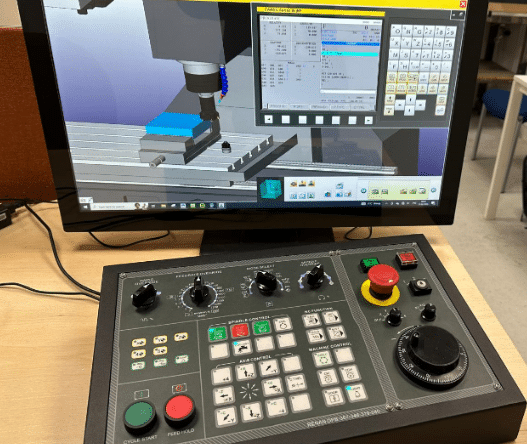
Clear MDI Screen Fanuc Parameter 3203

Messing With Parameters Can Be Fatal!!!!!

Clear MDI Screen Fanuc Parameter, to change this parameters you need to go to the setting screen in MDI. Now put a 1 in the parameter write box.

Today we are going to change the parameter that allows us to clear the MDI screen by pressing reset.

Fanuc Parameter
Parameter 03203 Bit 7 (MCL)

If you set parameter 3203 BIT 7 (MCL) to a 1 then when you press reset your MDI screen will be cleared.


Clear MDI Screen Fanuc Parameter

Clear MDI Screen Fanuc Parameter 3203

Ever thought how annoying it is when you want to do a tool change and you type

T01 M6;
M30;

Then later you want to do the same thing but the MDI screen has cleared. Help is at hand.

This was me in fancy dress when i was younger.

Anyway all you need to do is tinker with bit 7 (#7)

That means it will either clear when you press reset or just stay there waiting for you.

Please note you will need an M30 at the end of your MDI program for this to work.

Bits n Bobs

When counting the bits in parameters you count from right to left so the first one on the right is bit 0 or sometimes known as #0

Parameters You may Need to Change

1300 Stops over travel alarm

1401 Cutting Feed-Rate 0% stops movement of machine

3101 Clear Screen

3203 Clear MDI Screen

3204 Unlock Program 9000 to 9999 and 8000 to 8999 to Edit

3291 Wear Offset requires Key to Adjust

3401 Calculator Type Decimal Point or Integer

3402 G Codes that are Active When The machine is Turned On

5003 Retain Geometry when you Press Reset

6005 Allows the Use of Local Subroutines (Newer Control)

6050-6059  Allows you to Call a 9000 series Program with a G Code

6080-6089 Allows you to Call a 9000 series Program with An M Code

8134 3453 allows you to use ,R and ,C (Rads and Chamfers)

That’s it away you go.

Visit this guy if you don’t have a manual.

Oh just one other thing before you go off and cripple your machine forever.

Do yourself a favor take a picture of the screen before you change a parameter. If you aint got a camera then you must have a piece of paper.

Even better back everything up.

Thanks

If you have been affected by any of the issues in this post or need CNC Counselling then contact me.

Or call us

If you want to learn to program CNC Milling Machines

Look no further Contact CNC Training Centre


Display 9000 Programs Fanuc Parameter 3202

Category : Fanuc Parameters

Messing With Parameters Can Be Fatal!!!!!

Not display 9000 Programs Fanuc Parameter, first of all you’ll need to go to the setting screen and change the parameter write box to a 1.

Programs 9000 to 9999 are used for things like probing, tool-change and all sorts of other important things.

You are allowed to use them but proceed with caution.

Beware and above all back em up ASAP.

These programs will not be displayed when this parameter PSR #6 is a 1

3202 if #6 PSR is 1 then programs 9000 to 9999 can’t be displayed.

As per Manual

Don’t forget to lock the 9000 programs back up and turn off parameter write switch.

Bits n Bobs

When counting the bits in parameters you count from right to left so the first one on the right is bit 0 or sometimes known as #0

Display Programs Fanuc Parameter 3202

You might want to use this yourself if you have a sub program in your machine that you use quite often and you don’t want anyone messing with it.

Other Parameters You may Want to Change


1300 Stops over travel alarm

1401 Cutting Feed-Rate 0% stops movement of machine

3101 Clear Screen

3203 Clear MDI Screen

3204 Unlock Program 9000 to 9999 and 8000 to 8999 to Edit

3291 Wear Offset requires Key to Adjust

3401 Calculator Type Decimal Point or Integer

3402 G Codes that are Active When The machine is Turned On

5003 Retain Geometry when you Press Reset

6005 Allows the Use of Local Subroutines (Newer Control)

6050-6059  Allows you to Call a 9000 series Program with a G Code

6080-6089 Allows you to Call a 9000 series Program with An M Code

8134 3453 allows you to use ,R and ,C (Rads and Chamfers)

That’s it away you go.

Oh just one other thing before you go off and cripple your machine forever.

Do yourself a favour take a picture of the screen before you change a parameter. If you aint got a camera then you must have a piece of paper.

Even better back everything up.

Thanks

If you have been affected by any of the issues in this post or need CNC Counselling then contact me.

If you want to learn to program CNC Milling Machines

Look no further Contact CNC Training Centre


Unlock Programs Fanuc Parameter 3202

Messing With Parameters Can Be Fatal!!!!!

Unlock Programs Fanuc Parameter, first of all you’ll need to go to the setting screen and change the parameter write box to a 1.

Programs 9000 to 9999 are used for things like probing, tool-change and all sorts of other important things.

So beware back em up ASAP.

These programs along with 8000 to 8999 can be locked so no one can mess with them.

3202 if NE9 is 1 then programs 9000 to 9999 can’t be deleted or edited.

3202 if NE8 is 1 then programs 8000 to 8999 can’t be deleted or edited.

Once you’ve finished don’t forget to lock the 9000 programs back up and turn off that parameter write switch.

Unlock Programs Fanuc Parameter 3202

So you might want to use this yourself if you have a sub program in your machine that you use quite often and you don’t want anyone messing with it.

Don’t forget when this parameter is set to stop you editing the programs  you can’t read them in and out either. That means you can’t back them up until you unlock them.

Parameters You may Need to Change


1300 Stops over travel alarm

1401 Cutting Feed-Rate 0% stops movement of machine

3101 Clear Screen

3203 Clear MDI Screen

3204 Unlock Program 9000 to 9999 and 8000 to 8999 to Edit

3291 Wear Offset requires Key to Adjust

3401 Calculator Type Decimal Point or Integer

3402 G Codes that are Active When The machine is Turned On

5003 Retain Geometry when you Press Reset

6005 Allows the Use of Local Subroutines (Newer Control)

6050-6059  Allows you to Call a 9000 series Program with a G Code

6080-6089 Allows you to Call a 9000 series Program with An M Code

8134 3453 allows you to use ,R and ,C (Rads and Chamfers)

That’s it away you go.

Oh just one other thing before you go off and cripple your machine forever.

Do yourself a favour take a picture of the screen before you change a parameter. If you aint got a camera then you must have a piece of paper.

Even better back everything up.

Thanks

If you have been affected by any of the issues in this post or need CNC Counselling then contact me.

If you want to learn to program CNC Milling Machines

Look no further Contact CNC Training Centre


Precision CNC Machining

Category : CNC Machining

Precision CNC Machining Services – High-Quality, Accurate, and Reliable

Call David: 07834 858 407

We specialise in precision CNC machining, delivering high-quality components with tight tolerances and superior surface finishes.

With our advanced CNC milling and turning capabilities—including up to five-axis machining—we provide precise, efficient, and repeatable results for industries that demand excellence.

CNC Machining Services

Why Choose Our Precision CNC Machining Services?

•Advanced Equipment: We utilise state-of-the-art CNC machines, including multi-axis milling and turning centres, to produce intricate and complex parts with exceptional accuracy.

Precision CNC Machining

•Tight Tolerances: Our machining processes ensure precision down to the micron level, meeting the strictest industry standards.

•High-Quality Materials: We work with a wide range of metals and plastics, ensuring durability and performance for your components.

•CMM Inspection: Our large coordinate measuring machines (CMM) will verify the accuracy of each part, guaranteeing top-quality results.

•Prototyping & Production: Whether you need a one-off prototype or high-volume production, we have the expertise to meet your requirements.

Industries We Serve

We provide precision CNC machining services for industries such as:

•Aerospace

•Automotive

•Medical & Healthcare

•Defence


CNC Machining Services

Category : CNC Machining

Precision CNC Machining Services – Milling, Turning & Inspection

Looking for high-quality CNC machining services?

CNC Machining Services

CNC Training Centre now offer CNC Machining Services

We specialise in precision CNC milling and turning, offering up to five-axis machining for complex parts. Whether you need prototypes, small batch production, or large-scale manufacturing, we deliver accuracy, efficiency, and reliability.

Our CNC Machining Capabilities

CNC Milling – Up to 5-Axis

Our CNC milling services provide high-precision cutting for a variety of materials, from aluminium and stainless steel to plastics and titanium. With five-axis machining, we can produce complex geometries in a single setup, reducing lead times and ensuring tight tolerances.

CNC Machining Services

CNC Turning – Precision Lathe Work

For cylindrical and rotational parts, our CNC turning services deliver smooth finishes and exact dimensions. Whether it’s simple shafts or intricate components, we ensure high precision and repeatability.

CNC Machining Services

Large CMM Inspection – Guaranteed Accuracy

To maintain the highest quality standards, we have a large Coordinate Measuring Machines (CMM) for precision inspection. Every part undergoes thorough quality checks to meet your exact specifications.

CNC Machining Services

Why Choose Our CNC Machining Services?

✅ Advanced Equipment – CNC milling and turning up to 5-axis for maximum flexibility
✅ High Precision – Large CMM machine ensure accuracy in every part
✅ Fast Turnaround – Efficient machining to meet tight deadlines
✅ Versatile Materials – We work with metals, plastics, and composites
✅ Custom Solutions – Tailored CNC machining to fit your specific needs

Get a Quote Today!

If you need high-precision CNC machining, we’re ready to help. Contact us today for a free quote and let’s bring your designs to life with precision and efficiency.

CNC Machining Services


Careers in CNC

View all current vacancies in CNC

Click here

Call David: 07834 858 407