Maximise Your Production with Specialist On-site Haas TL1 TL2 TL3 Training
Unlock the full potential of your machinery and workforce with, tailored onsite Haas TL1 TL2 TL3 training.
Designed to minimise disruption and maximise productivity, our expert-led training programs bring high-quality, hands-on instruction directly to your facility.
Ensure your team is proficient and confident in operating your Haas tool room lathes.
The Value of On-site, Hands-On Training
Classroom theory is essential, but the real value lies in applying that knowledge in your actual production environment. On-site training offers several key advantages:
Minimum Production Loss: Training can be scheduled around your production needs, reducing machine downtime compared to off-site courses.
Contextual Learning: Employees learn on the specific machines they will use daily, allowing them to practice with your actual tooling, work holding, and parts.
Immediate Troubleshooting: Weaknesses in knowledge or production methods can be identified and addressed in real time by expert instructors.
Customised Content: The curriculum can be tailored to your specific operational goals, covering everything from basic operation to advanced, multi-axis programming and complex part setup.
Enhanced Safety and Morale: Proper, in-person training ensures operators understand and follow correct safety protocols, which reduces the risk of accidents and increases employee confidence and satisfaction.
What Our Haas TL1 TL2 TL3 Training Covers
Our comprehensive onsite Haas TL1 TL2 TL3 training is suitable for operators of all experience levels, from beginners to advanced users looking to refine their skills. A typical program includes:
Machine Orientation and Safety: A thorough introduction to the machine components, operation modes, and essential health and safety practices.
Control Operation: In-depth familiarisation with the user-friendly Haas CNC control, including navigation and file management.
Offsets Setting: Step-by-step guidance on setting tool and work offsets
Using the quick programming functions on the Haas TL range
Manual and semi automatic use of TL machines.
G-Code and M-Code Programming: Practical experience in writing, editing, and optimising programs to customise machining operations and improve part quality.
Operational Best Practices: Coverage of best practices for tooling selection, setup methods, program optimisation, and general machine performance monitoring.
Partner with Us for Success
We are dedicated to helping you maximise your machine shop productivity. Our experienced application engineers can help develop the talent within your existing workforce, providing tailored expertise that ensures your team is ready to tackle any project.
Transform your manufacturing processes today with specialist training. Contact us to discuss a customised onsite Haas TL1 TL2 TL3 training program for your facility and elevate your machine shop’s performance and efficiency.
G0 G54 X0 Y0 (Rapid to X0 Y0 using G54) X50. Y50. (Still rapid still G54) Z10. (Don’t panic I know you still want rapid and G54)
Zero Return
When you first turn on your CNC Machine you would normally reference or Zero Return all the axis. The machine then knows where it is.
All machines will have a position display. This position display will have one set of figures normally called “MACHINE“. This is the machines position from zero return. So when the machine is at zero return this will read.
X 0.000 Y 0.000 Z 0.000
The “MACHINE” position tells us how far we are from the machine zero. We don’t use this once we have set our datums.
This is the position we need to write into the work offset page to tell the control where each datum is (G54 to G59)
What we do when we are setting (G54 to G59) is enter this position in the work offset page.
When we subsequently call this G code the machine will use this position as it’s datum.
On the screen above if you programmed G0 G54 X0 Y0 the machine would move -75. in X and –145.5 in Y. This is it’s new zero position. Every subsequent command will work from this datum.
Now Let’s Set The Work Offsets
What we do when we are setting the machines datums or Work Offsets is we tell the machine where our datum is from Zero Return.
In the above case the datum is 806.25 away from X Zero Return and 147.1 away from Y Zero Return. These will both be minus figures.
What about Z you say?
Well yes we need to do that also. The Z will be the distance from Zero return to the top of the work-piece.
So in the above case the distance from the spindle nose to the top of the work-piece is 530.570. Again this will be a minus figure.
So there you have it your work offset in X Y and Z.
This is how it looks in the offset file on a Haas machine.
This is an imperial (inch) machine so this datum is 12.568 inches away from the X zero and 8.489 from the Y zero.
On the Fanuc control below it has values set in G54 G55 and G56. you could use any of these offsets.
Not all machines will have minus figures in these offsets as the zero return can be in a different place.
Mazak Work Offsets
Now if this were on a Mazak control it would be exactly the same if you were using the machine in ISO G Code type programming.
If you were using Mazatrol and not ISO this would be recorded in a WPC. No that’s not a Woman Police Constable.
Anyway it looks the same it’s just that they call them WPC 1 and WPC 2 etc.
WPS’s are set in the program as you go along. It’s the sort of “pay as you go” datum system.
Toshiba BMC 800 Work Offsets
On the Toshiba BMC 800 machine which uses the Tosnuc Control, H numbers are used for Work Offsets H901 to H999. Even the greediest programmer won’t run out of work offsets on this machine.
Is Six Enough?
Unfortunately on most Fanuc Controls you only get six offsets G54 to G59 this should be enough really. Anyway you can get what is called “Extended Offsets” as an option this gives you another 99.
These are called G54.1 P1, G54.1 P2, G54 P3 etc etc. You get the idea?
They work in exactly the same way as G54 to G59 you just stick in a P number.
G0 G54 X0 Y0 (Work offset G54)
G0 G54.1 P1 X0 Y0 (Work offset G54.1 P1)
Right Let’s Wrap This Up
So what we did is told the machine where G54 was in it’s own master “Machine Coordinate System”.
So now if we program
G0 G54 X0 Y0 the machine will rapid to the position that we set as the datum. All subsequent moves will be around this G54 Datum.
Imagine how difficult it would be if we had to keep adding all our figures onto the machine position. It’s just like when you have a manual machine with a Digital Readout (DRO).
You just clock up your datum position and Zero the display. Well that’s what this is doing on your CNC Machine.
The good news is you get to keep the position and there are six of them.
Toshiba BMC 800 Tosnuc 888 Control
Oh yea let’s come back to the Toshiba BMC 800 Tosnuc Control.
This is one of my favourite controls. Call me a geek but I get really excited about this kind of stuff. Below is the 888 control. (The 666 is a bit of a devil to program)
On this control you would just record the figures in H901. The program would read.
G57 H901 G0 X0 Y0
The G57 activates H numbered offsets and it needs to be on a separate line.
So Where’s This All Going?
Now then think about this.
Once this offset is in the machine it stays in no matter what. Like the curry you spilt down your white shirt when you were pissed on Saturday. “It’s going nowhere”.
So where do the other offsets come in.
Well. Imagine you set this job up and the boss came over and said “Jack, can you fit in an urgent job before you do that one”
(Please substitute your own name above)
Don’t panic no need to punch the boss or tell him to stick his job up his arse. No no it’s easy. You smile and say “No problem sir I’ll leave that job set up in G54 and I will use G55 for your new job”
Don’t Just Plonk It Anywhere
Something I forgot to tell you. Always set your parts up as near to one end of the table as you possibly can. Never in the middle of the table. That way you get to leave the part on the table and set up another job.
So you would just load up another vice or whatever and set the datum in G55.
Now when you program.
G0 G55 X0 Y0
The machine will use the new datum…. Easy what.
By The Way
Oh and obviously if you call out your old program, for that job the boss doesn’t want yet, it will use G54. Everything will work around the old datum.
There’s More
A tool change on a modern machine is amazingly fast like a fraction of a second.
But we don’t all have super fast tool changers and I have worked on big machines where a tool change can be two minutes!!
Well let’s compromise. Your machine is a bit of n old banger.
Actually these old Matsuura Machines with Yasnac Controls are awesome if you can get hold of one.
The tool change chip to chip is going to be about 17 seconds. Machines like the new Matsuura MX 520 tool change in just over a second. In my world that’s shit off a fuckin stick.
Lets Save Some Time
Imagine if we could get 17 parts on the machine table and set 17 datums. We pick up a spot drill. The tool change time is 17 seconds.
Ah but sunshine it’s gonna spot drill 17 parts so the tool change time really is only one second.
That’s 17 seconds divided by 17 parts. One second per part. It really is that simple.
It’s A Myth Size Really Does Matter
I had you fooled there just when you thought I was talking about Pizzas. I was talking about machines.
Look at the size of this Mazak Machining Centre it has the new Mazak Smooth Technology control.
Imagine you have an old machine but it has a huge table. Well if you fill the table with parts suddenly your slow tool changer does not matter.
Oh and about the slow rapid moves.
Doesn’t matter either.
The longest rapid moves are the ones to and from tool change. But we took care of them because one tool change does 17 parts.
From part to part there are only small rapid moves so we gain there too.
So our big old Tortoise can beat the Young Fast Hare.
Now The Bit You All Waited For
Work Offset G54 G55 G56
So these figures above would be entered into your work Offsets.
This is how it looks when it machines all three parts. No wasted moves and your making maximum use of each tool.
Another thing, notice how the drill starts at one end and instead of going all the way back. The next tool starts where the last one finished.
This won’t be possible on some machines but on most you can tool change wherever you want.
Lets Take A Look Under The Bonnet
The program looks something like this.
Just by putting the new work offset in front of the X and Y figures will make the coordinate system swap to the new work offset.
And…
Because the G code is modal it stays active until you call a different work offset.
Heidenhain
Found on a lot of Bridgeport Machines like the Interact 412, the Heidenhain Control can use the same method as above. You would have an offset table the same where all your offsets are stored.
Bridgeport Interact 412
Great little machines Bridgeport Interact 412 still loads of these in service.
These are then called out by numbers.
This would call out offset 1.
Heidenhain There’s Always a Simple Way
Just zero the display.
How easy is that?
Mmm don’t be confused. That really is all you do and your datum is set.
When you want a different datum you just use a datum shift command.
This would shift the datum by the above amount from your zero. And to change it back.
These can be put in Label commands so that they can be retrieved and used again.
Oh and you can have as many of these as you like.
So there you go from Heidenhain on a Bridgeport Machine to Matsuura MX520 with a Matsuura G-Tech 31i control. There are loads of different machines but the principle is always the same.
Understand one and you’ll easily understand them all.
Lots of software like Edgecam can perform full collision detection. You have a model of every tool and it’s holder. There is full model of the machine and all the work-holding.
Edgecam will even tell you if the flute length of the tool is too short!
Ok so that is all great so far but when we put this program in the machine to run there are three things the machine doesn’t know.
Can you guess what they are?
No it doesn’t know jackpot winning lottery numbers (that would be four things it didn’t know).
It doesn’t know where the part is in the machine coordinate system.
It doesn’t know how long the tools are (tool length offsets).
It doesn’t know the diameter of the tools.
Vital information wouldn’t you say?
So first of all we use the Work Offsets to tell the machine where the part is.
Please don’t worry if you don’t know how to do this after all this is beginners help with tool length offsets .
Your mates don’t know your reading it, you can tell them you already knew all this shit.
So in the picture above we would touch the spindle nose onto the Z datum of our work-piece. This would tell the machine where the part is in the Z axis.
This distance is input into our work offset table (in this case G54).
If we now program G0 G54 Z0 the spindle would rapid down to this position (G54 is where the values are stored).
We wouldn’t do this by the way cos the machine would crash.
Now The Tool Length
What we now need to do is take into account the length of the tool.
We would measure each tool length and store it in our tool length offsets file.
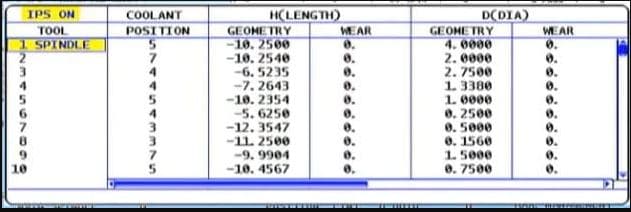
This is how they look on a Haas Machine
This tool length offsets file stays in the machine and is independent of your CNC Programs. So now any program can access this file.
So how does it do that?
It uses G43 and G43 says “ok get me a tool length offset”
G0 G43 Z3. H1
Which tool offset?? Well that’s the H number.
So the line above says to the machine rapid to Z3. Oh and by the way allow for the length of Tool 1 before you get there.
That’s the H1
So it gets the tool length from the tool length offsets file. It then does all the maths for you.
Actually it’s just a bit of simple arithmetic. Your (G54) work offset) minus your tool length.
Your tool will arrive 3mm above your component.
So whatever tool you called into the spindle with your M6 command you need to use the corresponding H number.
M6 T5 (Get tool 5 in the spindle) G90 G0 G54 X0 Y0 S1500 M3 (Rapid to X0 Y0 and start the spindle) G43 Z3. H5 (Rapid to Z3. but allow for the length of tool 5)
How do you measure the tools?
Well some people use a bit of paper!!!
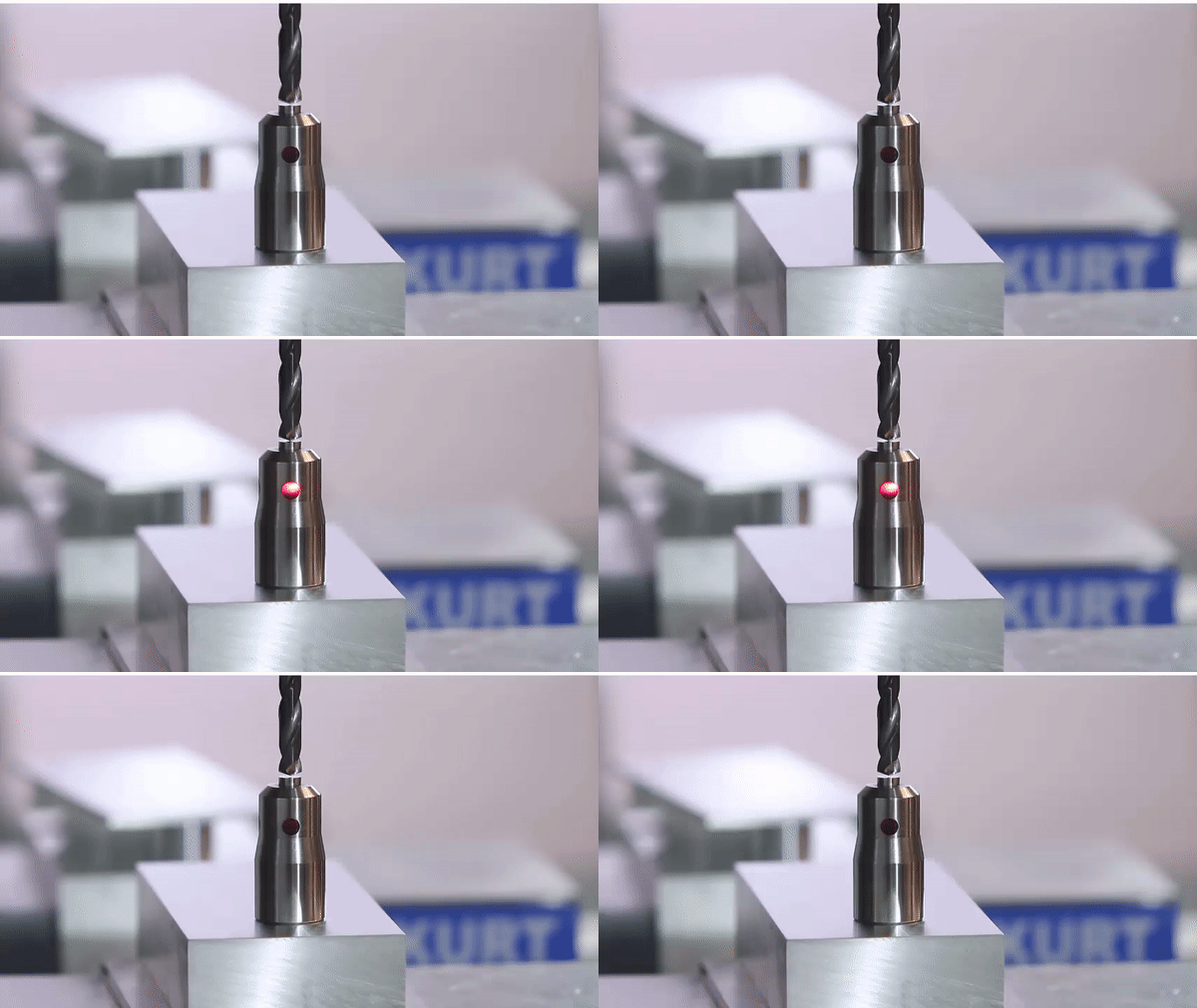
And some buy one of these little babies.
“It’s just a light on a fuckin stick” I hear you say. But it’s so much more. I comes on at an exact distance above your part. And because it’s all spring loaded, if the tool carries on a bit it don’t bust anything.
Only cheap but do a great job.
And if your a very good boy you might get one of these for Christmas.
Auto tool measurement (yes it’s all done for you)
In the cases above we are storing the actual tool length in the offset file.
Now let’s take a look at that tool file again.
Some of my readers are very astute but before you start writing me an email or commenting on this article. “oh David it looks like you fucked up again”
I know……
Why are the tool lengths (Under Geometry) minus figures?
That’s because as always there are several ways to do this. What some people do (and I am not one of them) is……
They bring each tool down from zero return and touch on the part. This figure is then recorded in the tool length offsets file. And yes it’s a minus figure. Of course the G54 work offset would be zero in the case of Z.
Now I am not prepared to argue with you about this (your doctor told me not to). It’s just bad.
That figure has no relation to the actual tool length and you need to reset every tool for every Job!!
I’m saying no more I’ll just wait for the comments.
There is Only One Way
Actually there is something else to consider. (I know I
said I’m saying no more).
By setting your tool length the correct way (my way), the stored offset is the actual tool length and you can do a rough check with your steel ruler before proving your program.
Auto tool length measurement will always give actual tool length and so will a tool pre-setter. That means you can swap tools between machines.
Well it’s easy. Mazak machines have active offsets so the minute you do a tool change and get your tool in the spindle the tool lengths offsets are active. They also nearly always have an auto tool measurement system
.
Sorry if you are a Mazak user and you are thinking “this dozy bastard has made me read all this gratuitous shit for nothing”
Now’s the time to leave. Go on off you go.
Ok so what.
Mazaks also do this…….
When you write a G code type program for a Mazak you don’t need a G43 and you don’t need the H
M6 T5 (Get tool 5 in the spindle) G90 G0 G54 X0 Y0 S1500 M3 (Rapid to X0 Y0 and start the spindle) Z3. (Rapid to Z3. but allow for the length of tool 5)
Forget the G43 H5 shit…. soooo easy.
Those Mazak guys just don’t believe in stating the obvious and wasting your precious finger tips typing in a load of bollocks that the machine should know anyway.
Just remember you can change this by parameter if you want it to work the same way as your Fanuc or your Haas. Oh and you don’t care about increasing your carbon footprint with those extra finger presses.
That way you can put programs from your Fanuc into your Mazak and vice versa.
Joking aside please don’t be arsed to learn a load of M Codes you will probably never use.
Well Commented Programs
Try to put M Code descriptions in your program. That way you won’t need to keep looking them up. A part transfer on a CNC Lathe is a good example, there are an absolute shit load of em.
They are everywhere. If you put a meaning to each one in brackets it will make proving the program out really easy. Oh and if you have a CAM system then change your post processor to output them for you.
M11 (OPEN CHUCK)
M10 (OPEN CHUCK)
etc etc
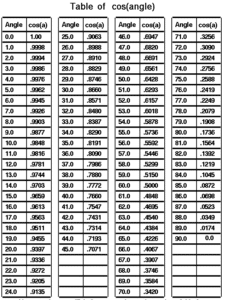
I had a boss once who actually learnt sines and cosines of angles.
Cosines of Angles
Holy shit I mean it’s impressive and I must add in 1975 it was actually worth doing because we didn’t even have calculators.
Hope you enjoyed reading my article on CNC Milling M Codes.
Please remember that it keeps me occupied and while I’m writing these articles I am not holding you up in the supermarkets queue trying to find a coupon for 10p off my incontinence briefs.
I’ve wanted to get my hands on a new Haas machine for a while. Really wanted to see what the new control was like.
Stiltz provided the machine and the victims for the training.
If you have read any of my articles you will know I have always had an affection for Haas machines. The first one I ever worked on being about 1994. At that time they were nothing short of ground breaking innovation.
Things like a built in airline and coolant wash-hose were not only innovative but really useful.
Coolant Hose (What Will You Do With This)
A machine that worked straight out of the box. Easy peasy tool-change. Handwheel to scroll through the program, people still get impressed by this today.
Programmable coolant nozzles, fuckin hell that was a game changer. Just move nozzle to a position and press an F key and it’s stored with the offset.
Macro at no extra cost (wow) some people wanted two grand for this (cost of a good family car in 1995)
Program restart still the best in the world, don’t get me started.
The New Machine David How Was It?
To start with on this one I didn’t like the interface but it does grow on you. You need to get used to using the touch screen. Access to some menus is a bit convoluted too.
This Haas Mini Mill has a 10k spindle and 30 tools.
Something I suddenly remembered about this model. Well you know when you get a cup of coffee and it’s in a tall tapered glass mug? You are thinking “nice big cup of coffee”. You take four big swigs n it’s gone, shit what happened. What happened is an optical illusion because the cup is tapered it’s actual capacity is that of a thimble.
It happens all the time everything comes in a great big box with loads of packaging and the actual item is minute.
Anyway try moving this machine to the end of it’s stroke in X. Fuckin hell what a disappointment I recon you can only move around about half the table. I mean great you can put a pretty big part on here. That’s great so long as you don’t want to machine it!!!
It definitely is not what you expect from the company that’s known for pragmatism. Anyway that does piss me off.
The way this machine is being used is running programs from a memory stick. At first I thought it was a bit crazy as the programs weren’t particularly big.
Anyway surprise surprise it works well. Just plug in and press load and it runs. But what about editing you ask. No problem you just do it. Same as normal.
Program restart, no problem works exactly the same as when running from memory.