Tool Offset Measure Button Haas, Useful or Relic?

Tool Offset Measure Button Haas, Useful or Relic?

Tool Offset Measure Button on a Haas Machines, Useful or Relic?

Call David: 07834 858 407

CNC Training Centre Reviews

30 five star ratings on Google (just saying)

This article is about the Tool Offset Measure button on a Haas machine.

Tool Offset Measure

I first worked on Haas Machines around 1996. The most amazing thing about Haas machines back then was the price. They were cheap, very cheap. At that time the cheapest CNC Machines were like the cost of a diamond studded jockstrap. But the Haas, well as I said it was cheap.

Everyone thought they were made in some far flung country by Santa’s Elves being paid the minimum wage and fed on reindeer shit.

Actually they weren’t. The reason I’m told they were so inexpensive was because they kept the specification of each machine the same. This made them simpler and cheaper to produce.

I fell in love with those early machines and they certainly earned their keep. The control was like a Fanuc that had been given steroids and a rocket up it’s arse for good measure.

Giving People What They Wanted

It was like someone had heard all my criticisms of CNC Machines and granted my wishes

The way that we trained people in those days was to use the tool offset measure button.

What you did was you touched each tool on the top of the component and pressed this button.

(Sorry about the shit picture couldn’t be arsed to find a better one)

It duly recorded the offset value for you.

So what you are doing is recording the distance from the end of the tool at its zero return position to the top of the workpiece.

Tool Offset Measure

This gives you a minus figure the size of a compulsive gamblers bank balance.

Problems

Ok so this works well but there are two problems. Actually no there a three.

  1. You can’t use a tool presetter.
  2. You can’t roughly check this figure by getting a ruler and checking the tool length.
  3. (And this is the big one) when you set a new job you need to do it all again.

Now I could be being really stupid here, and if you know me you are probably saying “well he is a bit of a dick”. Anyway from that day on I’ve avoided this button like Donald Trump avoids wind machines.

A couple of weeks back, when my restraining order was lifted, I was allowed back on a Haas machine to do some training.

They say you learn something new every day well this day I was about to learn about setting 64.

Tool Offset Measure

What this setting does is it allows for whatever work offset you are in when you press the Tool Offset Measure button.

Tool Offset Measure

So what you do is you get your setting block and you touch your spindle nose on it (I used a 6 inch block of slips).

Tool Offset Measure

One of these is even better.

Tool Offset Measure

Then set this in a work offset that you don’t use like G59.

Offset Is Actual Tool Length

  • So when you want to measure a tool.
  • Call out G59 in MDI.
  • Touch the tool on the top of the block.

Tool Offset Measure

Press the button

Tool Offset Measure

And guess what you get the actual tool length. Tool Offset Measure

If you use a tool presetter just tweak the G59 Z figure until it ties in exactly with your tool presetter.

Thanks for watching and reading

If you have been affected by any of the issues in this post or need CNC Counselling then contact me.

Or call us on

If you want to learn to program CNC Milling Machines

Look no further Contact CNC Training Centre


G Code Groups What Use Are They?

CNC Training Call David: 07834 858 407

CNC Training Centre Reviews

30 five star ratings on Google (just saying)

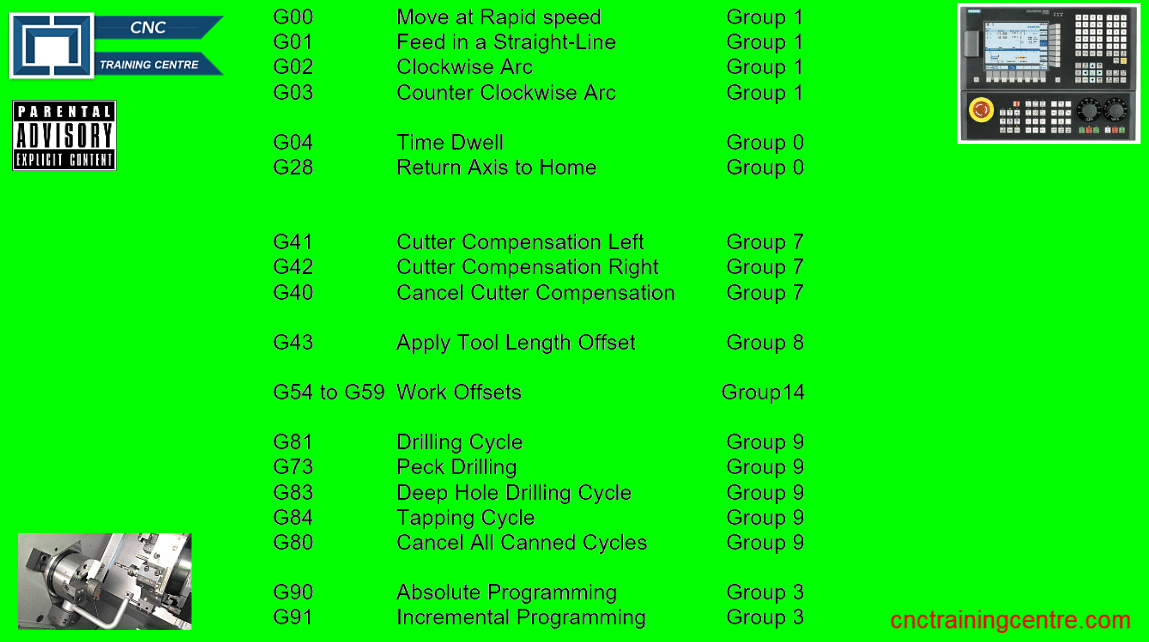
G Code Groups, every G code is in a group and I remember looking at G codes for years thinking why on earth do they do that?

I thought it was just to satisfy the geeks, it gave them more bullshit to talk about and confuse the shit out of me.

Anyway now I’m all grown up, I know exactly why G Codes are in groups.

The good news is today I am going to tell you why and….. I am going to give you a practical example.

(Be sure to read on for a free cheese on toast recipe)

Here is a list of G codes and the groups that they are in

G Code
G Code List with Groups

Hass G Code Groups do vary a little.

Now I know this is boring but please try to keep focused it gets exciting soon honestly.

If you are loosing the will to live already then off you go, this video is amazing.

I know it’s only two of us now but I will carry on. I wrote this article a bit back about macro for the over 18’s.

“Read More”

On-site Haas TL1 TL2 TL3 Training: Maximise Your Potential

Haas TL1 TL2 TL3 training

Call David: 07834 858 407


CNC Training Centre Reviews

30 five star ratings on Google, just saying.

Maximise Your Production with Specialist On-site Haas TL1 TL2 TL3 Training

Unlock the full potential of your machinery and workforce with, tailored onsite Haas TL1 TL2 TL3 training.
Designed to minimise disruption and maximise productivity, our expert-led training programs bring high-quality, hands-on instruction directly to your facility.
Ensure your team is proficient and confident in operating your Haas tool room lathes.
On-site Haas TL1 TL2 TL3 Training

The Value of On-site, Hands-On Training

Classroom theory is essential, but the real value lies in applying that knowledge in your actual production environment. On-site training offers several key advantages:
  • Minimum Production Loss: Training can be scheduled around your production needs, reducing machine downtime compared to off-site courses.
  • Contextual Learning: Employees learn on the specific machines they will use daily, allowing them to practice with your actual tooling, work holding, and parts.
  • Immediate Troubleshooting: Weaknesses in knowledge or production methods can be identified and addressed in real time by expert instructors.
  • Customised Content: The curriculum can be tailored to your specific operational goals, covering everything from basic operation to advanced, multi-axis programming and complex part setup.
  • Enhanced Safety and Morale: Proper, in-person training ensures operators understand and follow correct safety protocols, which reduces the risk of accidents and increases employee confidence and satisfaction.

What Our Haas TL1 TL2 TL3 Training Covers

Our comprehensive onsite Haas TL1 TL2 TL3 training is suitable for operators of all experience levels, from beginners to advanced users looking to refine their skills. A typical program includes:
  • Machine Orientation and Safety: A thorough introduction to the machine components, operation modes, and essential health and safety practices.
  • Control Operation: In-depth familiarisation with the user-friendly Haas CNC control, including navigation and file management.
  • Offsets Setting: Step-by-step guidance on setting tool and work offsets
  • Using the quick programming functions on the Haas TL range
  • Manual and semi automatic use of TL machines.
  • G-Code and M-Code Programming: Practical experience in writing, editing, and optimising programs to customise machining operations and improve part quality.
  • Operational Best Practices: Coverage of best practices for tooling selection, setup methods, program optimisation, and general machine performance monitoring.

On-site Haas TL1 TL2 TL3 Training

Partner with Us for Success

We are dedicated to helping you maximise your machine shop productivity. Our experienced application engineers can help develop the talent within your existing workforce, providing tailored expertise that ensures your team is ready to tackle any project.
Transform your manufacturing processes today with specialist training. Contact us to discuss a customised onsite Haas TL1 TL2 TL3 training program for your facility and elevate your machine shop’s performance and efficiency.
Training on all Haas Machines

Call David: 07834 858 407


CNC Training Centre Reviews

30 five star ratings on Google


Careers in CNC

View all current vacancies in CNC

Click here

Call David: 07834 858 407