Shibaura Tool Retract Tool Recover

Shibaura Tool Retract Tool Recover, I hate it when you have a button on a CNC machine and no one knows what it does.

CNC Training Call David: 07834 858 407


CNC Training Centre Reviews

30 five star ratings on Google (just saying)

Sound familiar,well you should be ashamed of your self. Get off your fat arse and find out what some of these frigging buttons do.

If people didn’t know what buttons did we would have died in a nuclear holocaust many times over.

007, Shibaura Tool Retract Tool Recover

Think of James bond with his fuckin ejector seat, he has some gorgeous chick sat next to him and he says “want the air con on?”. He then accidentally blasts her into next week, not a good look is it.

Anyway let’s talk about these babies, Shibaura Tool Retract Tool Recover

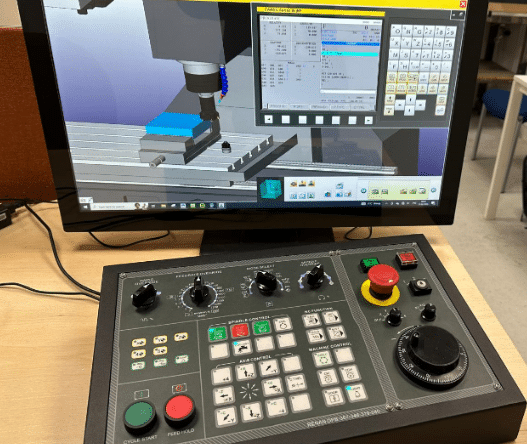
Not a great picture, but then neither was your profile picture before you Photoshopped it so back off.

Anyway I pressed them and all they did was flash.

Gertjan I love You

Two hours later me and my new Dutch friend Gertjan got them working.

I must say the result is awesome, Gertjan the Fanuc guru.

You get to stop your CNC Program, move the tool away, do whatever you want, then return it back before carrying on with the program.

Now for Fanuc users because we are years behind the times this is an absolute arse licking game changer.

Here is How you Do It

Stop your program with feed hold or cycle stop

Shibaura

Now press Tool Retract, Shibaura

Shibaura Tool Retract Tool Recover

The one on the left, it will light up. Now go into Jog or MPG and move your tool away. (This can be up to ten moves). If you need more than that then you are just plain greedy.

You can now change an insert or do whatever you want, I usually make a nice cheese and onion quiche at this point but it’s entirely up to you.

Now switch back to Memory and press CYCLE START, then press Tool Recover.

Your machine will move back, step by step, to it’s position where you so rudely interrupted it. All controled with your feed rate dial.

Shibaura

Don’t you just love that mmmmmm.

What more could you want? A cheese and onion quiche?


Onsite Shibaura CNC Training | Professional CNC Training at Your Facility

Category : New Stuff

Practical Training on Your Own Shibaura CNC Machines

CNC Training Call David: 07834 858 407


CNC Training Centre Reviews

30 five star ratings on Google

All training is carried out on your Shibaura machines, not generic classroom examples. This allows us to tailor the course around:

  • Your specific Shibaura model and control
  • Your tooling, fixtures, and work holding
  • Your components, tolerances, and materials
  • Your current programming and setup methods

This hands-on approach leads to faster learning, better knowledge retention, and immediate improvements on the shop floor.


CNC Training Tailored to Your Team

We structure every onsite Shibaura CNC training course around the experience level of your staff and the results you want to achieve. Training can include:

  • CNC fundamentals for new or developing operators
  • Safe machine operation and best practice setup
  • Datum setting, work offsets, and tool offsets
  • Program editing, proving, and optimisation
  • Cycle time reduction

Whether you need operator training, programmer development, or a productivity-focused refresher, we build the course to match your requirements.


Delivered by Experienced CNC Engineers

Instructors with extensive real-world machining experience. Training is practical, clear, and focused on what actually works in production—not theory alone.

Engineers leave the course with the confidence to:

  • Set up and run Shibaura machines more efficiently
  • Reduce scrap and setup errors
  • Improve repeatability and process reliability
  • Make safe, effective program changes at the machine

Why Choose Onsite Shibaura CNC Training?

  • No travel or offsite disruption
  • Training based on your actual production environment
  • Faster return on investment
  • Immediate, measurable improvements
  • Loads of CNC tips n tricks

Many customers see benefits from day one, including quicker setups, smoother handovers between shifts, and improved machine utilisation.


Why Choose CNC Training Centre?

  • Specialists in onsite CNC training
  • Real-machine training delivered across the UK
  • Courses tailored specifically to Shibaura machines
  • Clear, practical instruction with real results

If you’re looking to upskill your workforce and get more from your Shibaura CNC machines, our onsite training provides a highly effective and cost-efficient solution.

Contact CNC Training Centre today to discuss your onsite Shibaura CNC training requirements and let us design a course around your business.


Manual Guide i Access Tools

CNC Training Call David: 07834 858 407


CNC Training Centre Reviews

30 five star ratings on Google (just saying)

Ever been writing a program in Manual Guide i and wanted to look into the tool offsets?

Well obviously you can but it is a pain in the arse to switch from one screen to another.

Anyway help is at hand I’m going to show you a quick parameter change that will allow you to acces the tool offsets quickly.

If you want to know right now, skip to the end of this article, cos I’m going to rant a bit.

I recently got allowed into Holland to do some training on a Shibaura CNC machine for my mates at Leader CNC who sell these beasts.

Manual Guide i

Anyway anyone who knows me knows that I’m way too old and decrepit to actually work but unfortunately for the CNC World I still do.

I fluctuate between hating my job and retiring to go on cruises where it’s the norm to shit your pants and get a semi erection watching  a Freddy and the Dreamers tribute band.

The alternative is to carry on working and keep paying off the wife’s credit card bill which is the obvious choice.

Anyway when I landed in Amsterdam they gave me a car. First thing I thought was “why the fuck is the steering wheel on the wrong side of the car?”.

May be it was a Monday morning car and they just got it wrong. Any way I spent the next two hours trying to convince all the Dutch drivers that they needed to drive on the correct side of the road.

I made a stand for British values and refused to budge. The roads in Holland are so nice and the road makings are perfect like driving on rails. They just need to stop driving straight at you.

It’s not the same without the pot holes though these roads are for wimps not real men.

Back To Manual Guide i Access Tools

By altering a parameter you get to do this:

Click on the tool number.

Manual Guide i Access Tools

There it is in yellow, then press the ALTER key

Manual Guide i Access Tools

Voila the tool screen appears.

Manual Guide i

You can now modify tools or just take a good nose in there. Press CLOSE when you are pissed off with it and it will go away.

Ha ha, yours won’t work. Send £200 to me and I’ll tell you how.

Only joking, you just need to alter parameter 14705 bit 7 to a 1 and it works.

Manual Guide i Access Tools

Oh and you have to shut down the machine for this to work.

Manual Guide i

By the way if you fuck your machine it’s not my fault. Take a picture or a screen shot before you alter anything. you now have a reverse gear.

I would love to take credit for this but it was my new dutch friend Gertjan who showed me how.

I get to meet some great people and he is definitely is one of them. We exchanged loads of tips he showed me this and loads of other things. I did show him something, how men really can multitask, keep an eye on the door whilst watching porn.


CNC Programming Safely Using Decimal Point

CNC Training Call David: 07834 858 407

CNC Training Centre Reviews

30 five star ratings on Google (just saying)

CNC Programming Safely (Decimal Points)

CNC Programming Safely is very important. This post explains about the role of the decimal point.

Decimal points who needs em eh?

On Fanuc controls and Haas controls depending on the setting of a parameter if you input something like X20 it can be taken in two ways.

(1) X20 is taken as a movement in X of 20mm this is like a calculator and some controls will convert this to 20.000 for you.

(2) X20 is taken as 20 microns which would be .020

The difference between 20mm and .02mm is massive would you agree?

CNC Programming Safely

This also works on feed rates so you could be waiting a long time. Or the other way around you end up with a pile of broken tools.

The most dangerous one is with offsets this will definitely cause a collision.

I remember those things in comic books where you have to find the difference between two pictures. The difference with a CNC Machine is it can cost you your job if you don’t spot the missing decimal point.

Even at five years old I couldn’t really be arsed. I remember swearing for the first time and thinking “fuck this, pass the water pistol”

Sorry this is not true, obviously I was swearing long before my fifth birthday.

Please contact me with the answers to the quiz above (that way I’ll know never to offer you a job)

Decimal Points

Now you could go diving for your manuals and check your parameters and settings. I don’t actually recommend that right now.

Think of people like me and all those applications engineers who work here there and everywhere.

It maybe that in your company you have machines set in different ways and that’s gonna be real confusing.

It is obviously a good idea to have all your machines working in a similar manner if possible.

CNC Programming Safely

So in order to do your CNC Programming Safely I recommend that you make a rule when you are inputting code.

Always include a decimal point regardless of the control settings.

That way whatever your machine setup you will still get the right movements and offset adjustments.

Never Use a Decimal Point (CNC Programming Safely)

M codes
S Codes
G codes although there are exceptions such as G54.1
H numbers
T codes
L
N numbers
O (Programme numbers)
P  address

And if you do you will get an alarm. There are exceptions to these rules but you would need to check your programming manual.

Use a Decimal Point (CNC Programming Safely)

B   address
C   address
D  address
E   address
F   code
I   address
J   address
K  address
Q  address
R  address
U  address
V  address
W address
X  address
Y  address
Z  address

I have trained people who insist on programming X0.0 and that is ok if it helps you to remember the decimal point. Even though on X0 it would make no difference but rules are rules.
Just remember that if you change companies it will be very hard to break the habit if you are not inputting decimal points.

It’s a bit like keep putting your hands down your trousers. When your at home it’s a minor bollocking from the wife.

Try it in public and you’ll end up on the sex offenders register.

Those using CAD/CAM systems it is quite easy to change your post processor to always output decimal points too.

Here is the Fanuc parameter that you can alter.

Click Me

Services offered at CNC Training Centre

Edgecam training.

Classroom programmer training.

Onsite CNC Machine Training.

CNC Training on all controls and machines.

Mazak Training Fanuc Training

Don’t forget we offer training on all types of Mazak Machines and all Fanuc Controls 6m to 31i Oi old to young.


Mazak Spindle Warm Up Macro

CNC Training Call David: 07834 858 407

CNC Training Centre Reviews

30 five star ratings on Google (just saying)

Warm up Programme

This Mazak Spindle Warm Up Macro is something I created recently for the Macro training course that we offer at the CNC Training Centre. The course covers Macro Programming suitable for Haas, Mazak and Fanuc.

I must admit I often think that with Macro programming a little knowledge is a dangerous thing. On visiting companies I just think it’s more about a programmer’s ego than really getting good CNC code.

See this article, it gives a brief description of macro programming.

If you just want the Mazak Spindle Warm Up Macro then just jump to the end and copy it. I won’t be offended by the fact that you are just too selfish and greedy and can’t even spare the time to read my articles that I slave for hours to produce!

Gratuitous use of macro programming (that’s bullshit to the normal folk), can be dangerous and really confusing to the operator using it.

  • A macro can automate a regular task.
  • Families of parts can be grouped together and simplified in one programme.
  • Macros should be fool proofed with alarms to prevent erroneous input.
  • The details of the macro ideally should be protected (ie lock the 9000 programmes).
  • Where possible alias the macro to a G or M code.
  • The machine operator is your customer so treat him or her well.
  • If you don’t like re-inventing the wheel every day then macros are for you.
  • Don’t forget to check if you have the macro option on your machine it can be quite expensive to add. Oh and it will really piss you off if you read this whole article and find you ain’t got it!

Some Explanation.

This macro (Mazak Spindle Warm Up Macro) is for the warming up of the spindle, it’s a much smoother warm up because it does not take big leaps in speed. It is a much more gradual approach.

You tell it your maximum rpm you want to warm up to and the time you want the warm up to last. You can tell it what RPM increase you want as a step. You also tell it the initial speed you want your spindle to start at from cold.

It goes on to calculate the difference between your start speed and your maximum speed. It divides this speed by the speed increment that you give it. This will tell it how many times to go around the loop.

In the loop it uses the machine timer. It zeros the timer then runs it for the calculated time for each step.

It has to then get this time in milliseconds because that’s what the geeks use in these machine timers.

Ideally it should be aliased to an M code.

Alias WTF? No it’s not like changing your name from Reginald Kenneth Dwight to Elton John it is a bit more sophisticated.

What it means.

Well it means you can access a programme using your own G code or M code.

Mazak Spindle Warm Up Macro

So for example if you put 200 into parameter 92 when you programme a G200 it will jump to programme 9011. Just as if you had put M98 P9011 or G65 P9011. With a G code you can pass arguments to the programme a bit like G81. In G81 you tell it the depth and rapid point these are the Z and the R values. Now you can do the same with your G code.

Also for parameter 82 if you put 33 into parameter 81 when you programme M33 the control will jump into programme 9001. You cannot pass arguments when you use an M code. Best not to argue then eh.

So for my Mazak Spindle Warm Up Macro we will use M33 and alias it to programme 9000. So having done all this you can lock out programme 9000 so no one can even see it. (Our little secret). They will not be able to edit it either.

All they need to know is that M33 will run the Mazak Spindle Warm Up Macro.

M33 is aliased to O9000


Now then a word about testing.

Actually it’s more than one word but here we go.

When you test your macro you need to stop your control from looking ahead, put the blinkers on as it were.

(Sorry that’s totally wrong blinkers actually make a horse look ahead and not to the side).  Anyway CNC controls have to look ahead and here is why.

Cutter Compensation.

Below is a typical tool path where the tool is compensated to the left. In order to machine the part without cutting into it the control needs to read in front.

Mazak Spindle Warm Up Macro

As it moves up the left hand side it needs to know where its going in advance, moving round the outside in single block it would stop here.

Mazak Spindle Warm Up Macro

If it were about to cancel the compensation it would end the move here.

Mazak Spindle Warm Up Macro

If it were about to go to the left on the inside it would need to stop here.

Mazak Spindle Warm Up Macro

They would all be the same Y position but in single block it stops ready for the next move (three different places).

So this explains why the control looks ahead. Each move relies on the next for correct positioning.

When we write a macro programme and we are testing it this look ahead is a real nightmare. The system often will know the answer before you think it has seen the question.

Complicated?  mm read on:

Right joking aside, what we do is to use a G code to stop the system from looking ahead. What we can then do is single block through the macro and check the calculations as we go.

When you are happy with the code you can let the system look ahead again by turning look ahead back on.

Although what you are doing may be very simple, a very small mistake can really bugger things up. (Sorry for saying bugger, I meant knacker).

Have a System.

Now my advise here is to be very systematic in your approach and test each line of your macro as you go. Be happy that each line works ok before you move on to the next.

You can try it this with the Mazak Spindle Warm Up Macro below. Turn off the block look ahead and the single block restriction and check each variable as it is changed. It will help you to understand how the Mazak Spindle Warm Up Macro works.

Oh one other thing plan your macro before you start don’t get to excited and rush on. Also keep a record of what variables you have used so that you don’t accidentally use a variable twice. Things can get very scary if you do this.

Comment, comment, comments and more comments to say what the comments are for. Honestly you can’t have too many comments in a macro. The best approach is to imagine that you were abducted by aliens (I sincerely hope you never are) but if you are the will anyone understand your code?

If the answer is no then you are not explaining your code well enough. Also if you are like me and you have a poor memory then you will need them for yourself. So when you look back at this macro in 200 years you will know what it meant.

Check this article on how to lay out your CNC code and add comments.

“The code give us the bloody code?”

OK.

So here is the Mazak Spindle Warm Up Macro.

I hope it works for you.

PLEASE DO NOT USE THIS MACRO IF YOU ARE UNDER 18 OR ARE OF A NERVOUS DISPOSITION

Mazak Spindle Warm Up Macro

Oh by the way if you get bored easily then I definitely wouldn’t read all this. Just put the code in your machine and enjoy it with my compliments (thicko).

Mazak Spindle Warm Up Macro

O09000 (Mazak Spindle Warm Up Macro)

#3004= 7 (OVERRIDE CONTROL NOT ALLOWED)
#100= 20. (TIME)
#101= #100 * 60000. (TIME MILLISECONDS)

#102= 500. (RPM FROM COLD)
#103= 7000. (MAX RPM)
#104= #103 – #102 (RPM INCREASE)

#105= 1. (RPM STEP)
#106= #104 / #105 (LOOP)
#107= #101 / #106 (DWELL)
M03 S#102 (Start spindle at initial speed)

WHILE [ #106 GT 0 ] DO1 (DO LOOP)
S#102 (START SPINDLE AT INCREASED RPM)
#3001= 0 (RESET INTERNAL TIMER TO ZERO)

WHILE [ #3001 LT #107 ] DO2
END2

#106= #106 – 1 (COUNTER DECREASES BY ONE)
#102= #102 + #105 (INCREASE SPEED BY STEP)
END1

#3004= 0 (OVERRIDE BACK ON)

M30 

Boring, boring so what does it all mean?

Explanation of  Mazak Spindle Warm Up Macro

O09000 (Mazak Spindle Warm Up Macro)

#3004= 7 (OVERRIDE CONTROL NOT ALLOWED)
(Set this to a 7 to stop override of speed.)

#100= 20. (TIME)
(Total time of warm up in minutes)

#101= #100 * 60000. (TIME MILLISECONDS)

#102= 500. (RPM FROM COLD)
(Spindle will start at 500 RPM)

#103= 7000. (MAX RPM)
(Maximum RPM you want the warm up to reach)

#104= #103 – #102 (RPM INCREASE)

#105= 1. (RPM STEP)
(This in the step used as the RPM increases)

#106= #104 / #105 (LOOP)
(Calculate the number of times it goes around the loop)

#107= #101 / #106 (DWELL)
(Dwell time after each speed increase)

M03 S#102 (Start spindle at initial speed)

WHILE [ #106 GT 0 ] DO1 (DO LOOP)
S#102 (START SPINDLE AT INCREASED RPM)
#3001= 0 (RESET INTERNAL TIMER TO ZERO)

WHILE [ #3001 LT #107 ] DO2
(TIMER COUNTS DOWN BY DWELL TIME)
END2

#106= #106 – 1 (COUNTER DECREASES BY ONE)
#102= #102 + #105 (INCREASE SPEED BY STEP)

END1

#3004= 0 (OVERRIDE BACK ON)
(Override works again.)
M30

Single Block

You can suppress single block in a macro. You can suppress single block in this macro (Mazak Spindle Warm Up Macro) because it is really annoying if you expect your spindle to warm up in 30 minutes. You come back having made tea, toast and croissants (as us engineers do).

“Shit” you say “the machines been on single block and stopped at 500 rpm for 30 minutes”

Just add these.

#3003= 1 (SINGLE BLOCK OFF)

#3003= 0 (SINGLE BLOCK ON)

I have suppressed spindle override because you need the correct speed in a spindle warm up programme.

If you read the explanations above you will see how it works.


CautionSwitchSingleBlock

Oh and by the way here is a similar article for a Haas or Fanuc type machine.

Services offered at CNC Training Centre

Edgecam Training.

Classroom programmer training.

Onsite CNC Machine Training.

CNC Training on all controls and machines.

Mazak Training Fanuc Training

Don’t forget we offer training on all types of Mazak Machines and all Fanuc Controls 6m to 31i Oi old to young.


Careers in CNC

View all current vacancies in CNC

Click here

Call David: 07834 858 407