To take a Screen Shot Fanuc, you will need to have either a data card installed or a USB
MDI
In MDI I/O channel needs to be set (4) data card or (17) memory stick
Stick the Card in (or the stick)
Press and hold the shift key for about 10 seconds. You will see the clock stop. That’s how you know it worked. Time will stand still at this point and all the people around you will appear static.
Try not to panic, the world didn’t end. Your control just needs to ponder a while and think about what you just did.
Stop The Clock
Once it’s done your clock wil start again (phew).
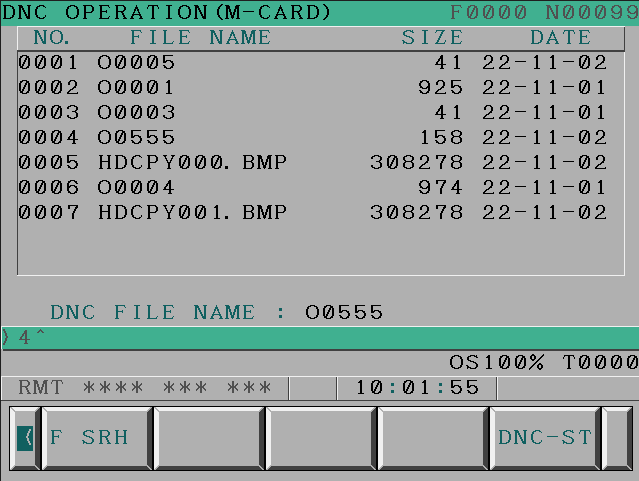
Then press CARD
Screen will show what is on the data card
The BMP files are your screen shots. You can then view them on your laptop or PC.
Now I know you are saying “what is the fuckin is the use of that”
Well It’s just so that I can show off my knowledge.
Parameter
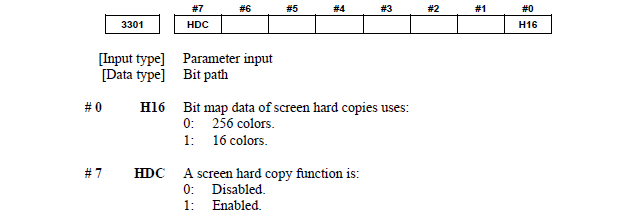
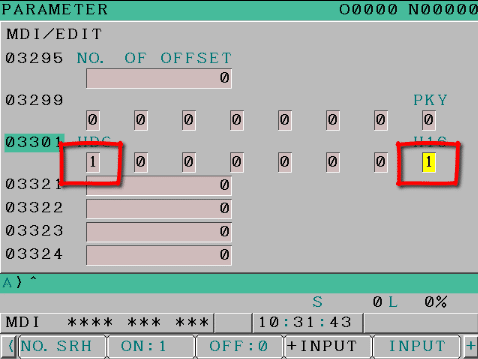
If this does not work then you may need to alter parameter 3301 bit zero and bit 7 need to be 1
Should look like this to make it work.
Screen Shot Fanuc
A good use is when you are changing parameters. There’s nothing worse than changing a parameter and trashing a £100,000 machine. Help is at hand, luckily you did a screen shot before you changed the parameter and you can view it and change it back.
With this parameter it wont work because you need to switch it on!!!
Good luck with the massive dent in the guarding and the bent tool. No screen shot will fix that.
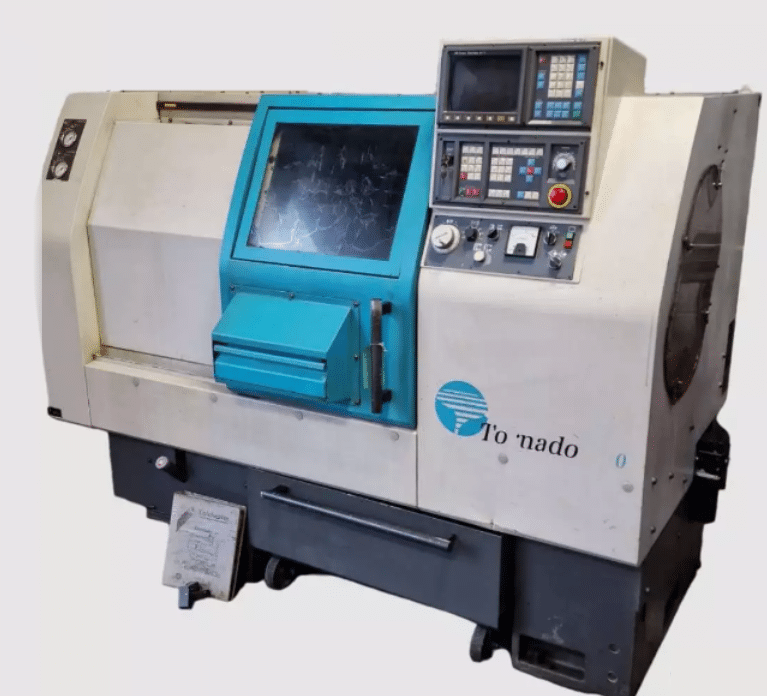
A visit to Halesowen to train on this beast. Nice simple two axis Colchester Tornado 90, this guys got six, mmmm.
This one has the following:
12 station turret, just about enough.
Fanuc 21i T and it’s got Macro too, lovely.
Absolute encoders, useful no zero return required
4000rpm spindle with a collet chuck
Bar-feeder (hydrafeed)
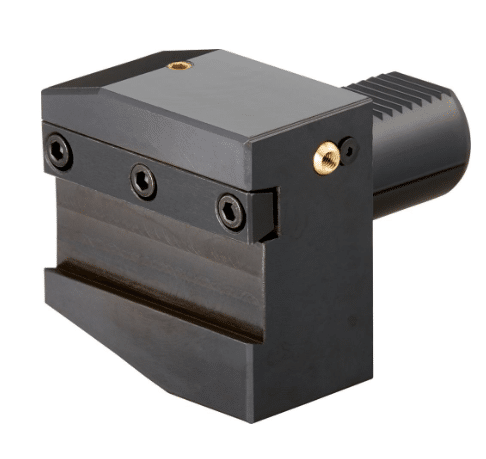
VDI turret these are great for accurately and quickly changing tools
This particular machine has a 42mm bar capacity.
Available from Fortis Tools
VDI
No it’s not a sexually transmitted disease, it’s that funny round thing with a pattern on at the back of the tool.
If you have this you’ll love it because it means you can quickly change a complete tool holder and it repeats really accurately.
Halesowen West Midlands
I’ve not been to Halesowen since 1974 I actually worked as a singer in a nightclub there. The band was “Sweet Rain” I wouldn’t google that one if I was you, if you don’t want to see some dodgy porn movie.
There was certainly no sexual innuendo intended back in 1970 when that name was conceived.
That’s me back then
These dates are not accurate but the price of oil quadrupled in 1974 and there was a shortage. I remember there was a 50mph speed limit on the motorway meaning the 50 mile journey took much longer.
It takes even longer today but that’s another grumble for a different post from me.
I’m a bit bored with 70’s music now but it was great at the time. I remember what it was like to be a tall man, my platforms adding over a foot to my total height. Us little guys were very reluctant to let the platforms go.
I still wear mine on occasions where I want to impress, especially with my mates all being taller than me.
Colchester Tornado
I remember years ago trying to set up a CNC Machine shop on a budget and it was almost impossible. The cost of machines being massive and the second hand market almost non existent. I ended up buying a Beaver, stop sniggering you infantile.
I know it’s now a euphemism but this was 1981 and Beavers were known for their hard work and making dams.
Sorry am I digging myself deeper into this?
Anyway if there had have been good CNC machines around then at the right price I’d now be sunning myself on a Caribbean island instead of writing this gratuitous shit that nobody reads.
Don’t know what gratuitous means but it sounds impressive in that sentence you must admit.
These machines can certainly deliver, now they are not exactly the Carlos Alcaraz in terms of looks but unless you’re a CNC geek like me you wont be taking selfies with one of these to impress your mates with the company you keep.
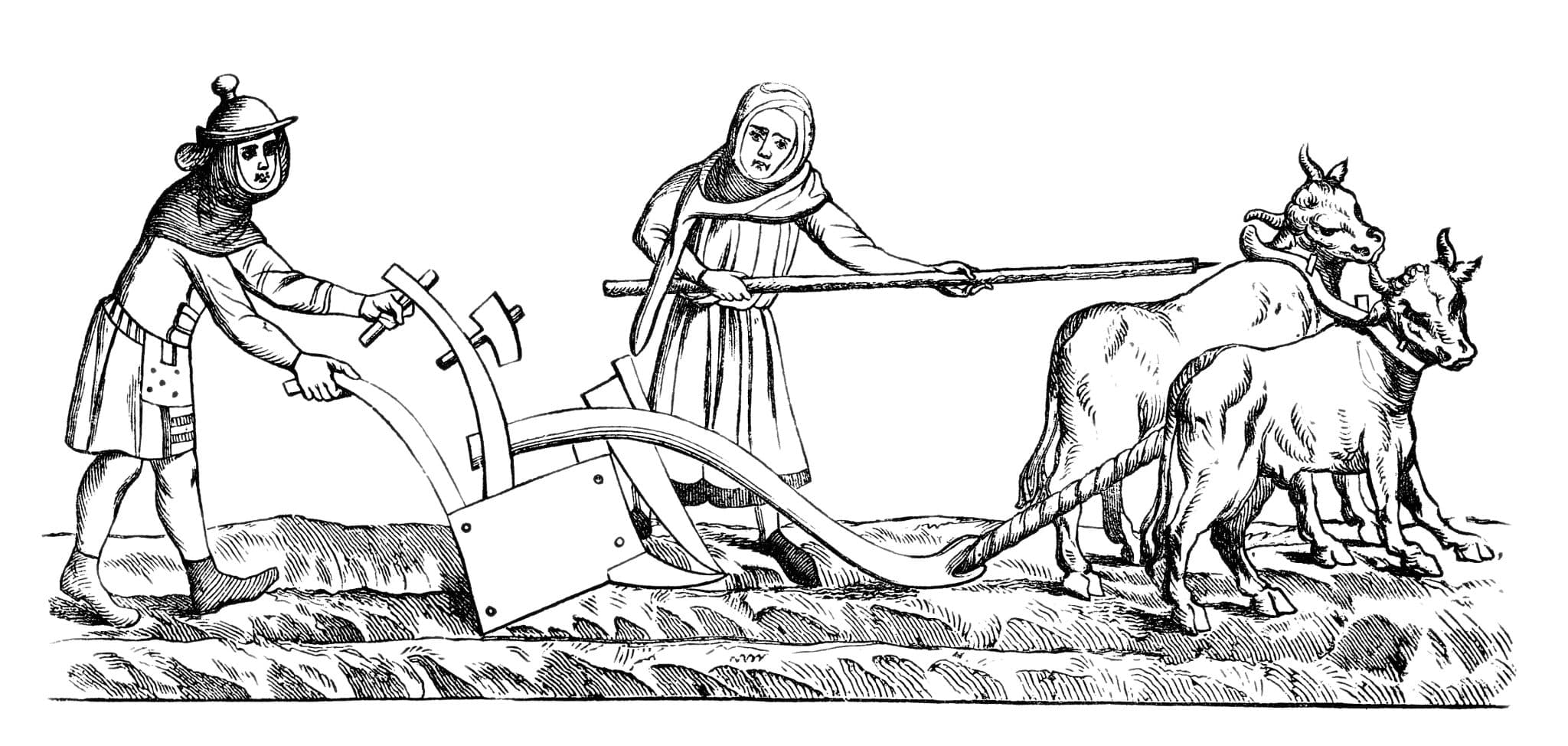
They ooze pragmatism, much like my wife they get things done, she can plough a large field in an afternoon on a good day.
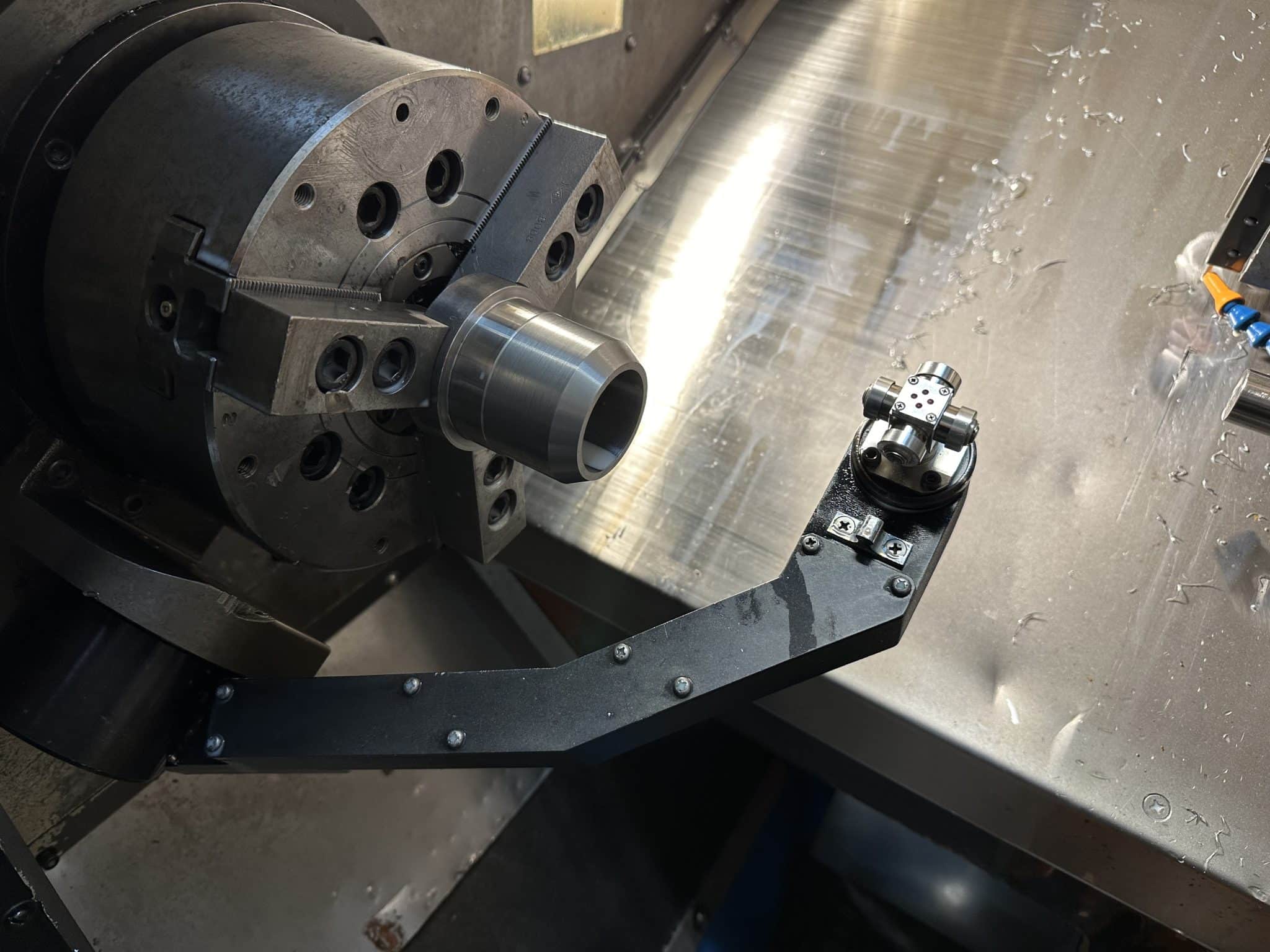
My Colchester Tornado doesn’t have a tool presetting arm like this one.
That really is a crying shame but let’s not get too upset
Here’s a nice video on how to use cut and measure.
Definitely more time consuming than if you have a measurement arm. So it’s something to look out for if you are buying one of these machines.
Calibration of these arms is not too difficult either. I would suggest you get some one like me or a service engineer to do it for you the first time and watch carefully. You should be able to do it yourself next time.
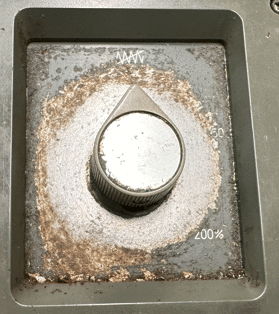
There is no separate rapid override on this Colchester Tornado. It’s just one control. A bit strange and scarry in equal measures until you get used to it.
I actually got to like it in the end.
No markings at all on ours, welcome to the world of old machines. Anyway it overrides your rapid and your feed rate all in one dial.
Just reember to leave it at 12 o’clock.
Absolute Encoders
Cool, very cool. When you switch this beast on you don’t need to zero return it. Just straight on with business.
What’s An Absolute Encoder David?
I haven’t had an alcoholic drink for nearly 20 years, that’s another story for another time. Anyway I still go out with my mates and they still get absolutely blind, dogshit, pissed.
Come 2am I am the only one who knows exactly where I am, in fact I know where I am at all times.
Well I’m the one with the absolute encoder.
Absolute encoders know where they are even when you switch off your machine. Therefore no need to zero return the axis.
New Shit (Colchester Tornado)
Yes always something new, I must admit it is amazing now a days how you can use shit in almost any context. In my days it was something confined to a toilet, but now it can mean whatever you want.
I personally use it everywhere but I have always loved swearing. My mum used to say “it’s not clever to swear”. Now listen kids I admit to not being clever but I must tell you swearing is great fun, long may it live.
Anyway “new shit” I learn something new on every machine I work on.
M51 means that M30 no longer stops and rewinds. M30 just rewinds and the machine will carry on.
It now thinks it’s an M99.
M52, you guessed it switches the M30 back to it’s normal self.
(Never seen that before, probably made up by Mr Colchester)
No G53….. What?
Not sure if this is an option but most newer machines I work on have it.
Fuck, this ain’t got it. Shame. Can I live without it?
Probably not, watch this space.
What is G53? You mean you don’t know? Shame on you.
No Copy n Paste
Editing is really painful on this beast as you can’t copy n paste at all and using brackets for comments is a mind numbing painful experience to be avoided at all cost. It does tend to piss one off but work with what you got boys.
Editing
So if you are buying a Colchester Tornado be prepared to take a trip back in time when it comes to the editing process.
Check what spec the control is. Not sure how you do this but I recon you just have to try these G codes to see if they work.
If you know a more scientific way then please let me know. Anyway if this was my machine I would definitely be doing my major program surgery offline.
Nice touch
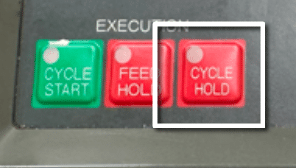
It has the normal feed-hold but it also has cycle hold.
This means you can halt the program and stop spindle then open the door and have a look around. Then when you close the door you can carry on. Great. The luxury.
How Simple.
You would be forgiven for thinking all CNC’s would do this, take it from me, and I’m old enough to remember when we had fish in the rivers instead of tampons and human excrement, they fuckin don’t.
Stuff I like on Colchester Tornado
Second hand these machines are great value.
Most of em have VDI turrets. (Look out for it)
Cycle hold can stop program for inspection .
If you press F2 you can rotate the turret in reverse to quickly get your tool.
Absolute encoders (no need to zero return)
Loads of em about so therefore easy to get fixed.
Easy to fix yourself.
4000rpm spindle.
Fanuc control, and yes I slagged it but everyone knows it, so if you buy one of these and you advertise for someone to use it they will flood your inbox.
Stuff I Don’t Like on Colchester Tornado
Fanuc control, shit to edit.
Rapid override scare the living bollocks out of me.
Buttons tend to wear down, might be worth investing in new ones.
Tend to be dirty but you can always clean it.
Old Fanuc controls have very small memories.
No tool arm, it’s an option so check if you have one.
Conclusion
This machine is not super precision, it’s not super fast although definitely not slow.
To make a car analogy it’s like buying an old ford car. You know you won’t need a second charge on your house in order to get it fixed and there are loads of em about.
Parked on the drive it might look a bit shit but never mind. My mate once said to me, sat behind the wheel of his new Mercedes “you still driving that old wardrobe”
No-one gets to insult my V70 Volvo. “Yes” was my reply “and when it breaks down I’ll put it in my wheelie bin with the rubbish and buy another one for one months payment on that Mercedes”
Because the Colchester Tornado is common there is plenty of knowledge and bits out there.
Old Fanuc Control? Well that means it’s easy to find someone to work it.
Easy to get training (just come to me)
The price means you can almost have one in the garage. My wife said no but you might have more luck.
Every CNC Setter, every CNC Operator, every CNC Programmer they all have a story about their worst CNC Crashes. I’ll tell you about mine in a minute. That’s not what this post is all about. Today I want to give you something to think about next time the unthinkable happens.
It all happened on a machine not unlike the one above, good old Mori Seiki work horse. I was so grateful of those bars on the door.
Bloody hell! Anyway what I did (like a bloody turkey) was to put a manual chuck inside a power chuck on a CNC Lathe. Worked great that was until the speed clamp stopped working.
When the machine faced off the part in G96 (see explanation) the spindle accelerated up to its maximum RPM. This was about 3000 revs. Now when a power chuck gets up to that kind of speed the centrifugal force starts to force the jaws open.
https://www.youtube.com/watch?v=x14poOHTXlM
Well if you are holding a manual chuck in there you are in deep shit, and I was. The manual chuck came out ripping off the power chuck soft jaws. Oh and for good measure it took off the machine door. I have never been so scared since my hamster bit me when I was six years old.
People say to me all the time an expression I hate “human error”, mmm. Nope sorry that will not do. It actually was a catalogue of cockups.
Although G50 is modal you must have one at the beginning of every programme. Even if it’s not needed set it to the maximum RPM of the machine.
Never never put a manual chuck inside a power chuck.
Power chucks need regular servicing to maintain optimum pressure.
Never stand right in front of the chuck, try to stay to one side of it.
Never remove machine interlocks.
Wear two pairs of underpants if you think you might mess yourself.
The Solution (CNC Crashes)
At the CNC Training Centre we offer to help companies make productivity improvements. When we do this I talk about ways to make things stick. That is what you need to do after a collision. Implement solutions so that this particular CNC Crash cannot be repeated.
When CNC Crashes Occur.
Get everyone involved together and fully analyze what happened.
Make lists of all the errors and mistakes.
Make sure everyone knows it is not about apportioning blame.
Make it very easy for people to be honest oh and don’t forget torture is illegal under the Geneva Convention..
Look at the things you can change. If someone forgot to do something then how do you automatically remind him. Maybe you can put something in place so he does not need to remember.
For everything that went wrong introduce a new rule or procedure to make sure it can never happen again.
Oh by the way it’s never human error where CNC Crashes are involved.
So let’s look at my example.
Put G50 in every programme on the first line. Go through all the old programmes and do this.
Maintenance programme for chucks and dated sheets on the back of each machine.
Training sessions to explain exactly how G50 and G96 work.
Videos are excellent for training as they cannot be altered. Word of mouth is unreliable.
CNC Battery Backup, I had a call from a customer the other day about a mysterious battery warning on the screen of his Haas CNC Lathe, it turns out he had been ignoring a battery alarm for a while. Battery warnings are a bit like strange rashes you ignore them at your peril.
I was too late the machine had lost its memory. A bit like the next day after you got drunk and everyone was telling you about how you got naked in the middle of the dance floor and to you it’s like it never happened.
No matter how many prompts you give the machine now, all is lost. When your battery backup goes unfortunately you don’t just loose your CNC Programmes, oh no you should be so lucky. Obviously it depends on the machine and the control and how the moon is aligned with the planets. You can loose all your parameters, all your offsets, all your settings everything. All in all it’s not good.
CNC Machine Parameters
The parameters are the most important one, if you ignore this whole article (like you did all my others) please don’t ignore this. It could almost scrap your machine, I jest not. All your machine backlash parameters would be lost and even if you had an identical machine these parameters would not be the same they are unique to each machine. You should have a disk or a paper tape or DVD, maybe somewhere in the machine cabinet. Make sure you have a copy of this and it is up to date.
On most machines the CNC Battery Backup gets charged when the machine is on and when it’s off that battery keeps hold of all what’s needed for when you switch it back on again. This works fine until the battery gets knackered after a few years. You should get a warning and if you do then you ignore at your peril. The best thing to do now is don’t switch off the machine (the hydraulics is fine to turn off).
Just press the E Stop (the big one shown above) but don’t switch off the main power. Now get HELP. Oh and by the way if your machine has power saving or auto shut-down you may need to turn this off as some do power down the whole system, this will be in your settings.
CNC Battery Backup
It’s particularly worth looking at before a shutdown type holiday. You might not realise it but this might be the only time in a year when the machine is off for more than a few hours, and that’s when the trouble starts.
Even when everything is restored you need to be really careful it’s a bit like restoring factory settings on your mobile phone “yea that’s OK” you say. Then for days you keep finding all those little customization you made and forgot about.
This is my phone (I like to have all the latest gadgets just like you young folk)
Oh By the way don’t forget the new classroom training courses.
If you are not familiar with the basics of Turning or Milling then you may need to take one of the course below before you do the New CNC Training Classes above.
CNC Battery Backup
Lets talk about what we can do with regards to CNC Battery Backup.
Get your machines on a regular maintenance contract.
Make sure you have an up to date backup of your machine parameters.
All backups should have an extra copy off the premises or in a fireproof safe
Always read alarms and don’t procrastinate, it can make you blind.
Never ignore warnings on the screen and keep your eyes out for quick flash warning as the machine comes on.
Don’t just keep programs in the machine you may have got away with it for years but one day……..
CNC Program Backup
The method I have found to work the best with regards to CNC program backup is to only keep in the machine the program you are currently using. That way you always have the most up to date program and it prompts operators to update the backup system after alterations. Also it will stop you relying on the machine memory.
There are many very good backup systems you can buy and I would recommend you get one. They usually have a way to quarantine a program so that the programmer can decide to update the master after alterations.
Make sure you have drawing issue numbers etc. on your programs and this covers you for ISO 90001 thingamy or whatever. Most machines have a way of saving all the programs at once and this is often a good temporary measure if your in a rush. On a Haas CNC Machine it puts them all into a single program.
Most machines have a way of saving your offsets either separately or with the programs and this is well worth checking out.
Read The Manual, CNC Battery Backup
This is not just an old man repeating himself yet again. It will tell you how to backup your parameters and offsets etc.
CNC Probes, Auto tool Measure, Lathe Measuring Arms
You will have to re calibrate these as the settings will be lost. Unless you saved your parameters that is. It is a good idea to write these figures down and if you didn’t do it before do it this time.
These settings effectively store where the probe is in relation to the coordinate system. If you don’t know how to calibrate your probe etc. it’s time to learn it is not only expensive to get this done it will stop you getting round to doing it. Once you have done it you will be surprised how easy it is.
If you are not familiar with the basics of Turning or Milling then you may need to take one of the course below before you do the New CNC Training Classes above.
It’s been a while since I trained anyone on a Mazak Quick Turn Machine. Another training job completely out of the blue.
Custom Rifles, didn’t know what to expect really. Anyway a drive to Tunbridge Wells, where for the price of a garden shed you could probably buy my village in the Midlands.
I ended up in glorious countryside on a farm in what felt like the middle of nowhere. The guy who runs this company (Paddy) has his workshop in the outbuildings of the farm.
It is like walking into Dr Who’s Tardis. This workshop wants for nothing, surface grinding, shot blasting. This guys even got a Faro Arm!
Two Haas machines and the Mazak Quick Turn 10. Not the tidiest of workshop but I am told it’s a work in progress.
It is really heartwarming to see such investment in tooling and modern equipment in what effectively is a one man band.
Paddy is a brilliant engineer and mostly self taught. Loads of the CNC stuff learnt from my website (happy days) . This guy googles everything but not in a “What I had for breakfast, oh fuck the cat just threw up” type of way.
This is very constructive use of google definitely the way forward.
He already had a pretty good understanding of what the machine could do. Being self taught, several gaps in his knowledge, so, in steps me, to fill em all up.
Paddy rebuilds, repairs and creates custom rifles.
Mazatrol
I had forgotten just how brilliant these machine are. I don’t believe there is a quicker way to get a part from drawing to bubble wrap than the Mazak Quick Turn.
Check out this video on Tool Path Store another brilliant feature on the Mazak Quick Turn.
I’m not flogging these things by the way but if your reading this article I’m always open to offers. That is providing I keep my clothes on, well maybe not, how much we talking?
From its original concept Mazatrol has never really got much better and that’s not a criticism. For turning it’s just bloody good, very bloody good.
Like for example on a Mazak you index the turret and you wanna use a tool. Now that’s not a big ask is it?
Well on most other controls you can’t because the bloody offset is not active. You can call it in MDI if you want. That is if you know how. Trouble is, the minute you press RESET it’s gone .
On a Mazak once you index the turret that tool is active along with all its associated geometry.
That means you can start manual turning with hand wheel or jog and the diameter is what it says on the screen.
So simple, so obvious but what a difference it makes. The list goes on and on as to how well thought out these Mazak Quick Turn machines are.
All the information is saved with the program. So that means your work offset, jaw details and chuck details are all there when you call the program again.
Graphics
Now the graphics are not like“Assassin’s Creed Origins” but they are adequate and definitely help a lot. If you can be arsed to set the graphics up with chuck jaws n stuff then you can be certain all will be okay when you run it for real.
You can even jump from the program directory straight to a graphic simulation of the part so there is no “oh shit I wish I’d made a note of what this does” moment. You quickly get to see what the program does.
Footnote: You should still add a program description (and there’s a facility for this too.)
Liar Liar Your Bums On Fire
One of the main criticisms I hear of Mazatrol is that you have to “Lie to it”. I think when you want to do something a bit unusual it’s sometimes hard to get Mazatrol to do it.
This Mazak Quick Turn 10 is a two axis CNC Lathe. Let’s be honest most of the bits you make are gonna be quite simple. If not then this is where the Manual Programming Unit steps in.
Manual programming units are the Mazak “Get Out Of Jail Free” card
You can go back to some very crude G code programming within Mazatrol. These Manual Programming Units can sometimes get you out of a jam. It is quite limited, in what G codes you can use, but it will help a lot.
Incremental is a bit strange because it does not use U and W like you would normally on a Fanuc type system. It puts like a sign after your X or Z to tell you it’s incremental.
Need To Know
It’s well documented how easy it is to program in Mazatrol so I won’t dwell on it.
If you have never used Mazatrol you need to check it out. I think it is the epitome of “need to know”. What I mean by that is that it’s the minimum amount of information to get it to make some bits.
You know stuff like do you want tool nose radius compensation? Of course you bloody do. So it doesn’t ask you, you just get it.
Anyone who has only used Mazatrol probably wouldn’t know what you were on about. And why should they care?
It’s like knowing all the bits inside your telly who gives a shit when you just want to watch “Emmerdale Farm”. I don’t watch that crap by the way, honest.
Read On It’s Not All This Boring
This control can smoothly go into ISO programming. Not sure if this is an option but they all seem to have it.
So………. from a Mazatrol program you just jump into an ISO G code type program and everything works the same.
So what’s all the fuss about. If there’s something you can’t do in Mazatrol just write a bit of straight ISO G code type program and call it from your Mazatrol main program. So there you go job done stop whining.
Even the graphics work in ISO so there is no excuse.
Priority
When you finish your program you get this list of processes and you can really easily swap things around. You know like if you wanted to thread before you did the grooving, you can easily just swap the order.
Then you have this button that says Rough Priority. When you press it all the roughing is done first. How cool is that??
Program Restart
It always amazes me that CNC Machines are never that good on this. Well Mazaks are not bad actually.
You can really easily start from any program unit in Mazatrol. It’s also got this Single Process thingy that’s been around for years. Dead useful though. It means you can just run one unit, so you don’t have to worry about it carrying on to the next unit it just does that unit and ends.
Useful for stuff like just going over a thread again.
You can’t actually break into a unit to restart but on CNC Lathes you nearly always just want to start at the beginning of a tool.
If you have an ISO program it’s still better than a lot I could name. A bit convoluted in a way only the Japanese seem to be able to do. Nevertheless seven out of ten.
Procrastination
I was accused of this years ago and once I’d looked it up I thought yea that’s me. “What’s the point of this you ask? He’s off again”
When you are running an ISO program and you are milling say a shape or something. You look at the program and you see something coming up that you never got round to changing. It could be a feedrate or something.
It’s something that can keep pissing you off cos you forget to do it.
Help is At Hand. On a Mazak you can actually go into edit and alter it then come back n continue your program.
I just love showing people that one, makes me feel like I earned my money.
Oh yea by the way this is only when you are in an ISO program not Mazatrol
Things I Don’t Like
Take That Records
Beef Burgers
Brass Bands
No I meant about this machine Mazak Quick Turn.
Not much actually, oh the editing is a bit slow.
Editing
Editing in ISO is a doddle.
Editing in Mazatrol is very cumbersome and when it comes to stuff like copying a unit you have to say what program it’s from and all sorts of bollocks. It wants your bank account number and sort code.
There are more questions than a fuckin mortgage application.
Moving units is the same not a pleasant customer experience. Once you get used to it and how the Mazak brain is wired it’s ok though.
Let’s Be Honest
There ain’t much to not like about the Mazak Quick Turn.
Even if I were only going to use the machine is ISO (Fanuc type programming) and not use Mazatrol I would still seriously consider buying one of these machines.
Why…..
In ISO it’s easier to restart a program than most G code controls.
The editing is easy.
Better graphics than most. (It’s still like early space invaders)