Mazak Programming Tutorial

Mazak Programming Tutorial

Mazatrol Training Onsite/Offsite

CNC Training Centre offers training on all Mazak Machines this article includes Mazak programming tutorial (VFC and TPS)

Call David: 07834 858 407

CNC Training Centre Reviews

30 five star ratings on Google (just saying)

Mazak, How It All began

Saddakichi Yamazaki  started making pots and pans in 1919 in a place called Nagoya in Japan.

He went on to mat-making and then woodwork machines. During the 1920’s they started making lathes.

World War II

The company were part of Japan’s industrial buildup during World War II. Like the rest of Japanese industry they were humbled by the outcome of the war.

Yamazaki was revived in the 1950s and 1960s by the founder’s sons. The company went from strength to strength and in the 1980s a manufacturing plant was built in Worcester in the UK.

Mazak Training Mazatrol Training

How do you get from pots n pans to CNC Machines?

Mmmmm

Mazak Training Mazatrol Training

Here is a nice old Yamazaki


Mazak Training Mazatrol Training

I remember going to the Hamburg engineering Show circa 1982 with my old boss and we actually met Teramatsu Yamazaki.

Well I think that was his name I know they called him Tel which we found quite funny at the time. They had this raffle and were giving away these really expensive vases as prizes it all seemed a bit strange at the time.

Oh and he had his own personal magician walking around with him. I’m not joking, a playing card would suddenly appear out of his pocket or some such thing. Weird but a lot of fun.

Anyway they made us very welcome and we bought our first Yamazaki.

Just shows how old I am being able to remember when Mazaks were called Yamazakis.

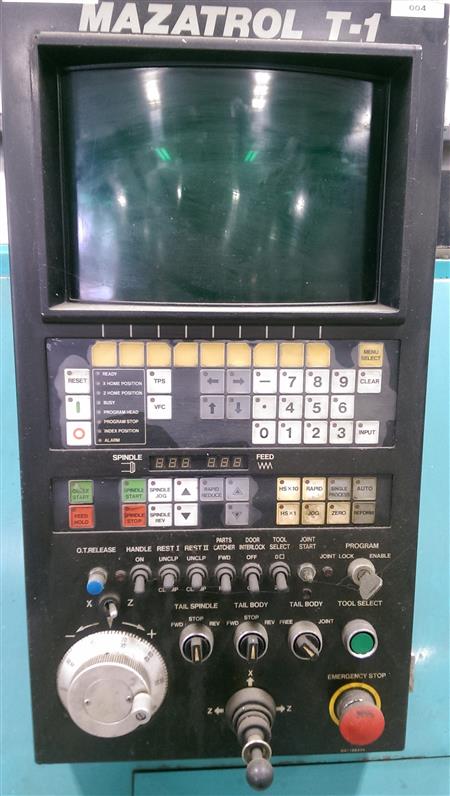
Early Mazatrol T1
mazak programming tutorial

I remember that you had a choice of Fanuc or Mazatrol as a control. My boss decided to go for Fanuc although I wanted the Mazatrol. (I still love playing around with anything new)

Having seen the demonstration I was absolutely knocked out. It was streets ahead of anything else, fully conversational.

It calculated feeds and speeds and you didn’t need to know any G Codes, M Codes absolutely none of that shit. Good graphics to check the tool path.

Oh did I say it picked it’s own tools too?

Anyway next machine we got we had Mazatrol and I have loved em ever since.

Mazak Programming Tutorial VFC

VFC (Very F***ing Clever)
mazak programming tutorial

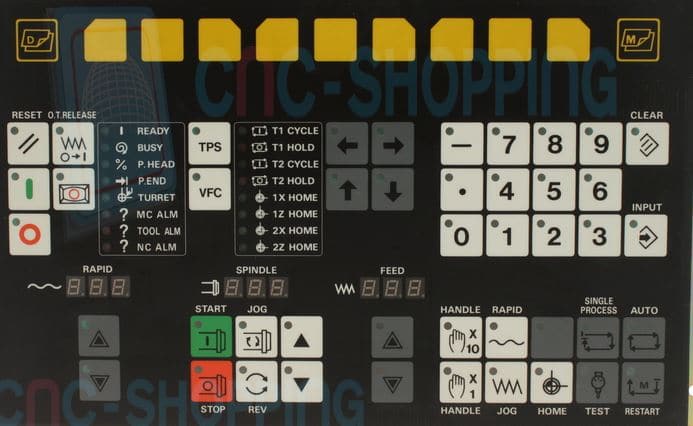
Contact CNC shopping for spares The control panel was and still is nice and easy to use.

It had this great feature called VFC and when asked what the button was the engineers would always reply “Very Fucking clever”.

Actually it was quite clever (and still is).

The irony here is that I spelt the word clever as cleaver so I am definitely not VFC.

So what you did you would run a face mill or whatever and as it was cutting override the speeds and feeds to your optimum values.

Here Comes The Magic

One press of the VFC button (not to be confused with the KFC Button) and your program would be updated to the new feeds and speeds.

Oh something else

I love showing people this when I am doing Mazak Training Mazatrol Training …………

Mazak Programming Tutorial TPS

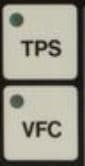
Mazatrol VFC Button and TPS Button
mazak programming tutorial

Yea that button above it (TPS) pretty cool too. It stands for Tool Path Store by the way.

And that is what it does.

Right imagine the scenario, you have a grooving tool happily doing its business and you want to stop the machine and see what’s going on. Or maybe it just broke the insert!

You press your feed hold button (That’s the red one).

mazak programming tutorial

Your machine stops.

You then press TPS and move the X axis. Press TPS and move the Z axis and so on…..

You can now change the insert if you need to.

More Mazak Magic

Move back into the AUTO mode. Ok now when you Cycle Start the machine it remembers this path, follows it and does not break the tool, it just continues where it left off.

Oh and There is More

Whenever I get involved in Mazak Training Mazatrol Training the one thing that impresses me most is this.

Once you call up a tool then the offset becomes active. First time I used a Mazak with Mazatrol I thought it was amazing.

This applies to Lathes and Machining Centres.

That means if you want to turn a diameter you can just move the tool with the hand-wheel to the diameter you want and turn.

On a machining centre it makes setting Work Offsets a doddle (That means easy).

So simple, so obvious, you’d think everyone would do it!!!!!

Mazak Training Mazatrol Training

If you require training on any Mazak machine or control then call the CNC Training Centre and we will be able to help you. We pride ourselves in helping people to get the most out of their CNC Machines.

Be honest how many buttons on your CNC Control have you never used or maybe have never understood?

Well………. now’s the time to start learning.

Here is a video on TPS (Tool Path Store) I left it till last cos I knew you wouldn’t be arsed to read my post.

Thanks For Reading

Don’t forget there’s loads more folks.

And a YouTube channel

Learn CNC Programming

Services offered at CNC Training Centre

Edgecam training.

Classroom programmer training.

Onsite CNC Machine Training.

CNC Training on all controls and machines.

Mazak Training Fanuc Training

Don’t forget we offer training on all types of Mazak Machines and all Fanuc Controls 6m to 31i Oi old to young.


Mazak Quick Turn 10 CNC Lathe. What’s not to Like?

CNC Training Call David: 07834 858 407

30 Five Star Reviews

CNC Training Centre Reviews

Contact CNC Training Centre

Mazak Quick Turn 10

It’s been a while since I trained anyone on a Mazak Quick Turn Machine. Another training job completely out of the blue.

Custom Rifles, didn’t know what to expect really. Anyway a drive to Tunbridge Wells, where for the price of a garden shed you could probably buy my village in the Midlands.

I just want Mazak Training I’m not interested in your boring article.


Mazak Quick Turn

I ended up in glorious countryside on a farm in what felt like the middle of nowhere. The guy who runs this company (Paddy) has his workshop in the outbuildings of the farm.


It is like walking into Dr Who’s Tardis. This workshop wants for nothing, surface grinding, shot blasting. This guys even got a Faro Arm!

CMM Solutions

Two Haas machines and the Mazak Quick Turn 10. Not the tidiest of workshop but I am told it’s a work in progress.

It is really heartwarming to see such investment in tooling and modern equipment in what effectively is a one man band.

Paddy is a brilliant engineer and mostly self taught. Loads of the CNC stuff learnt from my website (happy days) . This guy googles everything but not in a “What I had for breakfast, oh fuck the cat just threw up” type of way.

This is very constructive use of google definitely the way forward.

He already had a pretty good understanding of what the machine could do. Being self taught, several gaps in his knowledge, so, in steps me, to fill em all up.

Paddy rebuilds, repairs and creates custom rifles.

Mazatrol

I had forgotten just how brilliant these machine are. I don’t believe there is a quicker way to get a part from drawing to bubble wrap than the Mazak Quick Turn.

Check out this video on Tool Path Store another brilliant feature on the Mazak Quick Turn.


I’m not flogging these things by the way but if your reading this article I’m always open to offers. That is providing I keep my clothes on, well maybe not, how much we talking?

Mazak Quick Turn

From its original concept Mazatrol has never really got much better and that’s not a criticism. For turning it’s just bloody good, very bloody good.

G Code Programming

When I train people on G code type controls who have worked on Mazatrol and machines like the Quick Turn 10 they are stunned at how complex the programs are.


Mazak Quick Turn

Like for example on a Mazak you index the turret and you wanna use a tool. Now that’s not a big ask is it?

Well on most other controls you can’t because the bloody offset is not active. You can call it in MDI if you want. That is if you know how. Trouble is, the minute you press RESET it’s gone .

How to stop this from happening

On a Mazak once you index the turret that tool is active along with all its associated geometry.

That means you can start manual turning with hand wheel or jog and the diameter is what it says on the screen.

Mazak Quick Turn

So simple, so obvious but what a difference it makes. The list goes on and on as to how well thought out these Mazak Quick Turn machines are.

All the information is saved with the program. So that means your work offset, jaw details and chuck details are all there when you call the program again.

Graphics

Now the graphics are not like“Assassin’s Creed Origins” but they are adequate and definitely help a lot. If you can be arsed to set the graphics up with chuck jaws n stuff then you can be certain all will be okay when you run it for real.

Mazak Quick Turn

You can even jump from the program directory straight to a graphic simulation of the part so there is no “oh shit I wish I’d made a note of what this does” moment. You quickly get to see what the program does.

Footnote: You should still add a program description (and there’s a facility for this too.)

Liar Liar Your Bums On Fire

One of the main criticisms I hear of Mazatrol is that you have to “Lie to it”. I think when you want to do something a bit unusual it’s sometimes hard to get Mazatrol to do it.

This Mazak Quick Turn 10 is a two axis CNC Lathe. Let’s be honest most of the bits you make are gonna be quite simple. If not then this is where the Manual Programming Unit steps in.

Manual programming units are the Mazak “Get Out Of Jail Free” card

You can go back to some very crude G code programming within Mazatrol. These Manual Programming Units can sometimes get you out of a jam. It is quite limited, in what G codes you can use, but it will help a lot.

Incremental is a bit strange because it does not use U and W like you would normally on a Fanuc type system. It puts like a sign after your X or Z to tell you it’s incremental.

Need To Know

It’s well documented how easy it is to program in Mazatrol so I won’t dwell on it.

If you have never used Mazatrol you need to check it out. I think it is the epitome of “need to know”. What I mean by that is that it’s the minimum amount of information to get it to make some bits.

You know stuff like do you want tool nose radius compensation? Of course you bloody do. So it doesn’t ask you, you just get it.

Mazak Quick Turn

Anyone who has only used Mazatrol probably wouldn’t know what you were on about. And why should they care?

It’s like knowing all the bits inside your telly who gives a shit when you just want to watch “Emmerdale Farm”. I don’t watch that crap by the way, honest.

Read On It’s Not All This Boring

This control can smoothly go into ISO programming. Not sure if this is an option but they all seem to have it.

So………. from a Mazatrol program you just jump into an ISO G code type program and everything works the same.

So what’s all the fuss about. If there’s something you can’t do in Mazatrol just write a bit of straight ISO G code type program and call it from your Mazatrol main program. So there you go job done stop whining.

Even the graphics work in ISO so there is no excuse.

Priority

When you finish your program you get this list of processes and you can really easily swap things around. You know like if you wanted to thread before you did the grooving, you can easily just swap the order.

Haas SL 10

Then you have this button that says Rough Priority. When you press it all the roughing is done first. How cool is that??

Mazak Quick Turn

Program Restart

It always amazes me that CNC Machines are never that good on this. Well Mazaks are not bad actually.

You can really easily start from any program unit in Mazatrol. It’s also got this Single Process thingy that’s been around for years. Dead useful though. It means you can just run one unit, so you don’t have to worry about it carrying on to the next unit it just does that unit and ends.

Useful for stuff like just going over a thread again.

You can’t actually break into a unit to restart but on CNC Lathes you nearly always just want to start at the beginning of a tool.

If you have an ISO program it’s still better than a lot I could name. A bit convoluted in a way only the Japanese seem to be able to do. Nevertheless seven out of ten.

Procrastination

I was accused of this years ago and once I’d looked it up I thought yea that’s me. “What’s the point of this you ask? He’s off again”

When you are running an ISO program and you are milling say a shape or something. You look at the program and you see something coming up that you never got round to changing. It could be a feedrate or something.

It’s something that can keep pissing you off cos you forget to do it.

Help is At Hand. On a Mazak you can actually go into edit and alter it then come back n continue your program.

I just love showing people that one, makes me feel like I earned my money.

Oh yea by the way this is only when you are in an ISO program not Mazatrol

Things I Don’t Like

  • Take That Records
  • Beef Burgers
  • Brass Bands

No I meant about this machine Mazak Quick Turn.

Not much actually, oh the editing is a bit slow.

Editing

Editing in ISO is a doddle.

Editing in Mazatrol is very cumbersome and when it comes to stuff like copying a unit you have to say what program it’s from and all sorts of bollocks. It wants your bank account number and sort code.

There are more questions than a fuckin mortgage application.

Moving units is the same not a pleasant customer experience. Once you get used to it and how the Mazak brain is wired it’s ok though.

Let’s Be Honest

There ain’t much to not like about the Mazak Quick Turn.

Check this out on VFC it’s brilliant.

Even if I were only going to use the machine is ISO (Fanuc type programming) and not use Mazatrol I would still seriously consider buying one of these machines.

Why…..

  1. In ISO it’s easier to restart a program than most G code controls.
  2. The editing is easy.
  3. Better graphics than most. (It’s still like early space invaders)
  4. Erm…..

Oh yea I’d better do a plug for training. If you want to be trained on a Mazak give me a call.


Careers in CNC

View all current vacancies in CNC

Click here

Call David: 07834 858 407