Category Archives: Mazak Turn

How to use G50 on a CNC lathe

CNC Turning Basics G50 Speed Clamp

How to use G50 on a CNC lathe

How to use G50 on a CNC lathe

How to use G50 on a CNC lathe.

G50 in a turning program is a speed clamp. The machine accelerates up to the speed you set (G50 S2000) and will not go any faster.

Now before I get arrested by the “Correct Word and Grammar Police” I know it’s not actually a clamp. The truth is it’s just what everybody calls it, so get off my fuckin case.

Black dog his name is Boris

Anyway if I start to call it something else all my CNC mates (and I do have some) will be confused.

Just check me out on LinkedIn. Anyway as I was saying my mates wouldn’t know what the fuck I was on about.

You must program a G50 before each tool and at the beginning of the program for safety reasons which I will explain later.

It’s Modal

G50 is a modal G code (it stays active). If you have a program where you do not want to clamp the speed you must still put the G50 at the beginning of the program (set the clamp to the machines maximum RPM).

Otherwise it may pick up the G50 from the last program and you may not get the RPM you want. It can have the effect of slowing down production because the speed is being restricted and you didn’t realize.

Don’t use someone else’s G50 get your own.

You wouldn’t wear someone else’s dirty pants. (Americans call underpants underwear I think)


These are mine (sorry I din’t get time to wash them).

Modal G code explanation here.

Now Here Is Something You May Not Know

Historically G50 was used to set the machine datum. This still works so do not put any X or Z figures on this line. You will get some weird shit happening if you do. Oh and you will probably trash your 100 grand machine.

Anyway how to use G50 on a CNC lathe

G50 S2000 (SPEED CLAMP 2000 RPM)

Some G code systems, or depending on parameters, may use G92 instead of G50. This is not very common but it works exactly the same way.

On a Fanuc control they are called A type and B type G codes and depends on machine tool builder. Most of the G codes remain the same but proceed with caution.

It is particularly useful when you are facing a part using G96 (constant surface speed). When the tool reaches the centre of the part the machine will be running at maximum RPM. This could be very dangerous on large or out of balance components. When you set a G50 speed clamp, once the machine reaches the clamped speed it will go no further.

Here is a tutorial video about G96 and G97

RULES

  1. Use a G50 at every tool-change
  2. Use a G50 at the beginning of a program (even if you think it’s not needed)
  3. G50 S2000 (Only G50 and speed on one line, nothing else)
  4. There is no rule 4
  5. Never eat yellow snow.

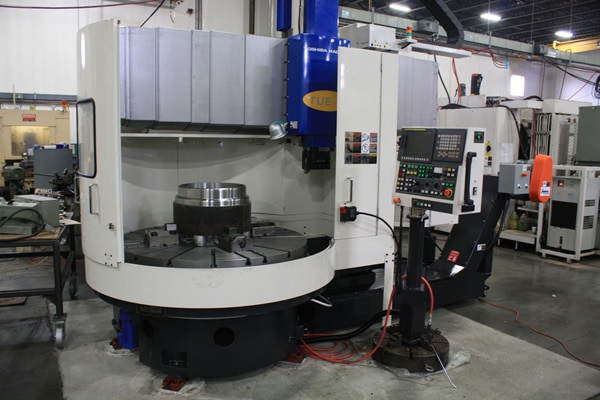
Toshiba VTL CNC

This is a Toshiba VTL (Vertical Turning Lathe).

If you want to buy one or fix one go to Leader CNC

Now imagine this revolving too fast you would soon need their services oh and a good trauma team.

More CNC Turning Help (G70 and G71)

Please contact me if you require:

  • CNC programming training.
  • Want to learn CNC programming.
  • Fanuc control training.
  • Yasnac programming training.
  • Any type of CNC course.
  • Fanuc training courses
  • CNC lathe training
  • CNC Vertical Machining Centre training

Services offered at CNC Training Centre

Edgecam Training.

Classroom programmer training.

Onsite CNC Machine Training.

CNC Training on all controls and machines.

Mazak Training Fanuc Training

Don’t forget we offer training on all types of Mazak Machines and all Fanuc Controls 6m to 31i Oi old to young.


Jumping Sections of Programme Using M99 and Block Skip


Click for M99

Please contact me if you require:

  • CNC programming training.
  • Want to learn CNC programming.
  • Fanuc control training.
  • Yasnac programming training.
  • Any type of CNC course.
  • Fanuc training courses
  • CNC lathe training
  • CNC Vertical Machining Centre training

Contact: 07834 858 407

Services offered at CNC Training Centre

Edgecam training.

Classroom programmer training.

Onsite CNC Machine Training.

CNC Training on all controls and machines.

Mazak Training Fanuc Training

Don’t forget we offer training on all types of Mazak Machines and all Fanuc Controls 6m to 31i Oi old to young.


CNC Turning G Code List For Beginners

Download and print this nice large print CNC Turning G Code List

Download CNC turning G Code List PDF

I always begin my training sessions by telling my students not to remember anything I say.

This sounds completely stupid and my excuse is it wasn’t my idea to say it.

About ten years ago I worked in France. After about a year it seemed obvious that I would need to speak to people to order “Fish n Chips” and stuff like that.

Anyway I got these CD’s to teach me French and the bloke (can’t remember his name) started off by telling you not to remember anything he told you.

Reverse Psychology

I think there is a bit of reverse psychology going on but the main idea is that you understand not remember. It didn’t work for me because I still managed to completely fuck up the language.

Not realising French Canadians speak differently to native Frenchmen (I was working for Bombardier) . Anyway I asked this bloke, in French, to “will you come with me”. I can’t remember what it is in French and after all the bloke on the CD had specifically told me not to remember.

Anyway turns out this had a sexual connotation and made me the complete laughing stock everywhere I went from then on. (I’ll let you do the maths on that one.)

“OK which one of you bastards bought all the fuckin toilet paper in lock-down?”

Now I know what you are thinking, “that is the gnats cock of CNC Turning G Code Lists”. Honestly size isn’t everything.

Learn these first and just by seeing them every day they will just sink into your brain.

When it comes to CNC Programming it is important to enjoy your self and not get bogged down trying to remember loads of G Codes.

The truth is you only need to remember a few and it’s all about understanding what they do.

For Example This is in your Programme.

You watch in amazement as it cuts your part.

So you look up what G71 means on your list of G Codes printed in large letters on the side of your machine.

Download CNC turning G Code List PDF

“Oh yea it’s that’s roughing shit” you say.

As You Watch it Run It All Makes Sense

From your Classroom Training you know that there is a multi repetitive cycle that can rough out a part.

You understand how the cycle works already.

CNC Turning G Code List
G71 Rough Turning Cycle

So as it runs, it all makes sense.


CNC Turning G Code List
Keep it Simple

Type up or print this list in nice big letters and stick it to the side of your machine

Download CNC turning G Code List PDF

CNC Turning G Code List

G00                 Move at Rapid speed
G01                 Feed in a Straight Line
G02                 Clockwise Arc
G03                 Counter Clockwise Arc

G04                 Time Dwell

G28                 Return Axis to Home

G41                 Cutter Compensation Left
G42                 Cutter Compensation Right
G40                 Cancel Cutter Compensation

G50                 Maximum Spindle Speed
G54                Work Offsets

G71                 Stock Removal Cycle
G70                 Finishing Cycle for Above
G76                 Threading Cycle

G83                 Peck Drilling Cycle

G96                 Constant Surface Speed
G97                 Speed in RPM


G74 Drilling Cycle With G96

Tags :

Category : Fanuc Turn Mazak Turn

G74 Drilling Cycle With G96

G74 Drilling Cycle with G96.

On a CNC lathe G96 is used for most machining. It was amazing in the old days when we suddenly discovered G96.

Because you are using a constant surface speed the metal cutting is consistent so you get a great finish.

The Black Art Of CNC Programming

CNC Programming was a bit of a black art back in the old days and generally speaking we used G96 for everything except for screw cutting and drilling holes on centreline (G74 Drilling Cycle).

When CNC Programming a drilled hole you would always use G97, (this means the speed is in RPM).

If you were to program for example G96 S50 M3 and then rapid to X0 and Z3. ready to drill a hole the machine would just go to its maximum RPM. This would be the speed you set in your G50. (The G code used to restrict the speed.)

Oh by the way that 50 meters per minute is for a B & Q drill.

Don’t get me wrong I love B & Q products but HSS drills are not for grown up engineers they are great for metal work classes at school and making a coffee table for the misses but it’s time to join the big boys and spend some money.

I Digress

Anyway the machine would calculate the speed at its current diameter. So at zero the spindle would always be flat out.

So you could say G96 is pretty useless for a drill.

But you would be wrong!!!!!!

Take a look at this bit of code.

G74 Drilling Cycle

The idea is to send the machine to the drill diameter. Because the machine is in G96 it calculates the correct speed. When you then issue G97 it fixes the speed. Now when you move to X0 it has the correct speed.

Let The Machine Do What It’s Good At

Mmmmmmm… So all you need to do is send the drill to its diameter and the machine does the arithmetic.

Let the machine do what it’s good at and you do what you’re good at.

What are you good at by the way?

Threading is the same if you were machining an M20 thread at 100m/min calculate the surface speed.

(This is the quickest way I have seen)

20/314.2 =.06365

100/.06365 = 1571 RPM

You could do the same thing let the machine do it’s shit.

Rapid to the diameter of the thread then program G96

G0 X20. Z5.;
G96 S100 M3 (Start Spindle at 100 metres per min);
;
G97 (This will swap to RPM and clamp the speed at the correct RPM);
X21.;
;
G76 P010060 Q20 R.02;
G76 X16.93 Z-25. P1534 Q485 F2.5;
;

ETC

So with this bit of code you can get the machine to calculate your speed.

Thanks for watching and reading

If you have been affected by any of the issues in this post or need CNC Counselling then contact me.

Or call us

If you want to learn to program CNC Milling Machines

Look no further Contact CNC Training Centre


G94 Facing Example (Sample Program)

G94 Facing Example

G94 Facing Program Example

G94 Facing Example

:Blank Size: 65mm Diameter 85mm Long

:Final Size: 65mm Diameter 82mm Long

This program will rapid to X66. Z3. it will then machine the face down to Z0 in three cuts. The first G94 line tells it to face past centreline to X-1.6 at a feed-rate of F.2 The Z axis moves to Z2.

Cuts
1: Z2.
2: Z1.
3: Z0

The cycle stays in the control until cancelled by a G0 rapid command.

So it remembers exactly what you told it, a bit like my wife, she keeps reminding me of the time I got so hammered I pissed in her wardrobe (some of the shoes still smell to this day).

The G0 G28 U0 W0 will move the turret back to machine reference point.

The G0 will cancel the G94 Facing cycle.

G94 Facing Example Is It Any Good?

Well personally I think it is.

Now I’ll tell you why. You could say it’s really easy to write the program to face a part.

G0 X50. Z0
G1 X-1.6 F.2
G0 X50. Z2.

So that’s easy to do but….

Some one wrote a comment on one of my posts the other day and he started it by saying “back in the real world”.

Can’t lie and say it didn’t piss me off but being the mature well balanced man that I am I ignored it.

Now my inner nasty, immature, unbalanced me said “look mate I was in the real world when you were still shitting yellow”. Obviously I didn’t post it and if your reading this now thinking it’s you, well it isn’t.

Anyway as to the G94 Facing Example

In the “real world” you get to the end of the batch of parts and find that one of them is way too long and you need to face a shit load off the front.

Now had you used the cycle as below and got into the habit of always using it.

G0 X50. Z3.
G94 X-1.6 Z0 F.2
G0 G28 U0 W0

The alteration would be really easy.

G0 X50. Z12. (Imagine You Have An Extra 12mm On the Face)
G94 X-1.6 Z10.5 F.2
Z9.
Z7.5
Z6.
Z4.5
Z3.
Z1.5
Z0
G0 G28 U0 W0

Rapid Move Cancels G94

Note don’t forget you must have the G0 rapid move at the end to cancel the G94.

(Just like G0 cancels a canned cycle in milling)

Don’t be tempted to put G0 in the moves as the control will just wiz around in Z and sit there laughing at you.

G0 X50. Z12. (This is what not to do)
G94 X-1.6 F.2
G0 Z10.5 (NO NO NO NO NO NO)
Z9.
Z7.5
Z6.
Z4.5
Z3.
Z1.5
Z0
G0 G28 U0 W0

See full explanation

Using G94 on a Haas Lathe

Thanks

If you have been affected by any of the issues in this post or need CNC Counselling then contact me.

If you want to learn to program CNC Milling Machines

Look no further Contact CNC Training Centre


Careers in CNC

View all current vacancies in CNC

Click here

Call David: 07834 858 407