Author Archives: David

Edgecam Associativity How it Works

CNC Training Call David: 07834 858 407

30 Five Star Reviews

CNC Training Centre Reviews

Contact CNC Training Centre

This tutorial is about Edgecam Associativity it’s not really a tutorial.

Edgecam Associativity

It’s about the concept of Edgecam Associativity in solid modelling. It shows how you can create a model in your solid modelling system which can be transferred straight through to your programming system.

Edgecam Training

Don’t watch the video about Edgecam Associativity yet, it took me ages to write all this.

https://youtu.be/9yxwhVEAsYI

“Read More”

G80 G-code Fanuc

CNC Training Call David: 07834 858 407

CNC Training Centre Reviews

Contact CNC Training Centre

I noticed a common search in google is G80 G-code Fanuc.

CNC Machines use what we call canned cycles in a nutshell G80 cancels a canned cycle.

What is a canned Cycle?

To be honest I think it is a funny choice of words “Canned Cycle”.

My guess would be that all the information to drill a hole would be kept together in a “Tin Can” to use whenever you want.

I made this…….G80 G-code Fanuc

First of all we program the cycle this is a G81:

G81 G98 Z-10. R1.5 F200. X55. Y55. F250.

The machine will move to the position X55. Y55. then it will rapid to 1.5mm above the part (this is the R1.5). It will then feed down to Z-10. at a feed-rate of 250 mm per minute F250.

Finally it will use rapid to come out of the hole.

It then sits ready for the next move.


All you do now is just give more positions.

G81 G98 Z-10. R1.5 F150. X56. Y56. F200.
X70.
X85.
X90.
X95. Y65.
G80

Every time it moves to a position it will do whatever you stated in the canned cycle (G81)

You don’t add anything else to these positions.

G80 G-code Fanuc

“Read More”

CNC Milling M Codes List For Beginners

CNC Training Call David: 07834 858 407

30 Five Star Reviews

CNC Training Centre Reviews

Contact CNC Training Centre


CNC Milling M Codes
List of M Codes for a CNC Milling Machine

Download CNC Milling M Code List

This is my list of CNC Milling M Codes and you will notice there aren’t many.

That’s because you don’t actually need many.

M Codes are used to turn things on and off on a CNC Milling Machine. Sometimes known as miscellaneous functions.

A typical M Code would be M03 which would start your spindle forwards.

M04 would be reverse and guess what?

M05 is stop the spindle.

There, you learned three already.

You don’t need the extra zero so I advise you leave it out, program M3 M4 M5.

It really doesn’t matter but….. You could be wasting memory space or wearing out the tips of your fingers.

Here’s what I think about leading zeros.

M codes are the Snow Leopards of CNC Machining

Snow Leopards are Solitary Animals

Snow Leopards only ever get together to mate, they don’t even have a Christmas party or get pissed on a stag night.

With M codes they hate being on the same line of code. If they are then they will fight to the death.

Tigers Playing

Please note no animals were hurt in the making of this post.

There are exceptions to this rule, M Codes that is, but please don’t overload yourself with this at the moment.

Just trust me.

The first one in the block usually wins but I can’t  guarantee it. So you could get some crazy shit happening.

G90 M8 G0 G54 X0 Y0 S1500 M3;

You wouldn’t even get an alarm on most controls and it may just obey the first M Code it sees and ignore the last one.

The other thing to note with M Codes is that it makes no difference where they are in a block of code.

So if you put your M Code at the front of a block of code.

M3 S1500 G0 X0 Y0;

Or the end.

G0 X0 Y0 S1500 M3 ;

The spindle will start according to the logic of the machine not where the M Code is in the block of code.

The Boring CNC Milling M Codes

That’s my list of M Codes the rest are really boring doing stuff like changing gear ranges and stuff.

Download CNC Milling M Code List

Sorry I’m being flippant again.

CNC Milling M Codes Where Are The Rest?

Sorry you can’t have them. The reason for this is that they are different depending on what machine they are on.

CNC Milling M Codes
Hand Em Over

For example this beast is a Mazak Megaturn

CNC Milling M Codes
Mazak Megaturn

It Has a Gearbox.

To change gear you program M41 M42 and M43 for the different gears

M40 is neutral. Now on machines with gearboxes they do normally use these same M Codes.

However they can be different.

M10….. mmmm well that’s normally a clamp.

I think you get the picture. It is up to the machine tool builder.

It is best to get a specific set of M Codes from your machine manual.

The manual by the way is that book that nobody ever reads, it’s usually at the bottom of a bent up old filing cabinet.

Please Don’t Read It

I’ll read it for you then charge you a shit load of money for training.

Click here for CNC Training

Joking aside please don’t be arsed to learn a load of M Codes you will probably never use.

Well Commented Programs

Try to put M Code descriptions in your program. That way you won’t need to keep looking them up. A part transfer on a CNC Lathe is a good example, there are an absolute shit load of em.

They are everywhere. If you put a meaning to each one in brackets it will make proving the program out really easy. Oh and if you have a CAM system then change your post processor to output them for you.

M11 (OPEN CHUCK)

M10 (OPEN CHUCK)

etc etc

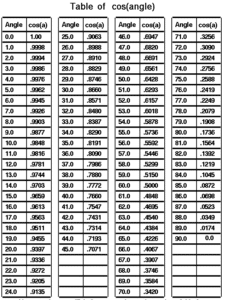
I had a boss once who actually learnt sines and cosines of angles.

Cosines of Angles

Holy shit I mean it’s impressive and I must add in 1975 it was actually worth doing because we didn’t even have calculators.

Hope you enjoyed reading my article on CNC Milling M Codes.

Please remember that it keeps me occupied and while I’m writing these articles I am not holding you up in the supermarkets queue trying to find a coupon for 10p off my incontinence briefs.

Download CNC Milling M Code List


Edgecam Tutorial 1: Intermediate Slices and Flat Land Finishing

CNC Training Call David: 07834 858 407

30 Five Star Reviews

CNC Training Centre Reviews

Contact CNC Training Centre

Intermediate Slices and Flat Land Finishing

This is a short video that covers Flatland Finishing and Intermediate Slices. You may have forgotten you can do this or maybe you didn’t know it existed. Please add comments and request any tutorial videos you may want.

If you liked this video, please don’t forget to subscribe to my YouTube channel by going to: CNC Training Centre

Please contact me if you require:

  • CNC programming training.
  • Want to learn CNC programming.
  • Fanuc control training.
  • Yasnac programming training.
  • Any type of CNC course.
  • Fanuc training courses
  • CNC lathe training
  • CNC Vertical Machining Centre training

Other Edgecam Stuff

Edgecam Instruction Simulation

Edgecam Associativity How it Works

Layers in Edgecam

Roughing Edgecam (Centre Cutting Tool)

Edgecam Version Update Now

Services offered at CNC Training Centre

Edgecam training.

Classroom programmer training.

Onsite CNC Machine Training.

CNC Training on all controls and machines.

Mazak Training Fanuc Training

Don’t forget we offer training on all types of Mazak Machines and all Fanuc Controls 6m to 31i Oi old to young.

Siemens Sinumerik Training


Fanuc Display – Relative Position


CNC Training Call David: 07834 858 407

30 Five Star Reviews

CNC Training Centre Reviews

Contact CNC Training Centre


Fanuc Display (Relative Position) is used only by the operator.

Fanuc Display

You can reset Fanuc Display (Relative Position) just like you would on a manual machine with a DRO. So use it for setting or even measurements. One thing to remember is it will not retain it’s position when you turn the machine off. The control in the video is a Fanuc 18i on a big vertical lathe but all other Fanuc controls are similar.

Subscribe to my YouTube channel (I beg you)

“Read More”


Careers in CNC

View all current vacancies in CNC

Click here

Call David: 07834 858 407