Heidenhain Work Offsets Explained

Heidenhain Work Offsets Explained

CNC Training Call David: 07834 858 407

CNC Training Centre Reviews

Heidenhain Work Offsets Explained

Heidenhain Work Offsets, traditionally the Heidenhain coordinate system was kept very simple. It was like the “Click and Collect” of the CNC World 20 years ahead of its time.

Heidenhain Work Offsets

Anyway all you did was go to the place where you wanted as your offset and zeroed the display.

That was the datum and when you had a new part you just zeroed it again.

WARNING THIS POST CONTAINS STRONG LANGUAGE AND NUDITY FROM THE OUTSET

Easy….

Simple as Jack Shit.

It even had a self destruct button.

Heidenhain Work Offsets

With this button you could really easily delete your program by accident.

I vividly remember having to lie and cheat my way out of that one.

Fortunately they moved it, well it’s gone anyway.

Now this button Wow….. Don’t even get me started. It was still there all those years ago.

Heidenhain Work Offsets

Watch this if you can’t stand the intrigue.

I Digress

Back to Heidenhain Work Offsets

Nowadays everything is so complicated. I still can’t work the fuckin TV remote control and my central heating comes on in the middle of the night for no reason.

I just put the heating full up all the time now, admittedly the kids have to stay outside in the summer but I like to keep things simple.

Some People Are Never Satisfied

Not happy with one work offset everyone wanted six. Then it went crazy with extended work offsets some of you greedy bastards (and you know who you are) have 99. Come on that’s just CNC debauchery.

Limitations with old Heidenhain Work Offsets

Joking aside it did have its limitations. Anyway now you can have as many as you want.

As we all know everything nowadays needs to be backwardly compatible. (I don’t actually know what that means, I heard a bloke say it in the pub)

Anyway the new machines have to still do what the old ones did.

From this screen you can make an offset active.

Once this offset is active any subsequent position move will be in this offset.

In your program you need one of these.

The above would call Datum 3

Above would call Datum 9

Heidenhain Work Offsets

This would take it back to Datun 0

Come on surely you get it now.

Heidenhain Work Offsets

The number (in this case zero) is the datum you wish to call. This would call the standard datum (can’t miss it it’s top of the list and it’s red)

Don’t forget this is modal so once selected the datum will be used all the time until you change it.

Now you have started using these datum you must have one at the beginning of each program. It’s a bit like taking out a mortgage (you can’t escape).

Obviously if you make it active in the datum table and then call a program. If that program has no datum call then it will use whatever’s there.

If you are affected by any of the issues raised in this post or need CNC Training or counselling then contact us.

Contact CNC Training Centre

Don’t forget to watch my Tutorial Videos

We offer training on all types of CNC Machines and controls check em out.

Or fill out the contact form below


Full Circle Heidenhain (Macro Program)

CNC Training Call David: 07834 858 407

CNC Training Centre Reviews

Macro to program a Full Circle Heidenhain

Heidenhain has its own form of parametric programming it uses Q values sometimes called Q DEF.

Er what you on about now David? You ask.

Ok sorry to shroud you in a cocoon of total bullshit.

It’s like Macro on a Fanuc Control. What you do is you program a circle and instead of putting numbers for the X values n stuff you put a Q number like Q1 or Q10

Then you tell it what the Q values are. So instead of X-20. you could have X+Q10

If you then went on to define Q10 as -20 then X would be X-20.

All will be revealed.

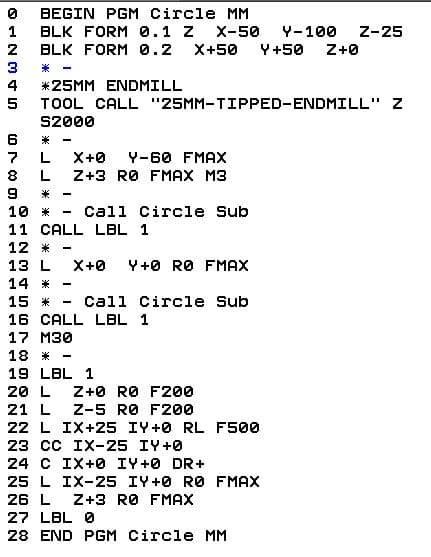
Take a look at this code.

Full Circle Heidenhain

This code will mill a full circle and because it’s in incremental (note the I in front of the X value) you can dump one anywhere. By that I mean you can mill one of these circles anywhere not take a shit anywhere.

Full Circle Heidenhain

Now watch it in action.

This is great but it is not easy to control. If we wanted a different diameter there are quite a few figures to change. If you are a bit of a prick like me then you’d probably get it wrong and scrap the part.

Q DEF To The Rescue Full Circle Heidenhain

Using Q def is really easy. You could start by using it to change the feedrate. Look at the code now.

Full Circle Heidenhain

Line 7 and line 17 define Q1 as two different values.Full Circle Heidenhain

Full Circle Heidenhain

So when each one calls LBL 1 the feedrate in line 25 will change to whatever value is in Q1.

Full Circle Heidenhain

Clever eh…..

But that’s not all.

You can have loads of Q values whopeeee.

Stick Around For The Exciting Stuff

“Read More”

Heidenhain Circular Interpolation

Heidenhain Circular Interpolation

CNC Training Call David: 07834 858 407


CNC Training Centre Reviews

30 five star ratings on Google (just saying)


Contact CNC Training Centre

Heidenhain circular interpolation, mm what bullshit, this just means cutting in a circular move.

Very often wrongly called interpolation here is Wikipedia meaning.
Well that’s definitely confused me. But to me interpolation means movement.

Circular interpolation moving in a circular motion, full or part circle.
Linear interpolation moving in a straight line.

Heidenhain circular interpolation, there are four ways to produce a circular move on a Heidenhain control. You will love the flexibility of this control once you take the time to get to know it.

CNC Airfryer

Heidenhain is the Air-fryer of CNC controls, it does the lot and in many different ways. Now the healthy option is the one that suits your drawing and require the least amount of Maths.

Here are some Air-fryer recipes to try at home.

Come on David Where are The Fuckin Circles????

  1. You can use the same way as a Fanuc using heidenhain circular interpolation which is end point and radius.
  2. Using heidenhain circular interpolationtangent and end point.
  3. Using heidenhain circular interpolationcircle centre and end point.
  4. Intersecting corners then program the heidenhain circular interpolationfunction.

This video explains it all. You’ll have four useful tools in your programming toolbox.

Subscribe to my YouTube channel please

The Heidenhain control offers multiple choices when it comes to circular moves try to use the information straight from your drawing.

“Read More”

Onsite Training Retro CNC Boko In Scotland

CNC Training Call David: 07834 858 407

CNC Training Centre Reviews

Onsite Training In Scotland

I was recently allowed into Scotland. My visit was to Abacus Valves in Glasgow, onsite training on a Boko with a retro fitted Heidenhain control.

It is rare for me to get repeat business but this just proves there is one customer out there who actually likes me. No law suites, no fights on the car park and no refund issued.

For those who don’t get the irony in my articles and might be getting a bit nervous right now, here are my ratings on google

I got the pleasure of working on this machine.

Onsite training with no manuals at all except for a generic Heidenhain 426 manual. The company that built this thing, well retro fitted the CNC bit, went out of business when to be sick meant to evacuate the contents of ones stomach and “Jim’ll Fix It” was a popular children’s TV show.

Onsite Training

Programming it with Heidenhain is no problem. Minor details like switching it on or moving it around would be a bit like driving a Sherman tank blindfold with your scrotum sack cable tied to the steering wheel. (Do tanks have steering wheels??)

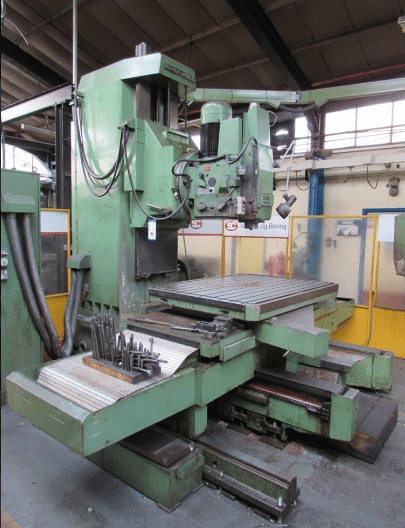
It’s a Boko vertical machine that has a retro Heidenhain 426 CB control.

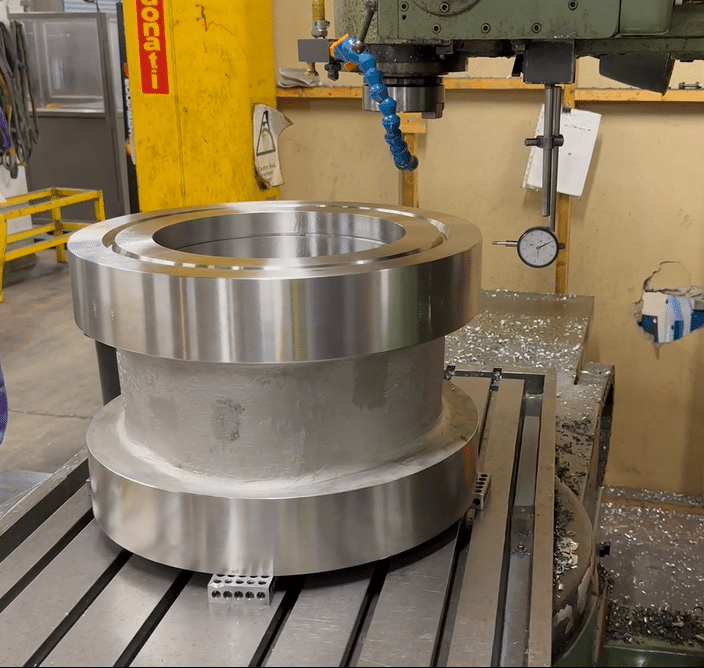
It’s used to make large valve bodies like this. To be honest I can’t remember when I had so much fun and kept my clothes on. Please don’t dwell too much on that thought, this is a septuagenarian speaking.

Onsite Training

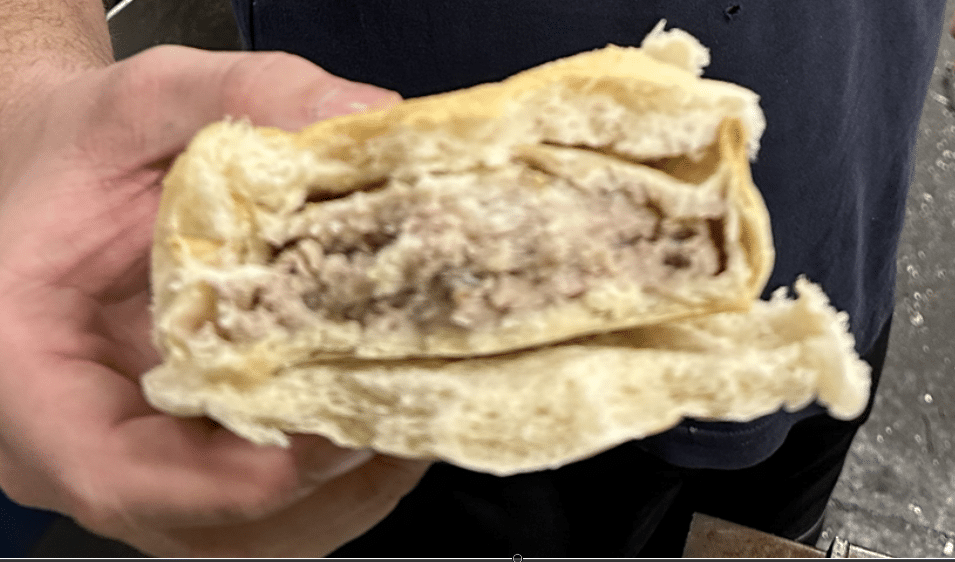
These guys were an absolute pleasure to work with constantly making me cups of coffee and offering tasty snacks like this.

Children be warned “do not take pies from strange men especially this one”

I’ve got to watch what I say here cos these guys constantly take the piss out of not just one another, but include me. The first day of training everyone is always on their best behaviour. By the third day one of us, often me manages to lower the tone and the banta begins.

I think the above treat is some kind of Glaswegian delicacy (and there a many)

It’s actually a pie between two haves of a bread batch, mmmm.

I didn’t eat one to be honest but only because at the moment I’m on a strict diet, I’ll spare you the details. I recon one bite of this beast would constitute the average male calorie intake for a year.

Anyway it’s lovely to be offered, last time it was tattie scones

and these really are nice.

“Read More”

Heidenhain Programming

Heidenhain Programming

Heidenhain Programming

CNC Training Call David: 07834 858 407

CNC Training Centre Reviews

(Read to the end for Heidenhain Programming tips)

The Heidenhain control is very easy to learn because it gives the operator prompts right from the outset. Follow these ten easy Heidenhain Programming steps to create your first working CNC program.

(1) Start your Heidenhain Programming. Heidenhain Programming input a Program Number when asked. On starting a new program you are asked if you want millimetres or inches.

(2) Create some stock for the graphics. You go on to create what is known as a blank form (BLK FORM). This is optional but is the blank shape for the graphics.

The first figure 0.1  is the bottom left hand corner and the second figure 0.2 is the top right. Take your datum figure into account when you dimension the blank.

Heidenhain Programming

This is a blank 110 x 110 x 10 and the datum is in the centre. If your datum was in the bottom left hand corner then it would be like this.

Heidenhain Programming

Hope this does not confuse you but I will be machining a 100mm square so this blank would leave me 5mm all round and you will see it removed when the graphics run..

Now we Need A Tool

(3) Define the tools to use. Heidenhain Programming

Heidenhain Programming

Above is the tools defined in the programme. The length has not been put in yet.

In Heidenhain programming tool offsets can be defined inside the program, which is traditionally how these controls worked. You can have them in an external file the same way as Fanuc and Mazak controls. These offsets are controlled from outside of the program.

In Heidenhain Programming work offsets (datums) again can be embedded in the program or external. If you use the external work offsets then each one has a number that you can call out to use it. It’s a bit like G54 to G59 on a Fanuc Control

It’s All So Easy On This Control.

You can just zero the display to set your datum position if you wish.

There is an advantage to everything being self-contained within a program. It means that when you recall the program everything is set and ready to go. Tools are defined in the program using the TOOL DEF button and you can either define all tools at the beginning or on the fly as you use them.

If your machine has an automatic tool changer the these will usually be in an external table.

You’re doing Well, So Far so Good

(4) Get the tool.  Heidenhain Programming

Heidenhain Programming

Call Tool 1

The tool call button will ask for a tool number and a spindle speed which you input. Once this line is read the tool is active. You may need to add an M6 if you have a tool changer. The M6 will instigate the tool change in this case Tool 1.


(5) Make a move to where you want to drill your first hole.  Heidenhain Programming


Heidenhain Programming

At the end of this line 5 you will need an M3 to start your spindle. The second line 6 brings your Z axis down to the component (3mm above).

Linear moves are programmed by using the L key which then prompts the operator for and X Y and or Z input. As you enter each figure you are prompted for the next input. It doesn’t take long to get the idea of how this is done.

Later controls have help screens.

After the XYZ input you are prompted to choose for RO RL or RR which is the choice of cutter compensation cancel or compensation to the left or right. You won’t need this because you are only drilling holes. So skip it or use RO.

There is no actual rapid on these controls you just program maximum feed (F9999). On the newer controls there is a FMAX soft key which does this for you.

You can input all the values in a line or press the END key which will complete the line. I recommend you play around with different keys to get the hang of how it all works. You can then just delete the program and have a go at a real one.

“Read More”

Careers in CNC

View all current vacancies in CNC

Click here

Call David: 07834 858 407