Category Archives: Useful Stuff

Driven Tools (Live Tooling) Milling on a CNC Lathe

Category : Useful Stuff

Classroom Training Click Here

This article is about driven tools (sometimes known as live tooling) on a CNC Lathe and how we use G12.1  (G112) to mill shapes.

At the CNC Training centre we have a three day course which covers all aspects of driven tools on a CNC Lathe. You will learn about machines with a Y axis and machines that use a virtual Y axis. There is also a lot of advanced CNC Turning material too and you get to test it all out on your own virtual CNC machine.

Everything we do is demonstrated on a real machine.

  • Sub Spindle Machining
  • Y axis machining
  • Using a B axis
  • Axisl and radial drilling
  • Part transfer to sub spindle
  • Everything you wanted to know about mil turn machining but were just too embarassed to talk about.

If you want to apply for this classroom course, then don’t  bother reading this article.

By all means read on, in fact you’ll probably not need to do the course and waste your money!

A new CNC Machine is a very expensive investment even a simple two axis X Z lathe would represent a large investment to most companies.

If you want your lathe to be able to do milling with driven tools as well, then it will cost considerably more.

driven tools

First of all you will need special holders for the driven tooling. That means the tools in your turret can rotate so you can have drills end mills taps all sorts of shit spinning around in your turret. Not all at once mind.

And you will need special holders for  your driven tools like this to do axial holes (holes in the front face).

driven tools

You will need a holder for driven tools like this to do radial holes.

driven tools

So now when you turn a part you could mill some flats on it or maybe drill and tap some holes in  the front face of the job.

You could even mill a radial slot or drill some radial holes.

This machine will need a rotary axis. Well it already has one its called the spindle and it has a great big chuck stuck to the end of it.

On this type of machine you will be able to lock into your spindle and it becomes a rotary axis. On your position display you will see X Z and C.

The C is the rotary axis.

You can even engage your handwheel and rotate it manually.driven tools

X50.236
Z25.235
C180.000

It is usually known as a C axis (Because it runs through the Z axis)

This works just like any other axis except it is programmed in decimal degrees. C90. is 90 degrees. It works as a simultaneous axis so that means you could program a move along with a C move.

G1 Z-30. C1080.

Your C axis would do three full turns (360 x 3 = 1080).

Meanwhile your Z is moving 30mm that is 10mm every turn.

That gives you a spiral with a 10mm pitch.

driven tools

You can program angles down to .001 of a degree like C123.456

By the way these are all machines that don’t have a Y Axis.

Get live demonstrations as well as hands on experience on this course.

Y Axis

Crudely (and I am known for being crude) a Y Axis means your turret can go up and down.

So when you are milling on the front face of your part the machine behaves just like a milling machine cutting in X and Y.

Here is what milling a hexagon looks like when you have a Y axis machine.

driven tools

Having a Y Axis is awesome the options are endless. But before you get too excited these machines come with a government bank balance warning.

driven tools

You got it they don’t come cheap.

And…. in any case that’s not what this article is about.

Lets forget the Y axis for a minute just buy one of these with the money I’m gonna save you.

There is another way to machine that hexagon (I never wanted a stupid Y Axis anyway)

Take a look at this.

driven tools

What’s happening you ask? Well there is some clever shit going on here.

Get live demonstrations as well as hands on experience on this course.

(Horay who needs a fuckin Y axis?)

The X axis is moving in and out and the C axis is rotating and magically the hexagon is produced.

Soooo…. no Y axis?

Sometimes known as Cartesian to Polar Coordinate Transformation.

Google it if you don’t believe me and no it’s not a sex change or something out of Doctor Who.


Thanks to forbiddenplanet.com

You would be forgiven for thinking you need a CAD/CAM system to produce this result.

The answer is yes and no. A CAD/CAM system would produce a bucket full of code to do this.

But actually you don’t need it.

This is what you need………

G112 and G12.1

G112 (G113) or G12.1 (G13.1) comes to the rescue. It kind of turns your lathe into a virtual milling machine.

Once you activate G12.1 or G112 (depending on your control) you can write a program just like on a CNC milling machine.

Now this does vary from one control to another so please smart arses back off. I’m just trying to make an honest living here.


If you want to go feed the cat at this point I’ll forgive you.

A gratuitous silly animal picture for all you pussy lovers. (David please, please save this crap for Facebook. No one laughs at your childish sexual inuendo either )

This is the program.

:0001 (MILL HEX SAMPLE)

M98 P600 (TOOL CHANGE POSITION)

T0505 (16MM ENDMILL)

M91 (ENGAGE C)
G98(FEED PER MIN)
G97 S100 M4 (Start Spindle 1000 RPM)
G0 X100. Z-5. C0. M8
S1500

G12.1 (MILL MODE)

G1 G42 X50. C-14.433 F500.
C14.433
X0. C28.867
X-50. C14.433
C-14.433
X0. C-28.867
X50. C-14.433
C14.433
G40 X64. C14.433
Z3. F2000

G13.1(TURN MODE)

M5
M41 G99 (FEED PER REV)
M98 P600 (TOOL CHANGE)

M30

Ok so it’s a bit hard to get your head around.

So let’s first of all see how it would look if you programmed it in X and Y on a CNC Mill.

driven tools

Ok so I’ll go make a cup of coffee while you digest the above.

………………….

cnc macro programming training courses

I’m back now.

So all you do is double all your X figures (because you are in the diameter mode).

Then you put a C in the place of Y.

And you have what is below.


driven tools


Stupid you say. Why do they do that? Well you better write to Mr Fanuc and ask him. Some machines like Mazaks just let you program it in X and Y just like it’s on a milling machine.

Hitachi Seiki is the same.

But sorry it’s what we are stuck with.

Template Program

So once you get your head around how all this works I suggest you make a template program.

Once you have a program that works in your machine it’s real easy to come back to it and modify it for another job.

Also there are lots of things, like changing from feed per rev to feed per minute, that you need to remember to do. If these are all in a template program you won’t get into any of those annoying situations.

You could put all the stuff you need in a sub program and call it before you start using your driven tools. That way you could use it each time you use driven tools.

Get live demonstrations as well as hands on experience on this course.

On-site Training

The CNC Training Centre (that’s me David) recently trained some guys at a company I can’t mention for legal reasons.

They had a couple of really nice Matsuura Machining Centres and this baby below.

It’s a Nakamura – Tome CNC Lathe with a C Axis and driven tools.

This is a sample part. They are producing some real high precision parts for racing motorbikes on this beast. This is a test program we ran on it.

So back to driven tools (live tooling). So if you don’t go for a Y axis you save shit loads of money and you get to buy a Lambo.

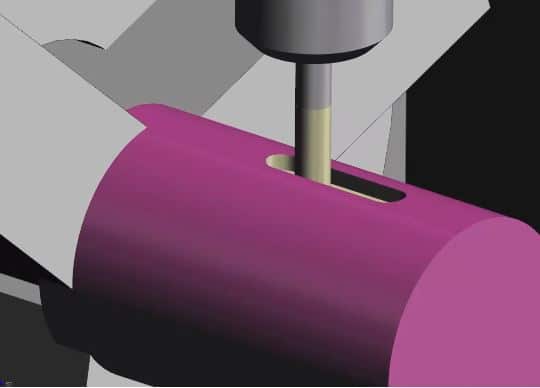
There is more to it though. If you don’t have a Y axis there are restrictions on what you can do radially.

Like this slot.

driven tools

You couldn’t do this without a Y Axis. You would only be able to slot sideways by moving your Z axis. That means you need your cutter to be exactly on centre and if it’s over size then your stuffed I’m afraid.


So if you have a Y axis you have choices but it does work out to be an expensive machine.

When you have a Y axis you can program with or without it. For larger profiles on the front face of the job (Axial) you more than likely won’t have enough movement on your X and Y axis to cover it. The G12 option is then going to be best.

All Without a Y Axis

If you want one of these I can make you one. Would look nice on your desk.

A Few Disadvantages

Driven tools need holders and they are expensive. Oh and you will soon run out of stations if you are doing lots of drilling and tapping for example.

Radial Holes

1 Spot Drill
1 Drill
1 Tap

Axial Holes

1 Spot Drill
1 Drill
1 Tap

That’s six holder!!!

A lot of cash.

These guys may help you. This is like the Arnold Schwarzenegger of turrets armed to the fuckin teeth.

Machine Tool Supplies

You can even get multi station ones like these. (Make sure you look to see if you need a Y axis or not.)

EWS Tool Technologies

More Disadvantages

You need a high level of skill to set, operate and prove out when using driven tools. Obviously that doesn’t include you cos you read my articles.

Driven Tools (Live Tooling)

Just one other point before you go. Now it’s no good me telling you to be careful not to crash your machine. If you do then it’s really important not to pretend it never happened or blame it on your mother.

Once the alignment is out then you are going to have loads of trouble. So you need to keep these machines in tip top condition, and the alignment must be spot on. The slightest bump then you need to check it.

Some machines are more sensitive than others it’s easy done just a sneeze on the turret and it’s completely shagged.

If you have no Y axis then the centreline of the tools is absolutely crucial and I can’t stress the importance of this enough. Most of the problems with these machines will come back to alignment, so make that the first check you do.

Get live demonstrations as well as hands on experience on this course.

Y Axis If You Have One (A Word of Caution)

Everyone loves being the hero don’t they.

Now I’m no exception to this rule. I’ll call it “The Y Axis Trick” or it might be just the opportunity to wear spandex.

When you have a Y axis you must always include a Y axis move when you first bring in a tool (even if you aint using it).

G0 X50. Y0 Z3.

Why??? You ask

Because if there is an offset in the Y axis it well stay in that position. If your last tool had 0.1 in the Y axis offset then your tool will remain 0.1 off centre.

If you don’t program a Y axis move to zero (Y0) the Y stays where it is.

It’s one of the first things I would look at when there is an alignment issue just check the position display (it’s a give away).

In Conclusion

Sorry there is no real conclusion but I didn’t know what to put for a title.

For those who like conclusions……

  1. I now fully get this driven tool bullshit so therefore stick the course up your fat arse.
  2. I kind of get it but you want to learn more. 
  3. None of the above.
  4. I enjoyed reading this article and feel so happy the next time I’m in a supermarket queue I’ll pay for a random persons shopping.

Please contact me for further information. All complaints are directed straight to junk email so don’t even bother.

Apply now for a three day advance mill turn CNC training course


Copy Paste Fanuc CNC Control

Tags :

Category : Useful Stuff

On or Offsite CNC Training
Tel: David 07834 858 407

Copy Paste Fanuc CNC Control, here is a video that shows you how to copy and paste on a Fanuc control.

Call 07834 858 407

Copy Paste Fanuc CNC Control, in the video I am using the Fanuc 18i on a big vertical lathe but most Fanuc controls are the same or very similar.

“Read More”

Roundness How Do You Measure It?

Category : Useful Stuff

On or Offsite CNC Training
Tel: David 07834 858 407

Can You Measure roundness With a Micrometer?

We will get to Roundness but first I am going to ramble on, because I always do, but I often think of when I worked with my dad many years ago.

My dad was a brilliant old school engineer and he worked for Alfred Herberts from boy to man, apart from a brief period in the RAF. In its day Alfred Herberts was the biggest and most successful machine tool builder in the world.

New CNC Training ClassesMy dad finally lost his job and had his pension robbed when AH finally went bust. I was running an engineering company so it seemed obvious to have him working with me.

I learnt so much from my dad about the basic principles of machining (this is the tenuous link to the training courses) .

My dad’s claim to fame was that he worked the first Cri Dan machine. This was an amazing innovative machine that could hold its own, until fairly recently, against a CNC lathe for high-speed threading. There are still a few about now.

New CNC Training ClassesMy dad often joked that he could offhand grind a 1/16 of an inch drill and read a steel rule to a thousandth of an inch which I am sure was bullshit although I would never dare to say.

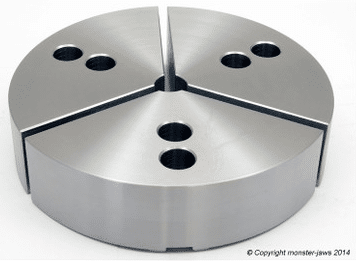
I remember we were trying to turn and bore some motor bodies on a Mori Seiki lathe and we could not get them round. Anyway he told me to weld up some jaws so that they would fully envelop the part.

RoundnessRoundness

Basically the part had nowhere to go. It was like a big collet and it worked.

Roundness

They are nowadays called pie jaws which you can buy from your local tool supplier or from Gregg’s as part of a meal deal

Monster Jaws sell them

But there was another lesson to learn….

Our inexperienced inspector was trying to measure roundness with a micrometer which I am sure you all know cannot be done.

An argument ensued and profanities were exchanged. We ended up buying a Talyrond roundness checker which is the correct tool for the job.

Roundness


As it happens the same thing cropped up in a customer’s only a few months back. I caught them trying to measure roundness with a micrometer. Back to basics again.

These days I have a much better way to prove my point than shouting and swearing. Please note I still make my point by shouting and swearing which us less intelligent folk always tend to do.

This method is cheap  and free of all profanity it cost 50 pence to be precise.

Roundness


I threw them a 50p piece (UK Currency) or even a 20p for the real cheapskates. “Is that round” was my question. They laughed.

.

“Here is a micrometer now check it for roundness”.

You’d need one bigger than this.

Mmm it’s dead round when you check it with a micrometer.

The smart arses amongst you will know that a 50p piece is an “equilateral curve heptagon“. And it measures the same across any two points you care to choose. It proves that you can’t measure roundness with a micrometer. Unless of course you think a 50p is round and the earth is flat.

Oh yea and if you were wondering “why the fuck would you make it that shape?” Just try and put a regular seven sided coin in a slot machine.

The Plug

I won’t be teaching you about roundness on my training courses ,that would be silly cos you already know. If you are interested in learning basic CNC Programming for a Lathe or Milling Machine look no further.

The New CNC Training Classes focus very much on the basics giving a solid understanding of the nuts and bolts of CNC programming on an ISO Fanuc Haas type control.

Oh, and you get to use our awesome simulators.

You don’t get all these five star ratings by being shit, so check us out.

See all The Courses

If you want to learn to program CNC Machines

Look no further Contact CNC Training Centre

Please contact me if you require:

  • Fanuc training.
  • CNC programming training.
  • Want to learn CNC programming.
  • Fanuc programming training.
  • Yasnac programming training.
  • Any type of CNC course.

Don’t forget to watch my Tutorial Videos

We offer training on all types of CNC Machines and controls check em out.

co*****@***************re.com

Or fill out the contact form below


Using a CNC Touch Probe

Category : Useful Stuff


CNC touch probe, everyone should have an electronic probe on their machine but I’m sure there are lots of reasons why you don’t have one.

CNC touch probe

The purpose of this article is to show some of the alternatives to buying an expensive touch probe systems. Please note if you can afford to one of these systems I’ll guarantee you’ll soon get your money back with increased productivity.

Probe Shaming

Now I know there is a lot of this about but if you’re guilty then I’m sorry but you deserve all you get.

What the fuck is he on about?

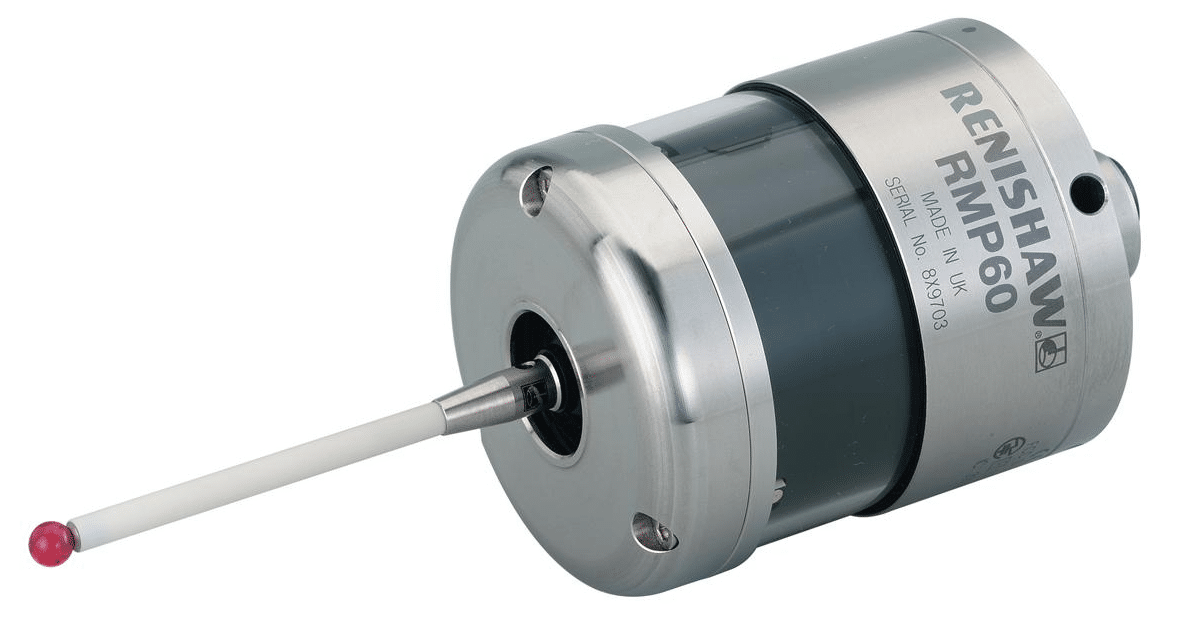
Yes you know who you are. Yes you, you with that gorgeous once shiny Renishaw CNC touch probe left to get covered in grease, shit and swarf in the back of your machining centre.

Sorry just remembered I must change my pants.

Yes I regularly come across this when training people onsite on their CNC Machines. The machine originally came with a touch probe and maybe got used a few times but then no one bothered to properly learn how to use it.

Most likely the bloke who knew how to use it left to buy a chip shop in Bradford.

As a result it was ignored for three years and left in the tool carousel to generally decay and rot.

Please sort it there’s a lot of cash sat there in the tool carousel oh and don’t leave your dirty pants lying around either.

Avoid People Who Own Wobblers

Maybe you call them wibblers never mind the fuckin semantics they are basically a piece of shit on a stick. Bin them.

Now I’m an old school engineer I remember the old halcyon days of engineering. I have the missing limbs, teeth and scars to prove it.

  • Pissing in the coolant tank on nights.
  • Using your finger as a work steady on a long component.
  • Dividing heads.
  • Clocking in cards.
  • Smearing engineers blue onto machine handles in the tea break.
  • Shaping machines
  • Vernier Scales.
  • Slide Rules.
  • Donny Osmond
  • Opportunity Knocks
  • Making star shapes in sheet steel to throw up and stick in the ceiling of the sheet metal training department at Rolls Royce.
  • Cleaning my Norton motorbike parts in the degreasing tanks.

Listen to David “it’s time to let this shit go”

You might be stuck in a 1950’s time warp but it’s costing you money.

Wibbler Wobbler

When you use a Wibbler there are so many things to go wrong. Get the speed wrong and it will kick off at the wrong point. If you don’t engage it far enough down the part it will probably snap off.

Maybe if you practice for long enough you can set a datum in less than an hour.

Why am I telling you this?

Just bin it and spend just a small amount of cash on some of the more up to date solutions.

  1. Buy a full blown probing system such as Renishaw, Blum, M & H.
  2. Buy a 3d taster type tool, loads to chose from.
  3. Electronic edge finder
  4. DTI clock
  5. Cutting tool
  6. Rip off a bit of paper

In that order the costs are thousands, hundreds, tens and units.

Advantages of a CNC touch probe

There are many, you can quickly set your part datum must be the most obvious one.

If the probe software is already on your machine then your machine will most likely have all the routines built in. These will quickly set your datums on corners, centre of bosses and bores and in slots. All at the press of a soft key.

Also you can quickly set your indexer or fourth axis to zero. Not least of all you get to measure shit. That means anything you make on the machine you can check all it’s sizes without taking it out of the machine.

CNC touch probe

If you can be arsed to learn Macro programming then the possibilities are endless. This will allow you to write your own routines and cycles.

For example within a program you can measure a part and update it’s offsets ready for the next run. Most probes will have simple cycles with this built in.

Don’t forget to download the apps for your probing system, the Renishaw one is amazing it just guides you through what you want to set or measure and then gives you the cycle. It even tells you where the results are stored (Variables)

You can even use your touch probe to recognise fixtures or parts. It’s quite common to drill holes in strategic places on fixtures so that the probe can detect the presence of the hole and thus identify the fixture.

Justification

It is a good idea to justify the cost of your probing system, do this by timing setups and things without the probe.

Soooooo, when you bust it which inevitably you will. Look back at this justification and you’ll see that the cheapest option is to buy a new one I guarantee.

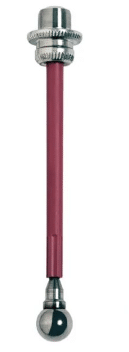
3D Taster or similar

I love these, I mean I really do. I actually sleep with one by my side I love it so much, oh and it doesn’t fart all night like the fuckin dog did.

When these devises are on the edge of your part you don’t have to allow for the diameter of the ball, it’s all done for you. Magic how do they do that?

It is worth spending time setting these up getting them calibrated to length and running really true.

Once you clocked it all up, take some time here to get it spot on. Oh yea and keep it in the same holder so it’s always calibrated true and to length.

Don’t leave it in the machine although the new ones are waterproof.

This means that by simply zeroing your display in X Y or Z you can use it to accurately inspect your parts.

Make sure to get the long stilus this means you are always well away from the body when your using it. Worst scenario is you break a stylus. It’s like cleaning up dog shit, best done at arms length.

CNC touch probe

Easy to Break

Handle with care because these devices are easy to break. Don’t don’t don’t leave it lying on the bench. It will roll off and fuckin break so put it on a proper stand.

These are not too expensive to buy. You can even make your own from an old porridge box and the cardboard centre of a toilet roll.

Here’s one I made earlier not quite fully developed but you can see where I’m going with this one.

CNC touch probe

Learn Macro Programming

By the sounds of this you’d think I ran a training school. Really how cynical of you.

But really if you can write macros you can do loads of clever stuff with 3D tasters by getting them to write into system parameters n stuff. Once you are in position you can automatically write into your work offsets.

Electronic Edge Finder

Still way better than a wobbler these devices pick up the edge of your part and sound a buzzer as well as lighting up. They don’t work on all machines as a circuit needs to be completed.

Again there are loads of macros you can write to make life easier.

Not good on Z as the ball does not compress.

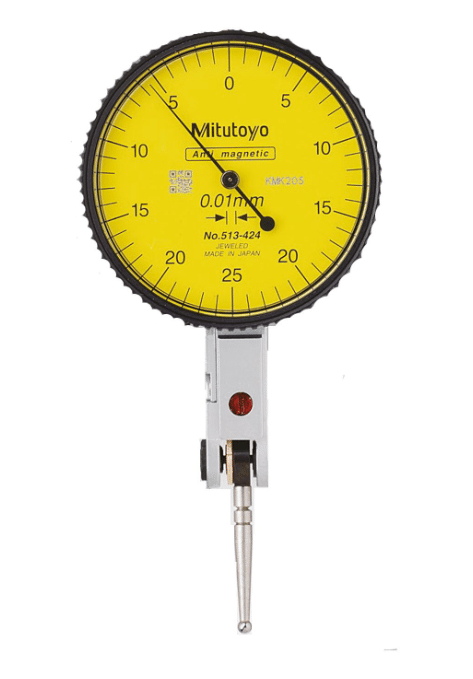
DTI Gauge (Old School)

This method was traditionally used on jig borers and is very accurate if a tenth clock is used.

Very time consuming and fiddly but it is accurate.

Use your dti gauge to find the edge of the part. Simply rotate the clock on the edge of your part and zero the dial. Now zero your position display on your machine.

Hold a slip gauge on the edge you just zeroed. Now clock the slip on the opposite side.

Half this final figure on you REL display to get to the edge of your part.

dti gauge

Cutting Tool (Endmill)

Touch your endmill on the edge of your part, best to have it rotating.

Move over the radius of the tool. Some controls even have a screen with icons to do this.

Make sure you know the exact diameter of your endmill and make sure it is running true.

Safety First CNC touch probe

If you use an electronic probe there are no safety issues unless your boss thumps you for breaking it.

Some of the methods decribed above are quite tricky to do with the machine doors closed so be very careful.

Never try to override any doorlocks or safety mechanisms on your CNC Machine


CNC Machine (Does Size Really Matter)

Category : Useful Stuff

CNC Machine (Does Size Really Matter)

CNC Machine

When I say Large CNC Machine I probably don’t mean this big but you can do some serious big shit with this machine.

Anyway you might be thinking “big machine” slow rapid, slow tool change etc etc. Well unless it’s really new and very expensive, it probably will be. But read on….

The Small Machine

So, you have a small machine brand new and its tool change time is just 2 seconds and the rapid is the speed of light.

Now let’s just imagine you are  making a part that’s fairly simple and uses 12 tools. Your cycle time is 5 minutes.

You finish machining it and check it all over. You give it to the “I just chewed a wasp” inspector and he passes it off first time.

Then you dance around the workshop like a schoolboy who just scored his first goal throwing your arms in the air.

Ok lets run one. Five minutes later. “Oh it needs another and another…”

So now you have to stay at the machine constantly loading it.

You then wet your pants cos there’s not even enough time to get to the toilet and back while it’s running. Not to mention the repetitive strain injury from loading a part every 5 minutes.

Large CNC Machines

On a large CNC machine you can load your part in several different presentations. In the example below the holes are being chamfered on the bottom of the part in a separate setup. Saves all that messy deburring.

You may think large machines are just for large components. Well yes that’s true. But…… I may have to disagree and ask you to think again.

On a large CNC machine you can fill the table with repeat parts. Or you could have many presentations of the same part.

CNC Machine

The cube above could be machined on all the faces in one setup.

So this might take a while to setup but once it’s running you would get a complete part after each run. Not to mention that you could nip home and feed the cat and still have time to make the boss a cup of tea before it’s done.

Never Never Ever

Why would you never set a part up in the middle of the machine table?

CNC Machine

Come on answer I don’t have all day.

CNC Machine

So the boss comes along and says “Jack, stop that job you are doing and do this one instead”

Must have happened to you before.

So which one of the above machines do you want now?

Yes you got it. The one with the part set up to the right.

Easy because you can leave it all completely setup and when the boss finally wants that job it’s just a matter of calling the program and hitting the CYCLE START

Don’t forget to set the datums using G10 by the way.

CNC Machine

So there is another advantage of a big machine.

You get to leave loads of shit on the machining table all ready to run.

Leave It Set

You might just leave your machine permanently with two vices and a table chuck all ready to use with the datums set. Oh and did I mention the fourth axis that’s just sat there in case I’m ever arsed to use it?

I Despair (Beam me up Scotty)

I was training this bloke recently and he said “oh we like to break every job down completely when we’ve finished, we take all the tools out and clean the machine”

Anyway I just smiled and muttered some profanity he couldn’t hear.

If you read this and think it’s you then it’s definitely not, I just don’t want any trouble ok.

I will agree on one thing only and that’s the cleaning of the machine.

Now look at this There’s Hope

CNC Machine

Imagine your machine is big enough to get all these parts on the table.

When you pick up your spot drill it’s going to do some serious work (88 holes).

Eight parts in total..

Lets say the tool change time chip to chip on this big old machine is 10 seconds well now it’s actually 1.25 seconds because it did 8 parts.

10/8 = 1.25

Now what about the slow rapid. OK but it’s not really moving very far either is it?

If you watch this video you’ll see that where the spot drill ends the drill takes over in the same place. (No wasted movement).

With a bit of work you could make the rapid moves on this part even shorter.

Now imagine this on every tool. The cycle time saving is breathtaking. And when it’s home-time, load the machine up and let it run. Oh by the way if the next day you have a pile of scrap and a grands worth of busted tools it wasn’t my idea ok.

What if You only Have a small One

Little and often is the approach.

If you saw some kind of sexual innuendo here then I think you need to grow up. This is serious engineering shit and I don’t want your filthy infantile minds on my website.

Unless of course you want some training.

Small machine often have much less power.

Wave Form Milling as it’s called by Edgecam is a way of using a large depth of cut but small engagement.

You can remove metal very fast by this method and you don’t need a lot of power. Other CAM systems have a similar things but with a different names.

If you have large threads to produce rather than tapping, where you need a lots of power, consider thread milling.

https://www.youtube.com/watch?v=cDTpeLyU2TQ

Add an Indexer or Fourth Axis

Adding an indexer or fourth axis to your small CNC Machine will increase capacity and allow you to rotate parts to get to areas that otherwise you couldn’t reach.

Here’s a free advert for someone

New Small CNC Machine

Pros Small CNC Machine

  • Shiny.
  • Very fast rapid and tool-change.
  • Small Footprint.
  • Quick to set up.
  • High rpm.
  • Lowish cost.
  • Warranty.

Cons Small CNC Machine

  • Not many tools.
  • Often low power.
  • Not much space to set up extra parts.

Large CNC Machine (Maybe Old and not too Expensive)

Pros Large CNC Machine

  • Make big bits.
  • You can leave jobs set-up cos there’s room for other work.
  • Make loads of bits at once, multi op or multi loading.
  • Tend to have a lot more tool pockets.
  • Usually more power.
  • You can leave vices and chucks permanently on the table.
  • Represent very good value second hand.
  • Machine runs much longer unmanned so you can get on with re-thatching your cottage roof.
  • Before you go home you can load up a full set of parts and let it run.
  • One tool does loads of work.
  • Great for “just in time” delivery because one complete part comes off per cycle.
  • If it’s second hand you’ll need training.

Cons Large CNC Machine

  • Cost shit loads of money new (more than a six bed-roomed mansion where I live)
  • Slow rapid moves.
  • Slow tool changes and pallet change times.
  • Can cost an arm and a leg to maintain, find a good independent specialist to fix it.
  • Can be very dirty.
  • Have you got room for it?
  • Watch the max RPM isn’t too slow.


More Things to do if You Have a Small One

Consider a fourth axis with a cube on it.

With a four sided cube you can increase your table capacity by an awful lot. Oh and you get to work on the side of the part too.

Manual pallet changers can be very cost effective.

Again these give you loads of extra capacity. They are actually cheaper than you think.

Conclusion

Let’s imagine you have £90,000 to spend on a machine. You could buy a new super fast small machine.

But, if you got the room you could buy a big second hand machine.

The new one will have a warranty and will be very fast. But what about the “old banger”. Well if you have room and you know someone who can fix it if it goes wrong …….

CNC Machine

CNC Machine

Thanks

If you feel you have been affected by any of the issues raised in this post or need CNC Counselling then contact me.

If you want to learn to program CNC Milling Machines

Siemens 840D Sinumerik training

Look no further Contact CNC Training Centre


Careers in CNC

View all current vacancies in CNC

Click here

Call David: 07834 858 407