Author Archives: David

CNC Programming Examples Turn and Mill

Tags :

Category : Fanuc

CNC Training Call David: 07834 858 407


CNC Training Centre Reviews

30 five star ratings on Google (Just saying)

Click CNC Programming Examples

These are the different CNC programming examples we have both turning and milling.

CNC Programming Examples

CNC Programming Examples Turning

G94 Facing

Milling

G81 Drilling Cycle

G73 Peck Drilling Cycle

G83 Deep Hole Peck Drilling Cycle

G82 Drill With Dwell Cycle

G84 Rigid Tapping

Examples from Haas


Webster & Bennett with Fanuc 10T

CNC Training Call David: 07834 858 407


CNC Training Centre Reviews

30 five star ratings on Google (Just saying)


Contact CNC Training Centre

I Just Love Old Machines

I recently got to train someone on one of these, a Webster & Bennett with Fanuc 10t Control.

Webster & Bennett

It’s what I crudely call a big bastard. But bastard it is not, it can definitely machine some big shit

Webster & Bennett

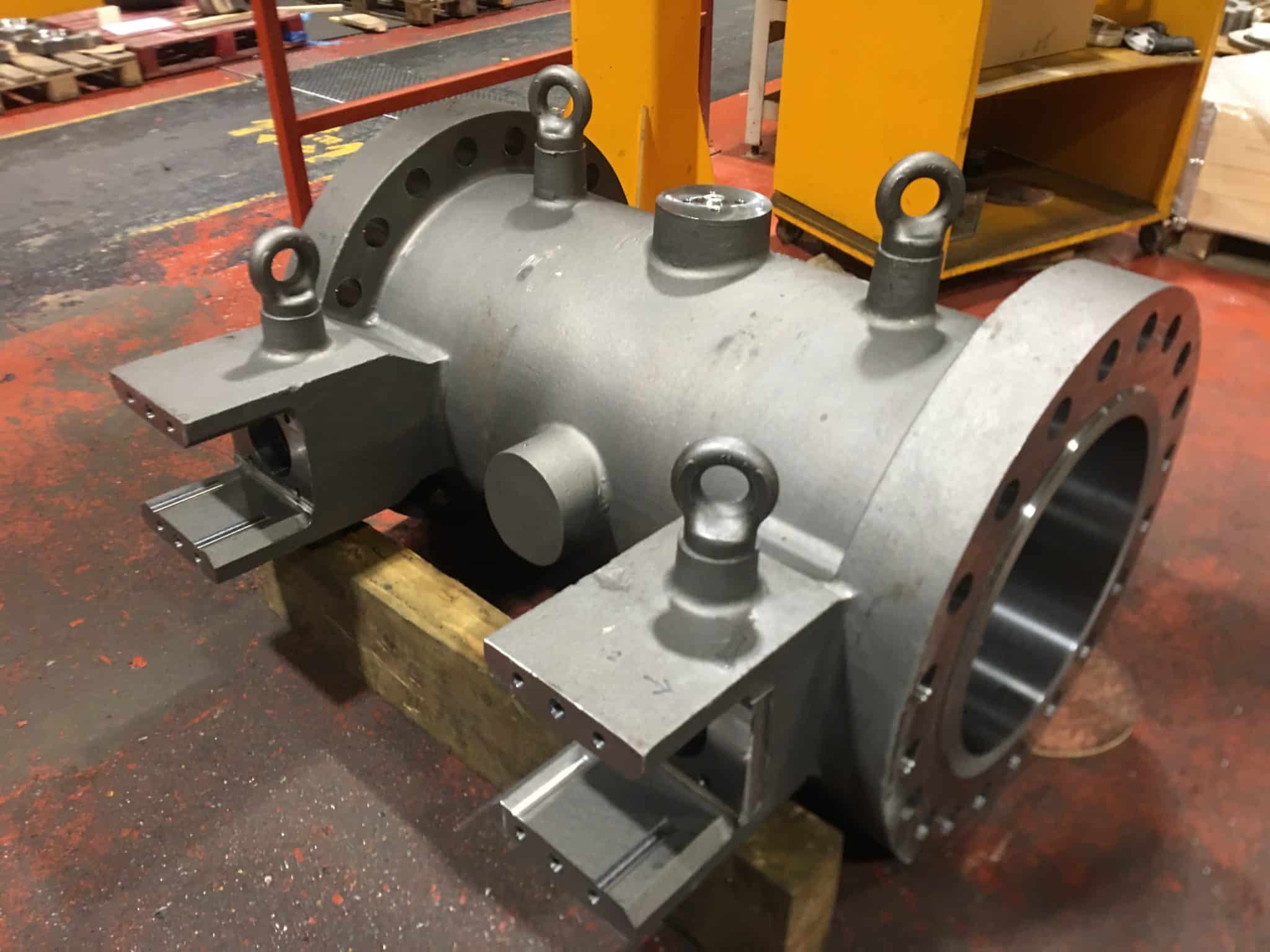
Like this monster.

Don’t ask me what it is or I would have to kill you. Joking aside I think it’s a water valve. Beware these jacuzzis use a lot of water,

The machine is a Webster & Bennett vertical borer and I think the Fanuc 10t control was possibly a retro fit.

When these start whizzing around even a few RPM it can scare the living shit out of even the most seasoned engineer. And me, well I,m more seasoned than a piece of Nando’s chicken.

G50 on a Webster & Bennett Your Best Friend

Anyway joking aside your best buddy now is definitely G50 get this wrong and it’s fuckin world war three.

Imagine the scenario, you program G96 S180 M3. Spin at 180m/min. Not too fast but…. what if the tool is sat in the middle of the part.

Machine says “come on lads happy days foot to the floor flat out joy riding” and it fucks off like two teenage boys in a stolen Lamborghini.

So without a G50, or the wrong speed, this beast will accelerate to it’s maximum rpm.

Oh and did I Mention it’s harder to stop than a P & O Criuise Ship with 4000 obese pensioners on board?

“Read More”

Fanuc Subprogram (Local Subroutine)

CNC Training Call David: 07834 858 407


CNC Training Centre Reviews

30 five star ratings on Google (Just saying)

Fanuc Subprogram (Local Subroutine)

If you have ever used local subroutines on Heidenhain or Yasnac. Then you will know how convenient it is to save all your programs in one go. No need to remember to save all those shitty little external sub programs.

What’s He On About?

If you are now saying “what the fuck is he on about”. Here is an explanation.

A local subroutine or subprogram is where you stuff all your subprograms at the end of your main program.

So on a Fanuc control if you were making this part below.

Drill spot drill then tap.

Fanuc Subprogram

Programme would look like this.

Fanuc Subprogram


Thing is the code is just repeated three times. I have nice round numbers in here like X40. and Y20. so it’s easy to notice mistakes. But if it was X40.392 for example you wouldn’t spot a slight mistake.

So if you call a subprogram it looks like this.

Fanuc Subprogram

And then your Subprogram is like this.

Fanuc Subprogram

Fanuc Subprogram

The M98 P500 calls the external Fanuc Subprogram. Read this if you don’t know about sub programmes.

Saves you having to repeatedly write shit loads of code.

So that’s why we use a Fanuc Subprogram. But……

You have to look after these bloody things and they seem to be able to just get lost on their own.

You find them at the back of the fridge sometimes along with a piece of mouldy old cheese. At least you can make a meal of the cheese.

Fanuc Subprogram No More Lost Programs

So this is how it looks with a Local Subroutine.

All you need to do is replace P with Q. So mind your P’s and Q’s as they say.

The Q corresponds to any N number. So you could have loads of these stacked up at the end of your programme and you only need to save it once. All this shit will go with it and you don’t need to worry about it ever again.

Haas To The Rescue

Of course Mr Haas sorted this out years ago with M97, this calls a local sub. M98 calls an external program. It’s on all Haas machines and you definitely do need to fuck with any parameters.

Just A word Of Caution.

There are PARAMETERS involved. Arrrrrrrrrrrh……..the dreaded PARAMETERS

To call a subroutine on your Fanuc control. You first need to make sure that Bit 0 of parameter 06005 is set to 1

Fanuc Subprogram

This should make it work. If it doesn’t then maybe you should call the Samaritans.

It’s only on the newer controls by the way.

Sub programs on a Siemens control.

Thanks For Reading My Articles We Love you all .

If you have been affected by any of the issues in this post or need CNC Counselling then contact me.

If you want to learn to program CNC Milling Machines


Background Edit Fanuc

CNC Training Call David: 07834 858 407


CNC Training Centre Reviews

30 five star ratings on Google (Just saying)

Background edit, I only really get to hear about background edit when people get stuck in it. It’s a bit like being accidentally locked in a toilet you feel a bit of a twat and very embarrassed in equal measures.

This button is your closest friend

Now I made it real big because one day it will save your life.

You know when you play Monopoly and you get one of those cards that says “GET OUT OF JAIL FREE”

If you get sent to jail you just present this card and your sentence is immediately quashed it’s a bit like having Donald Trump as a mate.

It doesn’t work for shop lifting by the way I tried it as a child when I nicked a tin of Spam from the Coop. Fortunately in those days the police were never involved as they knew your parents would beat you to within an inch of your life at the slightest hint of petty larceny.

Anyway press this button background edit all your woes will cease.

And if that doesn’t work this one is the nuclear option.

background edit

The first one is for the program you’re actually background editing. Don’t forget you can have more than one program that you are background editing, more on this later.

Anyway this button stops them all, a clean sheet as it were.

Oh Dear

The reason people get into such a mess with this is because you can actually get into background editing by accident it’s easy.

If you are in a folder and you press INPUT then whatever program your cursor is on immediately comes up for background editing.

If you do this a few times then you can have several programs on the screen to edit.


You can switch between these programs and edit any one. You can copy and paste between them which makes writing programs from templates really easy.

Use the FORWARD and BACKWARD softkeys to switch between programs

To escape this lot you need the help of this key

background edit

This will end it all.

Background Edit is Amazing

Yes background edit is really useful, maybe amazing is stretching it a bit, but it does have many uses. Editing a few programs together is the bit I like.

If you want to edit whilst you are running a program then that’s also useful.

Background edit Warning

Don’t hit the fuckin reset button!!!!

Obviously this will stop everything so why would you do it?

Well maybe you are one of those very naughty boys who uses it to get to the head of the program when editing.

When in background edit it’s easy to press reset except this time you just stopped everything because your program is running.

Change Your Habits

Use rewind, some controls have a rewind button

use this to get to the head of the program.

On other controls it’s LINE SEARCH then press TOP or BOTTOM

This will take you directly to the head of your program or the end of your program.

Nothing is stopped and no one is harmed.

background edit


Why I Hate Background Edit

It’s an absolute pain in the bollocks mainly because it is so easy to accidentally get into background edit and not even realise.

You keep pressing the MDI button and the screen just wont change. If you have Guide i then you will get a warning when you switch over and you can’t do anything until you end it.

To be honest I don’t hate it at all. You just need to be aware that you need to come out of it to do various other things.

Another Useful Feature

If you want to use a program for reference. In other words you want to look at what’s in it but you need to be careful not to alter it.

Press BG EDIT then type in your program number

Press REF EXEC

Your program will appear in green meaning it is “read only” so you can’t accidentally alter it.

What’s Running in The Background?

You can also call your running program in background edit. This will also appear in green and be read only.


Taking a Screen Shot Fanuc Control

CNC Training Call David: 07834 858 407


CNC Training Centre Reviews

30 five star ratings on Google (Just saying)

To take a Screen Shot Fanuc, you will need to have either a data card installed or a USB

Screen Shot Fanuc

MDI

In MDI I/O channel needs to be set (4) data card or (17) memory stick

Screen Shot Fanuc

Stick the Card in (or the stick)

Press and hold the shift key for about 10 seconds. You will see the clock stop. That’s how you know it worked. Time will stand still at this point and all the people around you will appear static.

Try not to panic, the world didn’t end. Your control just needs to ponder a while and think about what you just did.

Stop The Clock

Once it’s done your clock wil start again (phew).

Screen Shot Fanuc

Then press CARDScreen Shot Fanuc

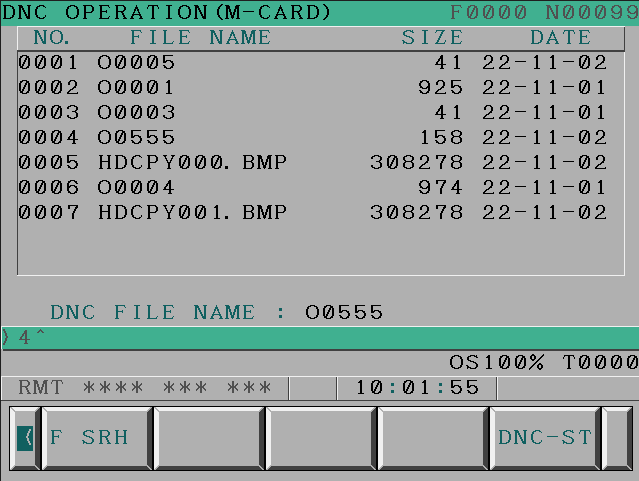
Screen will show what is on the data card

Screen Shot Fanuc

The BMP files are your screen shots. You can then view them on your laptop or PC.

Now I know you are saying “what is the fuckin is the use of that”

Well It’s just so that I can show off my knowledge.

Parameter

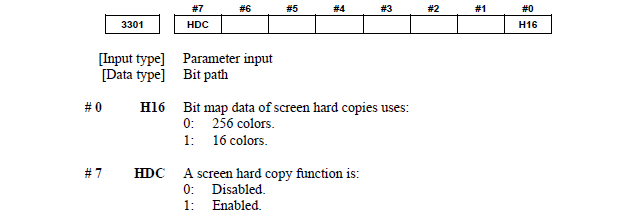
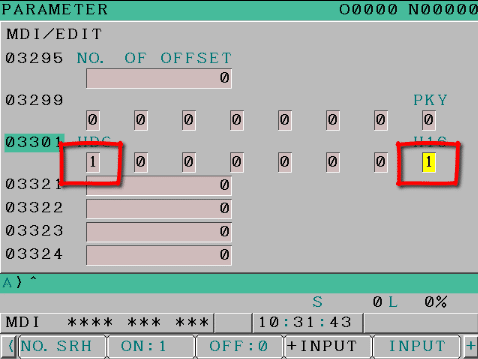
If this does  not work then you may need to alter parameter 3301 bit zero and bit 7 need to be 1


Should look like this to make it work.

Screen Shot Fanuc

A good use is when you are changing parameters. There’s nothing worse than changing a parameter and trashing a £100,000 machine. Help is at hand, luckily you did a screen shot before you changed the parameter and you can view it and change it back.

With this parameter it wont work because you need to switch it on!!!

Good luck with the massive dent in the guarding and the bent tool. No screen shot will fix that.

Screen capture Fanuc, thanks for reading.


Careers in CNC

View all current vacancies in CNC

Click here

Call David: 07834 858 407