G81 Drilling Example (Canned Cycle)

G81 Drilling Example (Canned Cycle)

G81 Drilling Example

The G81 is the most commonly used canned cycle it simply drills a hole and retracts.

All other canned cycles are similar to this but with a few extra bells and whistles.

G81 Drilling Example this simple part has four M12 holes drilled countersunk and tapped.

The datum is the centre of the part so the holes positions are.

X55. Y55.
X-55. Y55.
X-55. Y-55.
X55. Y-55.

G81 Drilling Example

G81 Drilling Program Example

Here is the CNC code

G81 Program Example

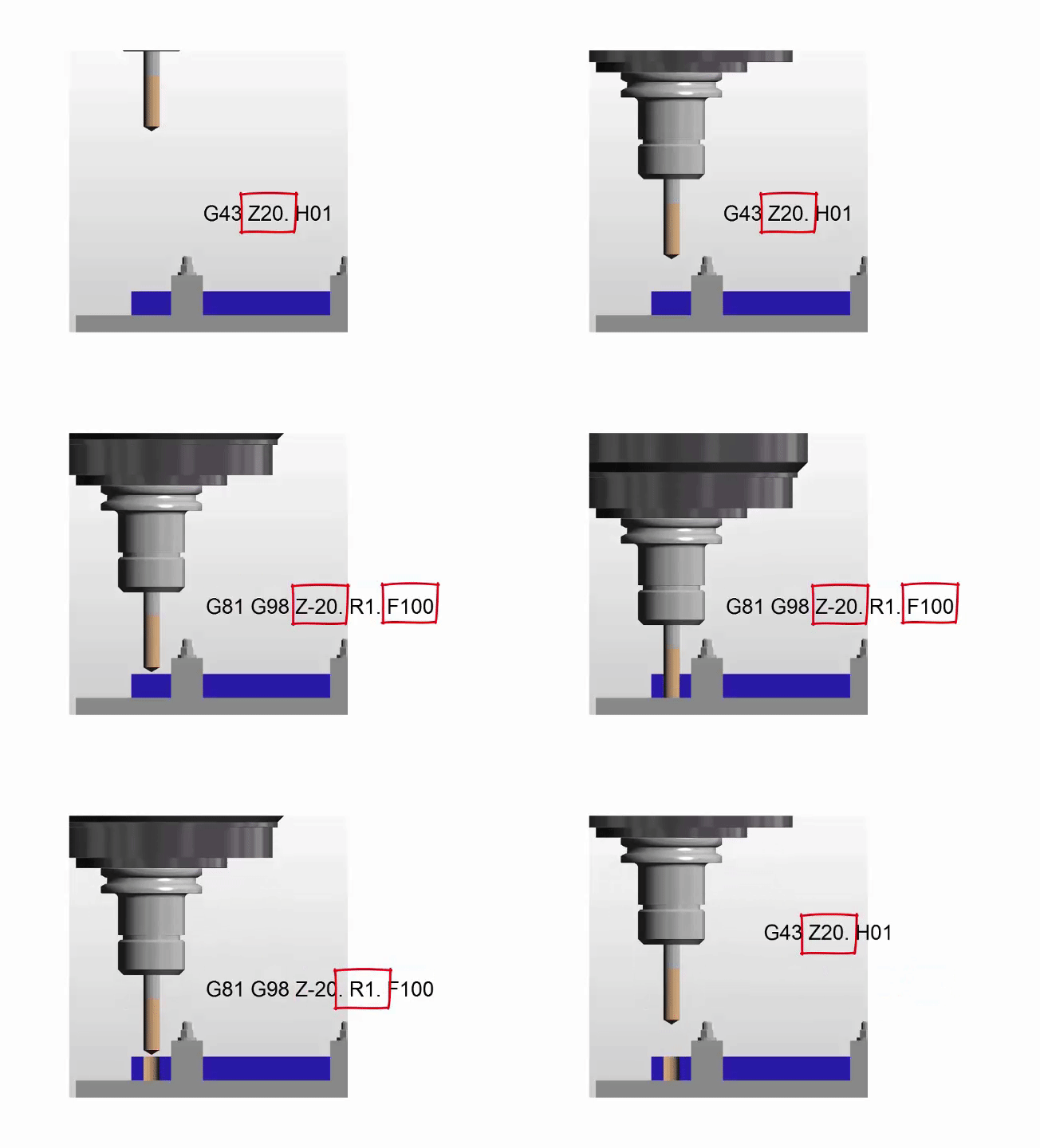
The machine first moves to X-55. Y-55. and rapids the Z axis to 3mm above the part.

It then rapids the Z axis down to 1mm above the part R1.

The G81 Cycle instructs it to drill a hole 6mm deep (Z-6.) at a feed of 200mm per minute (F200.)

When the hole is done it rapids back to the initial point (Z3.) This was in the line

This is because of the G98.

If it were G99 it would return to 1mm above the job (R1.)

See explanation of G98 and G99

Once the cycle is active each time it sees a position it repeats the drilling process.

When the G80 is programmed it no longer drills holes.

Now watch the video to see it all in action (G81 Drilling Example)

Haas G81

See full explanation

Thanks

If you have been affected by any of the issues in this post or need CNC Counselling then contact me.

If you want to learn to program CNC Milling Machines

Look no further Contact CNC Training Centre


G01 G00 Basic CNC Programming ( G01 not GO1 )

G01 not GO1 Back to Basic CNC Programming

The letter O is only used for a programme number and a GOTO statement on a Fanuc Control. It’s important not to get it mixed up with the number Zero. So we should really say G zero one ( G01 not GO1 ).

So remember it’s G01 not GO1 (Zero not letter O)

G01 not GO1

A good solution is to miss it out where possible G1 not G01 etc.

This is part of a series of articles designed to cover basic CNC Programming.

When I first learnt to programme, before the First World War, I still remember how daunting the thick yellow Fanuc Manuals were. The Japanese were learning to speak English and we were learning to speak G Code.

Fanuc Manuals

Fanuc manuals are just like the yellow pages. A note here for you young people who might not know what yellow pages are (no it’s not like someone pissed on the photocopier)

Long before Google we had these thick yellow books and we used them to find stuff like if your mam needed to get the outside toilet unblocked or something.

None of this stuff was in the Fanuc manuals but you could easily get them mixed up cos they looked very similar.

I can honestly say when I was learning Basic CNC Programming I read the old 6M Fanuc manual from cover to cover. The Macro bit was just like another planet to me. Some things I had to read over and over again to understand.

Some of it was so badly written you kind of had to guess what they meant.

In the Beginning

Every now and then I used to go right back to the beginning and read the basic stuff again. Believe me, every time I would find something I didn’t know, mind you I didn’t know much then anyway.

Try it later and if it doesn’t work I’ll give you your money back.

Okay enough of this bullshit and verbiage let’s talk about G codes.

Geometric Code, that’s what the G stands for.

Useless information but anyway, now I’ve said it. Don’t tell your mates down the pub because you will probably bore them shitless.

I often begin my training courses by saying “you only need to know four G codes to programme a CNC, it really is that easy”

G0 G1 G2 G3

(Please smart arses don’t contact me.)

What that means is that you can get round any shape with straight lines G1 and circles G2 and G3. Oh and you need to quickly get to the part so use G0 rapid.

Yes and another note. You don’t need leading zeros.

G00 can be G0 (Never GO as in letter O)
G01 can be G1 (Never GO1 as in letter O)
G02 can be G2 (Never GO1 as in Letter O)
G03 can be G3 (Never GO1 as in letter O)

Read this if you want to know more.

Lets Get On with It

G00 or G0 commands a rapid move. That means the axis will be flat out. Maximum foot to the floor, shit off a stick as we say in the Midlands.

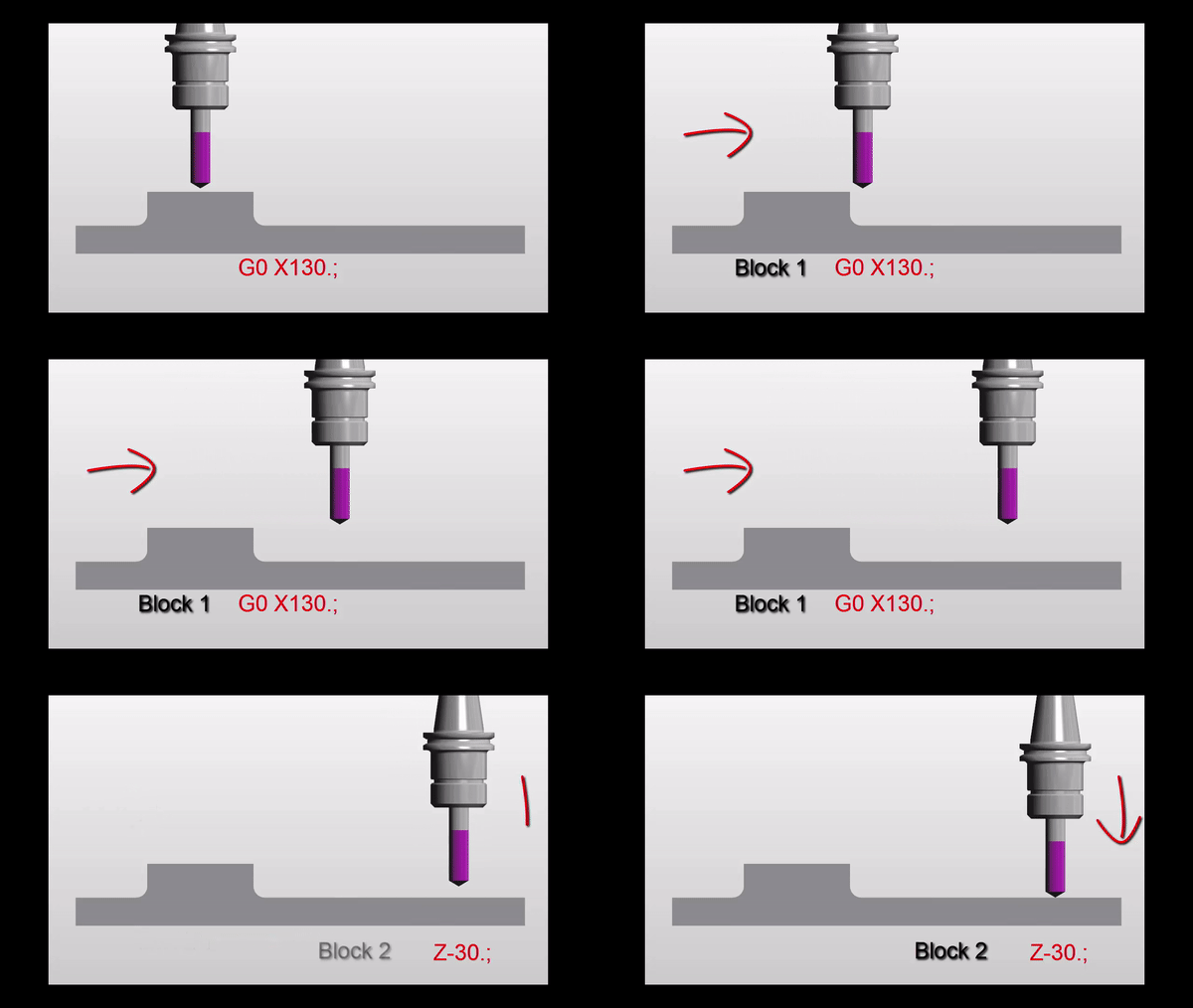
A common mistake with rapid moves is to assume that the axis will all move in a straight line like a bullet from a gun.

Not true. Because each axis is flat out one axis may arrive before the other. The rapid on your X axis could be slower than your Z. Anyway you get what I mean.

Why do I need to know this?

Easy because if something is in the way then you might hit it. That is if you assume the movement is a straight line.

Now lets see.

Move down in Z

G0 Z5.

G01 not GO1

Then a nice straight line G0 X130. Z-30.

G01 not GO1

But meanwhile in the real world

G01 not GO1

It’s obvious really.

Just think for a moment:

If both X and Z rapid motors ran at the same speed. Then each axis will move the same amount until one reaches its destination.

Looks like this.

G01 not GO1

Z has 30mm to move in total so they will both move 30mm. This will make a 45 degree line.

Ah but X is not finished yet. X will carry on and finish its move in a straight line.

G01 not GO1

If something is in the path of your rapid move you may need to programme your axis separately to be sure not to hit anything.

G00 X130. Z-30.

Could be:

G00 X130. ;
Z-30.;

G01 not GO1

Please don’t repeat the G00 (you know it will piss me off).

Now G01 ( G01 not GO1  )

G01 is a linear feed. It means feed in a straight line. Just like stretching a piece of string between two points. It can be just one axis or two simultaneous axis. You can even programme X Y and Z all in one line of code.

So this is what really separates a CNC from a manual machine. Remember how hard it was to machine an angle on a manual milling machine? Or a taper on a lathe.

You do?

Well on a CNC Machine we just programme the end point. It will then machine a straight line from it’s current position to the programmed point

If your machine was at X50. Y0 and you programmed a line

G01 X55. Y-200. ;

You would get an angle.

Ok what’s wrong in this picture?

Just to see if you are not a robot?

Yes congratulations but what is wrong with the line.

G01 X55. Y-200. ;

The Feed-rate

Yes with G01 you need a feed-rate. Don’t repeat the feed-rate, you only need another feed-rate when you want to change it.

G01 X55. Y-200. F100. ;

Don’t forget you can programme X Y and Z together and it will still be a straight line just like you tied a piece of string between the start and end point.

F100. means feed at 100mm per minute.

CNC Turning

On a manual lathe you would have to set up a compound slide to just machine an angle.

Basic CNC Programming

Mmm very skillful and I’m sure it’s loads of fun.

On a CNC Lathe this is just one line of code and some Basic CNC Programming!!

What About 3 Axis Rapid?

Yes you can programme 3 axis together in rapid move. It’s definitely the quickest way to get to the part.

G0 X50. Y20. Z3.

I would definitely advise using it but, and there always is one, just be real careful nothing is in the way. Don’t blame me I’ll just say I never  met you.

Oh just one more thing as Columbo would say.

You could use a very high feed instead of a rapid move. That way you really would guarantee a straight line. I’ve never done this but it just came to me in a flash.

So there you have it G0 is rapid ( never GO letter O).

G1 is linear feed, remember G01 not GO1 (Not letter O)

Thank you for reading my article ( Basic CNC Programming G01 not GO1 )

Services offered at CNC Training Centre

Edgecam training.

Classroom programmer training.

Onsite CNC Machine Training.

CNC Training on all controls and machines.

Mazak Training Fanuc Training

Don’t forget we offer training on all types of Mazak Machines and all Fanuc Controls 6m to 31i Oi old to young.


Absolute or Incremental G91 G90

Absolute or Incremental that is the question?

Absolute or Incremental no it’s not a Shakespearean Quote from Hamlet.

Two distinct ways of programming.

Understanding Absolute and Incremental Positioning in G-Code

When diving into the world of G-code, mastering the difference between absolute and incremental positioning can be a game-changer. This knowledge not only enhances your programming skills but also provides strategic flexibility in crafting your creations. By utilising G90 (absolute) and G91 (incremental) commands, you gain control over your machine’s movements, allowing for precision and adaptability in your projects.

We all know Absolute (G90)

You are working from an absolute datum. This means that every position or movement is a measurement from the datum.

It is just like on a drawing where every measurement is from the same datum point.

Absolute or Incremental

So no matter what position you move to the movement distance is from the datum. This is called Absolute and you use G90. G90 is modal so the G code stays in until you tell the control otherwise.

Absolute or Incremental

But do you understand Incremental (G91)???

Incremental is a bit harder to get your head around.

Absolute or Incremental

So this time it’s like every position is measured from where you are. So if the movement is X10. then the machine moves 10mm from where you are in a plus direction.

Here is the same part as above but drawn in a different way.

Absolute or Incremental

So each position is measured from the last one. Well that’s how incremental positions work. You just move the incremental distance regardless of where you are.

Absolute or Incremental Why?

Come on you tell me…….

You’ll have to work it out or read right to the end of this article. Oh by the way it’s incredibly boring.

Absolute or Incremental There is More

Absolute is like saying “Go to my house”. My house is in just one place and I only have one. So that is an absolute position.

Now if you were at my house and I said “Go to my house”. Apart from thinking I am a bit daft you wouldn’t move. You’d say “David, I am already at your house, are you OK?”

Well that’s like being in G90 Absolute.

G90 G0 X50. Y50.
X50. Y50.

When the machine gets to the second line, in the above code, it wouldn’t move. It would quite happily accept this line of code. I’m sure somewhere deep in it’s CNC brain it would think you were a bit daft. But they are very polite these CNC guys.

If you were in a canned cycle it would drill another hole in the same place because that is what a canned cycle does. (They repeat each time a position is given)

Ok Now are you ready? The Incremental Bit

So if I said to you “drive 5 miles north”.

Well it rather depends on where you are. You may well arrive at my house (and I would make you a cup of tea). Now if I repeated the command “drive 5 miles north” you wouldn’t stay for another cup of tea. You have another journey to make.

Well that’s like being in G91 Incremental.

G91 G0 X50. Y50.
X50. Y50.

After the second move in the above code you would be at X100. Y100. Each axis moves another 50mm.

The Wait Is Over Read On

Absolute or Incremental, why?

First of all let’s look at the two drawings again.

Absolute or IncrementalAbsolute or Incremental

Why not just read the figures off the drawing? Dead easy. First drawing would suit absolute. Second drawing would suit incremental. Or for some parts it would be a combination of Absolute or Incremental.

If you try to add up the figures on drawing number two you will more than likely make a mistake.

Reading The Program

When you read a CNC program you want the figures you see to be the same as the drawing. That way it’s easy to check and you won’t make so many mistakes.

Don’t forget it might be years later when you next read this program.

So Absolute or Incremental? Well it rather depends.

Here is another example where incremental programming would work well.

Absolute or Incremental

The pockets are all the same so you could program one pocket incrementally. Stick it all in a sub program and then just move to an absolute position and call it out.

It would be a bit like having a robot that could dig ten inch diameter holes two foot deep. You just send it anywhere in your garden, it will dig you a hole and you can plant a tree.

I can almost hear the comments on this article. “Oh I’d just use a different datum for each pocket”.

“Incremental no way bloody dangerous”

OK smart arse.

At the CNC Training Centre we like you to learn as much as possible about CNC Programming. Understand all the G codes all the M codes every principle. You end up with a toolbox full of CNC Programming Tools.

Absolute or Incremental Which Tool?


Absolute-or-Incremental Let’s Talk About Safety

When you use G91 Incremental as soon as possible add a G90 to bring the machine back to G90 Absolute.

So for example if you had a sub-program you could try and remember to put G90 in your main program. That is something I would definitely forget to do.

So put it at the end of your sub program. That way every time you come out of your sub program you are back in G90 Absolute.

O500(Drilling Sub-Program)
G91(Incremental)
X50.
X60.
X80.
X10.
X5.
X5.
G90(Absolute)
M99

It’s all about tidying up.

If you leave things lying around anything can happen.

You definitely can have a collision using G91 (Incremental) if you are not careful.

Don’t Be Put Off There’s More

Incremental has some brilliant uses. When drilling holes the same distance apart it can save you a lot of programming time. Oh and it really simplifies things.

When using a canned cycle like G81 you can make repeat moves.

G81 G98 Z-5. R1. F100.
X52.554 L20
G80

This will drill 20 holes 52.554mm apart. Think about adding all these figures up, very prone to mistakes.

But do be careful, if you get a figure wrong you can get a cumulative error. “Cumulative error” Sorry I promised not to fuckin swear.

Come on you G91 deniers it does exist and it can work.

Advantages

  1. You can program exactly what is on the drawing.
  2. No need to add up figures.
  3. Repeat holes are dead easy.
  4. Features that repeat can be placed in a sub program and used at any absolute position.
  5. Less errors because you don’t need to add up the figures.
  6. When you later read your program the figures look like the ones on the drawing.
  7. Great for using sub-programs.
  8. It can help you lose weight as part of a calorie controlled diet.

Understanding these concepts is like adding a powerful weapon to your G-code arsenal, enhancing both precision and efficiency.

Whether you’re executing complex designs or simply looking to streamline your process, this foundational knowledge ensures your commands translate perfectly from paper to product.

Disadvantages

  1. If you make a mistake then the errors will add up.
  2. Can cause collisions if used incorrectly.
  3. People don’t like it and are frightened of it.

How does understanding absolute and incremental positioning affect flexibility in G-code programming?

By mastering the use of G90 and G91 commands, you gain the ability to switch between absolute and incremental positioning, thereby increasing your programming flexibility.

2. Why is understanding the difference between absolute and incremental positioning important?

Grasping these concepts is crucial because it equips you with a significant advantage in G-code programming, enhancing your ability to execute precise and efficient commands.

Absolute-or-Incremental Remember This

  • Change back to Absolute G90 straight after use.
  • Make sure the figures you input are accurate.
  • Standardise your code (Read This).
  • After each tool change make sure you have a G90.
  • When you are proving out look at position display to check how figures add up.

Thanks For Reading

Don’t forget there’s loads more folks.

And a YouTube channel

Learn CNC Programming

Services offered at CNC Training Centre

Edgecam training.

Classroom programmer training.

Onsite CNC Machine Training.

CNC Training on all controls and machines.

Mazak Training Fanuc Training

Don’t forget we offer training on all types of Mazak Machines and all Fanuc Controls 6m to 31i Oi old to young.


Repeat Canned Cycle Using L and K

Category : Fanuc Mill Haas Mill

CNC Training Centre 29 Five Star Reviews and Still Counting

Please read all the reviews of CNC Training Centre

The Ones We Don’t Put on The Website

  • Such infantile humour you’ll never get the time back wasted in reading this utter shite.
  • The author is a prick.
  • This guy knows nothing about CNC Machining
  • Never been so insulted!
  • Written like a High School Student who just learnt to swear
  • If I wanted to laugh at 60’s sexual innuendo I’d watch a “Carry On Film”
  • Don’t read this garbage
  • My steak was over-cooked and the chips were cold
  • Crashed my machine six times as a result of reading this shit, I need to stop
  • He told me to tell the boss (“go shove your job up your arse”) I am now unemployed, so far had no compensation from CNC Training Centre (They don’t answer my calls)
  • In one article he states “Tell the boss, that’s the one with the Porsche 911, fat arse and little cock” my boss does not have a Porsche
  • Use “G Code Tutor” I know most of the articles are incorrect but at least he never swears

Please note, these reviews were all fake so we took them down

Repeat Canned Cycle

Repeat Canned Cycle, here is a simple G81 canned cycle.

O001 (Drilling Programme)

T1 M6 ((10mm Drill)

G90 G0 G54 X50. Y50. S1500 M3
G43 Z3. H1 M8

G81 G98 Z-15. R1. F200.
X60.
X70.
X80.
X90.
X100.
G80

G0 G53 Z0
G53 Y0
M30

Repeat Canned Cycle

Now here is the same programme in incremental.

O001 (Drilling Programme)

T1 M6 ((10mm Drill)

G90 G0 G54 X50. Y50. S1500 M3
G43 Z3. H1 M8

G81 G98 Z-15. R1. F200.
G91 X10.
X10.
X10.
X10.
X10.
G80 G90

G0 G53 Z0
G53 Y0
M30

Both programs do the same thing now lets shorten the last one.

Repeat Canned Cycle L5 or K5

O001 (Drilling Programme Repeat Canned Cycle)

T1 M6 ((10mm Drill)

G90 G0 G54 X50. Y50. S1500 M3
G43 Z3. H1 M8

G81 G98 Z-15. R1. F200.
G91 X10. L5
G80 G90

G0 G53 Z0
G53 Y0
M30

(This would be K5 on a Fanuc control)

Now you have to admit that’s easy.

For all you “incremental deniers” come on now, this saves a lot of code.

And……

if the distance between the holes was 10.236 imagine having to add them all up.  Lets face it you couldn’t even work out the total cost of six tins of beans at 86p a tin.

Everything is so fuckin expensive these days. Have you noticed the price of vintage champagne?

Anyway that’s another argument for another time.

Repeat with No Repeat !!!

This article is about iteration. Which is just bullshit for “how many time you do it”.

No I don’t mean how many time you do “it”, grow up.

Authors Note to Himself

Must ditch some of these readers, so childish and read sexual innuendo into everything I write.

Continue if You are 18 or Over

In other word the L5 or K5 means do it 5 times.

You can also use L0 or K0 which means do it zero times (don’t do it).

” Come on Dave don’t be a twat, why tell the machine not to do something”

Right, first of all don’t call me Dave I fuckin hate it, my names David. So shut up and carry on reading.

Reasons to Not Do Something

  • You broke the tap in a hole and you want to skip it.
  • You just want the machine to remember the canned cycle but you don’t want to do the cycle yet.
  • Getting round corners without collision. Read this.
  • You can’t be arsed to get off the chair to pick up the TV remote (when your lazy boyfriend put it on the floor)
  • You want to use a sub programme

See Below

O001 (Drilling Programme)

T1 M6 ((Spot Drill)

G90 G0 G54 X50. Y50. S1500 M3
G43 Z3. H1 M8

G81 G98 Z-5. R1. F200. L0 (Remember Cycle But Don’t Drill Yet)
M97 P500 (Go to drilling sub programme)
G80
G0 G53 Z0

T2 M6 ((10mm Drill)

G90 G0 G54 X50. Y50. S1500 M3
G43 Z3. H2 M8

G81 G98 Z-15. R1. F200. L0
M97 P500 (Go to drilling sub programme)
G80
G0 G53 Z0
G53 Y0
M30

N500 (Drilling Sub Programme)
X50. Y50.
X60.
X70.
X80.
X90.
X100.
M99

What this means is you set the canned cycle up so the control will know what you want to do. Because of the the L0 or K0 it does not actually drill a hole.

When it goes into the sub programme it’s business as usual and it drills all your holes.

All your positions are self contained in the sub programme.

Now it’s time for one of my famous, very boring stories.

Repeat Canned Cycle

Go here, this guys videos are way more interesting than this shit.

The Boring Story

Years ago when I worked at SP Engineering in Barwell. We used to make parts for knitting machines.

We made this part which was a massive plate covered in all different sized holes. Drilled tapped bored you name it. It was like that cheese that has all the holes in it. Well, not really but I paid for this picture and I want to use it.

We used to get a spot drill and just dotted the plate all over. We then put the part into inspection where they used a CMM (coordinate measuring machine) to measure all the positions of the dots.


The probe just drops neatly into the spot drilling dots.

Repeat Canned Cycle

Also because each set of holes was in a sub programme they could be reused once the positions were OK.

Oh and by the way contact CNC Training Centre for training on your CMM with PCDMIS


It is a useful method because once the sub programme is used you know all the positions are correct for any subsequent tools. It makes prove out much easier.

Putting any positions in the main programme would ruin the plot because you would have to check the first hole position for every tool.

Using L0 or K0 to Get Round Corners

This is a novel way to use L0 to get round the corner of a part. Not my idea I nicked it off the genius guys at Haas tip of the day.

My advise is don’t read this shit. Go to Haas Tip of the Day it’s way better. The guys are so polite and never swear.

Here Is a Nice Video In Case You Can’t Read

L0 for a Haas control K0 for a Fanuc control Repeat Canned Cycle.

Repeat Canned Cycle


G84 Rigid Tapping Program Example

G84 Rigid Tapping Program Example

For On-site CNC Training Contact David: 0783 858 407

G84 is a tapping canned cycle.

G84 taps holes.

This simple part has four M12 holes, drilled, countersunk and tapped. The datum is the centre of the part so the holes positions are.

X55. Y55.
X-55. Y55.
X-55. Y-55.
X55. Y-55.

G84 Rigid Tapping Program Example

G84 Rigid Tapping Program Example

Here is the CNC code

G84 Rigid Tapping Program Example

The machine first moves to X-55. Y-55. and rapids the Z axis to 3mm above the part.

G84 Rigid Tapping Program Example

The G95 selects feed per revolution which means we only need to program the tap pitch for the feed-rate.

See full rigid tap G84 Rigid Tapping Program Example

The M29 engages the rigid tapping mode and the S800 is the speed. (It does not start the spindle)

It then rapids the Z axis down to 1mm above the part R1.

The G84 Cycle instructs it to tap a hole 17.mm deep (Z-17.) at a feed of 1.75mm per revolution (F1.75) 

So it feeds at 1.75mm per revolution with the spindle turning clockwise to depth.

At the bottom of the hole it reverses the spindle and feeds back to the initial point.

This initial point was in the line.

G84 Rigid Tapping Program Example

This is because of the G98.

If it were G99 it would return to 1mm above the job (R1.)

See explanation of G98 and G99

Once the cycle is active each time it sees a position it repeats the tapping process.

When the G80 is programmed it no longer taps holes.

Single block and feedhold do not work in a tapping cycle.

Why? You ask.

IT BUSTS THE TAP

Now watch the video to see it all in action (not breaking the tap).

Thanks

If you have been affected by any of the issues in this post or need CNC Counselling then contact me.

If you want to learn to program CNC Milling Machines

Look no further Contact CNC Training Centre


Careers in CNC

View all current vacancies in CNC

Click here

Call David: 07834 858 407