Sound familiar,well you should be ashamed of your self. Get off your fat arse and find out what some of these frigging buttons do.
If people didn’t know what buttons did we would have died in a nuclear holocaust many times over.
007, Shibaura Tool Retract Tool Recover
Think of James bond with his fuckin ejector seat, he has some gorgeous chick sat next to him and he says “want the air con on?”. He then accidentally blasts her into next week, not a good look is it.
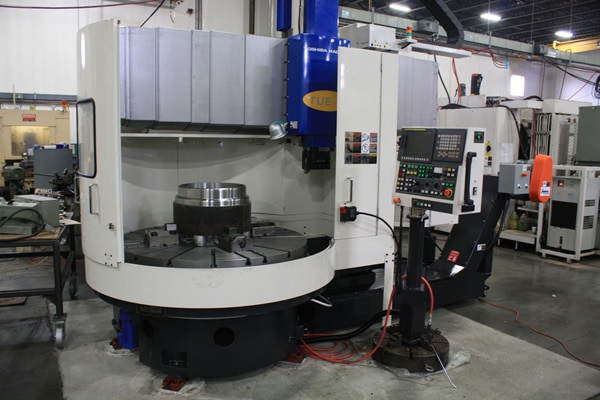
Anyway let’s talk about these babies, Shibaura Tool Retract Tool Recover
Not a great picture, but then neither was your profile picture before you Photoshopped it so back off.
Anyway I pressed them and all they did was flash.
Gertjan I love You
Two hours later me and my new Dutch friend Gertjan got them working.
I must say the result is awesome, Gertjan the Fanuc guru.
You get to stop your CNC Program, move the tool away, do whatever you want, then return it back before carrying on with the program.
Now for Fanuc users because we are years behind the times this is an absolute arse licking game changer.
Here is How you Do It
Stop your program with feed hold or cycle stop
Now press Tool Retract, Shibaura
The one on the left, it will light up. Now go into Jog or MPG and move your tool away. (This can be up to ten moves). If you need more than that then you are just plain greedy.
You can now change an insert or do whatever you want, I usually make a nice cheese and onion quiche at this point but it’s entirely up to you.
Now switch back to Memory and press CYCLE START, then press Tool Recover.
Your machine will move back, step by step, to it’s position where you so rudely interrupted it. All controled with your feed rate dial.
Don’t you just love that mmmmmm.
What more could you want? A cheese and onion quiche?
All training is carried out on your Shibaura machines, not generic classroom examples. This allows us to tailor the course around:
Your specific Shibaura model and control
Your tooling, fixtures, and work holding
Your components, tolerances, and materials
Your current programming and setup methods
This hands-on approach leads to faster learning, better knowledge retention, and immediate improvements on the shop floor.
CNC Training Tailored to Your Team
We structure every onsite Shibaura CNC training course around the experience level of your staff and the results you want to achieve. Training can include:
CNC fundamentals for new or developing operators
Safe machine operation and best practice setup
Datum setting, work offsets, and tool offsets
Program editing, proving, and optimisation
Cycle time reduction
Whether you need operator training, programmer development, or a productivity-focused refresher, we build the course to match your requirements.
Delivered by Experienced CNC Engineers
Instructors with extensive real-world machining experience. Training is practical, clear, and focused on what actually works in production—not theory alone.
Engineers leave the course with the confidence to:
Set up and run Shibaura machines more efficiently
Reduce scrap and setup errors
Improve repeatability and process reliability
Make safe, effective program changes at the machine
Why Choose Onsite Shibaura CNC Training?
No travel or offsite disruption
Training based on your actual production environment
If you’re looking to upskill your workforce and get more from your Shibaura CNC machines, our onsite training provides a highly effective and cost-efficient solution.
Contact CNC Training Centre today to discuss your onsite Shibaura CNC training requirements and let us design a course around your business.
Ever been writing a program in Manual Guide i and wanted to look into the tool offsets?
Well obviously you can but it is a pain in the arse to switch from one screen to another.
Anyway help is at hand I’m going to show you a quick parameter change that will allow you to acces the tool offsets quickly.
If you want to know right now, skip to the end of this article, cos I’m going to rant a bit.
I recently got allowed into Holland to do some training on a Shibaura CNC machine for my mates at Leader CNC who sell these beasts.
Anyway anyone who knows me knows that I’m way too old and decrepit to actually work but unfortunately for the CNC World I still do.
I fluctuate between hating my job and retiring to go on cruises where it’s the norm to shit your pants and get a semi erection watching a Freddy and the Dreamers tribute band.
The alternative is to carry on working and keep paying off the wife’s credit card bill which is the obvious choice.
Anyway when I landed in Amsterdam they gave me a car. First thing I thought was “why the fuck is the steering wheel on the wrong side of the car?”.
May be it was a Monday morning car and they just got it wrong. Any way I spent the next two hours trying to convince all the Dutch drivers that they needed to drive on the correct side of the road.
I made a stand for British values and refused to budge. The roads in Holland are so nice and the road makings are perfect like driving on rails. They just need to stop driving straight at you.
It’s not the same without the pot holes though these roads are for wimps not real men.
Back To Manual Guide i Access Tools
By altering a parameter you get to do this:
Click on the tool number.
There it is in yellow, then press the ALTER key
Voila the tool screen appears.
You can now modify tools or just take a good nose in there. Press CLOSE when you are pissed off with it and it will go away.
Ha ha, yours won’t work. Send £200 to me and I’ll tell you how.
Only joking, you just need to alter parameter 14705 bit 7 to a 1 and it works.
Oh and you have to shut down the machine for this to work.
By the way if you fuck your machine it’s not my fault. Take a picture or a screen shot before you alter anything. you now have a reverse gear.
I would love to take credit for this but it was my new dutch friend Gertjan who showed me how.
I get to meet some great people and he is definitely is one of them. We exchanged loads of tips he showed me this and loads of other things. I did show him something, how men really can multitask, keep an eye on the door whilst watching porn.
Heidenhain Sections, I don’t get to work on Heidenhain controls anywhere near as much as I would like to.
A recent training program we undertook with a packaging company meant I got loads of time to have fun with this control whilst working with some fantastic people oh, and I got paid too.
Ever since I first worked on Heidenhain controls in the early 80s I have found them very intuitive. As with all the CNC controls (and I am gonna have a moan) they tend to get over complicated.
Basic Turning, in the early days of CNC Turning G96 was one of the things that really made a massive difference.
It meant that instead of having to turn a part at a fixed speed and feed, the part could be programmed in G96 which was a constant surface speed.
Where diameters changed, particularly when facing, it made a massive improvement to tool life and surface finish as well as speeding up the whole process.
G97 Speed In RPM
In Basic Turning when you program G97 your machine will start the chuck up at a speed in RPM. So if you program. G97 S1500 M3
Your chuck will start revolving clockwise at 1500 rpm.
G97 for Drilling Tapping and Screwcutting
When drilling a hole you are on the centreline of the machine so you just want plain old simple RPM.
G96 however means meters per minute. This is a surface speed. G96 S200 M3
Your machine would start up at a surface speed of 200 meters a minute. Now your RPM would depend on where on the diameter the tool was positioned.
If the tool was positioned at a 100mm diameter it would be as if the tool were able to run around this diameter at a speed 200 meters a minute.
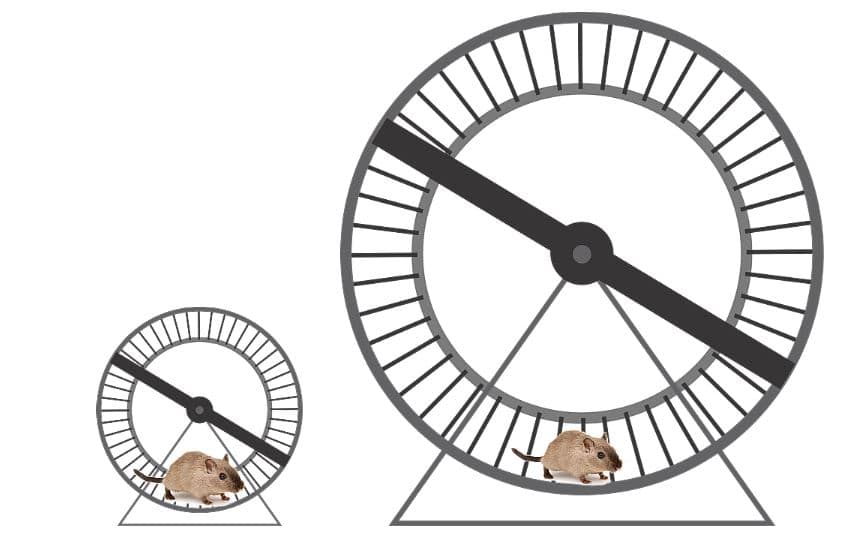
It’s a bit like being on a running machine if you ran at 200 meters a minute and placed various diameters under your feet the large ones would turn at slow rpm and the small ones would turn at high rpm. (Just like the hamsters above)
That’s why on a manual lathe it is hard to face a large diameter without changing speed half way.
Neeeeeoooooooowwww
You know when you face a part on a CNC Lathe and you hear that change in pitch? It’s the spindle increasing in RPM as it gets closer to the center of the part.
Well I bought my hamster loads of different wheels to play on just like the one above.
My hamster suffered with depression on account of being stuck in a cage all day and not having a girlfriend oh and he had a lot of credit card debts too.
These wheels varied in diameter from about 6 inches to a massive 2 foot one. They kept him happy all night. He was so tired he slept all day.
Harold could only run so fast but I noticed when he was on the small 6 inch wheel it absolutely whizzed around. Now on the big two foot diameter one it took him ages just to get it to spin around once.
G96 G97 all about hamsters
Harold Had G96
A CNC machine in G96 will give a lovely finish because the surface speed always remains the same.
So even though Harold ran at 200 metres a minute (this is fuckin lightening speed for a hamster)
The wheels ran at different RPM depending on what diameter they were.
Harold Was a Clever Bastard
Oh by the way Harold had a tail (unlike other hamsters) and a maths qualification.
He knew that if he multiplied the diameter of the wheel by .00312 it would give him the circumference of whatever wheel he was running on in meters.
200 mm wheel (.00312 x 200 = .6864)
All he now needed to do was divide this answer into the speed he was running at and he would know how many RPM his wheel was revolving at.
If he was running at 200 meters a minute not only would he be fuckin knackered but the wheel would be running at 291 rpm
200 / .6864 = 291
Basic Turning Manual Machining
Using a manual machine you have to compromise. At the outside your speed is too fast and when you get to the centre you are too slow.
Manual Lathe
On a CNC lathe we would normally program in mm per revolution as well because the speed is changing all the time so we need our feed to be locked into the speed.
With a machining centre our cutter is always revolving at the same speed so the feed can be constant in mm per minute.
Someone out there will be thinking “what happens in G96 when you get to the centre of the part”. Well the spindle will be flat out!
See how surface speeds are translated to speeds in RPM. There are many converters online that you can use for this and I do recommend their use. It will also mean you don’t have to watch my tedious video.
When I train people at the CNC Training Centre my emphasis is on understanding not memorising. I usually start by saying “please don’t remember all the things I am telling you”.
In the early days training students in Basic Turning I remember them saying to me the next day that they had G codes floating around in their head from the lessons the day before.
G96 and G97
What I really mean is that the most important thing is to understand what the machine can do and the concepts of programming and Basic Turning.
You could say “I know there is a G code that makes the machine run in RPM” so all you need is a list of G codes.
If you can be bothered to work through the simple maths above. It will help you to fully understand how G96 is works.