Here are ten things you might not know about Fanuc sub programs,
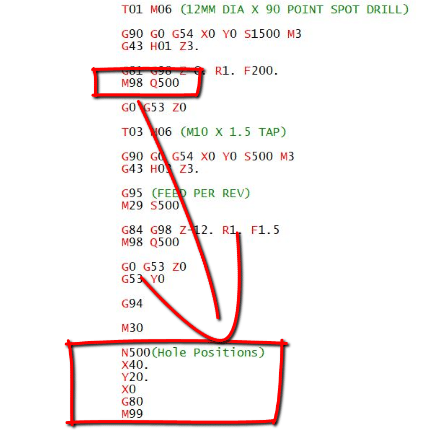
Fanuc CNC controls are the most common controls in the world so it might be useful to have a good understanding of how sub programs are called and used.
(1) You Can Call a Sub Program By Name.
Yes you heard it here the program can be called by it’s name or it’s number. When calling by name don’t use the P.
Just put the name of the program in these things <> with an M98 and your away.
M98<ALBERT>
The only problem with this is that the syntax needs to be spot on so if you have got complicated names for your your sub routines then you might be in the shit.
I always call mine names like ALBERT that are easy to remember.
(2) You can use internal sub routines on a Fanuc Control.
Some people call these local sub programs. It just means it’s tagged on the end of your program which makes them nice n easy to look after. A bit like a pet Goldfish or a pet fly.
I bought mine from the local pet store. I asked the assistant if he sold pet flies and he said no. I said “well there are loads in the window”.
Anyway he sold me one (£15) his name is Paul
This is not him this is Steve.
Internal Sub-Routines
By typing M98 Q500 your control will look for N500 within your current program. This is great because you can add the sub programs to the end of your main program. Don’t forget to leave big gaps so you can clearly see where and what they are. Oh and mind your P’s and Q’s.
Now I’ll warn you that it’s not a simple process but if you get into the habit of using it you’ll never leave home without it.
I am definitely not going to rant on and on about why all these simple procedures were not introduced years and years ago. Why has the editing on CNC controls generally been so shit over the years?
I am also not going to rant and and whinge about how fuckin complicated it all is.
I mean bloody hell all I want is to take this shit here and join it to the end of this shit here.
I’m not asking for an “X Factor Audition Here” (Simon if you are reading this my contact details are above) I only write this crap to try and make some money, my really passion is singing and exotic dancing in my underwear. I really want this Simon, just one chance is all I need.
Even experienced machinists with years of experience often do this completely wrong. It really can be done without crashing the machine.
What You MUST NOT DO When Checking CNC Programs
Don’t allow anyone to stand over you especially if it makes you nervous tell the boss to piss off.
Never ever rush this process.
Always carry out all the checks below before you prove out.
Don’t cut corners.
Never take off machine interlocks or override any kind of safety device.
Do not prove out your program when you need the toilet.
Have a Plan
It sounds stupid but what will you do if something goes wrong when you’re Checking CNC Programs.
Do you remember when you first drove a car?
The first emergency stop you did?
Well you didn’t automatically hit the brakes and depress the clutch did you? You had to think.
I thought these gloves made you drive better
When you are an experienced driver, in an emergency you will automatically hit the brakes. This is because a path is permanently etched on your brain and it’s almost an involuntary action.
This is the same with a CNC Machine if you are used to hitting the E Stop button then it will come automatically.
This is often called “muscle memory” which incidentaly is a complete misnomer. Muscles don’t have memory.
A bit like me there are loads of things I don’t remember. My wife recons when I came home the other night completely bladdered that I urinated in the wardrobe before eating the contents of the dog bowl.
As far as I’m concerned it never happened.
If you are like me, working on lots of different CNC Machines almost everyday, then you really don’t have a clue where the Emergency Stop Button is.
I still can’t remember which drawer my fuckin socks are kept in let alone the complex layout of 100 different CNC Machines.
The Plan For Checking CNC Programs
It’s easy, if you are new to the machine and you have any doubts at all, hold your hand over the Emergency Stop Button. Then in your mind think “one false move and you get it sucker”.
Pressing the E Stop button doesn’t start world war three but what it will do is halt everything instantly.
Big machines are the exception to this rule
The more metal swinging around the harder it is to stop. On these machines it’s probably best to just go into a blind panic and run off.
After hitting the E Stop you may have to go through your machines start-up procedure. You may even have to get a boring bar out of a tight spot but you didn’t break anything did you. That’s the idea.
So to use the car analogy. You think…..
Press brake and clutch.
Control the car.
You can panic now (it’s over you didn’t kill anyone)
So do the same with your machine…
Press the Emergency Stop.
Mmm, there is no number 2
Obviously your plan will not always be to hit the E Stop. This would be a very short blog if that’s my only advise.
You may just want to press Cycle Stop or the Feed Hold button.
The main idea is that you are covering the button you’re about to press. This keeps things really simple, the way I like it. In a panic you won’t have a clue where the button is.
The System When Checking CNC Programs
When Checking CNC Programs (proving a program) you should either be looking at the program with the machine stopped or, looking in the machine whilst it is running. You can’t do both at the same time so….
Stop the machine and look at the program.
Start the machine while you’re looking inside with your finger ready to feed hold or E stop.
Dry Run
Most machines have a Dry Run Button or switch. Personally I never use them. Dry Run gives you a feed control over both rapid and feed moves and it does depend on parameter settings as to how it works.
It means that you can control all your moves with the feedrate potentiometer.
Sorry for being posh a potentiometer is the dial thingamajig. Say it in front of the boss and if you get a pay rise I want a percentage.
Anyway try it and see what you think, (dry run that is). Your machine parameters will give you the option to override rapid moves or not.
OK so why don’t I like dry run?
That’s an easy one.
When using dry run it is easy to get carried away and feed really fast on a rapid move but don’t forget when you come to the next feed move you are probably feeding way too fast and you will break the tool.
Yes you have guessed it I have done that on a few occasions.
On some controls Dry Run will stop the spindle from running so it has to be run in fresh air with no part in the machine.
Rapid Override
Buttons or dials, you can override all rapid moves by a percentage.
On some of the Heidenhain control panels the override works for rapid and feed moves so you just have one control.
Beware because some controls have a massive difference between the slowest and the next setting. It’s either like watching paint dry or shit off a stick.
Machine Lock
You can use the machine lock which does as it says. Nothing moves so it is purely for testing the code. All the positions etc will change so you will see everything moving on your position display but the axis are locked.
CAUTION
On some older machines the machine will completely lose its position and you will need to zero return after using this. It’s what’s known as a shit storm.
Personally I think it’s a waste of space. Unfortunately on some controls you have to use it to run the graphics so you have no choice.
If at this point you are thinking “what the fuck”. I totally agree don’t get me started on graphics.
MST Lock
If you use this let me know cos I don’t know anyone who does. It effectively locks all M Codes all S Codes and all T codes.
So:
No coolant.
No spindle start.
No tool change.
Etc Etc
Running The Program 10 Foot Above the Part
Again not something I do. Some people like to run the program above the job (in fresh air). Or on a lathe away from the chuck.
The only problem is you still won’t be sure the program is OK when you do it for real. Anyway do it if you want I won’t ban you from my website or anything.
If you must do this it’s best to put a figure in the external work offset as below.
This means your program will run 100mm above your Z datum.
Don’t forget this shifts all your offsets so you need to proceed with caution,
You are very likely to forget to put this back. Even worse you may alter the wrong figures.
The long term solution is to put this line of code in every program which will reset it, you might want to put a block skip too so that you can skip it when you test the program.
Graphics
If you got em use em. A lot of, in fact all, machine graphics tend to be complete dogshit.
It is not like a CAM system such as Edgecam where you can completely collision check your program.
Don’t forget it’s a good way to pick up coding errors and you will see if you drilled a hole miles out of position.
We are looking for the big hitters here, big mistakes.
You definitely won’t know if a hole is a mm out of position but that is not really the idea. Read this article.
The Dangerous Bits When Checking CNC Programs
The most dangerous part in any program is when each tool first comes down to the part.
Why?
Because that’s when you apply the tool length and the work offset. Both of these can be wrong.
The second most dangerous time is when the tool leaves the part and goes back to tool change position.
Before You Start, Be Patient Tiger
Let’s do a checklist Before Checking CNC Programs Out
Milling First.
Check datum in MDI. Move your machine to X0 Y0 in your work offset as a test. You can test the Z too but be careful.
Does every tool have its length set? If you use proper tool lengths in your offsets then as a rough guide you can manually measure each tool with a steel rule as it comes out.
On Fanuc type controls make sure the T and H codes correspond. On a Haas Machine this can be automatically checked by changing a setting and it will give an alarm (Setting 15).
Also on Fanuc type controls make sure your D offsets are correct.
Check your tool change position is adequate to clear every tool. A sub-programme is useful for storing this as you only need to get it right once. And don’t forget that the turret will spin around here. Make sure it can’t hit anything.
Remove long large tools if not in use.
Check that each tool calls its offset T0101 (Tool one offset one).
Clean all your screens make sure you have the best view possible.
Here’s A Thought
If your rapid is nice n slow even if you hit the part with the tool as it approaches the workpiece:
I probably won’t break the tool.
If it cuts the metal, so what.
You will have time to stop it.
You probably wont get fired.
Most controls have a check screen so use it
How we Teach Checking CNC Programs (Prove Out) at The CNC Training Centre
You might want to reduce spindle speed for the prove out it feels less stressful.
I don’t start the spindle until the tool gets to the workpiece. That way there is a lot less drama.
Set rapid override to minimum.
Set position screen so that you can see the distance to go or remain. You must be able to read the program (a printout may be useful).
You need to be able to view the modal G codes as well as spindle RPM. All controls will have a screen to show this along with loads more useful shit.
If you have a set-up key then use it. It will allow you to do more things such as opening the door at low RPM.
Check your manual to know exactly what you can and can’t do when you stop your program. This varies massively between machine tools.
Set your Optional Stop switch or button to on. If you have M01 before or after each tool then the machine will stop.
Set single block to on. This is a button or switch. This means for each block of code (line ending in ;), the machine will read it, do it and wait.
Single Block
If you try and prove out a program with single block off you will get to the end of a block and the machine will carry on.
This often causes operators to shit themselves as they are not ready for what ensues. Keep single block on and you will only have to worry about the block you are doing.
Sometime in a CNC program there is a load of bollocks going on in the background that you can’t see. Something like a tool change may be reading loads of blocks you can’t see and are of no interest to you.
A quick work around on this one is take the machine out of single block
Set rapid and feedrate overrides to zero. Press cycle start and just wait around for some shit to happen.
Look at your display and as soon a the machine shows a distance to go or starts to move press the feedhold button.
Now you can switch the single block on and proceed with your prove out.
Checking CNC Programs
So here we go…..
Rewind and Reset the program to the beginning. Best done in memory with rewind button.
Press cycle start as you look into the machine. Be ready to press Feed Hold or Program Stop button.
If your rapid is set nice and slow it’s OK to switch off single block until the machine starts to move. As soon as it does press Feed Hold and turn Single Block back on. This may be necessary if your tool change program (which is not normally visible) allows single block. This means just a tool change will require loads and loads of presses of the button.
Watch as the tool gets closer to the workpiece. Press feed hold when it is close to the workpiece. (It may stop before this).
Now read the program.
Look at the remaining distance to go. If this is a massive number it’s time to panic.
Now work through each block like this.
Stop the machine and look at the program. Read the position display. Start the machine while you’re looking inside with your finger ready to feed hold or E stop.
When you have completed the Prove Out run the program without single block but still keep the rapid nice and slow.
After a few parts you can put rapids up to maximum.
Video below shows how to use REWIND in Auto mode.
Remember when the machine is moving you should be watching not looking at the display. Only look at the display when the machine is stopped.
I could say good luck but I would never expect you to rely on luck. Be patient and follow the above and you wont need it. As Louis Pasteur said luck favors the prepared mind.
Thanks for reading this article and don’t forget the most important thing is your personal safety and the safety of others.
CNC Beginner, at the CNC Training Centre we get emails every day from people trying to get into CNC Machining and programming.
All our courses are still only £300 per day plus VAT
A two day course in total s £720 including VAT
They ask how to start as a CNC Beginner.
The idea of the beginners courses at the CNC Training Centre is to get you started on your CNC career path.
It takes years to become a skilled engineer the clues in the title “skilled”. The good news is no one is going to stop you.
CNC Beginner
What I mean is, that although it may be hard to get that foothold, once you’re in all you need to do is work hard, learn and progress.
At the CNC Training Centre we can help you do this.
Because companies are desperate for good people they want you to succeed. All you have to do is perform.
You already have the most important requirement:
You’re flexible.
You are friendly.
You’re never late.
You don’t phone in sick Monday morning cos you’ve been on the piss all weekend.
You listen and you want to learn.
This is you isn’t it?
Hope I’m not talking to the wrong person here.
So if you already have all the above qualities then all you need is an opportunity. My advice is quite simple get into the environment.
In other words find a small engineering company with CNC Machines and get any job they have on offer even if your just cleaning the shit-houses.
That way you have a good chance of getting started on a machine. Even if your just making the tea it’s a start.
Bullshit Never Works
Recently almost everyone I train has a story about this bloke who started at their company. CV looked amazing, in practice he knew Jack Shit and two weeks later he either walked out or was slung out.
Please don’t let this be you. Everyone including you becomes very pissed off. Your confidence takes a massive knock, not to mention that you look a twat.
Tell the truth but show confidence and a willingness to learn. Be honest about what you can and can’t do. You’ll be surprised your good looks and magnetic personality will get you the first step on the steep CNC ladder.
For On-site CNC Training Contact David: 0783 858 407
Every day at the CNC Training Centre we get calls from people wanting to get a job as a CNC Programmer or CNC Machinist .
We can’t get you a job but we can get you started on the path.
That’s why we put these courses together.
These courses are designed to get you started on CNC Machining.
If you are a beginner and want to do a hands on course that teaches you to become a setter operator then try these two courses. These are ideal if you think you can get a start on the ladder and don’t want to jump in at the deep end.
These courses are for people who have little or no experience and the idea is to get you on the first rung of the ladder.
Starting with moving the machine around in Manual Mode.
To creating simple programmes.
You’ll learn some basics about measuring equipment.
And we’ll teach you about the common materials used in manufacturing.
Well maybe not gold but steel, brass, aluminium and stainless steel.
I served my time at Rolls Royce as an apprentice circa 1971 (do the maths I’m a real old git).
Well maybe not that old.
It took four years before you could even start as a proper engineer. Even then there was a kind of unwritten rule that you still needed a fair bit of time before you actually would be any good.
In them days there weren’t many people who could call themselves a CNC Machinist. That technology was in its infancy.
There were over 200 apprentices at Rolls Royce then. If you add to that all the other companies in Coventry alone. The pool was massive.
Manufacturing was destroyed in the UK in the 1980’s. Let’s not get political. But it isn’t any better now.
Before I put you off all together and you start looking into hairdressing let’s give you the good news.
The Good News
There is a huge demand for CNC Programmers, Machinists, Setters and Operators. That means it’s a good trade to be in.
Employers are inclined to take more of a risk as a result.
More Good News
There are no filters. Engineering is still old school if you can do it you’ll more than likely get the job.
In the smaller companies no-one cares too much about what qualifications you have if you can do the job.
Please don’t quote me on this it’s just an observation.
So that means if you’re a quick learner and you study hard you got a good chance.
Suggestion To Become a CNC Machinist
Do anything you can to get started in a small CNC Machine shop.
Cleaning up, making the tea anything. There is a good chance if you keep getting in the way, one day when they are really busy you’ll get a chance to run a CNC machine.
Mine is a single-shot-caramel-soya-latte in a Chevron Denby cup.
Colleges are a good place to get the basic training as an engineer but you’re probably not in a position to go to full time college.
You may well have to take a drop in salary to get started but try not to think about the money.
That’s easy for me to say. What I mean by that is if you get any opportunity to learn then grab it. It may mean working over or coming in at the weekend but….
The learning is yours forever.
We offer onsite training and before I start working with my students I always talk to them about their own personal development.
The company they work for is spending a lot of cash to train them and will gain massively from the training. The student will be a lot more valuable as an employee.
That student may even get a pay rise.
The real gain
Knowledge is power.
Now I don’t mean you can go and invade some rich oil state or become a judge on the X Factor.
Your value on the job market is now much higher so every opportunity to learn you need to take. Don’t get me wrong a pay rise is lovely and not to be sniffed at but it’s only as good as it lasts. When you lose your job there is no guarantee you will get paid as much in your next position.
What I always say to students is that if they get made redundant they will gladly pay for college courses or training courses. They will in fact expect to pay.
So when offered any kind of training in the workplace keep this in mind. That is if you want to become a CNC Machinist.
When you get a chance to go onto a new machine or learn don’t hesitate. Yes you are helping the company but even if they don’t realise that think if your own personal development.