Author Archives: David

Tool Offset Measure Button Haas, Useful or Relic?

Tool Offset Measure Button on a Haas Machines, Useful or Relic?

Call David: 07834 858 407

CNC Training Centre Reviews

30 five star ratings on Google (just saying)

This article is about the Tool Offset Measure button on a Haas machine.

Tool Offset Measure

I first worked on Haas Machines around 1996. The most amazing thing about Haas machines back then was the price. They were cheap, very cheap. At that time the cheapest CNC Machines were like the cost of a diamond studded jockstrap. But the Haas, well as I said it was cheap.

Everyone thought they were made in some far flung country by Santa’s Elves being paid the minimum wage and fed on reindeer shit.

Actually they weren’t. The reason I’m told they were so inexpensive was because they kept the specification of each machine the same. This made them simpler and cheaper to produce.

I fell in love with those early machines and they certainly earned their keep. The control was like a Fanuc that had been given steroids and a rocket up it’s arse for good measure.

Giving People What They Wanted

It was like someone had heard all my criticisms of CNC Machines and granted my wishes

The way that we trained people in those days was to use the tool offset measure button.

What you did was you touched each tool on the top of the component and pressed this button.

(Sorry about the shit picture couldn’t be arsed to find a better one)

It duly recorded the offset value for you.

So what you are doing is recording the distance from the end of the tool at its zero return position to the top of the workpiece.

Tool Offset Measure

This gives you a minus figure the size of a compulsive gamblers bank balance.

Problems

Ok so this works well but there are two problems. Actually no there a three.

  1. You can’t use a tool presetter.
  2. You can’t roughly check this figure by getting a ruler and checking the tool length.
  3. (And this is the big one) when you set a new job you need to do it all again.

Now I could be being really stupid here, and if you know me you are probably saying “well he is a bit of a dick”. Anyway from that day on I’ve avoided this button like Donald Trump avoids wind machines.

A couple of weeks back, when my restraining order was lifted, I was allowed back on a Haas machine to do some training.

They say you learn something new every day well this day I was about to learn about setting 64.

Tool Offset Measure

What this setting does is it allows for whatever work offset you are in when you press the Tool Offset Measure button.

Tool Offset Measure

So what you do is you get your setting block and you touch your spindle nose on it (I used a 6 inch block of slips).

Tool Offset Measure

One of these is even better.

Tool Offset Measure

Then set this in a work offset that you don’t use like G59.

Offset Is Actual Tool Length

  • So when you want to measure a tool.
  • Call out G59 in MDI.
  • Touch the tool on the top of the block.

Tool Offset Measure

Press the button

Tool Offset Measure

And guess what you get the actual tool length. Tool Offset Measure

If you use a tool presetter just tweak the G59 Z figure until it ties in exactly with your tool presetter.

Thanks for watching and reading

If you have been affected by any of the issues in this post or need CNC Counselling then contact me.

Or call us on

If you want to learn to program CNC Milling Machines

Look no further Contact CNC Training Centre


Reposition Haas Machine Mid Program

Reposition Haas  Mid-Program

Haas machines have the best program restart ever. (Providing you switch it on that is.)

You just move to a position in the program and press CYCLE START.

Piss easy.

Reposition Haas

But what if you want to stop a program and move the tool away to look at what you did?

Same Shit different Day

Did you ever work on a machine for years then some smart arse like me comes along and tells you something you didn’t realize it could do?

Well that happened to me the other day, except I did know but never got round to trying it. Anyway if I had said “oh I already knew that” he would have thought I was a smart arsed prick.

Needles to say I didn’t say that.

Back to Reposition Haas  Mid-Program

Well you guessed it they even thought of that.

It means you can drill a hole, move the drill away and have a good look inside and then continue with the program just like nothing ever happened.

Here We Go

First of all Press Feed Hold button.

Reposition Haas

Actually it’s not that one it’s the red one next to it, sorry but I don’t have an animated GIF for that.

Then press X, Y or Z followed by the Handle Jog button.

The control will now store the X, Y, and Z positions.

You will now see the message  “Jog Away”on the screen.

Now use your handwheel to move the tool away.

Reposition Haas

You can use other manual controls to stop spindle and coolant etc if you wish.

Do whatever you want to do.

  • Inspect the part.
  • Blow the hole out.
  • Remove your own appendix without anesthetic.

Now move the tool close to where it originally was making sure nothing is in the way for it to hit.

Now go back into memory mode.

Press Cycle Start.

Reposition Haas

The control will display the message “Jog Return”

X and Y will move back to position at 5% .

Then axis.

And bang away you go.

The program continues.

Thanks for watching and reading

If you have been affected by any of the issues in this post or need CNC Counselling then contact me.

Or call us

If you want to learn to program CNC Milling Machines

Look no further Contact CNC Training Centre


Mazak Programming Tutorial

Mazatrol Training Onsite/Offsite

CNC Training Centre offers training on all Mazak Machines this article includes Mazak programming tutorial (VFC and TPS)

Call David: 07834 858 407

CNC Training Centre Reviews

30 five star ratings on Google (just saying)

Mazak, How It All began

Saddakichi Yamazaki  started making pots and pans in 1919 in a place called Nagoya in Japan.

He went on to mat-making and then woodwork machines. During the 1920’s they started making lathes.

World War II

The company were part of Japan’s industrial buildup during World War II. Like the rest of Japanese industry they were humbled by the outcome of the war.

Yamazaki was revived in the 1950s and 1960s by the founder’s sons. The company went from strength to strength and in the 1980s a manufacturing plant was built in Worcester in the UK.

Mazak Training Mazatrol Training

How do you get from pots n pans to CNC Machines?

Mmmmm

Mazak Training Mazatrol Training

Here is a nice old Yamazaki


Mazak Training Mazatrol Training

I remember going to the Hamburg engineering Show circa 1982 with my old boss and we actually met Teramatsu Yamazaki.

Well I think that was his name I know they called him Tel which we found quite funny at the time. They had this raffle and were giving away these really expensive vases as prizes it all seemed a bit strange at the time.

Oh and he had his own personal magician walking around with him. I’m not joking, a playing card would suddenly appear out of his pocket or some such thing. Weird but a lot of fun.

Anyway they made us very welcome and we bought our first Yamazaki.

Just shows how old I am being able to remember when Mazaks were called Yamazakis.

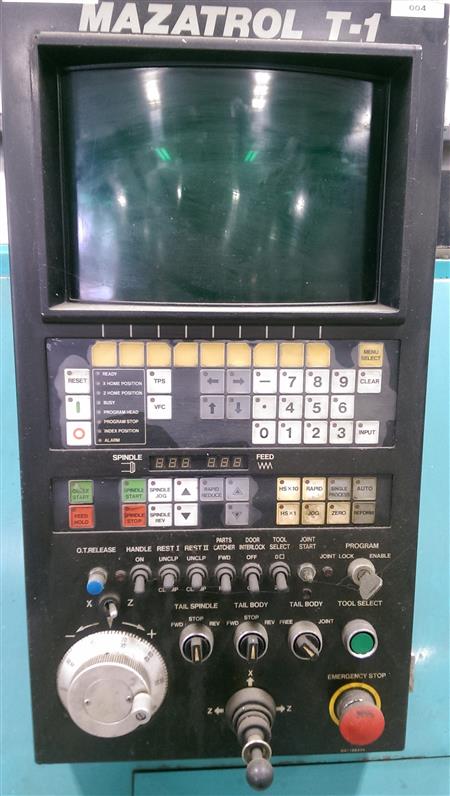
Early Mazatrol T1

mazak programming tutorial

I remember that you had a choice of Fanuc or Mazatrol as a control. My boss decided to go for Fanuc although I wanted the Mazatrol. (I still love playing around with anything new)

Having seen the demonstration I was absolutely knocked out. It was streets ahead of anything else, fully conversational.

It calculated feeds and speeds and you didn’t need to know any G Codes, M Codes absolutely none of that shit. Good graphics to check the tool path.

Oh did I say it picked it’s own tools too?

Anyway next machine we got we had Mazatrol and I have loved em ever since.

Mazak Programming Tutorial VFC

VFC (Very F***ing Clever)

mazak programming tutorial

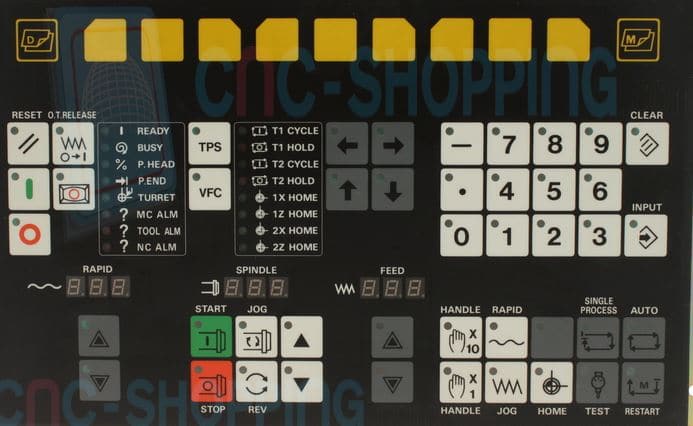
Contact CNC shopping for spares The control panel was and still is nice and easy to use.

It had this great feature called VFC and when asked what the button was the engineers would always reply “Very Fucking clever”.

Actually it was quite clever (and still is).

The irony here is that I spelt the word clever as cleaver so I am definitely not VFC.

So what you did you would run a face mill or whatever and as it was cutting override the speeds and feeds to your optimum values.

Here Comes The Magic

One press of the VFC button (not to be confused with the KFC Button) and your program would be updated to the new feeds and speeds.

Oh something else

I love showing people this when I am doing Mazak Training Mazatrol Training …………

Mazak Programming Tutorial TPS

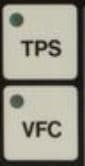
Mazatrol VFC Button and TPS Button

mazak programming tutorial

Yea that button above it (TPS) pretty cool too. It stands for Tool Path Store by the way.

And that is what it does.

Right imagine the scenario, you have a grooving tool happily doing its business and you want to stop the machine and see what’s going on. Or maybe it just broke the insert!

You press your feed hold button (That’s the red one).

mazak programming tutorial

Your machine stops.

You then press TPS and move the X axis. Press TPS and move the Z axis and so on…..

You can now change the insert if you need to.

More Mazak Magic

Move back into the AUTO mode. Ok now when you Cycle Start the machine it remembers this path, follows it and does not break the tool, it just continues where it left off.

Oh and There is More

Whenever I get involved in Mazak Training Mazatrol Training the one thing that impresses me most is this.

Once you call up a tool then the offset becomes active. First time I used a Mazak with Mazatrol I thought it was amazing.

This applies to Lathes and Machining Centres.

That means if you want to turn a diameter you can just move the tool with the hand-wheel to the diameter you want and turn.

On a machining centre it makes setting Work Offsets a doddle (That means easy).

So simple, so obvious, you’d think everyone would do it!!!!!

Mazak Training Mazatrol Training

If you require training on any Mazak machine or control then call the CNC Training Centre and we will be able to help you. We pride ourselves in helping people to get the most out of their CNC Machines.

Be honest how many buttons on your CNC Control have you never used or maybe have never understood?

Well………. now’s the time to start learning.

Here is a video on TPS (Tool Path Store) I left it till last cos I knew you wouldn’t be arsed to read my post.

Thanks For Reading

Don’t forget there’s loads more folks.

And a YouTube channel

Learn CNC Programming

Services offered at CNC Training Centre

Edgecam training.

Classroom programmer training.

Onsite CNC Machine Training.

CNC Training on all controls and machines.

Mazak Training Fanuc Training

Don’t forget we offer training on all types of Mazak Machines and all Fanuc Controls 6m to 31i Oi old to young.


Fanuc G73

Call David: 07834 858 407

CNC Training Centre Reviews

30 five star ratings on Google (just saying)


Fanuc G82

Call David: 07834 858 407

CNC Training Centre Reviews

30 five star ratings on Google (just saying)


Careers in CNC

View all current vacancies in CNC

Click here

Call David: 07834 858 407