Clear MDI Screen Fanuc Parameter 3203

Messing With Parameters Can Be Fatal!!!!!

Clear MDI Screen Fanuc Parameter, to change this parameters you need to go to the setting screen in MDI. Now put a 1 in the parameter write box.

Today we are going to change the parameter that allows us to clear the MDI screen by pressing reset.

Fanuc Parameter
Parameter 03203 Bit 7 (MCL)

If you set parameter 3203 BIT 7 (MCL) to a 1 then when you press reset your MDI screen will be cleared.


Clear MDI Screen Fanuc Parameter

Clear MDI Screen Fanuc Parameter 3203

Ever thought how annoying it is when you want to do a tool change and you type

T01 M6;
M30;

Then later you want to do the same thing but the MDI screen has cleared. Help is at hand.

This was me in fancy dress when i was younger.

Anyway all you need to do is tinker with bit 7 (#7)

That means it will either clear when you press reset or just stay there waiting for you.

Please note you will need an M30 at the end of your MDI program for this to work.

Bits n Bobs

When counting the bits in parameters you count from right to left so the first one on the right is bit 0 or sometimes known as #0

Parameters You may Need to Change

1300 Stops over travel alarm

1401 Cutting Feed-Rate 0% stops movement of machine

3101 Clear Screen

3203 Clear MDI Screen

3204 Unlock Program 9000 to 9999 and 8000 to 8999 to Edit

3291 Wear Offset requires Key to Adjust

3401 Calculator Type Decimal Point or Integer

3402 G Codes that are Active When The machine is Turned On

5003 Retain Geometry when you Press Reset

6005 Allows the Use of Local Subroutines (Newer Control)

6050-6059  Allows you to Call a 9000 series Program with a G Code

6080-6089 Allows you to Call a 9000 series Program with An M Code

8134 3453 allows you to use ,R and ,C (Rads and Chamfers)

That’s it away you go.

Visit this guy if you don’t have a manual.

Oh just one other thing before you go off and cripple your machine forever.

Do yourself a favor take a picture of the screen before you change a parameter. If you aint got a camera then you must have a piece of paper.

Even better back everything up.

Thanks

If you have been affected by any of the issues in this post or need CNC Counselling then contact me.

Or call us

If you want to learn to program CNC Milling Machines

Look no further Contact CNC Training Centre


Rads and Chamfers Fanuc Parameters 8134 3453

Category : Fanuc Parameters

Messing With Parameters Can Be Fatal!!!!!

To change parameters you need to go to the setting screen in MDI. Now put a 1 in the parameter write box.

Bits n Bobs

When counting the bits in parameters you count from right to left so the first one on the right is bit 0 or sometimes known as #0

Rads and Chamfers Fanuc Parameters. Today we are going to change the parameters that make ,R and ,C work this means you can program point to point and just stuff in some rads and chamfers as an afterthought.

Here’s an article on it if you want to use it

Fanuc have two ways of putting on chamfers and rads and that’s where the confusion lies.

Just do as you’re told (oh and read this article)

So in Parameter 3453 you can set bit #0 (CRD) to a 1 this allows what Fanuc call “Direct Drawing Inputs” to work.

Rads and Chamfers Fanuc Parameters

Also in Parameter 8134 set bit #2 (CCR) to a o

Rads and Chamfers Fanuc Parameters

Now don’t let the description put you off this turns on the crappy one that uses R and R- and K and K-. This only works on 90 degree corners and unless you won Mastermind I wouldn’t even try to understand how it works.


Trust me it’s shit

Anyway Rads and Chamfers Fanuc Parameters 8134 3453 all sorted!

Isn’t it just great to sort out those annoying problems?

If you want to learn about rads and chamfers on a Sinumeric Siemens 840D read this

Other Parameters Of Interest

1300 Stops over travel alarm

1401 Cutting Feed-Rate 0% stops movement of machine

3101 Clear Screen

3102 Unlock Programs

3203 Clear MDI Screen

3204 Unlock Program 9000 to 9999 and 8000 to 8999 to Edit

3291 Wear Offset requires Key to Adjust

3401 Calculator Type Decimal Point or Integer

3402 G Codes that are Active When The machine is Turned On

5003 Retain Geometry when you Press Reset

6005 Allows the Use of Local Subroutines (Newer Control)

6050-6059  Allows you to Call a 9000 series Program with a G Code

6080-6089 Allows you to Call a 9000 series Program with An M Code

8134 3453 allows you to use ,R and ,C (Rads and Chamfers)

That’s it away you go.

Oh just one other thing before you go off and cripple your machine forever.

Do yourself a favour take a picture of the screen before you change a parameter.

If you aint got a camera then you must have a piece of paper.

Even better back everything up.

Thanks

If you have been affected by any of the issues in this post or need CNC Counselling then contact me.

Or call us

If you want to learn to program CNC Milling Machines

Look no further Contact CNC Training Centre


Display 9000 Programs Fanuc Parameter 3202

Category : Fanuc Parameters

Messing With Parameters Can Be Fatal!!!!!

Not display 9000 Programs Fanuc Parameter, first of all you’ll need to go to the setting screen and change the parameter write box to a 1.

Programs 9000 to 9999 are used for things like probing, tool-change and all sorts of other important things.

You are allowed to use them but proceed with caution.

Beware and above all back em up ASAP.

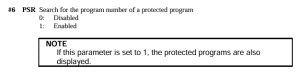
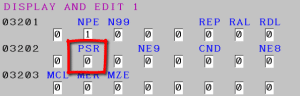
These programs will not be displayed when this parameter PSR #6 is a 1

3202 if #6 PSR is 1 then programs 9000 to 9999 can’t be displayed.

As per Manual

Don’t forget to lock the 9000 programs back up and turn off parameter write switch.

Bits n Bobs

When counting the bits in parameters you count from right to left so the first one on the right is bit 0 or sometimes known as #0

Display Programs Fanuc Parameter 3202

You might want to use this yourself if you have a sub program in your machine that you use quite often and you don’t want anyone messing with it.

Other Parameters You may Want to Change


1300 Stops over travel alarm

1401 Cutting Feed-Rate 0% stops movement of machine

3101 Clear Screen

3203 Clear MDI Screen

3204 Unlock Program 9000 to 9999 and 8000 to 8999 to Edit

3291 Wear Offset requires Key to Adjust

3401 Calculator Type Decimal Point or Integer

3402 G Codes that are Active When The machine is Turned On

5003 Retain Geometry when you Press Reset

6005 Allows the Use of Local Subroutines (Newer Control)

6050-6059  Allows you to Call a 9000 series Program with a G Code

6080-6089 Allows you to Call a 9000 series Program with An M Code

8134 3453 allows you to use ,R and ,C (Rads and Chamfers)

That’s it away you go.

Oh just one other thing before you go off and cripple your machine forever.

Do yourself a favour take a picture of the screen before you change a parameter. If you aint got a camera then you must have a piece of paper.

Even better back everything up.

Thanks

If you have been affected by any of the issues in this post or need CNC Counselling then contact me.

If you want to learn to program CNC Milling Machines

Look no further Contact CNC Training Centre

Unlock Programs Fanuc Parameter 3202

Messing With Parameters Can Be Fatal!!!!!

Unlock Programs Fanuc Parameter, first of all you’ll need to go to the setting screen and change the parameter write box to a 1.

Programs 9000 to 9999 are used for things like probing, tool-change and all sorts of other important things.

So beware back em up ASAP.

These programs along with 8000 to 8999 can be locked so no one can mess with them.

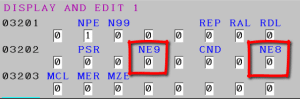
3202 if NE9 is 1 then programs 9000 to 9999 can’t be deleted or edited.

3202 if NE8 is 1 then programs 8000 to 8999 can’t be deleted or edited.

Once you’ve finished don’t forget to lock the 9000 programs back up and turn off that parameter write switch.

Unlock Programs Fanuc Parameter 3202

So you might want to use this yourself if you have a sub program in your machine that you use quite often and you don’t want anyone messing with it.

Don’t forget when this parameter is set to stop you editing the programs  you can’t read them in and out either. That means you can’t back them up until you unlock them.

Parameters You may Need to Change


1300 Stops over travel alarm

1401 Cutting Feed-Rate 0% stops movement of machine

3101 Clear Screen

3203 Clear MDI Screen

3204 Unlock Program 9000 to 9999 and 8000 to 8999 to Edit

3291 Wear Offset requires Key to Adjust

3401 Calculator Type Decimal Point or Integer

3402 G Codes that are Active When The machine is Turned On

5003 Retain Geometry when you Press Reset

6005 Allows the Use of Local Subroutines (Newer Control)

6050-6059  Allows you to Call a 9000 series Program with a G Code

6080-6089 Allows you to Call a 9000 series Program with An M Code

8134 3453 allows you to use ,R and ,C (Rads and Chamfers)

That’s it away you go.

Oh just one other thing before you go off and cripple your machine forever.

Do yourself a favour take a picture of the screen before you change a parameter. If you aint got a camera then you must have a piece of paper.

Even better back everything up.

Thanks

If you have been affected by any of the issues in this post or need CNC Counselling then contact me.

If you want to learn to program CNC Milling Machines

Look no further Contact CNC Training Centre

CNC Course

Category : New Stuff News

CNC Course

Precision Machining with Expert Training

If you’re looking to enhance your CNC machining skills or start a career in precision engineering, these CNC courses are the perfect opportunity.

CNC Course

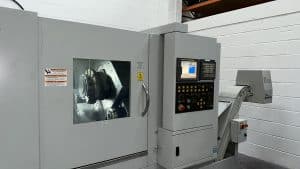
Based in Nottingham, THE CNC Training Centre offers hands-on learning with real CNC machines and simulators, ensuring you gain practical experience in CNC milling, turning, and advanced mill-turn operations.

Why Take a CNC Course?

CNC (Computer Numerical Control) machines are essential in modern manufacturing, used in industries such as aerospace, automotive, and medical engineering.

Learning how to program and operate CNC machines can open up excellent career opportunities and improve efficiency for businesses.

The CNC courses cater to:

•Beginners looking to enter the industry

•Experienced machinists wanting to upgrade their skills

•Companies seeking to train their staff in the latest CNC programming techniques

What The CNC Courses Cover

We provide two-day intensive training courses, offering a structured learning approach to CNC programming and operation. Our 2025 courses include:

•Introduction to CNC Programming – Learn the basics of G-code, tool paths, and setting up CNC machines.

•Advanced CNC Milling and Turning – Focus on complex multi-axis machining, tool compensation, and cycle optimisation.

•Mill-Turn Programming – Master advanced mill-turn techniques on real machines.

Why Choose Our CNC Training?

•Real CNC Machines – Unlike many training centres that rely solely on simulators, we provide hands-on training with real CNC milling and turning machines.

CNC Course

•Expert Instructor – Experienced CNC machinist who offer industry-relevant insights.

•Small Class Sizes – We ensure personalised instruction to maximise learning.

•State-of-the-Art Facilities – Our Nottingham-based training centre is equipped with the latest CNC technology.

CNC Course

Enrol in a CNC Course Today

Whether you’re a beginner or an experienced machinist, these CNC courses will help you improve your skills and stay competitive in the industry.

Contact us today to book your place on our next CNC course and take the next step in your machining career.

Get in Touch

Contact CNC Training Centre


Start your journey in precision machining today with our expert-led CNC training!


Careers in CNC

View all current vacancies in CNC

Click here

Call David: 07834 858 407