
Fanuc Change Parameters
Category : Fanuc Parameters

Category : Fanuc Parameters
Category : Macro

Macro programming can use a G code to access a 9000 series program.
Read this article if you don’t know about this.
In this example macro we are going to set G181 to access program 9010.

We will create a new drilling cycle that can take into account the point of the drill in the drill depth.

The line below would call program 9010 from the G181
It works the same as a G81 but with a drill point angle (A) and a drill diameter (D). It then goes on to use some simple trigonometry to calculate the drill point.
Believe me it has to be simple for me because as my mate used to say, “if brains were made of dynamite I would struggle to blow my your fuckin head off”
It feeds down to the Z depth then incrementally drills the extra bit for the drill point. Then it rapids back out.
A (#1) = 120.
D (#7) = 16.
R (#18) = 1.
Z (#26) = -20.
F (#9) =200.
Remember the table below from the last article.

O09010 (Drill Point Macro)
G103 P1 (No Look Ahead)
(Letter A #1 = Drill Point Angle)
(Letter D #7 = Drill Diameter)
(Letter R #18 = Rapid Point)
(Letter Z #26 = Depth)
(Letter F #9 = Feedrate)
G00 Z#18 (Rapid To R Point)
G01 Z#26 F#9 (Feed to Z depth)
#100= #1 / 2 (1/2 Drill Angle)
#100= TAN[ #100 ] (Tan Of Half Drill Angle)
#101= #7 / 2 (1/2 Drill Diameter)
#102= #101 / #100 (Calculate Extra Depth)
G91 Z – #102 (Extra Bit)
G90
G00 Z#18 (Rapid Back To R Point)
G103 P0 (Look Ahead On)
M99
O09010 (Drill Point Macro)
G103 P1 (No Look Ahead)
The G103 is so that the macro does not read in front and get confused, it will now only read block by block. A bit like knowing the end of a book, you wouldn’t be arsed to read the rest of it.
The control normally reads in front so it has some idea what is going to happen next.
Always include an explanation with your macro in case you forget how it works. You wrote this thing so you can’t blame the bloke on nights.
(A #1 = Drill Point Angle)
(D #7 = Drill Diameter)
(R #18 = Rapid Point)
(Z #26 = Depth)
(F #9 = Feedrate)
G00 Z#18 (Rapid To R Point)
G01 Z#26 F#9 (Feed to depth at 200mm per minute)
The calculation below halves the drill angle. You will note that the drill angle is letter A which corresponds to #1
#100= #1 / 2 (1/2 Drill Angle)
Below will get the tangent of the angle and this ends up back in #100
#100= TAN[ #100 ] (Tan Of Half Drill Angle)
Calculation below halves the drill diameter and puts it in #101
#101= #7 / 2 (1/2 Drill Diameter)
This is simple trigonometry and the answer is the depth of the drill point (Y).

In the diagram above
X is #101 (Radius of drill)
A is #100 (1/2 drill point angle)
Y is #102 (the bit we need to know)
#102= #101 / #100 (Calculate Extra Depth)
G91 Z – #102 (Feed down the extra amount calculated above incrementally)
G90 (Back to absolute)
G00 Z#18 (Rapid Back To R Point)
G103 P0 (Look Ahead Back On)
M99
Earlier in the post I mention the “Grown Up World Of Macro”. That is because I often meet programmers who learn macro and use it just because they can. Oh and to confuse the shit out of the machine operators and other programmers.
You learnt a bit of macro.
So fuckin what no one is impressed.
You can actually do more harm than good. As I have said in these posts before no one gives a flying fuck if you mess up the machine. Well apart from your boss (you know that bloke with the fat arse, little cock, and a Porch 911).

Seriously (and I rarely am) if you want to write macros here’s what you need to do.
Do you really need one or is it just your huge ego?
I think it could be quite useful to be able to allow for the drill point.
Maybe you need to get out more?
Definitely.
Will it confuse the operator?
No it’s very similar to a G81
Can anyone use it?
Yes
Is it simple for the user?
Yes my mum loves it and she’s 96.
Is it fool proof?
No definitely not we need to talk about this
What if you missed out the Z value?
What if you had a minus value in R and a plus value in Z?
Would it still try and work if you input ridiculous figures?
Any of the above would completely screw it up. You could say “I’ll tell the operator to make sure he follows my rules”.
OK so if you just bought a new television and you accidentally pressed 12356 as a channel number.
What if the television just went off, or the screen locked up or it exploded and burnt down your house.
You would complain wouldn’t you. Us Brits can ignore this because we never complain. We’d probably ring up and thank them for the opportunity to build a new house.
Anyway we all know that the telly wouldn’t do that. It would either ignore you and treat you like the dipstick that you are. Or it would just go to channel 999 which is it’s highest channel.
Now this is not because Mr Sony is inside your telly thinking what to do if you make a mistake like shoving the remote control up your arse.
Your television has logic. This means in every scenario it knows what to do. It’s like the Bear Grylls of televisions.
In a macro you can use a conditional statement. It’s like my wife said to me you either change your underpants every week or you piss off back to your mothers.

It gives choices.
IF [ #18 LT 0.0 ] GOTO999
What this means is that if #18, which is the R value, is less than 0 the control will jump to N999.
This means if you put a minus figure in R it would be less than zero and trigger the jump to N999.
N999 #3000= 1 (R LESS THAN ZERO PRICK!!)
#3000 puts the machine into an alarm state. The comment in brackets will be the alarm message and it looks like this.

This is how the programme looks now.
%
O09010 (Drill Point Macro)
G103 P1 (No Look Ahead)
IF [ #18 LT 0.0 ] GOTO999
(Letter A #1 = Drill Point Angle)
(Letter D #7 = Drill Diameter)
(Letter R #18 = Rapid Point)
(Letter Z #26 = Depth)
(Letter F #9 = Feedrate)
G00 Z#18 (Rapid To R Point)
G01 Z#26 F#9
#100= #1 / 2 (1/2 Drill Angle)
#100= TAN[ #100 ] (Tan Of Half Drill Angle)
#101= #7 / 2 (1/2 Drill Diameter)
#102= #101 / #100 (Calculate Extra Depth)
G91 Z – #102 (Extra Bit)
G90
G00 Z#18 (Rapid Back To R Point)
N999 #3000= 1 (R LESS THAN ZERO PRICK!!)
G103 P0 (Look Ahead On)
M99
%
Now it doesn’t take much imagination to see that you could completely fool proof this macro.
Oh and you can have loads of fun with the childish comments and sexual innuendo.
#0 is a unique variable because it means no value.
IF [ #18 EQ #0 ] GOTO998
If you put a statement like the one above it means if #18 is vacant (meaning it has no value).
Then the programme will jump to N998.
N998 #3000= 2 (SORRY MY FRIEND, R HAS NO VALUE)
This is a much politer alarm and it saves a kick in the bollocks from the machine programmer when he gets offended by your childish alarm comments.
Don’t confuse zero with no value. Zero is a value. Ask your clever mate.
So now for the “no value” scenario. You could make your programme jump to a line that gives a default value.
IF [ #18 EQ #0 ] GOTO123
GOTO124
N123 #18=1.
N124
Take a moment to study the above code.

Come on get a grip do you understand it?
Now I’m from the old school of education. When I was a boy if you didn’t know the answer to the teacher’s question it was simple.
They beat the fuckin shit out of you.
And if you discount completely fucking up the planet and starting a lot of pointless wars, my generation have done a pretty good job thus far.
Anyway today I’m going to be patient.
IF [ #18 EQ #0 ] GOTO123
GOTO124
N123 #18=1.
N124
It’s very easy really, the first line will jump to N123 and set #18 to 1 if #18 has no value.
If however, there is a value in #18, then the control ignores the GOTO123 and reads the next line which jumps to N124 and carries on as if nothing ever happened.
Check all of the following, what happens if…………
You can set alarms or default values if your conditions are not met.
It’s a bit like blackmail except for the bit where they have to leave a shit load of money in a phone box for you to pick up.
Think of every dumb ass thing that your user could do with your macro.
Then make your macro respond in a adult way. So if he inputs daft information the macro sorts it out. It can use defaults or go into an alarm state with a message.
Keep the macro front end really simple, this is the bit the user sees and uses. For example my macro needs the radius of the drill for it’s calculation. You will note I ask the user to input the diameter.
Why?
Because it’s simple and easy for him and that’s what he will know. I can do all the work behind the scenes hidden away in my 9000 series programme.
This bit is all he needs to worry about I take care of everything else. It’s like an all inclusive holiday. All you needs to do is eat sleep and constantly get pissed on cheap booze.
I hope you have enjoyed reading this article.
If you have been affected by any of the issues in this post or need CNC Counselling then contact me.
Siemens 828 840 Sinumerik Training
If you want to learn to programme CNC Milling Machines
Look no further Contact CNC Training Centre
Category : Macro
G Code Alias. What is an alias Wikipedia?
Alias, it’s not just about James Bond

Alias, in the case of CNC Programming means you are using a G code or an M code to call a program.
For example you could set up G181 to call program O9010
G181 would be an alias for program O9010
These are special 9000 series programs and you set them in your parameters.
M Code Alias Fanuc Parameter 6080
G Code Alias Fanuc Parameter 6050
If you have a Haas machine it’s parameter 81 to 90 for M code alias.

It’s parameter 91 to 100 for G code alias.

So if you look above at parameter 91.
Then enter 181.
When you write G181 in a program or in MDI.
The control would go into program O9010
Therefore you can use a G code to access O9010 through to O9019. You can’t use any G code it has to be one that is not used.

The same thing applies with M codes (Programs 9000 to 9009).
You may be asking why you would want to do this. Well it means that you can fully automate your Macro.
You first of all place your macro code in one of these program numbers then when you want to use it you just use the G or M code you allocated to the program.
Imagine you set 100 in parameter 81, when you issue an M100 the control will jump into program O9000

This is very simple but you can see how exciting it can get. I didn’t sleep for a week when I first discovered this. Just make up your own M code to do any old shit you want.
In your parameters you can alter a setting so that 9000 programs can’t be viewed or edited. So no one gets to tinker with your precious code. Below is Haas but you can do it on any control.
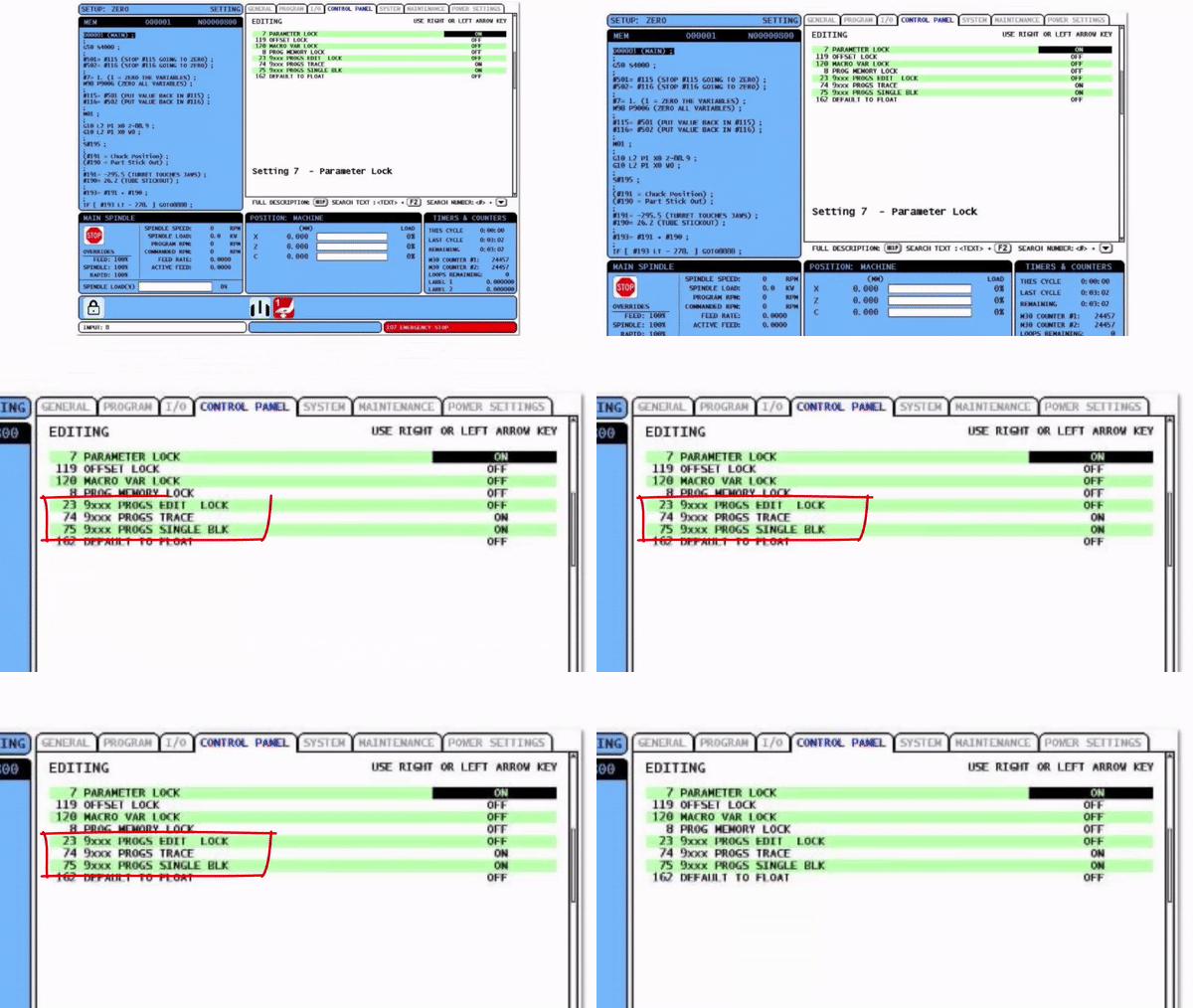
Welcome to the grown up world of macro because now you can make an M code that an operator can freely use but never access or alter. So to him it’s just a regular M code.
Oh don’t forget to tell him what it does otherwise he’ll never be arsed to use it.
You may well ask why can you do this with M codes and G codes. Well with M codes that’s really all you can do.
Let me explain….
You can add parameters. You know like when you use a G81 drilling cycle.
G81 calls a program that drills holes. You control the depth and feed etc with parameters.
Once you call a G81 it knows all about drilling holes. Like when it gets to the bottom it has to get the hell out of there.
G81 Z-20. R1. F100
The Z the R and the F are the parameters that pass into the program.
None of the above. It’s just an M code. Very useful I must say but you can’t pass parameters to it.
Ever worked on a machine where you have to write extra code to stop the spindle and take the tool up to zero before you can tool change?
Well that’s what M6 does, just tool change.
What most machines do is use an alias for M6.
So it’s not really M6?
Nope…..
M6 uses an alias. So in your parameters you make M6 access a 9000 program. That way you can put any old bollocks in the 9000 program.
When you subsequently use M6 it goes into this program which contains everything you could ever want for a tool-change.
And all with just an M6.
If you have one of these old machines you could make your own alias.
This is where it gets clever and it gets complicated.
But……
You have me to hold your hand.
OK so you set G181 to access program O9010.
G181 A50. C20. Z-10.
This G181 would pass the values of A, C and Z through to program 9010
9010 would then use the values to do it’s business.
These guys below are know as the macro variable gnomes and each one has his own letter and his own macro variable.

If you think I’m joking then go into your programming department and ask them. Say you want to learn about the macro variable gnomes.
It took me ages to do those stupid fuckin gnomes. Then I realized it wasn’t even funny but I couldn’t bear to get rid of them.
Below is a table that shows the corresponding variable for each letter. Forget the fuckin gnomes, it’s just a failed experiment. Let it go.

What this means is that if you put a value in A it will register in #1 and if you put a value in Z it will register in #26.
Then in your 9000 series programme it can use those values. It’s like a secret way to get information into your macro programme.
First of all put 181 in parameter 91.

This means that G181 would call programme O9010.
Lets create a drilling programme the same s G81 we will call it G181.
It’s no different to G81 but it will demonstrate the use of Alias.
In other words it’s completely fuckin useless but at least I’ll get my point across. Oh yes, and stop picking fault with every bloody thing I do
G181 Z-20. R1. F200.
The G181 above will call O9010 and pass the values for Z, R and F into it.
#26 (Z)
#18 (R)
#9 (F)
O9010 (My Drilling Cycle)
G0 Z#18
G1 Z#26 F#9
G0 Z#18
M99
G181 Z-20. R1. F200.
O9010 (My Drilling Cycle Linked to G181)
G0 Z#18
#18 is the value passed from the letter R
R had a value of 1 so #18 is assigned the value 1
The machine will rapid to Z1.
G1 Z#26 F#9
#26 is the value passed from Z
Z had a value of -20. therefore #26 is assigned the value -20
Machine will feed to Z-20.
#9 is the value passed from the letter F
F had a value of 200 so #9 is assigned the value of 200
Machine will use a feed-rate of 200 mm per minute.
G0 Z#18
#18 is the value passed from the letter R.
R had a value of 1 so #18 is assigned the value 1
Machine will rapid back to Z1.
M99
Don’t you just love all this shit?

See this post for grown up Macro programming
If you have been affected by any of the issues in this post or need CNC Counselling then contact me.
Siemens 828 840 Sinumerik Training
If you want to learn to programme CNC Milling Machines
Look no further Contact CNC Training Centre
Category : Useful Stuff
When we talk about a fourth axis it means that we have four simultaneous axis X Y Z plus one other.
That means you can move them all together (the moves are simultaneous) and they are all timed together.
It’s a bit like trying to pick your nose and scratch your arse at the same time. You can get mixed up and poke your eye out.
CNC Machines are much better at this kind of stuff than we are.
Below is what happens when you program an X Y Z and C (rotary axis) move in one block of code.
The one below is on a lathe so the Z works the same as the X above.
In this program it’s just a Z C move or on a CNC Milling Machine it would be X C

In the above example just the two axis (Z and rotary) are simultaneous..
If your machine has a simultaneous fourth axis, sometimes known as a full fourth axis.
On the position display you will see X Y Z but you will also see C (sometimes A or B I’ll explain later)
A full A B or C axis will be programmable in .001 degrees. That’s one thousandth of a degree (very small).
Typically G0 C185.326 rotate to 185.326 degrees
If a machine has an indexer and not a full fourth axis it normally won’t be shown on the position display.
Another thing to note about a full fourth axis is that it doesn’t stop at 360 degrees and start again at zero.
Angle wise 0 and 360 are the same but if you are talking simultaneous then it’s continuous.

This is my pet goat his name is Beelzebub I named him after a famous politician.
Let me explain. In the example above (the fourth axis example, not my goat) you want the fourth axis to rotate more than once.
You programme C1440. which is 360 x 4 and it turns four times and the other axis works simultaneously.
So if the other axis (X) is moving 60mm. For each turn it moves 15mm. Just like a 15mm pitch thread.
Ok you get it now? Good. Very good. Just when I am starting to loose my fuckin patience with you.
The number of times I have to beat my students with sticks these days is getting more n more.
When we talk about an indexer on a CNC machine this means we have a rotating axis but we can only move it to a position. This can be 1 degree or .1 degree depending on the machine tool.
Whilst these are really useful you can’t do all that clever shit that you see above. So don’t get confused especially if you are footing the bill for a new or second hand machine.
Check the minimum angle you can index. If you have a part and it has holes at 10.5 degrees and your indexer is one degree increments then you’re knackered (or fucked but I have decided not to swear in these articles anymore).
You could be disappointed. “Sold a pup” as my mother used to say. I”l have to ask her what the fuck that means.

Don’t you just love them. I know they’re little portable shit machines but soo cute. Make lovely Christmas gifts.
Not on Linkedin though for fuck sake. Anyway enough gratuitous crap.

Retro, a bit like sick and gay, this word has a totally different meaning to an old guy like me.
Political correctness to me means voting for the correct political party.
Now with regards to an indexer retro means it’s added on, like sticking a spoiler on your old Mini Metro.
What retro doesn’t mean, is wearing your dad’s old Parker Jacket and thinking you look cool when you actually look like a prick.

Anyway when you add an indexer to an existing machine you control it by a dedicated M code from the CNC Machine.
Your indexer will have it’s own little control system and programme. This programme will be a series of index moves probably followed by clamp and unclamp command.
The machine will send an M code to the indexer and won’t continue until it gets a signal back from your indexer saying it has completed whatever it is doing.
Now your CNC machine doesn’t give a flying shit what the indexer is doing, but it won’t carry on until it gets the signal back saying it’s complete. It’s like wall papering the hall through the letterbox, unless of course you are a gynaecologist.
You do have to be careful with all this stuff but it’s a relatively cheap way to get a programmable indexer.
Haas machines come really well equipped and it’s usually relatively cheap to add a full forth axis years after you bought the machine.
After all they used make the bloody things, before they made CNC machines, I think.
They do a great range of add on bits n pieces.
This is all stuff to consider when you buy a CNC machine new. It can be really expensive to add at a later date as an extra. So bite the bullet, grasp the nettle and get one with your new machine. Give them my name so I get a fat commission.

A rotary axis can be called A B or C. This will depend on which axis it runs through.
On a vertical machining centre like this one the centre of the fourth axis runs along the X axis so it’s called an A axis

If it runs through Y it’s called a B axis. And Z well……. try n guess.
In the real world there aren’t actually loads of jobs that need a full simultaneous fourth axis. Radial slots maybe radial engraving.
When you start talking about indexing to angles and just doing stuff, well there are loads and loads of uses. For example with a square part you can get all around it just by indexing so your part can come off complete.
Don’t forget to set your fourth axis as far to the right as you can so you don’t have to keep taking it off.
You should consider a base plate That way you can mount your indexer outside the machine stroke.
By mounting your indexer I don’t mean trying to shag it by the way.
Taking a fourth axis off and on can be a real pain the arse.
Also don’t forget to use a G10 to store the work offset. If you don’t know how to use G10 then be ashamed of yourself and read this.
Adding an indexer or fourth axis to your small CNC Machine will increase capacity and allow you to rotate parts to get to areas you didn’t even know were there.
Here’s a free advert for someone

If you consider the long cube on the axis above. You actually have four faces so it can be a lot of surface area when you add it up.
A lot of people make these cubes themselves and it can save money like baking your own cakes or performing your own keyhole surgery.
Congratulations you are the first person to get to the end of one of my articles without being bored shitless.
If you feel you have been affected by any of the issues raised in this post or need CNC Counselling then contact me.
If you want to learn to programme CNC Milling Machines
Siemens 840D Sinumerik training
Look no further Contact CNC Training Centre