5 Axis Machining is it all it’s Cracked up to be?

Category : 5 Axis

5 Axis Machining


5 Axis Machine
XYZ 5 Axis


5 Axis Machining The latest Buzz Word

A few years back, probably more than I think. I was asked to speak at the Edgecam user group meetings.

If you have Edgecam you really should be going to these (they’re brilliant).

Anyway the buzzword was 5 Axis machining everything was bloody 5 axis machining. Anyway me being theĀ agent provocateur, that I am, didn’t want to talk about 5 axis machining.

(Agent Provocateur: French meaning awkward old bastard)

Before you panic, 5 axis machining is not illegal but it may not be the panacea you think it is.

Armitage Shanks

Apart from being a great track by Greenday. Armitage Shanks is a company known for its toilets and its bathroom fittings.

At one time these were in every Shithouse in the UK.

Anyway the story I told was about when I worked for Armitage shanks making bidet taps.

A bidet is a sink that posh people wash their arses in.

They were making these bidet taps on a 5 axis machine. This meant that a completely machined tap could come off the machine in one hit.

I was asked to speed it up. After much deliberation I went back to the boss, who wanted a cycle time of about 3 minutes per tap, to explain that it was not possible.

I think the cycle time they were getting was about 10 minutes.

“Imagine” I said “if we only did tool changes and no machining”. He looked at me a bit strange (as they do in Wolverhampton).

“The cycle time would be 2.5 minutes. So there wouldn’t be much time left for machining”. I also asked him if he needed to be able to produce one complete tap at a time.

The five axis method would be perfect if they had needed to produce say five of one type then five of another type on a “just in time” basis.

Anyway it transpired that this was not the case.

There Lies The Problem

Because they were only making one tap per cycle the tool changes really added up. The solution was that we bought four three axis CNC Milling machines and each machine had a manual pallet changer.

The component was broken down into single operations presenting one or two operations per machine.

This meant each machine was working on 12 taps at once.

Just like a car track production line the time to produce one tap was the longest operation. The final time was about 2 minutes per tap.

Tool Change Time

So you pick up a tool and make 12 parts before you change to the next tool. If the tool change time was 12 seconds then that’s 1 second per part.

Are you with me on this one?

Can you see how all the tool change time is disappearing?

5 Axis Machining

Happy Ending

The five axis machine got used for something else it wasn’t scrapped it’s ok no need to worry.

Five Axis Machining

A five axis machine will be a huge drain on your wallet andĀ  can turn your brain to fudge.

So imagine I am a machine tool salesman and I am about to sell you five axis machine. Dead easy the machines would fly out the showroom like “shit off a stick”.

My Pitch (If I was flogging you a 5 axis Machine)

How often do you damage parts moving them from one machine to the next?

How often do you lose parts between operations?

Why set up a part for five operations when you can do it in one hit?

Yea and you get to do shit like this.


5 Axis Machine

This is called a swarf cut Side Wall Axial Relief Feed. (Go on impress your mates with that one)

This is something you can only do on a 5 Axis Machine. And yes you need all five of em to do this.

Also unless your name isĀ Alfred EinsteinĀ you will need a computer to calculate the code.

Now The Down Side of 5 Axis

It always makes me smile when people brag about being a 5 Axis CNC setter Operator. It’s actually more difficult trying to operate the self service checkout at Morrisons (an English supermarket)

5 Axis Machine

I can certainly recommend the fish at Morrisons by the way, but go to one of the staffed checkouts otherwise you’ll meet me still trying scan my fuckin pizza.

The reason why I say this, before I get a terrade of hate mail from all the 5 axis machinists, is because it’s all programmed on a CAD/CAM system and downloaded to the machine.

The operator has the privilege of pressing the cycle start button.

5 Axis Machine

5 Axis Machine

5 Axis Machine

Easy As X Y Z A C

So from an operating point of view once you get over the fancy footwork they are a pretty boring machine to run.

Disadvantages Of 5 Axis Machining

  • Lots of tools to manage.
  • Loads of features to check.
  • High level of CAD CAM programming skill required.
  • Machine initial cost.
  • Software cost.
  • Big investment in one machine, if it breaks down your haemorrhaging money.
  • Set up time will be much longer.
  • Difficult to multi load parts.

Three Plus TwoĀ 5 Axis Machining

You must have heard people say that?

Well what does it mean?

It means you have a three axis machine X Y and Z and then you stuffed on a rotary axis (4th axis)Ā usually called A and then on top of that you mounted another rotary axis (5th axis) sometimes called C.

You can program the XYZ as usual and then add a position in A and CĀ something like A60. C45.

Now theĀ A and C axis don’t have a clue what the other axis are doing and frankly they don’t give a shit.

So you get to present a part at a compound angle and once it’s there you can do stuff.

You know stuff like milling a face, machining a pocket or drilling and tapping a hole.


So What’s The Difference

So to do simultaneous five axis machining your machine has got to have the software to produce simultaneous moves like SWARF cuts.

Three plus two could be done just by placing manual indexers on the table to create the compound angle you need.

Advantages of Thee Plus Two

  • You can load a part and machine on different faces so you may only need to pick it up once.
  • Cheaper to buy or can be retro fitted.
  • It’s easier to control dimensions because once the datums are set each part will be the same.
  • Reaches the parts other machines can’t reach.

Multi Loading With 5 Axis Machining

By the way you can multi load on a five axis CNC Machine but it does need to be quite a big machine.

This means you have a cube with several parts mounted on each face.

Thanks for reading my article.

Please contact me if you require:

  • Fanuc training.
  • CNC programming training.
  • Want to learn CNC programming.
  • Fanuc programmingĀ training.
  • YasnacĀ programming training.
  • Any type of CNC course.

Don’t forget to watch my Tutorial Videos

We offer training on all types of CNC Machines and controls check em out.

co*****@***************re.com

Or fill out the contact form below


Surface Finish CNC Turning

Category : Beginners

CNC Turning Surface Finish

Ever wondered what feed rate is best to give you a particular CNC Turning surface finish? Or do you just guess?

Well look no further. From now on you’ll be able to work out what feed-rate will give you the surface finish you require when CNC Turning.

Oh and there’s a formula where you can work out what surface finish you’re going to achieveĀ without a fortune teller.


We are going to use um Ra.

TheĀ um stands for microns.

The Ra stands for roughness average.

Here is a full explanation if you really want to know.Ā 

CNC Turning


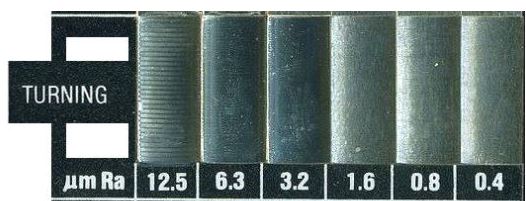
You can buy a flat block like the one above which you can use as a comparison to see what surface finish you’re getting.

The section above is forĀ CNC Turning surface finishes.

So you can already see that 12.5 is like a plowed field and .4 is like a babies arse (as my father used to say) .

So if you’re fixing a fence post then 12.5 might be OK.

Surface Finish The Dreaded Formula

surface finish

First of all what feed rate would you need to obtain a certain CNC Turning surface finish.

CNC Turning

Now what if you’re already machining the part. That means you know the feed rate. What surface finish will you get?

CNC Turning

So………….

Our tip radius is .8mm

CNC Turning

We want to achieve a 3.2 um RaĀ  CNC Turning surface finish

CNC Turning

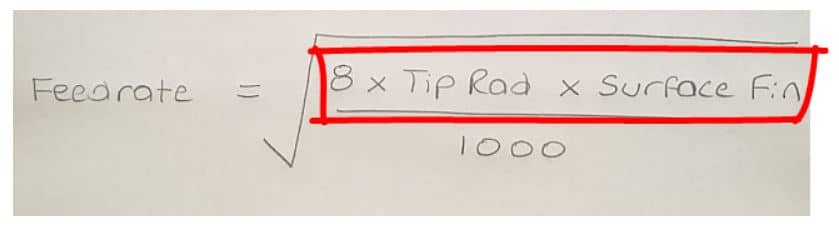
So here’s the formula.

CNC Turning

Let’s do this bit first.

https://www.youtube.com/watch?v=vWQgBtlUUMM&ab_channel=MotoMadness

8 x .8 x 3.2 = 20.48

Now let’s divide it by 1000

https://www.youtube.com/watch?v=vWQgBtlUUMM&ab_channel=MotoMadness

20.48 / 1000 = .02048

Now lets square root the answer.

https://www.youtube.com/watch?v=vWQgBtlUUMM&ab_channel=MotoMadness

Square root of .02048 = .143

So the feed-rate you need is F.143

CNC Turning

OK… You Came Back. You Ready to Carry On?

Anyway let’s see how you do it backwards.

surface finish

So imagine you had been turning these imaginary bits with a .8mm radius insert at a feed-rate of .143 (F.143)

First of all square the feed rate .143 x .143 =Ā .020449

CNC Turning

Now do the bottom bit 8 x .8 = 6.4

surface finish

Now divide the top by the bottom.

surface finish

.020449 / 6.4 =Ā 0.00319515625

Then simply multiply this by 1000

0.00319515625 x 1000 =3.19515625 (3.2)

That’s 3.2 to you

surface finish
A surface finish comparator

It worked backwards!!! Phew what a relief.

Surface Finish, Now Let’s Think About This

So to get a 3.2 finish with a .8 tip radius you would need a feed rate of .14

Now let’s do the same calculation with a .4 radius tip.

surface finish
Calculate surface finish

So did you work it out?

Here’s one I prepared earlier.

The answer is .101

And if you can be bothered to work it out with a 1.2Ā radius tip.

The answer is .175

.4Ā  Ā  =Ā  .101
.8Ā  Ā  =Ā  .143
1.2Ā  =Ā  .175

Interesting

So as the tip radius gets bigger you get to increase the feed rate!

Thanks for watching and reading

If you have been affected by any of the issues in this post or need CNC Counselling then contact me.

Oh yea we do CNC Training too not to mention Classroom Training.

Or call us

If you want to learn to program CNC Milling Machines

Look no further Contact CNC Training Centre


G82 Drilling Program Example

G82 Drilling Program Example

G82 Drilling Program Example, this simple part has four M12 holes drilled countersunk and tapped.

The datum is the centre of the part so the holes positions are.

X55. Y55.
X-55. Y55.
X-55. Y-55.
X55. Y-55.

G82 Drilling Program Example

Here is the CNC code

G82 Drilling Program Example

The machine first moves to X-55. Y-55. and rapids the Z axis to 3mm above the part.

It then rapids the Z axis down to 1mm above the part R1.

The G82 Cycle instructs it to drill a hole 6mm deep (Z-6.) at a feed of 200mm per minute (F200.)

When it gets to depth the P3000 tells it to dwell for 3000 milliseconds which is 3 seconds. No decimal point allowed. (Varies on controls)

When the hole is done it rapids back to the initial point (Z3.) This was in the line

This is because of the G98.

If it were G99 it would return to 1mm above the job (R1.)

See explanation of G98 and G99

Once the cycle is active each time it sees a position it repeats the drilling process.

When the G80 is programmed it no longer drills holes.

Now watch the video to see it all in action.

G82 Drilling Program Example

Haas G82 example

It’s been great fun writing this article for you but to be totally honest i think this cycle is a complete waste of time. Whenever I have put a dwell in a spot drilling cycle it always seems to chatter.

However if you do use this cycle please let me know if you have success with it.

Thanks

If you have been affected by any of the issues in this post or need CNC Counselling then contact me.

If you want to learn to program CNC Milling Machines

Look no further Contact CNC Training Centre


G83 Peck Drilling Program

Category : Beginners Fanuc

G83 Peck Drilling Program Example

G83 Peck Drilling Program, G83 is a deep hole peck drilling canned cycle.

Cycle G83 drills holes breaks up the chips as it goes. It fully retracts from the hole after each peck.

This simple part has four M12 holes drilled countersunk and tapped. The datum is the centre of the part so the holes positions are.

X55. Y55.
X-55. Y55.
X-55. Y-55.
X55. Y-55.

G83 Peck Drilling Program

G83 Peck Drilling Program

Here is the CNC code

G83 Peck Drilling Program

The machine first moves to X-55. Y-55. and rapids the Z axis to 3mm above the part.

G83 Peck Drilling Program

It then rapids the Z axis down to 1mm above the part R1.

The G83 Cycle instructs it to drill a hole 17.5mm deep (Z-17.5) at a feed of 200mm per minute (F200.)Ā 

The Q2. tells the machine to drill the hole in 2mm steps. After each step it retracts to the surface of the part.

This allows all the chips or powder to come out of the hole after each cut. It also allows the drill to cool.

As it drills the depth increases by 2mm each time.

When the hole is done it rapids back to the initial point (Z3.) This was in the line

G83 Peck Drilling Program

This is because of the G98.

If it were G99 it would return to 1mm above the job (R1.)

See explanation of G98 and G99

Once the cycle is active each time it sees a position it repeats the drilling process.

When the G80 is programmed it no longer drills holes.

Now watch the video to see it all in action.

G83 Drilling Program Example

More G83 stuff from Haas

Thanks

If you have been affected by any of the issues in this post or need CNC Counselling then contact me.

If you want to learn to program CNC Milling Machines

Look no further Contact CNC Training Centre


G73 Peck Drilling Example (Canned Cycle)

G73 Peck Drilling Example

G73 is a peck drilling canned cycle.

This cycle drills holes and breaks up the chips as it goes. It does not fully retract from the hole.

It retracts just enough to break the chips up.

This simple part has four M12 holes drilled countersunk and tapped. The datum is the centre of the part so the holes positions are.

X55. Y55.
X-55. Y55.
X-55. Y-55.
X55. Y-55.

G73 Peck Drilling Example

Here is the CNC code (G73 Peck Drilling Example)

G73 Peck Drilling Example

The machine first moves to X-55. Y-55. and rapids the Z axis to 3mm above the part.


G73 Peck Drilling Program Example

It then rapids the Z axis down to 1mm above the part R1.

The G73 Cycle instructs it to drill a hole 17.5mm deep (Z-17.5) at a feed of 200mm per minute (F200.)Ā 

The Q2. tells the machine to drill the hole in 2mm steps. After each step it retracts a small amount to break up the chips from the drilling.

As it drills the depth increases by 2mm each time.

When the hole is done it rapids back to the initial point (Z3.) This was in the line

G73 Peck Drilling Program Example

This is because of the G98.

If it were G99 it would return to 1mm above the job (R1.)

See explanation of G98 and G99

Once the cycle is active each time it sees a position it repeats the drilling process.

When the G80 is programmed it no longer drills holes.

Now watch the video to see it all in action (G73 Peck Drilling Example)

G73 Drilling Example

Haas G73 example

Thanks

If you have been affected by any of the issues in this post or need CNC Counselling then contact me.

If you want to learn to program CNC Milling Machines

Look no further Contact CNC Training Centre


Careers in CNC

View all current vacancies in CNC

Click here

Call David: 07834 858 407