Learn how To CNC Program: Unlock Your Potential

Learn how To CNC Program: Unlock Your Potential

Call David: 07834 858 407

CNC Training Centre Reviews

In today’s fast-paced manufacturing world, the ability to learn how to CNC program is a game-changer for aspiring machinists, engineers, and hobbyists alike.

At CNC Training Centre, we specialise in providing comprehensive, hands-on instruction that equips you with the skills to operate and program CNC machines effectively.

Whether you’re a complete beginner or looking to refine your expertise, our courses are designed to meet you where you are and propel you forward.
Learn to CNC Program

Why Choose CNC Training Centre to Learn how To CNC Program?

Our programs stand out because we offer flexible learning options tailored to your needs. We teach in both classroom settings and onsite at your facility, ensuring that you get practical, real-world experience without disrupting your schedule.

  • Classroom Training: Join us at our facility in Barwell, England, where you’ll benefit from small class sizes, modern equipment, and experienced instructors.
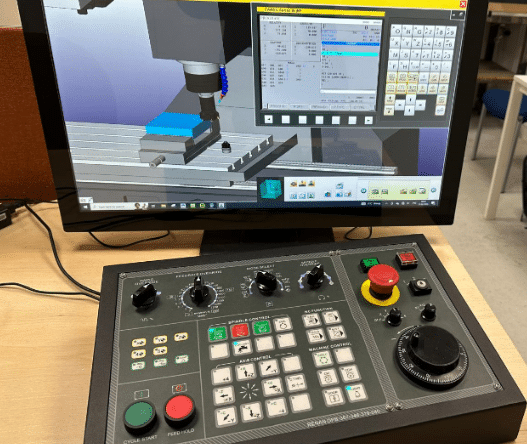
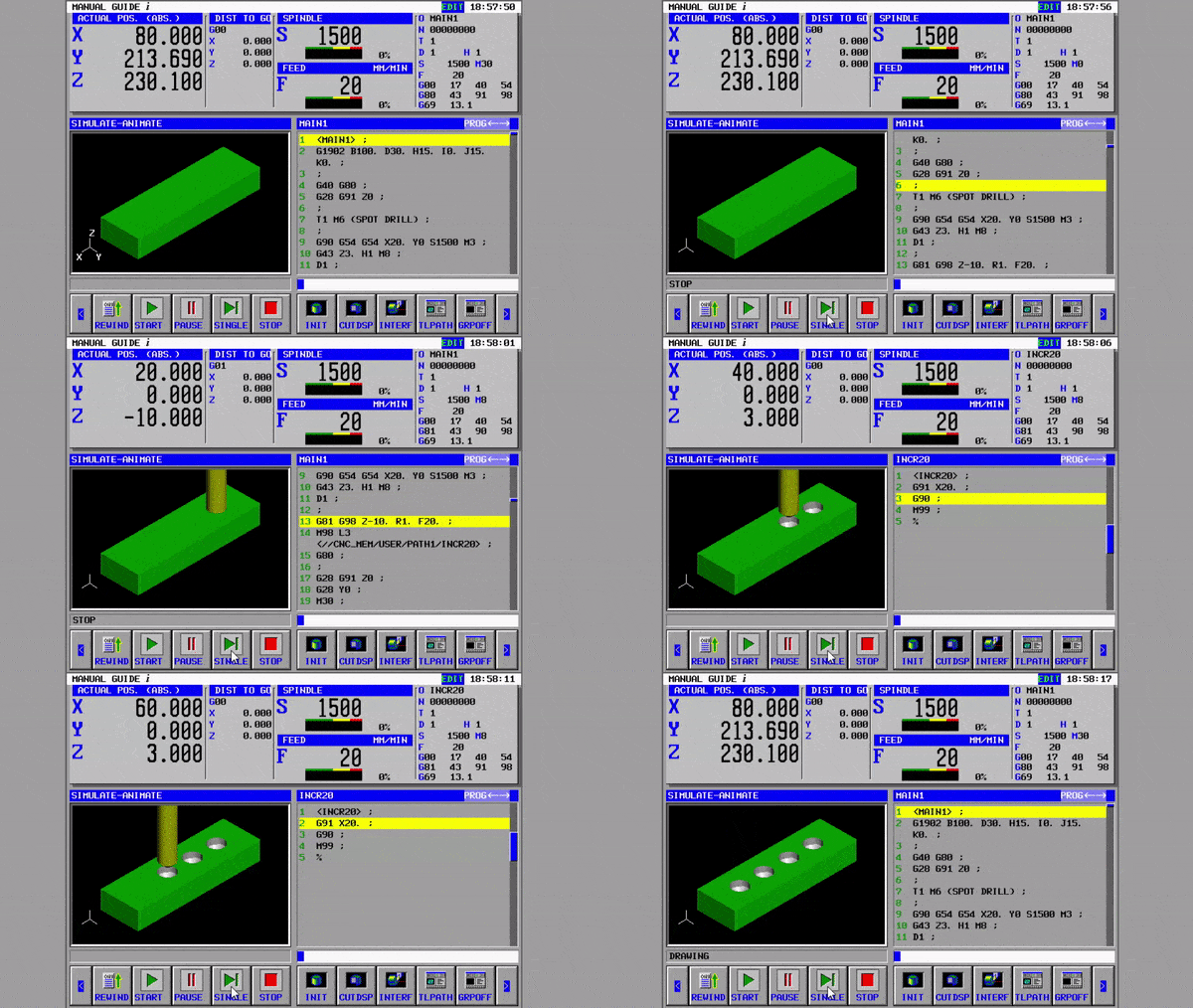
  • Incredibly realistic simulators used for collision free practising and experimenting.
  • Our classroom sessions cover everything from basic CNC concepts to advanced programming techniques using industry-standard software like G-code and M-code. You’ll get to practice on actual CNC machines, simulating real production environments to build confidence and proficiency.
  • Onsite Training: Can’t make it to our centre? No problem! We bring the training to you. Our onsite programs are customised for businesses and individuals, allowing your team to learn how to CNC program directly on your own machines.
  • This minimises downtime and maximises relevance, as we address your specific equipment and workflows. From setup and tooling to troubleshooting and optimisation, our experts ensure you gain actionable skills that boost productivity and reduce errors.
Learn to CNC Program

Learn how to CNC Program

What sets us apart is our commitment to practical learning. Unlike theoretical courses, our training emphasises “learning by doing.” You’ll dive into projects that mirror industry challenges, such as creating precise parts for automotive, aerospace, or medical applications.

By the end of the course, you’ll not only understand CNC programming but also how to apply it to improve efficiency and innovation in your work.

Application

Most CNC Machines use a form of G Code programming. Fanuc and Haas as well as Siemens.

Even Mazak and Hurco machines will run G code programs. So your training will always remain relevant.

The Benefits of Mastering CNC Programming

Investing time to Learn how to CNC Program opens doors to exciting career opportunities. With the global demand for skilled CNC operators on the rise, our graduates often see immediate improvements in job prospects, salary potential, and job satisfaction. Plus, our courses are affordable and provide certification upon completion to add value to your resume.
Learn To CNC Program

Don’t just take our word for it—our alumni rave about the transformative impact:

Highly recommend David as a trainer. The amount that has been taught in a short space of time is unbelievable.

David is very patient and can alter the training to suit your learning style very easily.

He is our go to CNC expert every time

 says one satisfied client.

Ready to Get Started?

If you’re eager to Learn how to CNC Program and take your skills to the next level, contact us today at cnctrainingcentre.com. Spaces fill up quickly, so enrol now for upcoming sessions. Whether in the classroom or onsite, we’re here to help you succeed in the world of CNC machining.


Learn CNC Canned Cycles G81 G84 G73

Learn CNC Programming (Canned Cycles)

Call David: 07834 858 407

CNC Training Centre Reviews

A Canned Cycle What is It?

If you want to learn CNC programming  then you need to know what a canned cycle is.

I’m going to have to be honest here it is a funny choice of words “Canned Cycle”. But a wild guess would be that all the information to drill a hole would be kept together in a “Can” ready to use.

In a Can…….Learn CNC

So let’s learn CNC Programming….

Make sure you read the end of this article to see a really cool way to drill equally spaced holes.

First of all we state the cycle:

G81 Z-20. R1. F100. X50. Y50. F200.

The machine will move to X50. Y50. then rapid to 1mm above the part (this is the R1.). It will then feed down to Z-20. at a feedrate of 200 mm per minute F200.

Finally it will rapid out of the hole.

It then sits ready for the next move.

dog-163527

All you need to do now is just keep giving positions.

G81 Z-20. R1. F100. X50. Y50. F200.
X60.
X70.
X80.
X90. Y60.
G80
The G80 at the end will cancel the canned cycle. It just means “Look I am a bit pissed off with drilling holes so can you stop”

So that’s it Canned Cycles it really is that easy you put all the information in the “Can” then each time you give a position you get another hole.

Want to know More?

Thought you would. You want to learn CNC programming don’t you?

There are loads of these canned cycle but I am not going to talk about every one in detail. No sorry you will have to read the boring old manual for that.

Not to Worry They Are All The Same

Well sort of. You state the cycle then it repeats at each position given until you cancel it (and that applies to all the cycles).

Anyway Here are a few:

G84 taps holes, tell it the pitch depth usual stuff.


G73 peck drilling is the same as drilling (G81) but you give it the peck depth.It pecks the hole breaking up the swarf.


G83 same as G73 but with each peck the drill comes right out of the hole. For deep holes or swarf that clogs.


G76 bores a hole, stops at the bottom, moves over and rapids out to avoid marking the bore.

Ok let me tell you this, you are doing great so far. This is how we learn CNC programming. Nice small steps.

G98 G99

I already wrote a post on this click to see it all (it’s truly amazing). I purposely didn’t include it in the cycle above which is ok. The idea was to keep it simple.

 G43 Z50.H1 M8

G81 G98 Z-20. R1. F100. X50. Y50. F200.
X60.
X70. G99
X80.
X85. G98
X90. Y60.
G80

g98gif

All it is in a nutshell. G98 returns to the Z point you were at before you started the canned cycle.

G99 will return to the R point (R1.)

Why you ask?

Easy you can jump over shit.

Clamps, high sections on a part, tall buildings, anything.

spiderman-1579249

It Gets Better.

G81 Z-20. R1. F100. X50. Y50. F200.

The Z-20. the R1. the feed-rate etc are all known as parameters. These are the things that control your cycle.

These can be altered at anytime and stay in until you alter them again or cancel the cycle.

G81 Z-20. R1. F100. X50. Y50. F200.
X60.
X70. Z-30. (From here onwards the holes are drilled 30mm deep not 20)
X80.
X90. Y60.
G80

Now let’s alter the feed

G81 Z-20. R1. F100. X50. Y50. F200.
X60. F300. (Change feed)
X70.
X80.F200.(Change it back)
X90. Y60.
G80

Remember it stays in until you say otherwise.

I Think you Now Need to Learn About Modal Information

Read the above article. Modal means that the information stays in the control until you cancel it or change it.

Do’s And Don’ts

Do Not………

Put in a rapid command G0 X50. Y50. it will cancel your cycle and the machine will just sit laughing at you. (No hole drilled).

See this post G0 cancels canned cycle.

G81 Z-20. R1. F100. X50. Y50. F200.
X60.
G0 X70. (Rapid to X70. no hole drilled)
X80. (Rapid to X80. no hole drilled)
X90. Y60. (ETC)
G80 (You already cancelled the cycle with G0)

Do Not Repeat Axis Moves. 

G81 Z-20. R1. F100. X50. Y50. F200.
X60. Y50. (Don’t need Y50.)
X70.
X80.
X90. Y60.
G80

D0…….

  • Always use a canned cycle if possible it saves loads of time. It is also really easy if you need to edit anything.
  • Make your CAD/CAM system output canned cycles, not long hand code. I saves loads of time if you need to edit.
  • Love engineering and be nice to your cat.

 Really cool way to drill equally spaced holes

Imagine you need to drill and tap this part. Nine M10 holes.


Learn CNC


Learn CNC


Quite simple but 31.63 added up nine times? Mmmm I never learnt my 31.63 times table.

O0001(Drill and Tap M10)

T01 M06 (20mm Spot Drill)

G90 G0 G54 X0 Y0 S1500 M3

G43 Z3. H1 M8
G81 G98 Z-10. R1. F100 L0
G91 X-31.63 L9
G80
G0 G53 Z0
ETC
M30

Learn CNC Programming? How easy is that?

  • The programme moves to the datum X0 Y0 which is the middle of the part at the right hand end.
  • The G81 has an L0 at the end. L0 is not a Lionel Richie song it just means don’t do one. So it moves to X0 Y0 and does nothing.
  • The next line, G91 means incremental move so it moves incrementally nine times (L9) X-31.63 and drills a hole each time.

Brilliant I told you it was worth waiting for.


Learn CNC


Thanks For Reading

Don’t forget there’s loads more folks.

And a YouTube channel

Call David: 07834 858 407

Learn CNC Programming

Services offered at CNC Training Centre

Edgecam training.

Classroom programmer training.

Onsite CNC Machine Training.

CNC Training on all controls and machines.

Mazak Training Fanuc Training

Don’t forget we offer training on all types of Mazak Machines and all Fanuc Controls 6m to 31i Oi old to young.


Learn to programme a CNC machine

Call David: 07834 858 407


Learn to programme a CNC machine

Who Should Apply to Learn to programme a CNC machine

A CNC Machinist who wants to learn to program a Fanuc or Haas control.

Someone currently operating a CNC Machine.

Manual machinists.

All apprentices learning mechanical engineering.

Learn to programme a CNC machine

Cost : 3 Days £750 Plus VAT £900 including VAT

The CNC Training Centre is Here:

CNC Training Centre
Nottingham
NG7 2TS
England

What’s in this Course

  • Program numbers
  • Sequence numbers
  • Sub Programs
  • G codes G0 G1 G2 G3
  • Cycles G81 G73 G83 G84
  • M Codes
  • Programming Absolute and Incremental.
  • G Codes for Work-Offsets .
  • Tool Length Offsets.
  • G53 and G28 Reference return.
  • Radius Compensation G42 G41.

Learn to programme a CNC machine


Apply Now

We use Full Simulation Software

  • Students will use their own workstation. These have touch screens and use machine simulation software.
  • Good news is that you get to practice everything you do as you progress.

Learn to programme a CNC machine

Practical Examples

  • Everything you learn is then demonstrated on an actual CNC milling or turning Machine
  • Tons of examples and demonstrations.
  • Hands on use of real CNC Machines.

Learn to programme a CNC machine

  • You will be able to program a CNC Milling Machine.
  • Drill and tap holes.
  • Mill simple shapes.
  • Mill pockets.
  • Check and edit programs.
  • Fully understand CNC Programs.

This course Comes With

  • Free Memory Stick
  • Certificate of completion.
  • Tea and coffee.
  • Light lunch.

Apply Now

Call David: 07834 858 407

We reserve the right to cancel courses and will give a full refund.


Careers in CNC

View all current vacancies in CNC

Click here

Call David: 07834 858 407