CNC Turning Using T00 to Cancel Offset
Category : Fanuc Turn New Stuff Useful Stuff
CNC Turning Using T0000 to Cancel Offset

This article is about CNC turning programs and the use of T00 or T0000 to cancel the tool offset.
My daughter is autistic, and one of the things that she has taken great delight in doing during the Covid lock down, was picking up on the stupid nonsensical phrases and expressions that neurotypicals have created in their non-binary brains.
In case you don’t already know neurotypical is an expression used by autistic people to describe non-autistic people. I still haven’t worked out if it is a term of endearment or mildly offensive but I don’t really care anyway.
Anyway, whilst I was writing an article about using multiple offsets, yet to be completed, I suddenly realised why it is a good idea to cancel the tool offset on a CNC Lathe (more about that later).
We were sat drinking tea in our summer house, me my wife and my daughter.
I know it sounds grand but really, it’s not exactly a summer-house it’s more of an old shed. It’s one I converted to compete with my neighbours when they had a fancy new summer house built.

I was talking about this article in rather abstract terms as my wife and daughter are none engineers but always pretend to be interested in my rantings.
Anyway, with reference to tool offset cancellation I said “you learn something new every day”.
My daughter immediately retorted “oh so what did you learn yesterday?”. Fortunately, I could think of something I remembered learning that there are 206 bones in the human body, so I used it.

I need to add a this point that my daughter is not an autistic savant and we still need google and takeaway menus. She’s not like that bloke in “Rain Man” who can remember every number in a fuckin’ phonebook.
The expression is “if you know one autistic person, you know one autistic person”
Anyway with her autistic brain I should have known this wouldn’t suffice. “The world tilts at 23.5 degrees on its axis” I quickly added.

“You already knew that” she said.
(Please ignore this if you think the world is flat as I know a lot of my readers do)
She insisted that I should go back at least three weeks in order to prove the validity of the statement.
I decided to give in and the conversation ended by me admitting that all neurotypical people are stupid.
In our household that’s a result and a common strategy we use to resolve this kind of conflict.
Such idioms as “washing your dirty laundry in public” are just banned unless you think you have a simple way of explaining it.

A friend once exclaimed that “there is more than one way to skin a cat!” and as a result required a police escort to get home (joke).
My daughter has a cat and her whole existence revolves around it. I’ll let you imagine her reaction.
Using T00 to Cancel tool Offsets
Anyway, this was going to be an article about using multiple offsets in a CNC Turning program.
They are a bit like multiple orgasms but not nearly as much fun. Anyway I had this eureka moment with regards to T00 and ditched the whole thing.
On a CNC Lathe we use a four-digit number when we do a tool change.
T0101 for example.
The first two digits make the turret index T0101 (index to tool 1)
The second two T0101 will call an offset. You will note I said an offset because it can be any.
By the way some controls like Haas omit the first zero on a tool change.

In the above case it’s offset 1 but it could be T0112 this would index to tool 1 and use offset 12.
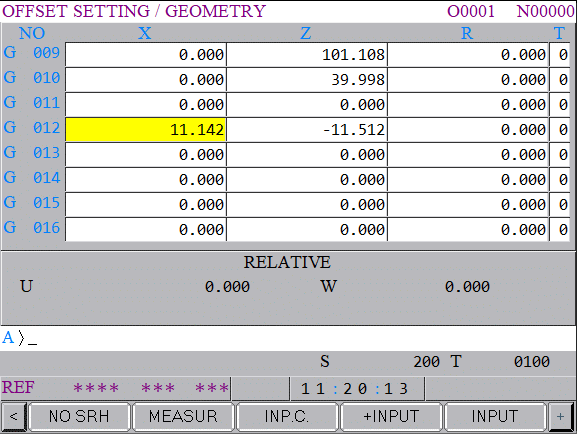
Anyway thinking about these four digit numbers made me think about when you use zeros.
On older machines you used to have to cancel the offset by stating T0100 or much safer T0000. Otherwise the machine would add the new offset to the old one and a shitstorm would ensue.
I had consigned, this now inert procedure, to the CNC Turning equivalent of room 101 or at least the annals of CNC History. Anyhow, it seems there is life in the old T000 dog yet.

Now this is where that eureka moment happened in my summer house / luxury shed and I wrongly claimed to learn something new every day.
The Theory
When you write a CNC Turning program you can either return the tool back to the machine reference or return it to a tool change position.
Now the first option (reference) is OK if it is a small a machine. In other words it’s not gonna take it a week to get there.
On a big machine you would have to navigate around all sorts of shit like the tailstock or a steady or the boss’s Bentley. And it would almost definitely be a waste of time.
Soooo normally we would use a tool change position. This would be making use of G53
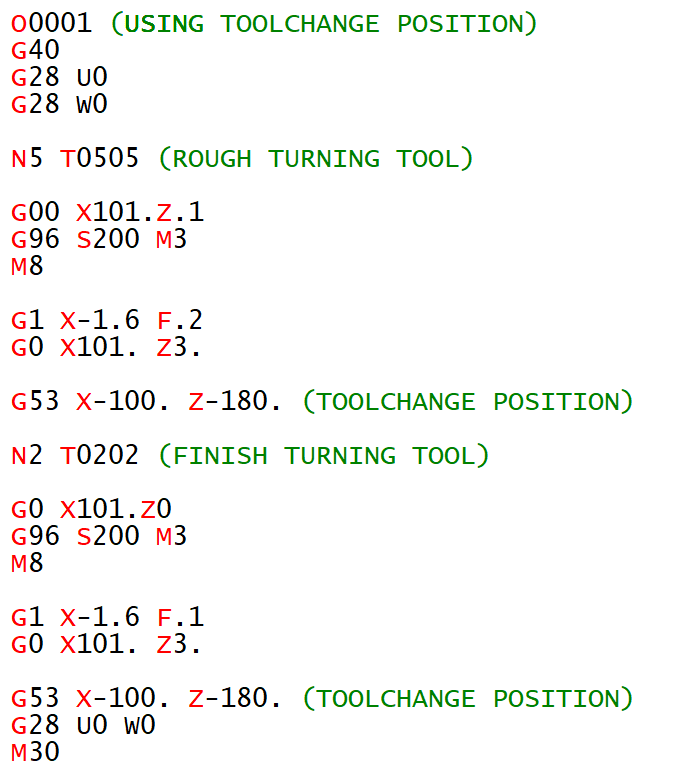
Using G53 for tool change position
CNC Turning G53
Because the G53 uses the machine coordinate system it will be the same place for each tool.

You could then put this position in a sub program. That way it would be the same for every tool. If you needed to change the position you would only need to change it once in the sub-program.
I will forgive beginners for thinking you could just rapid each tool to the same position away from the work piece.
For example G0 X100. Z100. for every tool.
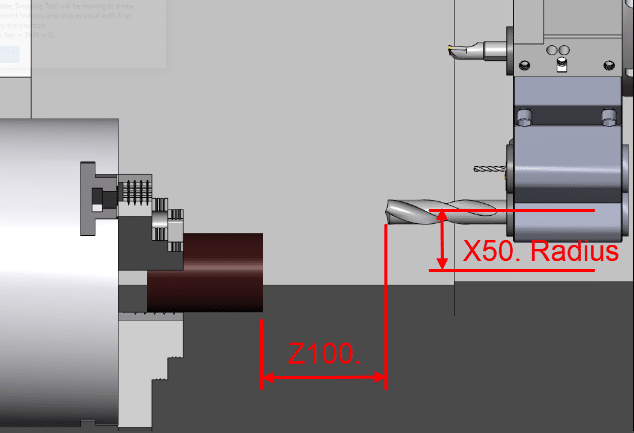

Just look at the turret position in the pictures above. Although the X Z position of both tools is the same there is a huge difference in the turret position.
This could work but when you pick the program up again maybe months later. The tools could be different lengths the tool-change position would have to be altered.
Your drills may not be the same length and the machine may even over-travel when you try to move it to your old tool change position..
Using a G53 you can always allow for the longest tool and know your index position is safe.
Remember G53 does not consider the tool offset or the work offset. To be honest G53 is the selfish bastard of the G codes it just does not give a flying shit what offset is active.
Eureka
Anyway, thinking about cancelling tool offsets it gave me an idea.
If at the end of each CNC Turning tool you cancel its offset. you could send it to a known position.
Because no tool offset is active this would always be the same place.
Some of you probably already do this but honestly, I never thought of it.
I intend to program this way from now on.

You should be able to use T00 or T000 to cancel your tool offset.
Don’t Do This (I really shouldn’t be telling you)
You can use the tool number plus the zeros so to cancel T0101 you could put T0100. I strongly recommend that you do not do this because it introduces an index move and therefore another potential collision.
You would need to remember to change this on all tools if for some reason you moved the tools around in the turret.
Oh yea about the multiple offsets. I will be writing and article on it when I can be arsed but in the meantime here is a video.

Thanks for reading my articles (no flies were killed in the writing of this article) except for the little bastard that’s flying around my office.
I will ask it politely to leave or else.