CNC Sub Program, all CNC machines will have some form of sub programs.
This article deals with G code (ISO) type programming but most of the features talked about will be available in some form on any CNC control.
A CNC sub program is a branch from your main program into another program.
After completing this, your control will return to the main program and continue where it left off.
It’s like the branches of a tree.
Probably the most common use of a CNC Sub Program would be for a tool change position. You could have a sub program which took the machine to a position for tool change. Your machine probably does this anyway but it’s hidden.
The advantage of this is that you could use it for any program and you don’t have to keep writing it. It is going to be very reliable because you know you never touched it. (Honest governor).
You could use a sub-program for a set of hole positions, call it out once to spot drill and again to drill and again to tap. Just use it as many times as you want.Got to be good for the environment too.
Some controls have internal sub programs Haas and Yasnac as well as Heidenhain and Siemens have this facility.
It means you can stuff these at the end of your program and jump into them the same way as you would an external one.
Why would I want to do that you say?
Easier to manage is the quick answer.
You know when you save your main program there are no pesky sub programs lurking that you forgot to save. They are all built into your main program.
Normally you would call your sub-program once only and you don’t need to tell it “oh I want this once” it says “come on mate I know that I’m not stupid.
But you can call it several times and if you get into incremental programming, and I hope you do, you will definitely find a need for this.
Sometimes with sub-programs it’s what you don’t put in that matters. What I mean is if your milling and you put the feed in the sub-program you are stuck with it. If it’s not there then you can state the feed externally and use a different one every time.
On Machines Like The BMC 800 from Toshiba
This machine has the Tosnuc 888 control.
It uses G72 followed by the dollar sign, oh and for the repeat command it uses L but don’t forget the comma.
G72 $MYPROGRAM , L2
Yes Tosnuc uses anything for a program name up to eight characters. So that it doesn’t get confused by the L you have to put in a comma.
By the way on this control (Tosnuc 888) you don’t use M99 at the end of your sub program you just use M30 and it works correctly.
Don’t try this on your Fanuc or Haas control as M30 means stop and rewind and that’s what it will do. Then it will just sit laughing at you.
Ok now you can watch the video.
CNC Milling sub programming examples.
If you liked this video, please don’t forget to subscribe to my YouTube channel by going to:CNC Training Centre
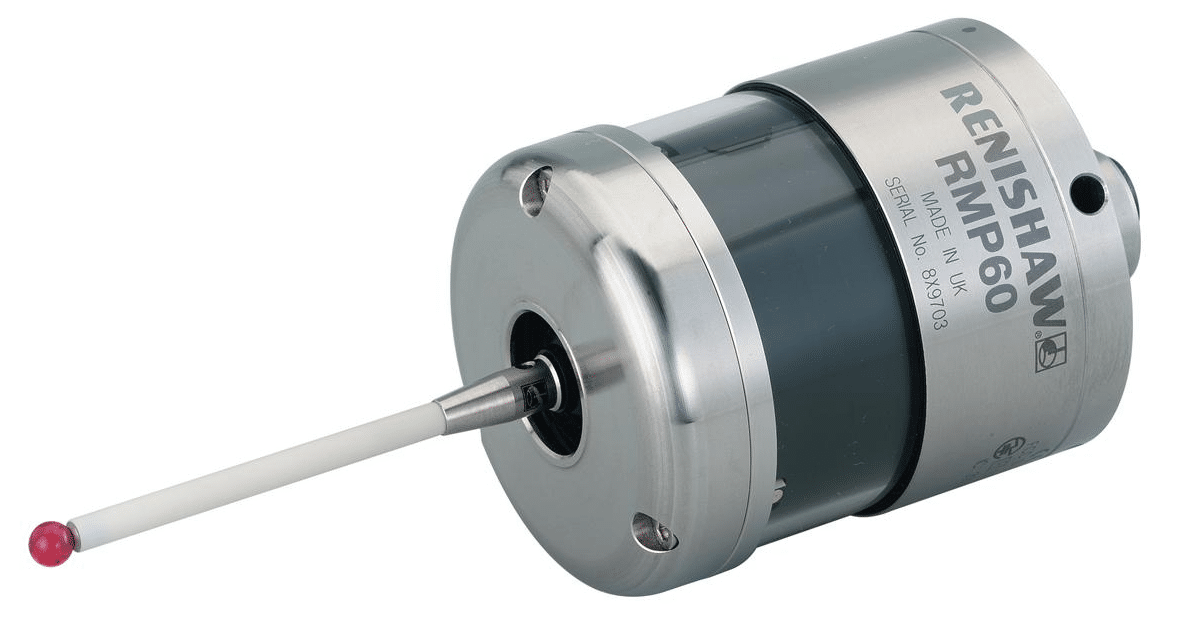
CNC touch probe, everyone should have an electronic probe on their machine but I’m sure there are lots of reasons why you don’t have one.
The purpose of this article is to show some of the alternatives to buying an expensive touch probe systems. Please note if you can afford to one of these systems I’ll guarantee you’ll soon get your money back with increased productivity.
Probe Shaming
Now I know there is a lot of this about but if you’re guilty then I’m sorry but you deserve all you get.
What the fuck is he on about?
Yes you know who you are. Yes you, you with that gorgeous once shiny Renishaw CNC touch probe left to get covered in grease, shit and swarf in the back of your machining centre.
Sorry just remembered I must change my pants.
Yes I regularly come across this when training people onsite on their CNC Machines. The machine originally came with a touch probe and maybe got used a few times but then no one bothered to properly learn how to use it.
Most likely the bloke who knew how to use it left to buy a chip shop in Bradford.
As a result it was ignored for three years and left in the tool carousel to generally decay and rot.
Please sort it there’s a lot of cash sat there in the tool carousel oh and don’t leave your dirty pants lying around either.
Avoid People Who Own Wobblers
Maybe you call them wibblers never mind the fuckin semantics they are basically a piece of shit on a stick. Bin them.
Now I’m an old school engineer I remember the old halcyon days of engineering. I have the missing limbs, teeth and scars to prove it.
Pissing in the coolant tank on nights.
Using your finger as a work steady on a long component.
Dividing heads.
Clocking in cards.
Smearing engineers blue onto machine handles in the tea break.
Making star shapes in sheet steel to throw up and stick in the ceiling of the sheet metal training department at Rolls Royce.
Cleaning my Norton motorbike parts in the degreasing tanks.
Listen to David “it’s time to let this shit go”
You might be stuck in a 1950’s time warp but it’s costing you money.
Wibbler Wobbler
When you use a Wibbler there are so many things to go wrong. Get the speed wrong and it will kick off at the wrong point. If you don’t engage it far enough down the part it will probably snap off.
Maybe if you practice for long enough you can set a datum in less than an hour.
Why am I telling you this?
Just bin it and spend just a small amount of cash on some of the more up to date solutions.
Buy a full blown probing system such as Renishaw, Blum, M & H.
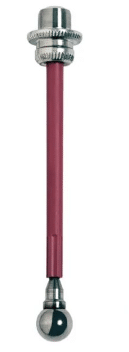
Buy a 3d taster type tool, loads to chose from.
Electronic edge finder
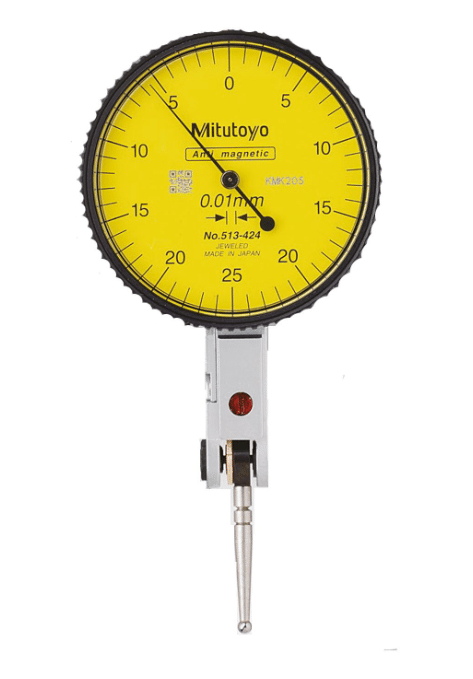
DTI clock
Cutting tool
Rip off a bit of paper
In that order the costs are thousands, hundreds, tens and units.
Advantages of a CNC touch probe
There are many, you can quickly set your part datum must be the most obvious one.
If the probe software is already on your machine then your machine will most likely have all the routines built in. These will quickly set your datums on corners, centre of bosses and bores and in slots. All at the press of a soft key.
Also you can quickly set your indexer or fourth axis to zero. Not least of all you get to measure shit. That means anything you make on the machine you can check all it’s sizes without taking it out of the machine.
If you can be arsed to learn Macro programming then the possibilities are endless. This will allow you to write your own routines and cycles.
For example within a program you can measure a part and update it’s offsets ready for the next run. Most probes will have simple cycles with this built in.
Don’t forget to download the apps for your probing system, the Renishaw one is amazing it just guides you through what you want to set or measure and then gives you the cycle. It even tells you where the results are stored (Variables)
You can even use your touch probe to recognise fixtures or parts. It’s quite common to drill holes in strategic places on fixtures so that the probe can detect the presence of the hole and thus identify the fixture.
Justification
It is a good idea to justify the cost of your probing system, do this by timing setups and things without the probe.
Soooooo, when you bust it which inevitably you will. Look back at this justification and you’ll see that the cheapest option is to buy a new one I guarantee.
3D Taster or similar
I love these, I mean I really do. I actually sleep with one by my side I love it so much, oh and it doesn’t fart all night like the fuckin dog did.
When these devises are on the edge of your part you don’t have to allow for the diameter of the ball, it’s all done for you. Magic how do they do that?
It is worth spending time setting these up getting them calibrated to length and running really true.
Once you clocked it all up, take some time here to get it spot on. Oh yea and keep it in the same holder so it’s always calibrated true and to length.
Don’t leave it in the machine although the new ones are waterproof.
This means that by simply zeroing your display in X Y or Z you can use it to accurately inspect your parts.
Make sure to get the long stilus this means you are always well away from the body when your using it. Worst scenario is you break a stylus. It’s like cleaning up dog shit, best done at arms length.
Easy to Break
Handle with care because these devices are easy to break. Don’t don’t don’t leave it lying on the bench. It will roll off and fuckin break so put it on a proper stand.
These are not too expensive to buy. You can even make your own from an old porridge box and the cardboard centre of a toilet roll.
Here’s one I made earlier not quite fully developed but you can see where I’m going with this one.
Learn Macro Programming
By the sounds of this you’d think I ran a training school. Really how cynical of you.
But really if you can write macros you can do loads of clever stuff with 3D tasters by getting them to write into system parameters n stuff. Once you are in position you can automatically write into your work offsets.
Electronic Edge Finder
Still way better than a wobbler these devices pick up the edge of your part and sound a buzzer as well as lighting up. They don’t work on all machines as a circuit needs to be completed.
Again there are loads of macros you can write to make life easier.
Not good on Z as the ball does not compress.
DTI Gauge (Old School)
This method was traditionally used on jig borers and is very accurate if a tenth clock is used.
Very time consuming and fiddly but it is accurate.
Use your dti gauge to find the edge of the part. Simply rotate the clock on the edge of your part and zero the dial. Now zero your position display on your machine.
Hold a slip gauge on the edge you just zeroed. Now clock the slip on the opposite side.
Half this final figure on you REL display to get to the edge of your part.
Cutting Tool (Endmill)
Touch your endmill on the edge of your part, best to have it rotating.
Move over the radius of the tool. Some controls even have a screen with icons to do this.
Make sure you know the exact diameter of your endmill and make sure it is running true.
Safety First CNC touch probe
If you use an electronic probe there are no safety issues unless your boss thumps you for breaking it.
Some of the methods decribed above are quite tricky to do with the machine doors closed so be very careful.
Never try to override any doorlocks or safety mechanisms on your CNC Machine
When I say Large CNC Machine I probably don’t mean this big but you can do some serious big shit with this machine.
Anyway you might be thinking “big machine” slow rapid, slow tool change etc etc. Well unless it’s really new and very expensive, it probably will be. But read on….
The Small Machine
So, you have a small machine brand new and its tool change time is just 2 seconds and the rapid is the speed of light.
Now let’s just imagine you are making a part that’s fairly simple and uses 12 tools. Your cycle time is 5 minutes.
You finish machining it and check it all over. You give it to the “I just chewed a wasp” inspector and he passes it off first time.
Then you dance around the workshop like a schoolboy who just scored his first goal throwing your arms in the air.
Ok lets run one. Five minutes later. “Oh it needs another and another…”
So now you have to stay at the machine constantly loading it.
You then wet your pants cos there’s not even enough time to get to the toilet and back while it’s running. Not to mention the repetitive strain injury from loading a part every 5 minutes.
Large CNC Machines
On a large CNC machine you can load your part in several different presentations. In the example below the holes are being chamfered on the bottom of the part in a separate setup. Saves all that messy deburring.
You may think large machines are just for large components. Well yes that’s true. But…… I may have to disagree and ask you to think again.
On a large CNC machine you can fill the table with repeat parts. Or you could have many presentations of the same part.
The cube above could be machined on all the faces in one setup.
So this might take a while to setup but once it’s running you would get a complete part after each run. Not to mention that you could nip home and feed the cat and still have time to make the boss a cup of tea before it’s done.
Never Never Ever
Why would you never set a part up in the middle of the machine table?
Come on answer I don’t have all day.
So the boss comes along and says “Jack, stop that job you are doing and do this one instead”
Must have happened to you before.
So which one of the above machines do you want now?
Yes you got it. The one with the part set up to the right.
Easy because you can leave it all completely setup and when the boss finally wants that job it’s just a matter of calling the program and hitting the CYCLE START
You get to leave loads of shit on the machining table all ready to run.
Leave It Set
You might just leave your machine permanently with two vices and a table chuck all ready to use with the datums set. Oh and did I mention the fourth axis that’s just sat there in case I’m ever arsed to use it?
I Despair (Beam me up Scotty)
I was training this bloke recently and he said “oh we like to break every job down completely when we’ve finished, we take all the tools out and clean the machine”
Anyway I just smiled and muttered some profanity he couldn’t hear.
If you read this and think it’s you then it’s definitely not, I just don’t want any trouble ok.
I will agree on one thing only and that’s the cleaning of the machine.
Now look at this There’s Hope
Imagine your machine is big enough to get all these parts on the table.
When you pick up your spot drill it’s going to do some serious work (88 holes).
Eight parts in total..
Lets say the tool change time chip to chip on this big old machine is 10 seconds well now it’s actually 1.25 seconds because it did 8 parts.
10/8 = 1.25
Now what about the slow rapid. OK but it’s not really moving very far either is it?
If you watch this video you’ll see that where the spot drill ends the drill takes over in the same place. (No wasted movement).
With a bit of work you could make the rapid moves on this part even shorter.
Now imagine this on every tool. The cycle time saving is breathtaking. And when it’s home-time, load the machine up and let it run. Oh by the way if the next day you have a pile of scrap and a grands worth of busted tools it wasn’t my idea ok.
What if You only Have a small One
Little and often is the approach.
If you saw some kind of sexual innuendo here then I think you need to grow up. This is serious engineering shit and I don’t want your filthy infantile minds on my website.
Wave Form Milling as it’s called by Edgecam is a way of using a large depth of cut but small engagement.
You can remove metal very fast by this method and you don’t need a lot of power. Other CAM systems have a similar things but with a different names.
If you have large threads to produce rather than tapping, where you need a lots of power, consider thread milling.
https://www.youtube.com/watch?v=cDTpeLyU2TQ
Add an Indexer or Fourth Axis
Adding an indexer or fourth axis to your small CNC Machine will increase capacity and allow you to rotate parts to get to areas that otherwise you couldn’t reach.
Here’s a free advert for someone
New Small CNC Machine
Pros Small CNC Machine
Shiny.
Very fast rapid and tool-change.
Small Footprint.
Quick to set up.
High rpm.
Lowish cost.
Warranty.
Cons Small CNC Machine
Not many tools.
Often low power.
Not much space to set up extra parts.
Large CNC Machine (Maybe Old and not too Expensive)
Pros Large CNC Machine
Make big bits.
You can leave jobs set-up cos there’s room for other work.
Make loads of bits at once, multi op or multi loading.
Tend to have a lot more tool pockets.
Usually more power.
You can leave vices and chucks permanently on the table.
Represent very good value second hand.
Machine runs much longer unmanned so you can get on with re-thatching your cottage roof.
Before you go home you can load up a full set of parts and let it run.
One tool does loads of work.
Great for “just in time” delivery because one complete part comes off per cycle.
Cost shit loads of money new (more than a six bed-roomed mansion where I live)
Slow rapid moves.
Slow tool changes and pallet change times.
Can cost an arm and a leg to maintain, find a good independent specialist to fix it.
Can be very dirty.
Have you got room for it?
Watch the max RPM isn’t too slow.
More Things to do if You Have a Small One
Consider a fourth axis with a cube on it.
With a four sided cube you can increase your table capacity by an awful lot. Oh and you get to work on the side of the part too.
Manual pallet changers can be very cost effective.
Again these give you loads of extra capacity. They are actually cheaper than you think.
Conclusion
Let’s imagine you have £90,000 to spend on a machine. You could buy a new super fast small machine.
But, if you got the room you could buy a big second hand machine.
The new one will have a warranty and will be very fast. But what about the “old banger”. Well if you have room and you know someone who can fix it if it goes wrong …….
Thanks
If you feel you have been affected by any of the issues raised in this post or need CNC Counselling then contact me.
If you want to learn to program CNC Milling Machines