

Display 9000 Programs Fanuc Parameter 3202
Category : Fanuc Parameters
Messing With Parameters Can Be Fatal!!!!!
Not display 9000 Programs Fanuc Parameter, first of all you’ll need to go to the setting screen and change the parameter write box to a 1.
Programs 9000 to 9999 are used for things like probing, tool-change and all sorts of other important things.
You are allowed to use them but proceed with caution.
Beware and above all back em up ASAP.
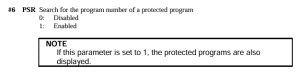
These programs will not be displayed when this parameter PSR #6 is a 1
3202 if #6 PSR is 1 then programs 9000 to 9999 can’t be displayed.
As per Manual
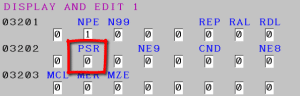
Don’t forget to lock the 9000 programs back up and turn off parameter write switch.
Bits n Bobs
When counting the bits in parameters you count from right to left so the first one on the right is bit 0 or sometimes known as #0

Display Programs Fanuc Parameter 3202
You might want to use this yourself if you have a sub program in your machine that you use quite often and you don’t want anyone messing with it.
Other Parameters You may Want to Change
1401 Cutting Feed-Rate 0% stops movement of machine
3204 Unlock Program 9000 to 9999 and 8000 to 8999 to Edit
3291 Wear Offset requires Key to Adjust
3401 Calculator Type Decimal Point or Integer
3402 G Codes that are Active When The machine is Turned On
5003 Retain Geometry when you Press Reset
6005 Allows the Use of Local Subroutines (Newer Control)
6050-6059 Allows you to Call a 9000 series Program with a G Code
6080-6089 Allows you to Call a 9000 series Program with An M Code
8134 3453 allows you to use ,R and ,C (Rads and Chamfers)
That’s it away you go.
Oh just one other thing before you go off and cripple your machine forever.

Do yourself a favour take a picture of the screen before you change a parameter. If you aint got a camera then you must have a piece of paper.
Even better back everything up.
Thanks
If you have been affected by any of the issues in this post or need CNC Counselling then contact me.
If you want to learn to program CNC Milling Machines
Look no further Contact CNC Training Centre