Month: November 2025

Brother CNC machine training

Brother CNC machine training on the TC 32B come to us at the CNC Training Centre

Call David: 07834 858 407


CNC Training Centre Reviews

30 five star ratings on Google (just saying)

Brother Manual Mode

Brother produces a wide range of high-efficiency compact CNC vertical machining centres and multitasking machines, primarily from their acclaimed SPEEDIO series. These machines are known for their high speed, energy efficiency, and compact footprints.

This is part of a short series of posts on how to operate the Brother CNC TC 32 B

I must say I love these machine (he always says that, I hear you say). It’s like your children you love em all in different ways. Even if one of them is an absolute prick.

To turn on the spindle manually press SP CW

Brother CNC machine training
Spindle Start

It starts up and goes green

Brother CNC machine training
Start Spindle

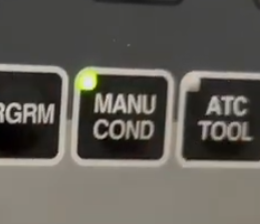
Press your MANU COND button

Manual

This will display

Brother CNC machine training
Spindle Speed
Speed Adjust

You can adjust the speed with these buttons

You will see speed change on screen

Handwheel Off

Note it’s important to switch off the remote handwheel in order for any of this to work. It’s a little punishment.

Brother CNC machine training
Brother Handwheel

Brother CNC Machine Training, Index Pallet

This button will index the pallet, no need to move away the tool as it is built into the cycle. Well thought out procedure.

Brother CNC machine training
Index The Pallet

Brother Manual Mode Zero Return

This button will return all axis to zero, it always does Z first, so no panic there.
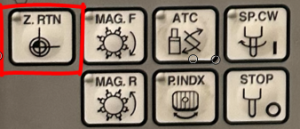
Zero Return Button

Using Jog, Brother CNC machine training

Press jog button will take you to the same blue screen

Jog

And the same buttons will adjust it.

Brother CNC machine training
Adjust jog speed

They call it Low travel speed, mmm.

Brother CNC machine training

Incremental Jog Brother CNC machine training

This is a very underused function great for clocking in bores n stuff like that. Loads of people have this and never both ot even use it. Think of it as the sandwich toaster of CNC Machining.

Incremental jog is adjusted from the same screen, go ahead press it.

Each press will jog the machine in the selected axis by the amount you set.

Rapid Traverse
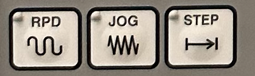
The rapid works the same way.

Use your X Y Z keys to Step, Rapid or Jog
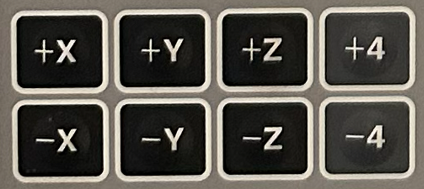
Axis Buttons

More on Brother Manual Mode

The machine has a RELATIVE position display that can be zeroed. This is purely for manual use and the machine ignores it.

Press counter reset soft key. It’s yours, do what you want with it. It’s no one else business.
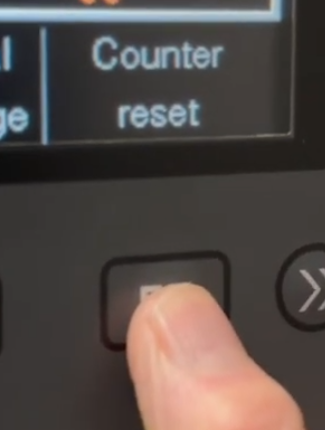
You can now move to each axis and zero it or press “Set all axis to zero”  (F1 soft key)

Brother CNC machine training
Reset X Y Z

CNC Training Centre can conduct all your onsite CNC Training


Edgecam Move Datum

CNC Training Call David: 07834 858 407

30 Five Star Reviews

CNC Training Centre Reviews


Training Course Fanuc Haas Macro Programming

CNC Training Call David: 07834 858 407


CNC Training Centre Reviews

30 five star ratings on Google (Just saying)

Haas Macro Programming

Fanuc Training Onsite


CNC Macro Programming Training Courses

Call David : 07834 858 407

(Suitable for Fanuc, Mazak and Haas Macro Programming)

Duration:          2 days.
Times:               Start 9.30am Finish 4.00pm
Location:          Barwell in Leicestershire.

Apply Now


Price £300 per day

Total £600 2 days

CNC Macro Programming Training Courses

If you want to learn how to use

  • Macro CNC Programming Fanuc
  • Macro CNC Programming Haas
  • Macro CNC Programming Mazak

Most ISO type controls that have Macro use a very similar system.

Follow the link to learn some more about Macro.

Heidenhain Q parameter programming is very similar to Macro CNC Programming for Haas and Fanuc.

Once you have grasped the concept of parametric programming you will find Heidenhain Q parameter programming easy to figure out.

Suitable for Fanuc, Mazak and Haas Macro Programming Lathe and machining centre


Haas, Fanuc or similar controls (ISO Mazak).

Haas Macro Programming   Haas Macro ProgrammingHaas Macro Programming

Make sure you have the Macro option on your control, it’s a real disappointment when you get all excited about this only to find you don’t have the option. Remember if you have a touch probe you will almost definitely have Macro installed on your machine.

Good news is you can buy the option, it don’t come cheap so sit the boss down and make him a cup of tea before you ask.

Haas Macro ProgrammingHaas Macro Programming


CNC Macro Programming Training Courses

What Use Will it Be?

This is where CNC Programming gets really exciting, welcome to the turbo charged world of Macro Programming for Haas and Fanuc type controls. There is so much exciting shit you can do with this I really don’t know where to start.

Write your own canned cycle

Yes you always dreamed of having your own personal G code, you can’t call it like Bill’s G code or something but you may have G271 or something which is personal to you.

Say you wanted a drilling cycle that changed speed half way down a hole or some daft thing well now you can do it.

Make A Set of Similar Parts

Imagine you had a bunch of parts that were similar, maybe the same holes but in different positions or a similar shape.

Haas Macro Programming

You could write a parametric (Macro) programme that would be completely adjustable and would make them all instead of having to keep writing similar programmes.

You can build these programmes and add to them as you get better and better and your ideas flood in.

I always say to students to start simple and build on your experience. Just using Macro in its simplest form will inspire you to go on to do greater things.

Interrogate Your CNC Machine

You can get almost any information you want from the machine.

  • Spindle Speed.
  • Position.
  • Datum.
  • Tool Length.
  • What tool is in the spindle.
  • Put the machine into an alarm state when things go wrong like wrong data is input.
  • And loads more.

You can even modify this information and send it back.

Do Calculations

  • Simple trigonometry.
  • Calculate feeds and speeds.
  • Simple maths.
  • Input formula and get answers.

I’m getting really excited just telling you this. It means you can add all sorts of functionality to your machine that you didn’t have before.


What Skills Will I Learn

  • Basic use of variables
  • Creating simple Macro programmes
  • How system variables work
  • How to write probing Macros
  • Creating your own G Codes
  • Create alarms to make sure your Macro users behave
  • Practical use of Macro
  • Creative use of Macro
  • and more, loads more

Careers in CNC

View all current vacancies in CNC

Click here

Call David: 07834 858 407