Learn to CNC Program In Our Classroom
Category : New Stuff
Master the Future of Manufacturing: Learn to CNC Program in Our 2026 Classroom Sessions
In the rapidly evolving world of industrial technology, the ability to Learn to CNC Program is more than just a skill—it’s a career-defining advantage. While online tutorials offer a starting point, nothing replaces the high-impact, hands-on environment of a professional classroom.
Our 2026 classroom courses are specifically designed to bridge the gap between theoretical G-code and real-world precision manufacturing using the latest industry technology.
Realistic Simulation: Touch Screens & Physical Controls

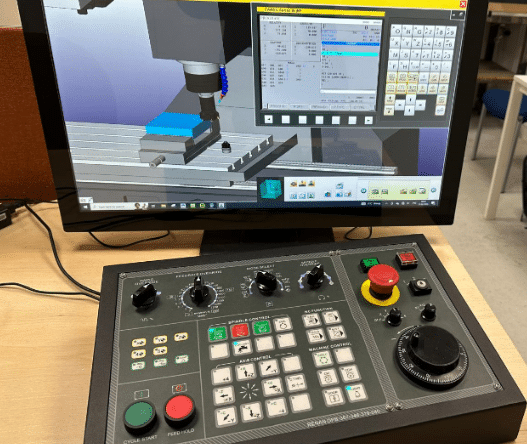
We believe that learning to program shouldn’t just happen behind a computer mouse. Our classroom is equipped with high-fidelity CNC simulators that feature:
- Intuitive Touch Screens: Large realistic touch screen.
- Authentic Control Panels: Practice on real physical operator panels, including emergency stops, manual pulse generators (MPG), and override switches.
- Tactile Learning: By using the same physical buttons and dials you will encounter on the shop floor, you develop the tactile familiarity required to operate expensive machinery with confidence.
Why Choose Our Classroom for CNC?
Learn to CNC Program in a physical setting with dedicated hardware offers unique advantages:
- Immediate Instructor Feedback: Get real-time answers to your most complex questions and tailored feedback as you write and test your code on-site.
- Risk-Free Precision: Use our simulators to verify tow-paths and detect collisions in 3D before ever touching a live machine, ensuring you build confidence without the fear of costly errors.
- Fanuc style G Code
- Collaborative Environment: Network and solve problems alongside peers, mirroring the team-based dynamics of modern machine shops.
- Hands-On Mastery: Master everything from setting tool offsets to navigating complex sub-programs using real-world hardware.

Program CNC Machines, what You Will Master
Our curriculum is built for 2026 industry standards, covering:
- G-Code & M-Code Fundamentals: Understand the “why” behind every command.
- Program prove out.

Learn to CNC Program for 2026
Don’t just watch a screen—step into the workshop. Whether you are a beginner looking for a new career or an experienced operator aiming to upskill, our classroom is where your future in manufacturing begins.